
1. پیژندنه
This manual provides detailed instructions for the Amazon Basics Aluminum Type-C Docking Station. This device expands the connectivity of your USB-C enabled laptop or tablet, offering a wide range of ports for various peripherals and external displays. Please read this manual thoroughly before use to ensure proper operation and to maximize the product's functionality.
2. د محصول ب Featuresې
- د 11-in-1 ملټي پورټ ډیزاین: Integrates Mini DisplayPort, HDMI, VGA, 3 USB-A ports, Ethernet, SD/TF card reader, 3.5mm audio jack, and a Type-C charging port (PD 100W).
- د لوړ ریزولوشن ویډیو محصول: Supports Ultra HD 4K output via Mini DisplayPort/HDMI and Full HD 1080P via VGA, allowing for mirroring or extending your display to HDTVs, monitors, or projectors. Note: 4K resolution is supported at 30Hz refresh rate.
- د معلوماتو چټک انتقال: Three USB 3.0 A ports provide data transfer speeds up to 5Gbps, backward compatible with USB 2.0/1.0.
- Stable Network Connection: 1000Mbps RJ45 Ethernet port ensures a fast and reliable wired network connection.
- Universal Card Reader: Integrated SD and TF slots allow simultaneous reading of universal SD and Micro SD memory cards.
- د بریښنا رسول: Type-C charging port supports Power Delivery (PD) up to 100 watts for charging your host device.
- د آډیو ارتباط: 3.5mm audio jack for headphones or speakers.
- دوامدار ساختمان: Features an aluminum pedestal-style housing for enhanced durability and heat dissipation.
3. د بسته محتويات
- Amazon Basics Aluminum Type-C Docking Station
- د کارن لارښود
4. محصول ختم شوview او د پورټ ترتیب
Familiarize yourself with the various ports and their functions on your docking station.

انځور: نږدې انځور view of the Amazon Basics Type-C Docking Station's ports, including Ethernet, Mini DisplayPort, HDMI, VGA, and USB-C.
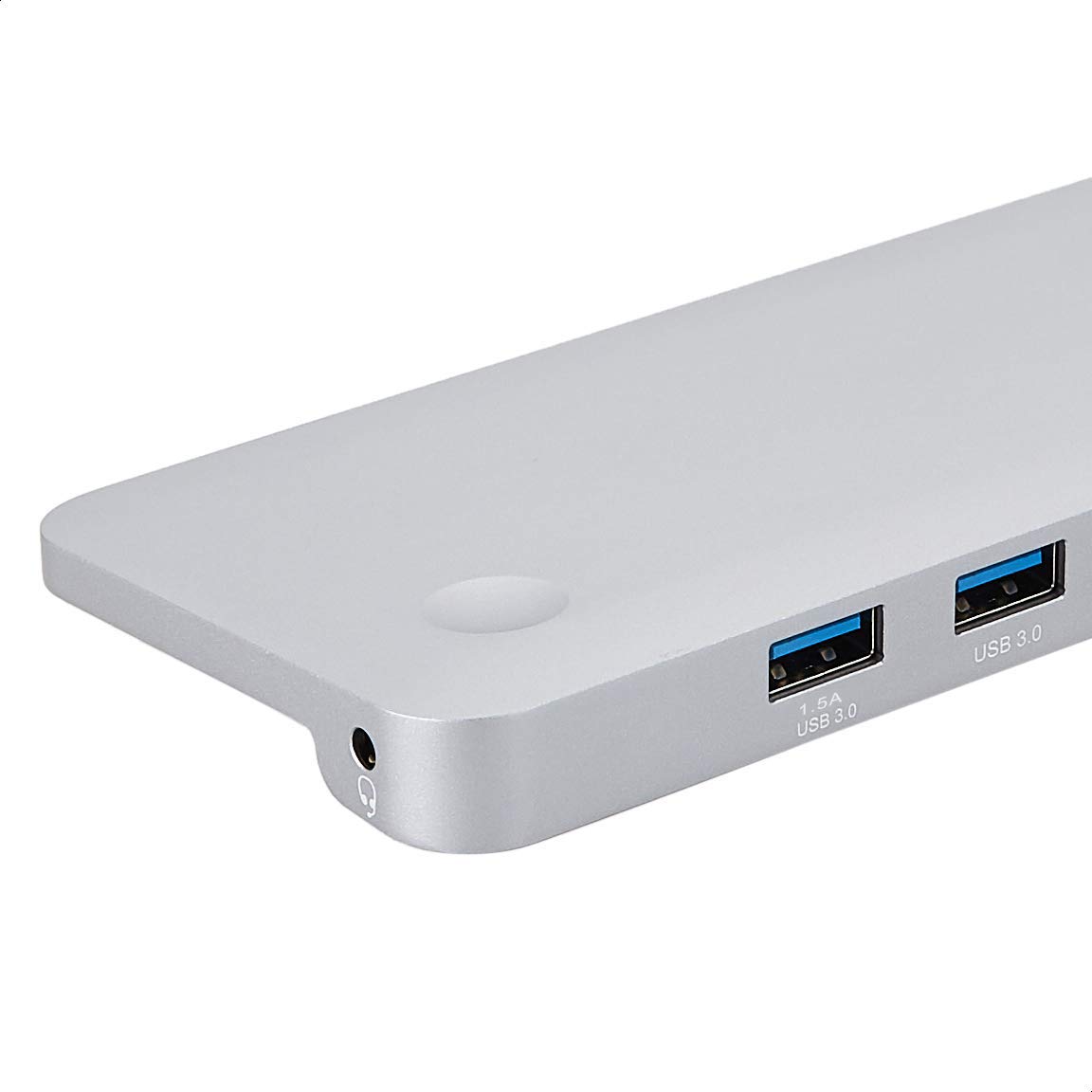
انځور: تفصیلي view of the USB 3.0 ports and 3.5mm audio jack on the Amazon Basics Type-C Docking Station.
- USB-C Host Connector: Connects to your laptop or tablet's USB-C port.
- د USB 3.0 بندرونه (x3): For connecting USB devices such as external hard drives, keyboards, mice, or USB flash drives.
- د SD کارت سلاټ: د معیاري SD حافظې کارتونو لوستلو لپاره.
- د TF کارت سلاټ (مایکرو SD): For reading Micro SD memory cards.
- RJ45 ایترنیټ پورټ: د تار لرونکي شبکې اتصال لپاره.
- مینی ډیسپلی پورټ: د بهرني نندارې سره د نښلولو لپاره.
- د HDMI پورټ: د بهرني نندارې سره د نښلولو لپاره.
- VGA پورټ: د بهرني نندارې سره د نښلولو لپاره.
- 3.5mm آډیو جیک: د هیډفونونو یا سپیکرو د نښلولو لپاره.
- د USB-C PD چارج کولو بندر: For connecting a USB-C power adapter to charge your host device and power the docking station.
۴. د تنظیم لارښوونې
Follow these steps to set up your docking station:
- د کوربه وسیلې سره وصل شئ: Plug the integrated USB-C host connector cable from the docking station into an available USB-C port on your laptop or tablet. Ensure your host device's USB-C port supports DisplayPort Alt Mode (DP Alt Mode) for video output functionality.
- د بریښنا سره وصل کړئ (اختیاري مګر سپارښتنه شوې): If your host device requires charging or if you are connecting power-intensive peripherals, connect your USB-C power adapter (up to 100W) to the USB-C PD Charging Port on the docking station. This will charge your host device and provide stable power to the docking station and connected peripherals.
- پرفیریلز وصل کړئ: Connect your desired peripherals (e.g., external monitors, USB devices, Ethernet cable, SD/TF cards, audio devices) to the corresponding ports on the docking station.

Image: Amazon Basics Type-C Docking Station connected to a laptop, with multiple peripherals like a USB drive and external display cables plugged in.
6. عملیاتي لارښوونې
6.1. د ویډیو تولید
- Connect your monitor or projector to the HDMI, Mini DisplayPort, or VGA port.
- Your operating system should automatically detect the external display. You may need to adjust display settings (e.g., extend, duplicate) in your computer's display preferences.
- The docking station supports 4K resolution at 30Hz refresh rate via HDMI and Mini DisplayPort. For optimal performance, ensure your display and cables support the desired resolution and refresh rate.
- Dual video display is supported, allowing you to mirror or expand your screen across multiple monitors.
۴.۳. د USB ډیټا لیږد
- Plug your USB devices into the USB 3.0 ports.
- The ports support data transfer speeds up to 5Gbps.
6.3. ایترنیټ پیوستون
- Connect an Ethernet cable from your router or modem to the RJ45 Ethernet port on the docking station.
- Your computer should automatically establish a wired network connection.
6.4. SD/TF Card Reader
- Insert your SD or TF (Micro SD) card into the corresponding slot.
- The cards will appear as removable drives on your computer, allowing you to access and transfer files. Both slots can be used simultaneously.
6.5. د آډیو محصول
- Connect your headphones or speakers to the 3.5mm audio jack.
- You may need to select the docking station as the default audio output device in your computer's sound settings.
۶.۳. د بریښنا رسولو (PD)
- Connect your laptop's USB-C power adapter to the USB-C PD Charging Port on the docking station.
- This port supports up to 100W power delivery to charge your host device while using the docking station.
7. مطابقت
This docking station is compatible with a wide range of USB-C enabled devices, including but not limited to:
- MacBook Pro 2018/2017/2016
- iPad Pro 2018
- Mac mini 2018
- MacBook Air
- iMac 2017
- سامسونګ نوټ 9
- HUAWEI MateBook X
- ډیل ایکس پی ایس 13
- ThinkPad
- Chromebook
مهم: This product functions only with computers that support DisplayPort Alt Mode (DP Alt Mode) via their USB-C port. Please verify your computer's specifications for compatibility before use.
8. ستونزه حل کول
- د ښودلو محصول نشته:
- ډاډ ترلاسه کړئ چې ستاسو د کوربه وسیلې USB-C پورټ د DisplayPort Alt حالت ملاتړ کوي.
- Check all cable connections (USB-C to host, video cable to monitor).
- Verify the external monitor is powered on and set to the correct input source.
- خپل کمپیوټر بیا پیلولو هڅه وکړئ.
- 4K Resolution Not Working at 60Hz:
- This docking station supports 4K resolution at a maximum refresh rate of 30Hz. If your monitor is set to 4K@60Hz, it will not display correctly. Adjust your display settings to 4K@30Hz or a lower resolution with a higher refresh rate if desired.
- USB Devices Not Recognized or Disconnecting:
- Ensure the docking station is receiving sufficient power. Connect a USB-C power adapter to the PD port if you are using multiple power-intensive USB devices.
- Try connecting the USB device directly to your computer to confirm it is functional.
- Reconnect the docking station to your computer.
- No Network Connection via Ethernet:
- د ایترنیټ کیبل اتصال د ډاکینګ سټیشن او خپل روټر/موډیم دواړو سره وګورئ.
- Verify your network settings on your computer.
- ډاډ ترلاسه کړئ چې ستاسو روټر/موډیم په سمه توګه کار کوي.
- د آډیو محصول نشته:
- Ensure your headphones or speakers are properly connected to the 3.5mm audio jack.
- Check your computer's sound settings and select the docking station as the default audio output device.
- د کوربه وسیله چارج نه کوي:
- Ensure a compatible USB-C power adapter is connected to the docking station's USB-C PD Charging Port.
- تایید کړئ چې ستاسو کوربه وسیله د USB-C بریښنا رسولو ملاتړ کوي.
- د بریښنا اډاپټر او کیبل د زیان لپاره وګورئ.
9. مشخصات
| فیچر | مشخصات |
|---|---|
| برانډ | د ایمیزون اساسات |
| د ماډل شمیره | UTC-DOCK01-PRO |
| رنګ | خړ |
| ابعاد (LxWxH) | ۴۹.۵ x ۳۰.۵ x ۹.۵ سانتي متره (۱۹.۵ x ۱۲ x ۳.۷۵ انچه) |
| د توکي وزن | ۳۰۰ ګرامه (۰.۳ کیلوګرامه) |
| ټول بندرونه | 11 |
| USB بندرونه | 3 x USB 3.0 ډول-A |
| د ویډیو تولید بندرونه | 1 x HDMI, 1 x Mini DisplayPort, 1 x VGA |
| د HDMI ریزولوشن | تر 4K@30Hz پورې |
| Mini DisplayPort Resolution | تر 4K@30Hz پورې |
| ایترنیټ پورټ | RJ45 ګیګابایټ ایترنیټ (10/100/1000Mbps) |
| د کارت لوستونکی | SD and TF (Micro SD) slots, simultaneous read |
| آډیو پورټ | 3.5mm آڈیو جیک |
| د USB-C PD چارج کولو بندر | تر 100 واټو پورې |
| هډوتري برسیر | Ethernet, HDMI, Mini DisplayPort, VGA, USB-A, USB-C, SD/TF, Audio |
10. ساتنه
- پاکول: Use a soft, dry cloth to clean the docking station. Avoid using liquid cleaners or aerosols.
- ذخیره کول: وسیله په یخ او وچ ځای کې د مستقیم لمر وړانګو او سختې تودوخې څخه لرې وساتئ.
- سمبالول: د وسیلې د غورځولو یا قوي ټکانونو سره مخ کیدو څخه ډډه وکړئ. د ډاکینګ سټیشن د جلا کولو یا ترمیم کولو هڅه مه کوئ.
11. د خوندیتوب معلومات
- وسیله د اوبو، اور او لوړ رطوبت چاپیریال څخه لرې وساتئ.
- وسیله د خورا تودوخې سره مه ښکاره کوئ.
- یوازې مطابقت لرونکي بریښنا اډاپټرونه او کیبلونه وکاروئ.
- د ماشومانو د لاسرسي څخه لرې وساتئ.
- If the device is damaged or malfunctions, discontinue use immediately and contact customer support.
12. تضمین او ملاتړ
This Amazon Basics product comes with a 1 کلن محدود تضمین from the date of purchase. This warranty covers manufacturing defects and workmanship under normal use. It does not cover damage caused by misuse, accident, modification, or unauthorized repair.
For warranty claims, technical support, or further assistance, please contact Amazon Basics customer service through your Amazon purchase history or the official Amazon Basics support channels.