
د خوندیتوب مهمې لارښوونې
To ensure safe operation and prolong the life of your monitor, please read and follow these instructions carefully:
- د مانیټر پاکولو دمخه تل د بریښنا تار د بریښنایی سایټ څخه جلا کړئ.
- د بریښنا شاک څخه د مخنیوي لپاره مانیټر باران یا رطوبت ته مه ښکاره کوئ.
- د ډیر تودوخې مخنیوي لپاره د مانیټر شاوخوا مناسب هوا ورکول ډاډمن کړئ. د هوا د توییدو دروازې مه بندوئ.
- یوازې د تولید کونکي لخوا چمتو شوي بریښنا اډاپټر او کیبلونه وکاروئ.
- د بریښنا په تار یا مانیټر باندې د درنو شیانو له ایښودلو څخه ډډه وکړئ.
- If the monitor is damaged or malfunctions, do not attempt to repair it yourself. Contact qualified service personnel.
د بسته محتويات
Before proceeding with the setup, please check the contents of your package to ensure all items are present:
- Acer CB272U smiiprx LED Monitor
- د څارنې موقف (اساس او بازو)
- د بریښنا تار
- HDMI کیبل
- د چټک پیل لارښود / د تضمین کارت
چمتو کول
۱. د مانیټر سټینډ راټولول
- Carefully remove the monitor from its packaging. Place the monitor face down on a soft, clean cloth or surface to prevent scratches to the screen.
- Attach the stand arm to the back of the monitor panel. Ensure it is securely fastened, typically by sliding it into place until it clicks or by tightening screws.
- Connect the stand base to the bottom of the stand arm. Secure the base by tightening the captive screw located underneath the base.

شکل 1: شاته view of the Acer CB272U smiiprx monitor with the stand attached, illustrating the assembly points.
2. Connecting the Monitor to Your Computer
- Connect one end of the provided HDMI cable to the HDMI port on the monitor.
- Connect the other end of the HDMI cable to the HDMI output port on your computer or graphics card.
- Plug the power cord into the monitor's power input, then plug the other end into a grounded electrical outlet.

شکل ۵: زاویه لرونکی شا view showing the input ports of the monitor, including HDMI and power connections.
د نظارت عمل کول
بریښنا کول او بندول
Locate the power button on the monitor's bezel. Press it once to turn the monitor on. The power indicator light will illuminate. Press it again to turn the monitor off.
Adjusting Display Settings (OSD Menu)
The On-Screen Display (OSD) menu allows you to customize various monitor settings. Use the control buttons (usually located on the back or bottom right of the monitor) to navigate the OSD menu. Common adjustments include:
- روښانتیا/ تضاد: د رڼا او تیاره سیمو ترمنځ عمومي رڼا او توپیر تنظیم کړئ.
- د رنګ ترتیبات: د رنګ تودوخې، ګاما، او انفرادي RGB کچې تعدیل کړئ.
- د ننوتلو سرچینه: Manually select the video input (e.g., HDMI).
- آډیو: د جوړ شوي سپیکرو لپاره حجم کنټرول کړئ.
ارګونومیک سمونونه
The Acer CB272U smiiprx monitor stand offers multiple ergonomic adjustments to optimize your viewآرامتیا:
- د لوړوالی سمون: مانیټر د سترګو سطحې ته پورته یا ښکته کړئ.
- ټیلټ: Adjust the screen angle forward or backward to reduce glare.
- تیر: Rotate the monitor horizontally to share your screen or adjust viewزاویه.
- محور: Rotate the screen to a portrait orientation for document viewکول یا کوډ کول.
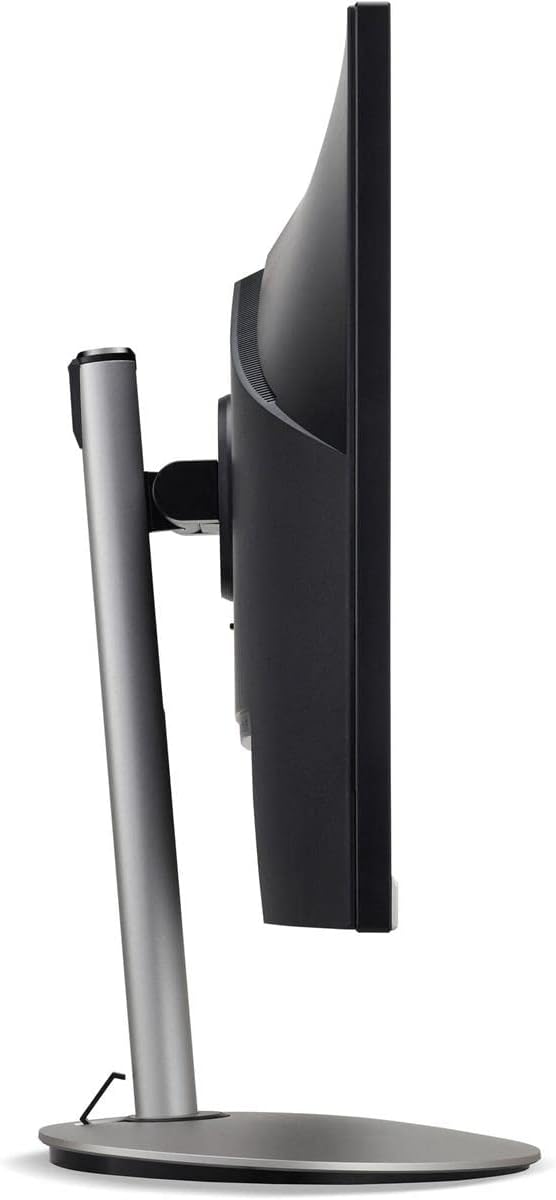
شکل ۳: د اړخ پروfile of the monitor, illustrating its adjustable stand for ergonomic positioning.
ساتنه
Cleaning the Monitor Screen and Casing
To clean your monitor, first ensure it is turned off and unplugged from the power outlet. Use a soft, lint-free cloth. For stubborn marks, lightly dampen the cloth with water or a specialized non-abrasive screen cleaner. مایع په مستقیم ډول په سکرین یا ج مه سپری کوئasing. د سختو کیمیاوي موادو، خړوبونکو پاکوونکو، یا محلولونو کارولو څخه ډډه وکړئ.
د ذخیره کولو لارښوونې
If you need to store the monitor for an extended period, it is recommended to use its original packaging to protect it from dust, moisture, and physical damage. Store in a cool, dry environment away from direct sunlight and extreme temperatures.
د ستونزو حل کول
د عامو ستونزو او د هغوی د حل لارو لپاره لاندې جدول ته مراجعه وکړئ:
| ستونزه | احتمالي لامل | د حل لاره |
|---|---|---|
| په پرده هیڅ عکس نشته | د برېښنا کیبل قطع شوی؛ د ویډیو کیبل قطع شوی؛ د ننوتلو ناسمه سرچینه غوره شوې ده. | Check power and video cable connections; Ensure the monitor is powered on; Select the correct input source via the OSD menu. |
| انځور تیاره یا تحریف شوی دی | Incorrect resolution setting; Faulty video cable. | Set the display resolution to 2560 x 1440 at 75 Hz; Try a different HDMI cable. |
| د سپیکرو څخه هیڅ غږ نشته | Monitor volume too low or muted; Incorrect audio output selected on computer. | Adjust monitor volume via OSD; Unmute audio; Select the monitor as the audio output device in your computer's sound settings. |
| د څارنې ځلېدل | د تازه کولو نرخ ناسم دی؛ مداخله؛ ناقص کیبل. | Ensure refresh rate is set to 75 Hz; Check for nearby electronic devices causing interference; Replace video cable. |
مشخصات
Key technical specifications for the Acer CB272U smiiprx LED Monitor:
| فیچر | تفصیل |
|---|---|
| د ماډل نوم | CB272U smiiprx |
| د سکرین اندازه | ۷۸۷ انچه |
| اصلي حل | 2560x1440 (WQHD) |
| د تازه کولو نرخ | 75 Hz |
| د غبرګون وخت | 1 Millisecond (VRB) |
| د اړخ نسبت | 16:9 |
| د ښودلو ډول | LED-backlit LCD / TFT active matrix (IPS) |
| روښانتیا | 350 cd/m² |
| د تناسب تناسب | 1000:1 (ثابت) |
| ارتباط | HDMI |
| د تطبیق وړ همغږي | FreeSync |
| جوړ شوي سپیکرونه | هو |
| Dimensions (WxDxH with stand) | 24.1 په x 9.2 کې په x 20.5 کې |
| وزن (د موقف سره) | 18.1 پونډه |

Figure 4: Monitor dimensions with stand, indicating width, depth, and height.
د تضمین معلومات
The Acer CB272U smiiprx LED Monitor comes with a د جوړونکي ۱ کلن محدود تضمین. This warranty covers defects in materials and workmanship under normal use. For complete details regarding warranty coverage, limitations, and how to make a claim, please refer to the warranty documentation included with your product or visit the official Acer support webسایټ
Please retain your proof of purchase (receipt or invoice) as it will be required for any warranty service.
د پیرودونکي ملاتړ
Should you require further assistance, technical support, or wish to download the latest drivers and firmware updates for your monitor, please visit the official Acer support webسایټ:
You can also find contact information for Acer customer service in your region on the support webد شخصي مرستې لپاره سایټ.