
Alpha EK 60
د الفا EK-60 61-کیلي الیکترونیکي پیانو کیبورډ کارونکي لارښود
Portable Digital Keyboard with Audio Input, Microphone Input, Headphone Output, 255 Tones, Rhythms, LED Display
1. پیژندنه
د پیرودلو لپاره مننهasing the Alpha EK-60 61-Key Electronic Piano Keyboard. This manual provides detailed instructions for the proper setup, operation, and maintenance of your new instrument. The EK-60 is designed to offer a rich musical experience with its versatile features, including a wide range of tones and rhythms, intelligent teaching functions, and various connectivity options. Please read this manual thoroughly before using the product to ensure optimal performance and longevity.
2. د خوندیتوب معلومات
To prevent electric shock, fire, or damage to the unit, please observe the following precautions:
- Do not expose the keyboard to rain or moisture.
- Do not place objects filled with liquids, such as vases, on the keyboard.
- د وینټیلیشن هیڅ خلاصون مه بندوئ.
- یوازې ټاکل شوی بریښنا اډاپټر وکاروئ.
- واحد مه جلا کوئ یا یې بدلوئ. ټول خدمتونه وړ پرسونل ته راجع کړئ.
- د کوچنیو ماشومانو د لاسرسي څخه لرې وساتئ.
3. د بسته محتويات
مهرباني وکړئ وګورئ چې لاندې ټول توکي ستاسو په بسته کې شامل دي:
- 1 x Alpha 61-Key Standard Keyboard EK-60
- ۱ x د تنظیم وړ سټینډ
- 1 x د میوزیک شیټ هولډر
- 1 x د بریښنا اډاپټر
- ۱ x د کارونکي لارښود (دا سند)
4. محصول ختم شوview
Familiarize yourself with the components of your Alpha EK-60 keyboard.
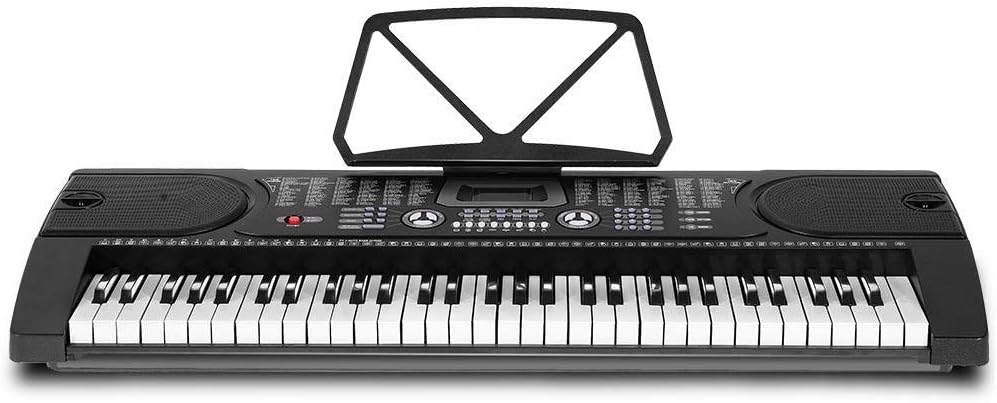
شکل ۱: پورته څخه ښکته view of the Alpha EK-60 keyboard, highlighting the control panel, integrated speakers, and the 61 standard piano keys.

Figure 4.2: Detail of the LED display for convenient settings adjustment and the battery compartment for portable use.

شکل 4.3: View of the multiple jacks including Audio Input, Microphone Input, and Headphone Output for versatile connectivity.
کلیدي ځانګړتیاوې:
- 61-Key Standard Piano Keyboard
- LED display for easy navigation
- 24 ډیمو سندرې
- 255 timbres (instrument sounds)
- 255 rhythms (accompaniment styles)
- 61 kinds of keyboard percussions
- 8 Panel Percussions
- Master volume, accompaniment volume, and tempo control
- Intelligent teaching function: one-key, follow and ensemble function
- د تال پروګرام کولو فعالیت
- Auto chord and chord timbre option
- د ثبت او پلے بیک فعالیت
- Sustain and vibrato effects
- Microphone input and speaker output
- Headphone jack for silent practice
- Battery powered option (6 x AA-size batteries, not included)
5. ترتیب کول
۱.۲ د سټینډ راټولول
- Unpack all components of the adjustable stand.
- Connect the horizontal support bars to the vertical legs, ensuring they are securely fastened.
- Adjust the height of the stand to your preferred playing position using the adjustment knobs. The stand is adjustable from 59cm to 79cm in height.
- Place the keyboard securely on top of the assembled stand.
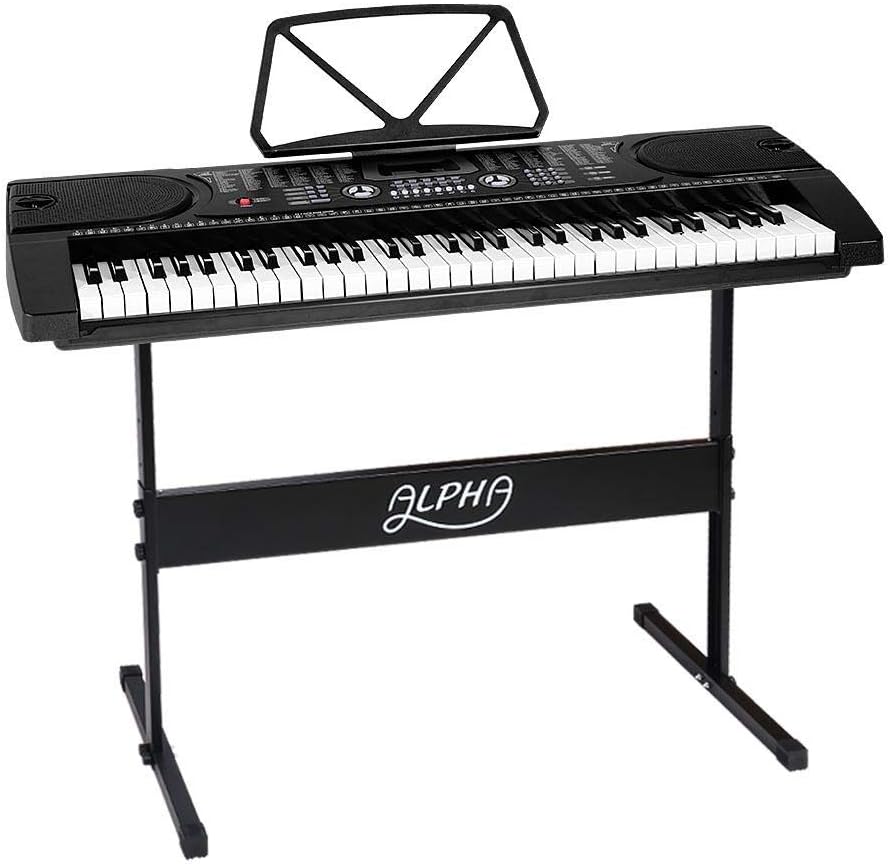
Figure 5.1: The Alpha EK-60 keyboard fully assembled on its adjustable stand, ready for use.
۳.۲ د کیبورډ ځواک ورکول
The Alpha EK-60 can be powered by the included AC adaptor or by batteries.
د AC اډیپټر کارول:
- Connect the DC plug of the power adaptor to the DC 9V input jack on the rear of the keyboard.
- د AC اډاپټر په معیاري دیوال آوټ لیټ کې ولګوئ.
د بیټرۍ کارول:
- د کیبورډ په لاندې برخه کې د بیټرۍ کڅوړه ومومئ.
- د بیټرۍ کمپارټ پوښ خلاص کړئ.
- Insert 6 x AA-size batteries (not included), ensuring correct polarity (+/-).
- د بیټرۍ کمپارټ پوښ په خوندي ډول وتړئ.
Note: When using batteries, disconnect the AC adaptor. The keyboard will automatically switch to battery power if the adaptor is removed.
6. عملیاتي لارښوونې
6.1 بنسټیز عملیات
- پاور آن/بند: فشار ورکړئ پاور د کیبورډ د فعالولو یا بندولو لپاره تڼۍ.
- د حجم کنټرول: د کارولو ماسټر ولیم د غږ د ټولیز کچې تنظیمولو لپاره غوټۍ.
- د حرارت کنټرول: د کارولو ټیمپو buttons to adjust the speed of rhythms and demo songs.
6.2 Selecting Tones and Rhythms
- Tones (Timbre): فشار ورکړئ ټمبري button, then use the number pad or +/- buttons to select from 255 different instrument sounds. The selected timbre number will appear on the LED display.
- نظمونه: فشار ورکړئ RhyTHM button, then use the number pad or +/- buttons to select from 255 accompaniment rhythms. Press پیل / ودرول د تال پیل یا پای ته رسولو لپاره.
6.3 Intelligent Teaching Function
The EK-60 features a 3-step intelligent teaching system to help you learn to play.
- یو کیلي: Plays the melody of a demo song by pressing any key.
- تعقیب کړئ: Waits for you to play the correct note before proceeding with the melody.
- یوځای: Plays the accompaniment while you play the melody.
To use, select a demo song, then press the desired teaching mode button (یو کلی, تعقیب کړئ، یا ENSEMBLE).
6.4 ریکارډ کول او پلے بیک
The keyboard allows you to record your performances.
- فشار ورکړئ REC button to start recording. The LED display will indicate recording mode.
- خپل مطلوبه سندره وغږوئ.
- فشار ورکړئ لوبه وکړئ button to stop recording and play back your recorded performance.
6.5 نښلول
- د سر غوږ جیک: هیډفونونه سره وصل کړئ هیډفون jack for silent practice.
- د مایکروفون داخلول: یو مایکروفون سره وصل کړئ د مایک معلومات jack to sing along while playing.
- آډیو ان پټ/آؤټ پټ: د کارولو د اوریدنې توکي to connect external audio devices (e.g., MP3 player) and the د اوریدو آټپټ to connect to external speakers or an ampلايف
7. ساتنه
Proper care will ensure the longevity of your Alpha EK-60 keyboard.
- پاکول: کیبورډ د نرم او وچ ټوکر سره پاک کړئ. د سختې خاورې لپاره، یو څه ډډ وکاروئamp cloth and then wipe dry immediately. Do not use abrasive cleaners, waxes, or solvents.
- ذخیره کول: When not in use for extended periods, store the keyboard in a cool, dry place away from direct sunlight and extreme temperatures. If using batteries, remove them before long-term storage to prevent leakage.
- سمبالول: د کیبورډ له غورځولو یا د قوي ټکانونو سره د مخ کیدو څخه ډډه وکړئ.
8. ستونزه حل کول
If you encounter any issues with your keyboard, refer to the following table for common problems and solutions.
| ستونزه | احتمالي لامل | د حل لاره |
|---|---|---|
| غږ نشته | Volume is too low; Power is off; Headphones connected; Faulty power connection. | Increase master volume; Turn on power; Disconnect headphones; Check power adaptor or replace batteries. |
| کلیدونه ځواب نه ورکوي | Keyboard is in a teaching mode; Internal malfunction. | Exit teaching mode; Power cycle the keyboard. If issue persists, contact support. |
| Rhythm/Demo song not playing | Rhythm/Demo song not selected; START/STOP button not pressed. | Select a rhythm/demo song; Press START/STOP. |
| تحریف شوی غږ | Volume too high; External device connected incorrectly. | Reduce volume; Check connections of external devices. |
که چیرې د دې حل لارو هڅه کولو وروسته هم ستونزه دوام ومومي، مهرباني وکړئ د پیرودونکو ملاتړ سره اړیکه ونیسئ.
9. مشخصات
| فیچر | تفصیل |
|---|---|
| ماډل | EK-60 |
| کلیدونه | 61 Standard Piano Keys |
| Key Width | 1.9 سانتي متره |
| Tones (Timbres) | 255 |
| تالونه | 255 |
| د ډیمو سندرې | 24 |
| اعظمي پولیفوني | 8 |
| ارتباط | Audio Input, Audio Output, Headphone Jack (3.5mm), Microphone Input (3.5mm) |
| د بریښنا رسول | AC Adaptor (DC 9V) or 6 x AA-size batteries (not included) |
| ابعاد (کی بورډ) | 86cm (L) x 32.5cm (W) |
| Dimensions (Overall with Stand) | 86cm (L) x 32.5cm (W) x 59-79cm (H) |
| وزن | 6.2 کیلوګرامه |
| رنګ | تور |

Figure 9.1: Detailed dimensions of the Alpha EK-60 keyboard and its adjustable stand.
10. تضمین او ملاتړ
10.1 د تضمین معلومات
The Alpha EK-60 keyboard comes with a 1 کلن تضمین from the date of purchase. This warranty covers manufacturing defects and ensures the product is free from defects in material and workmanship under normal use. It does not cover damage caused by misuse, accident, unauthorized modification, or normal wear and tear.
10.2 د پیرودونکي ملاتړ
For any queries, technical assistance, or warranty claims, please contact the seller or manufacturer directly. Please have your purchase receipt and product model number (EK-60) ready when contacting support.
Ask a question about this manual
Ask about setup, troubleshooting, compatibility, parts, safety, or missing instructions. Manuals+ will review the question and use this page’s manual context to help answer it.