
1. محصول ختم شوview
The Polar Aurora Gaming Chair is designed for comfort and functionality, suitable for gaming, office work, and relaxation. It features an ergonomic design with adjustable components to support prolonged use.

Image 1: The Polar Aurora Gaming Chair in blue and black, positioned in a home office environment with a computer setup.
محصول پای ته ورسیدview ویډیو
Video 1: An official seller video showcasing the Polar Aurora Gaming Chair, highlighting its design and features.
2. د محصول ب Featuresې
- اسانه او ارامه عملیات: Equipped with 5 casters that roll smoothly and quietly on various floor types, having passed a 1,000-mile rolling test.
- خوندیتوب او آرامۍ: Features racing-specific PU leather and high-density shaped sponges for moderate hardness and comfortable rebound. The chair has passed SGS test for the gas lift and BIFMA test for the 5-star base, supporting a maximum weight capacity of 300 lbs.
- څو اړخیز فعالیت: Ergonomically designed backrest, lumbar pillow, and headrest conform to body curves, relieving back pressure. The backrest reclines between 90-160 degrees for versatile use, from working to resting.
- څو اړخیز استعمال: Suitable for game rooms, bedrooms, offices, living rooms, study rooms, or home theaters.
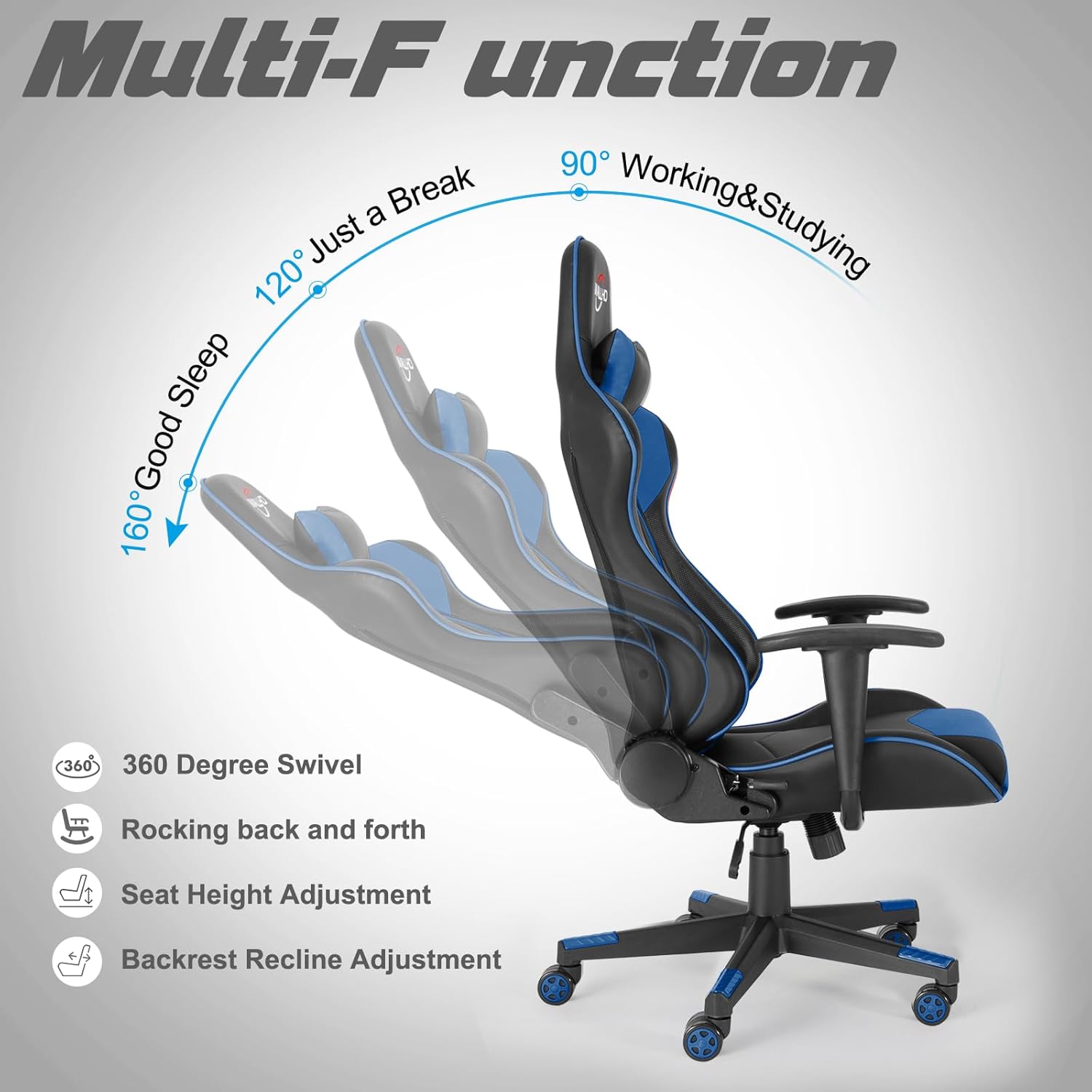
Image 2: An illustration highlighting the chair's multi-functional adjustments, such as 360-degree swivel, rocking, seat height, and recline angles (90°, 120°, 160°).
3. تنظیم او مجلس
The Polar Aurora Gaming Chair is designed for easy installation. A detailed installation manual and video are typically provided with the product to guide you through the assembly process.
د عمومي غونډې مرحلې:
- Attach the casters to the 5-star base.
- د ګاز لفټ د اډې په مرکز کې دننه کړئ.
- Secure the seat plate mechanism to the bottom of the seat cushion.
- د څوکۍ کشن سره د بازو پټۍ وصل کړئ.
- Connect the backrest to the seat cushion using the provided screws.
- راټول شوی څوکۍ د ګازو په لفټ کې ځای په ځای کړئ.
- Attach the headrest and lumbar support pillows as desired.
Ensure all screws are tightened securely before use. Do not overtighten.

Image 3: Product dimensions are illustrated, showing key measurements for the backrest, seat, and adjustable height.
4. عملیاتي لارښوونې
The Polar Aurora Gaming Chair offers several adjustment options to customize your seating experience:
- د څوکۍ لوړوالی تنظیمول: Use the lever located under the seat on the right side to raise or lower the chair. Pull the lever up while seated to lower, or pull it up while standing to raise. Release the lever to lock the height.
- شاته تکیه: Use the lever on the side of the chair (typically the left side) to adjust the backrest angle. Pull the lever up to recline the backrest from 90 to 160 degrees. Release the lever at your desired angle to lock it in place.
- د راکینګ فعالیت: The chair features a rocking mechanism. A knob under the seat (usually at the front) controls the tension of the rocking motion. Turn clockwise to increase tension (less rocking) and counter-clockwise to decrease tension (more rocking).
- 360 درجې تیریدل: The chair's base allows for full 360-degree rotation.
- د ملا او سر د غاړې بالښتونه: The included lumbar and headrest pillows are adjustable and can be positioned to provide optimal support for your lower back and neck.
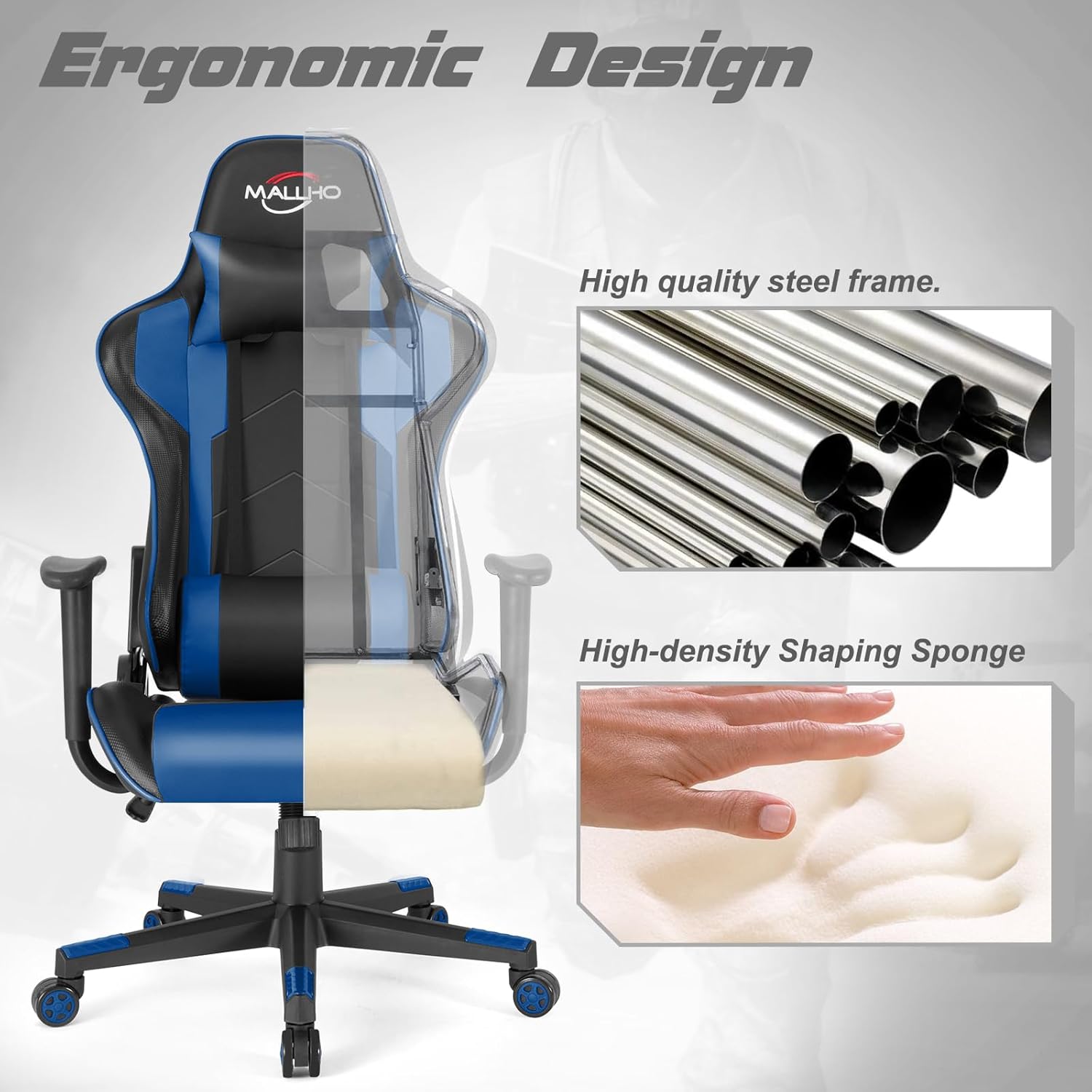
Image 4: The ergonomic design of the chair is shown, emphasizing the high-quality steel frame and high-density shaping sponge for comfort and durability.
5. ساتنه
Proper maintenance ensures the longevity and performance of your gaming chair:
- پاکول: د مصنوعي چرم سطحې د نرم، d سره پاک کړئamp ټوکر. د سختو داغونو لپاره، د صابون یو نرم محلول وکاروئ او سمدلاسه یې وچ کړئ. د سختو کیمیاوي موادو یا د کثافاتو پاکوونکو څخه ډډه وکړئ.
- د کاسټر پاملرنه: Regularly check the casters for hair, dust, or debris that may impede smooth rolling. Clean as needed.
- د هارډویر معاینه: په دوره یي ډول ټول پیچونه او بولټونه معاینه کړئ ترڅو ډاډ ترلاسه شي چې دوی کلک دي. که اړتیا وي نو بیا کلک کړئ ترڅو ثبات او خوندیتوب وساتئ.
- د مستقیم لمر وړانګو څخه ډډه وکړئ: Prolonged exposure to direct sunlight can cause the faux leather to fade or crack. Position the chair away from direct sunlight when possible.
6. ستونزه حل کول
که تاسو د خپلې څوکۍ سره کومې ستونزې سره مخ شئ، نو لاندې عام د ستونزو حل کولو لارښوونو ته مراجعه وکړئ:
- Chair Sinks or Won't Stay Up: This usually indicates an issue with the gas lift. Ensure the height adjustment lever is fully engaged. If the problem persists, the gas lift may need replacement.
- د څوکۍ ټپونه: Check all assembly screws and bolts, especially those connecting the seat to the base and the armrests. Tighten any loose hardware. Ensure the 5-star base is correctly attached to the gas lift.
- کاسټرونه چې په اسانۍ سره نه ګرځي: Inspect casters for obstructions (hair, dirt) and remove them. If casters are damaged, they may need replacement.
- Backrest Won't Recline/Lock: Verify that the recline lever is functioning correctly and not obstructed. Ensure no foreign objects are preventing the mechanism from engaging.
د هغو ستونزو لپاره چې دلته نه دي پوښل شوي، مهرباني وکړئ د پیرودونکو ملاتړ سره اړیکه ونیسئ.
7. مشخصات
| برانډ | قطبي اورورا |
| د ماډل نوم | اورورا |
| رنګ | آبي |
| مواد | مصنوعي چرم، فوم |
| د محصول ابعاد (د x څلویښتم x څلویښتم) | ۱۶"د x ۲۶"وچ x ۴۷"ح |
| د اعظمي وزن سپارښتنه | 300 پونډه (136 kg) |
| د تکیه کولو موقعیت شمیره | 2 (90-160 degrees) |
| شاملې برخې | Caster, Cushion, User Manual |
| د توکي وزن | ۶ پونډه (۳ کیلو ګرامه) |
8. د خوندیتوب معلومات
WARNING: Do not exceed the maximum weight capacity of 300 lbs (136 kg). Always assemble the chair according to the provided instructions to ensure stability and safety.
- د غونډو په جریان کې کوچني برخې د ماشومانو څخه لرې وساتئ.
- د څوکۍ کارولو دمخه ډاډ ترلاسه کړئ چې ټولې اړیکې خوندي دي.
- په څوکۍ د ودرېدو یا د زینې د څوکۍ په توګه د کارولو څخه ډډه وکړئ.
- څوکۍ په نا مساوي سطحو مه کاروئ.
9. تضمین او ملاتړ
While specific warranty details are not provided in this manual, Polar Aurora is committed to customer satisfaction.
If you have any questions when you receive the chair or during its use, please contact us for assistance. We are dedicated to offering a perfect solution to any concerns you may have.
For further support, please visit the official Polar Aurora store: Polar Aurora Store