
Amazon Basics DLB111-US290
Amazon Basics Single Computer Monitor Stand User Manual
Model: DLB111-US290 | Brand: Amazon Basics
پیژندنه
This user manual provides comprehensive instructions for the assembly, operation, and maintenance of your Amazon Basics Single Computer Monitor Stand. This desk-mounted arm is designed to enhance your workspace ergonomics and free up valuable desk space by securely holding a single computer monitor.
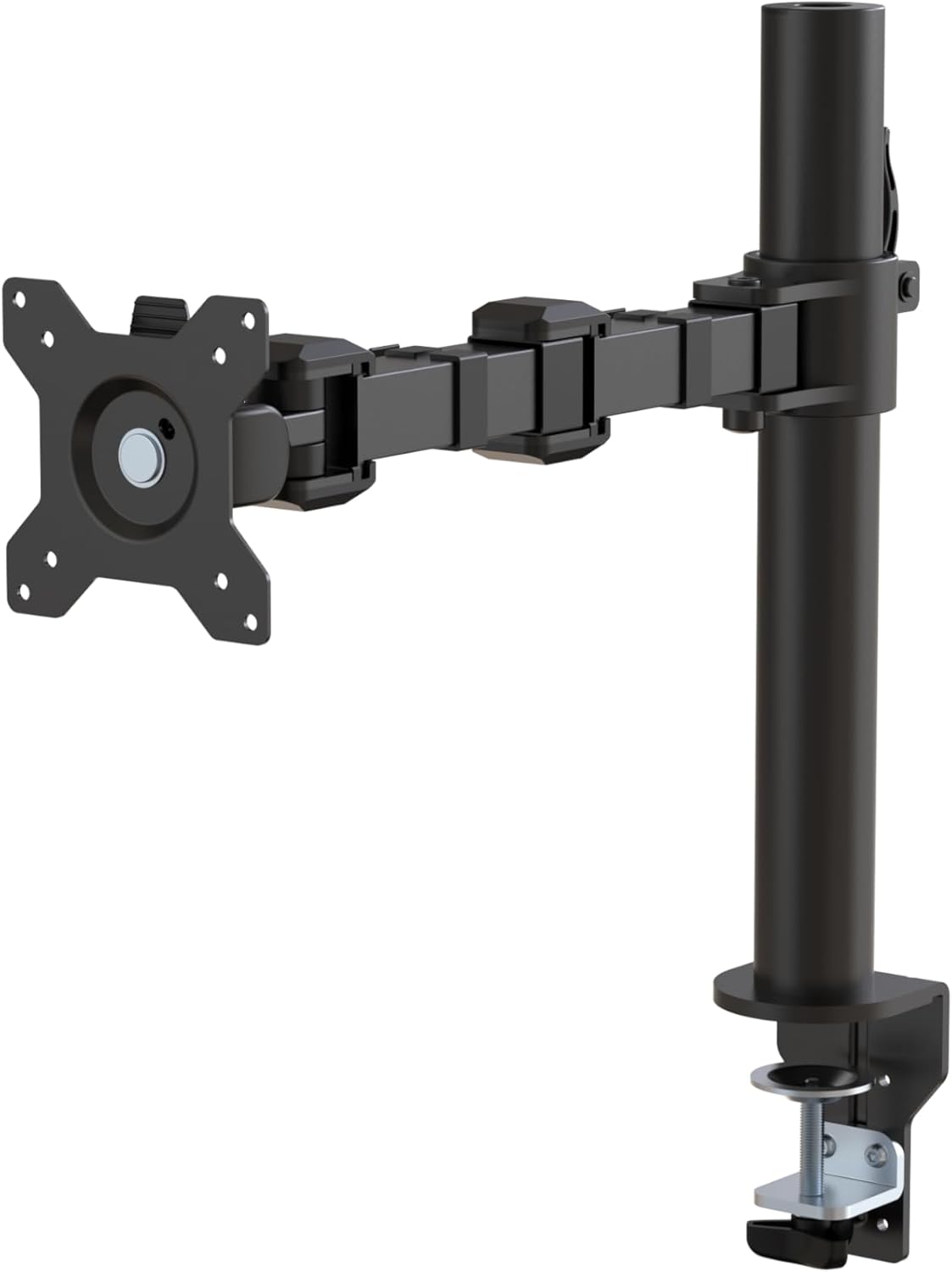
شکل 1: پایview of the Amazon Basics Single Computer Monitor Stand.
د خوندیتوب مهم معلومات
- د راټولولو او کارولو دمخه ټولې لارښوونې په دقت سره ولولئ.
- د وزن اعظمي ظرفیت له ۲۵۰ پونډو (۱۱۳ کیلوګرامه) څخه زیات مه کوئ.
- Ensure your desk surface is stable and can support the combined weight of the monitor arm and your monitor.
- Verify that the desk thickness is between 0.8 to 3.9 inches (2 cm to 10 cm) for proper clamp نصب
- Use only the provided hardware. If any parts are missing or damaged, contact customer support.
- د غونډې په جریان کې ماشومان او څاروي لرې وساتئ.
- په دوره یي ډول ټول پیچونه او اړیکې وګورئ ترڅو ډاډ ترلاسه شي چې دوی کلک او خوندي پاتې دي.
د بسته محتويات
مهرباني وکړئ تصدیق کړئ چې ټولې برخې د غونډې پیل کولو دمخه شتون لري:
- Monitor Arm Assembly (Pre-assembled arm and VESA plate)
- د میز Clamp بیس
- د غونډۍ قطب
- Hardware Kit (Screws for VESA mounting, Allen keys)
- د کیبل مدیریت کلیپونه
- د کارن لارښود
د تنظیم کولو لارښوونې
لومړی ګام: د میز Cl ضمیمه کړئamp بیس
د میز ځای clamp base on your desk edge. Ensure the desk thickness is compatible (0.8 to 3.9 inches). Tighten the clamp screw securely until the base is firmly attached to the desk. Do not overtighten.

Figure 2: Securely attaching the desk clamp base to your desk.
Step 2: Install Mounting Pole
Insert the mounting pole into the hole on the desk clamp base. Secure it by tightening the set screw on the side of the clamp base using the provided Allen key.
Step 3: Attach Monitor Arm to Pole
Slide the monitor arm assembly onto the mounting pole. Adjust the height to your desired position and tighten the height adjustment screw on the arm collar to secure it.
4 ګام: نظارت ته د VESA پلیټ ضمیمه کړئ
The monitor arm features a detachable VESA plate. Remove the VESA plate from the arm by lifting it up. Align the VESA plate with the mounting holes on the back of your monitor (compatible with 100x100mm and 75x75mm VESA patterns). Use the appropriate screws from the hardware kit to secure the plate to your monitor. Ensure the screws are tightened firmly but do not overtighten.

Figure 3: The detachable VESA plate for easy monitor attachment.
څلورم ګام: مانیټر په لاس کې نصب کړئ
Carefully slide the monitor (with the attached VESA plate) onto the monitor arm. Ensure it clicks securely into place. You may need to adjust the tension screws on the arm joints to support the monitor's weight and allow for smooth movement.

Figure 4: Monitor securely mounted on the arm, viewد مخ څخه ed.

Figure 5: Top-down perspective of the monitor mounted, showcasing desk space optimization.
6 ګام: د کیبل مدیریت
Utilize the integrated cable management system to route your monitor cables (power, video, etc.) along the arm and down the pole. This helps maintain a tidy workspace and prevents cable clutter.
عملیاتي لارښوونې
The monitor arm offers a full range of motion to customize your viewتجربه:
- د لوړوالی سمون: The horizontal arm can be adjusted from 7.9 to 14.2 inches high along the pole. Loosen the height adjustment screw on the arm collar, slide the arm to the desired height, and re-tighten.
- ټیلټ: Adjust the screen tilt from -15 to +85 degrees to reduce glare and optimize viewزاویې
- تیر: Swivel the monitor left or right up to 180 degrees at various joints for collaborative viewing or screen sharing.
- گردش: Rotate the monitor 360 degrees to switch between landscape and portrait modes without removing the monitor.

Figure 6: Visual representation of the flexible screen adjustment capabilities: Tilt (-85/+15 degrees), Swivel (±180 degrees), and Rotation (360 degrees).
ارګونومیک موقعیت
Proper monitor positioning is crucial for ergonomic comfort and reducing strain. Adjust the monitor arm so that the top of your monitor screen is at or slightly below eye level when you are sitting upright. Your eyes should be approximately an arm's length away from the screen. Ensure your wrists are straight and your forearms are parallel to the floor when typing.

Figure 7: Comparison of correct and incorrect sitting postures, highlighting the importance of proper monitor height.
ساتنه
- پاکول: د مانیټر لاس په نرم، d سره پاک کړئamp ټوکر. د کثافاتو پاکوونکو یا محلولونو څخه ډډه وکړئ کوم چې پای ته زیان رسولی شي.
- د کلکوالي چک: په دوره یي ډول ټول پیچونه او اړیکې وګورئ، په ځانګړې توګه د میز کلپamp and VESA plate screws, to ensure they are tight and secure. Re-tighten if necessary.
- غوړول: د حرکت کوونکو برخو لپاره غوړولو ته اړتیا نشته.
د ستونزو حل کول
| ستونزه | احتمالي لامل | د حل لاره |
|---|---|---|
| د څارنې لاس ښکته کېږي یا په خپل ځای کې نه نیسي. | Tension screws are too loose. | Tighten the tension screws on the arm joints using the provided Allen key until the arm holds the monitor's weight. |
| په لاس کې د ټپونو څارنه وکړئ. | VESA plate screws are loose or desk clamp is not secure. | Ensure the VESA plate screws attaching the monitor are tight. Re-tighten the desk clamp سکرو |
| Cannot adjust monitor height. | Height adjustment screw is too tight. | Loosen the height adjustment screw on the arm collar, adjust height, then re-tighten. |
مشخصات
| فیچر | تفصیل |
|---|---|
| د ماډل شمیره | DLB111-US290 |
| د محصول ابعاد | 20 x 18.13 x 4.5 انچه |
| د توکي وزن | ۲.۴۵ پونډه |
| مواد | د الماس فولاد |
| رنګ | تور |
| د نصب کولو ډول | tabletop Clamp غره |
| د مطابقت وړ سکرین اندازه | له 13 څخه تر 30 انچو پورې |
| د اعظمي وزن ظرفیت | ۶ پونډه (۳ کیلو ګرامه) |
| د میز ضخامت مطابقت | له 0.8 څخه تر 3.9 انچو پورې |
| د VESA مطابقت | 75x75mm، 100x100mm |
| د لوړوالی تنظیم کولو سلسله | 7.9 to 14.2 inches (horizontal arm) |
| د خښتو زاویه | د 15 درجې ته + 85 |
| گردش | 360 درجې |
تضمین او ملاتړ
This product is backed by an Amazon Basics limited 1-year warranty.
For detailed warranty information or technical support, please refer to the official documentation or contact Amazon Basics customer service.
- د کارونکي لارښود (PDF): د کارونکي لارښود ډاونلوډ کړئ
- تضمین (PDF): د تضمین معلومات ډاونلوډ کړئ