
پیژندنه
The Thrustmaster T80 Ferrari 488 GTB Edition racing wheel is a replica of the Ferrari 488 GTB steering wheel, officially licensed by Ferrari and PlayStation 4. This racing wheel is designed to provide a realistic driving experience across various PlayStation 4, PlayStation 5, and PC racing games. It features integrated PlayStation buttons for system navigation and an ergonomic design suitable for different racing game genres.
The wheel incorporates a realistic linear resistance mechanism with automatic re-centering, utilizing Thrustmaster's exclusive "Bungee Cord" system. It also includes sequential paddle shifters and a large, adjustable pedal set for precise control over acceleration and braking. A central clamping system ensures optimal stability during use.
د بسته محتويات
- Thrustmaster T80 Ferrari 488 GTB Edition Racing Wheel
- 2-Pedal Pedal Set
- د بندولو سیسټم
- د تضمین معلومات
- د کارونکي لارښود (دا لاسوند)
چمتو کول
1. Attaching the Racing Wheel to a Surface
The T80 Ferrari 488 GTB Edition racing wheel features a central clamping system designed for optimal stability. This system allows you to securely attach the wheel to a desk or table.
- Place the racing wheel on a flat, stable surface (e.g., a desk or table).
- Position the central clamping system's wide jaws against the edge of the surface.
- cl کلک کړئamping screw until the wheel is firmly secured and does not move during use.
2. د پیډل سیټ سره نښلول
Connect the pedal set to the racing wheel using the dedicated connector cable. Ensure the connection is secure.
3. د سیسټم پیوستون
The racing wheel is compatible with PlayStation 4, PlayStation 5, and PC (Windows 7/8/10).
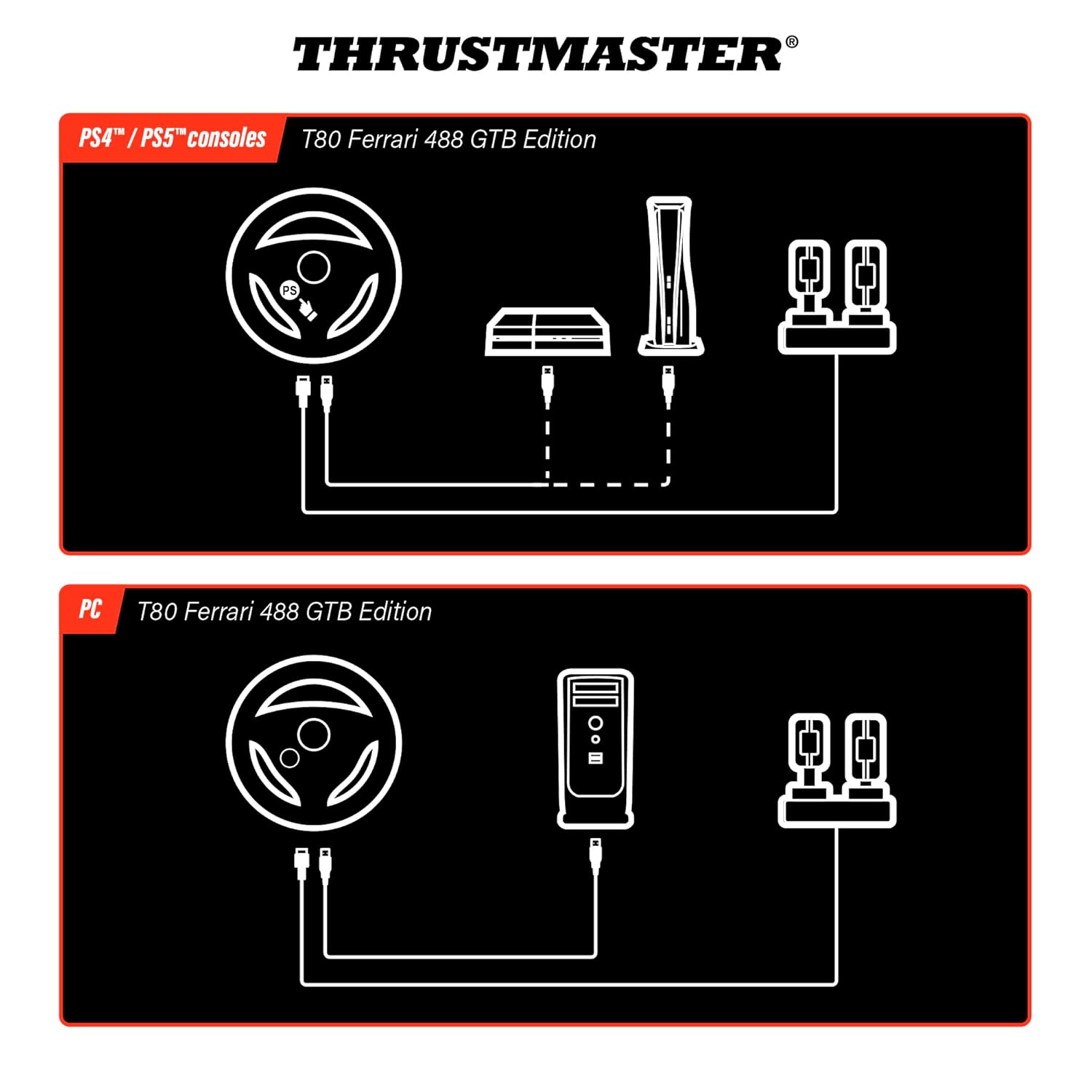
Image: Connection diagram for the T80 Ferrari 488 GTB Edition racing wheel. The top diagram illustrates connecting the wheel and pedals to a PlayStation 4 or PlayStation 5 console via USB. The bottom diagram shows connecting the wheel and pedals to a PC via USB.
For PlayStation 4 / PlayStation 5:
- Ensure your console is powered off.
- Connect the racing wheel's USB cable to an available USB port on your PlayStation console.
- Power on your console. The system should automatically detect the racing wheel.
- Press the "PS" button on the racing wheel to assign it to a user profile.
د کمپیوټر لپاره:
- د ریسینګ ویل USB کیبل په خپل کمپیوټر کې موجود USB پورټ سره وصل کړئ.
- Windows will automatically detect the device and install the necessary drivers. If prompted, follow the on-screen instructions.
- For optimal performance, it is recommended to download and install the latest drivers and firmware from the official Thrustmaster support webسایټ
عملیاتي لارښوونې
د سټیرینګ ویل کنټرولونه

انځور: مخکینۍ برخه view of the T80 Ferrari 488 GTB Edition racing wheel, showing the Ferrari logo, PlayStation buttons (PS, SHARE, OPTIONS), action buttons, D-pad, and paddle shifters.
- Integrated PlayStation Buttons: The wheel features "PS", "SHARE", and "OPTIONS" buttons for easy navigation within the PlayStation system and game menus.
- Action Buttons & D-pad: The wheel is equipped with 11 action buttons and a D-pad, which can be configured for various in-game functions.
- Sequential Paddle Shifters: Two digital paddle shifters (up and down) are mounted on the wheel, allowing for quick gear changes. These are designed for durability and responsiveness.
- Linear Resistance & Auto-Centering: The "Bungee Cord" mechanism provides realistic linear resistance to steering movements and automatic re-centering, enhancing control and immersion. The rotation angle is 240 degrees.
Pedal Set Operation

انځور: پورته-ښکته view of the T80 Ferrari 488 GTB Edition racing wheel and its two-pedal set. The pedals are shown with a wide footrest, indicating their adjustable nature for comfortable use.
- Two-Pedal Set: Includes an accelerator pedal and a brake pedal.
- Adjustable Tilt & Footrest: The pedal set features adjustable tilt and a wide footrest, allowing users to customize their setup for comfort and precise control.
- Progressive Brake Resistance: The brake pedal offers progressive resistance, simulating a more realistic braking feel.
ساتنه
Proper maintenance ensures the longevity and optimal performance of your Thrustmaster T80 Ferrari 488 GTB Edition racing wheel.
- پاکول: Use a soft, dry cloth to clean the racing wheel and pedal set. Avoid using abrasive cleaners or solvents, as these can damage the surfaces.
- ذخیره کول: کله چې په کارولو کې نه وي، وسیله په پاک او وچ ځای کې د مستقیم لمر وړانګو او سختې تودوخې څخه لرې وساتئ.
- د کیبل مدیریت: ډاډ ترلاسه کړئ چې ټول کیبلونه د زیان د مخنیوي لپاره نه تړل شوي او نه تړل شوي دي.
- د فرم ویئر تازه معلومات: Regularly check the official Thrustmaster support website for any available firmware updates. Keeping your device's firmware up-to-date can improve performance and compatibility.
د ستونزو حل کول
If you encounter issues with your racing wheel, please refer to the following common solutions:
| ستونزه | احتمالي حل |
|---|---|
| Wheel not detected by console/PC |
|
| No force feedback or linear resistance |
|
| پیډلونه ځواب نه ورکوي |
|
| Buttons not working correctly |
|
If these solutions do not resolve your issue, please contact Thrustmaster customer support.
مشخصات
| فیچر | تفصیل |
|---|---|
| د ماډل شمیره | 4160672 |
| مطابقت | PlayStation 4, PlayStation 5, PC (Windows 7/8/10) |
| د سټیرینګ ویل قطر | 28 سانتي متره (11 انچه) |
| د گردش زاویه | 240 درجې |
| د مقاومت سیسټم | Realistic linear resistance with automatic re-centering (Thrustmaster "Bungee Cord" system) |
| شفټرونه | 2 digital sequential paddle shifters |
| تڼۍ | 11 action buttons, 1 D-pad, "PS", "SHARE", "OPTIONS" buttons |
| پیډل سیټ | 2-pedal set (accelerator, brake) with adjustable tilt and wide footrest; progressive brake resistance |
| Clampسېسټم | مرکزي clamping system with wide jaws for optimal stability |
| د محصول ابعاد | 14.57 x 12.4 x 12.4 انچه |
| د توکي وزن | ۲.۴۵ پونډه |
| جوړونکی | thrustmaster |
| نیټه لومړی شتون لري | د ۲۰۲۲ کال د دسمبر ۵ مه |
تضمین او ملاتړ
This product comes with a manufacturer's warranty. Please refer to the warranty information included in your package for details regarding coverage and duration. For technical support, driver downloads, firmware updates, and additional product information, please visit the official Thrustmaster support webسایټ:
تاسو کولی شئ د ملاتړ سرچینې او د اړیکو معلومات هم په په ایمیزون کې د ترسټ ماسټر پلورنځی.