
1. پیژندنه
This manual provides essential information for the safe and efficient operation of your Amazon Basics 400VA Standby Uninterruptible Power Supply (UPS) with Battery Backup and Surge Protection. Please read these instructions thoroughly before use and retain them for future reference.
2. د خوندیتوب معلومات
- ځای په ځای کول: Do not lie the UPS on its side. Ensure proper ventilation and avoid placing it near heat sources or in direct sunlight.
- لومړنی لګښت: For optimal performance, plug in the UPS and allow it to charge for at least 8 hours before connecting devices.
- د بارولو ظرفیت: Do not overload the UPS. For optimal system performance, keep the total load below 80% of the unit's rated capacity (255W).
- بیټرۍ: Contains a sealed lead-acid battery. Do not attempt to disassemble or incinerate. Refer to local regulations for proper battery disposal.
- سرکیټ ماتونکی: The unit includes a circuit breaker to prevent overload. If it trips, reduce the load and press the breaker to reset.
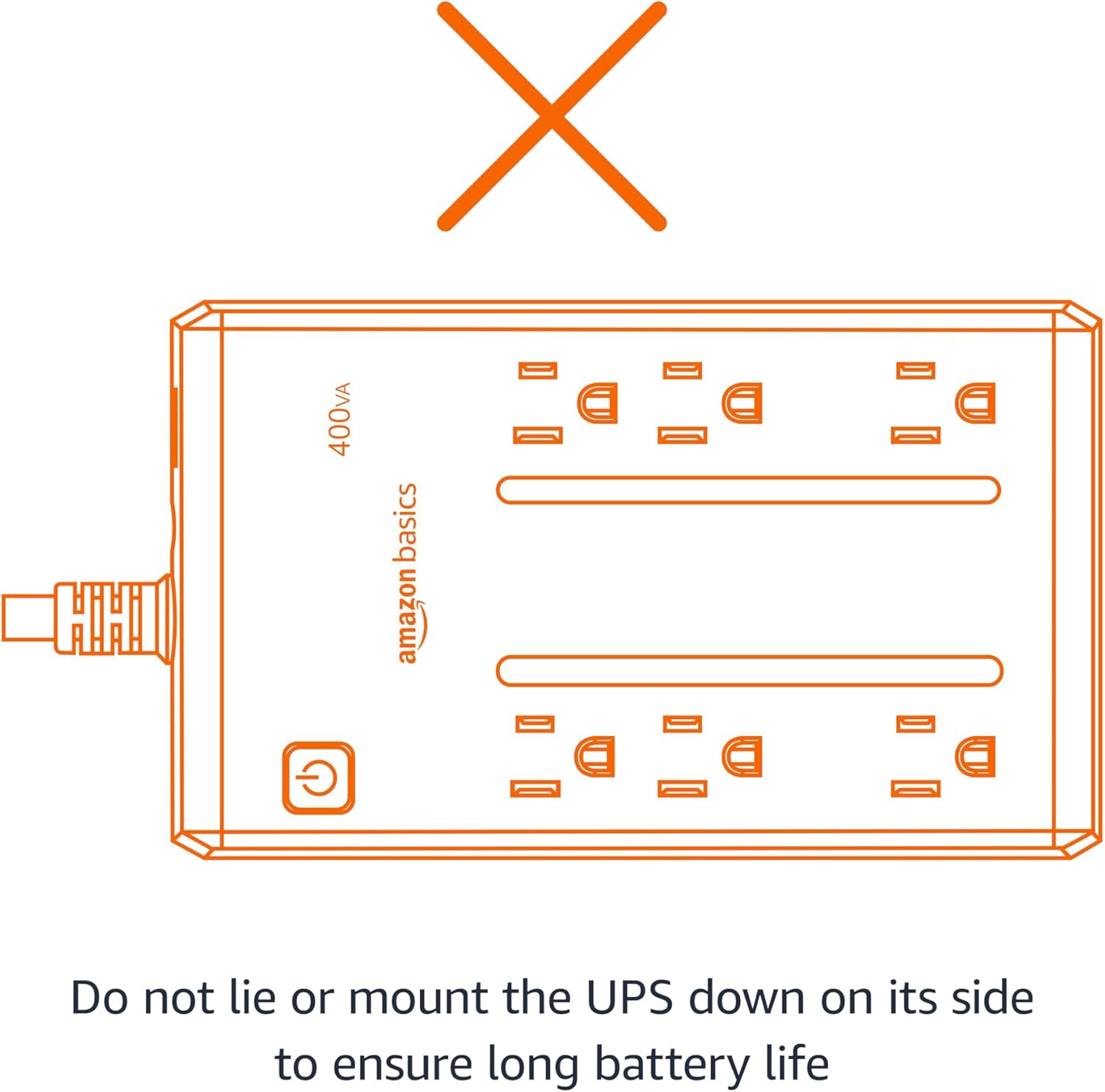
Figure 2.1: Proper orientation is crucial for battery life and unit performance. Avoid lying the UPS on its side.
3. د بسته محتويات
ډاډ ترلاسه کړئ چې ټول توکي په کڅوړه کې شتون لري:
- Amazon Basics 400VA Standby UPS Unit
- د کارن لارښود

Figure 3.1: The Amazon Basics 400VA Standby UPS unit.
4. محصول ختم شوview
The Amazon Basics 400VA UPS features a compact design with multiple outlets for power protection.
- ټول دکانونه: 6 (NEMA 5-15R)
- Battery Backup & Surge Protection Outlets: 3 outlets provide continuous power during outages او د زیاتوالي په وړاندې ساتنه وکړئ.
- یوازې د زیاتوالي محافظت رسنۍ: 3 outlets protect against surges but do not provide battery backup during power outages.
- د بریښنا تڼۍ: د واحد ځواک کنټرولوي.
- د بریښنا تار: 5-foot cord with NEMA 5-15P right-angle and 45-degree offset plug.

Figure 4.1: Key features and outlet types of the UPS.

شکل 4.2: مفصل view of the UPS outlets, distinguishing between battery-backed and surge-only ports.
5. ترتیب کول
- خلاص کړئ: Carefully remove the UPS unit from its packaging.
- لومړنی لګښت: Plug the UPS into a standard wall outlet. Press and hold the power button for 2 seconds to turn the unit on. The green LED indicator will illuminate. Allow the unit to charge for a minimum of 8 hours before connecting any critical devices.
- د وسیلو نښلول: Plug your electronic devices into the appropriate outlets. For devices requiring continuous power during outages (e.g., routers, modems, computers), use the د بیټرۍ بیک اپ او د زیاتوالي محافظت outlets. For devices needing only surge protection, use the د سرو محافظت دکانونه
Video 5.1: Demonstrates connecting devices to the UPS, highlighting the distinction between battery-backed and surge-only outlets.
6. د UPS چلول
Once fully charged and devices are connected, your UPS is ready for operation.
- پاور آن/بند: Press and hold the power button for approximately 2 seconds to turn the UPS on or off. The green LED indicates power status.
- بریښنا اووtage: د ځواک په حالت کې outage, devices connected to the د بیټرۍ بیک اپ او د زیاتوالي محافظت outlets will continue to receive power from the internal battery. The UPS may emit an audible alarm to indicate it is operating on battery power.
- د الارم کنټرول: To silence the audible alarm during a power outage, quickly press the power button twice. To reactivate the alarm, press the power button twice again.
- د چلولو وخت: The battery backup runtime varies based on the power consumption of connected devices. At half load (200VA/127.5W), the UPS provides approximately 6 minutes of backup power. At full load (400VA/255W), it provides approximately 1.5 minutes of backup power.
ویډیو ۳.۱: یو اوورview of the Amazon Basics 400VA UPS, demonstrating its features and functionality.
7. ساتنه
- د بیټرۍ بدلول: The internal battery is a sealed lead-acid type. Its typical lifespan is 3-5 years, depending on usage. Battery replacement should be performed by qualified personnel.
- پاکول: Disconnect the UPS from the power outlet and wipe the exterior with a dry cloth. Do not use liquid cleaners.
- ذخیره کول: If storing the UPS for an extended period, ensure it is fully charged and recharge it every 3 months to maintain battery health.
8. ستونزه حل کول
د عامو ستونزو او د هغوی د حل لارو لپاره لاندې جدول ته مراجعه وکړئ:
| علامه | احتمالي لامل | د حل لاره |
|---|---|---|
| UPS نه چالانېږي. | بیټرۍ نه ده وصل شوې یا خارج شوې ده. | Ensure battery is connected. Plug into wall outlet and charge for 8 hours. |
| UPS په دوامداره توګه غږ کوي. | ډیر بار یا ټیټ بیټرۍ. | Reduce connected load. Allow battery to recharge. |
| No power from battery backup outlets during outage. | Devices plugged into surge-only outlets. | Ensure critical devices are plugged into د بیټرۍ بیک اپ او د زیاتوالي محافظت دکانونه |
| سرکټ ماتونکی ټکر شو. | اوورلوډ. | Unplug some devices, then press the circuit breaker to reset. |
9. مشخصات
| فیچر | تفصیل |
|---|---|
| ماډل | ABST400 |
| ظرفیت | 400VA / 255W |
| ننوتۍ جلدtage | 120V~, 10A, 50/60Hz |
| د محصول Voltage | 120V~, 5.0A, 50/60Hz |
| ټول محصول اوسنی | 10A (Including Surge Outlets) |
| د بیټرۍ ډول | مهر شوی لیډ اسید |
| ابعاد (L x W x H) | 7.24 x 4.33 x 3.22 انچه (18.39 x 11 x 8.18 سانتي متره) |
| د توکي وزن | ۲.۴۵ پونډه |
| د تار اوږدوالی | ۹ فوټه |

Figure 9.1: Physical dimensions of the UPS unit.
10. تضمین او ملاتړ
This Amazon Basics UPS is backed by a limited 1-year warranty, including the battery. For support or warranty claims, please refer to the Amazon Basics customer service channels.
Additionally, a $75,000 connected equipment guarantee is provided. Please refer to the product documentation or Amazon's website for full details on how to make a claim.