
1. پیژندنه
Thank you for choosing the Cable Matters Braided USB C to Micro USB Cable. This manual provides essential information for the proper use, maintenance, and troubleshooting of your new cable. This cable is designed to bridge the gap between modern USB-C devices and legacy Micro USB 2.0 peripherals, offering reliable charging and data transfer capabilities.
2. کلیدي ځانګړتیاوې
- څو اړخیز ارتباط: Connects USB-C devices (laptops, smartphones, wall chargers, power banks) to Micro USB 2.0 devices (smartphones, tablets, gaming controllers, digital cameras, dash cams, USB-DAC audio).
- د تیز رفتار ډیټا لیږد: Supports USB 2.0 data transfer speeds up to 480 Mbps.
- موثر چارج کول: Delivers up to 3A/15W charging for compatible devices.
- دوامدار ساختمان: Features a reinforced braided jacket for enhanced durability and tangle resistance.
- Reliable Connectors: Equipped with gold-plated connectors and molded strain relief for frequent use and a secure connection.
- Reversible USB-C: The USB-C connector allows for effortless plugging in any orientation.
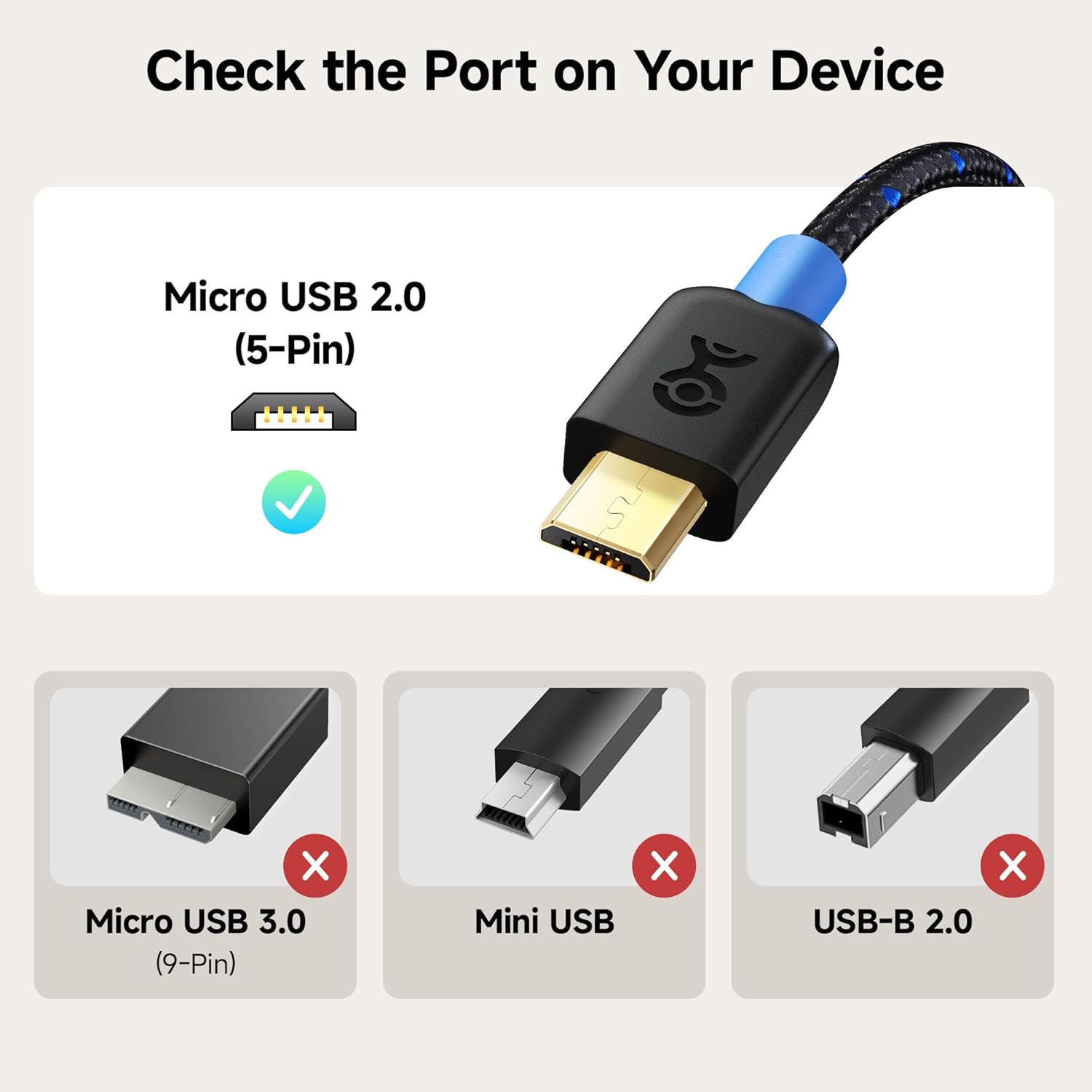
Figure 2.1: Ensure your device has a Micro USB 2.0 (5-Pin) port for compatibility.

Figure 2.2: The cable supports USB 2.0 data transfer rates up to 480 Mbps.
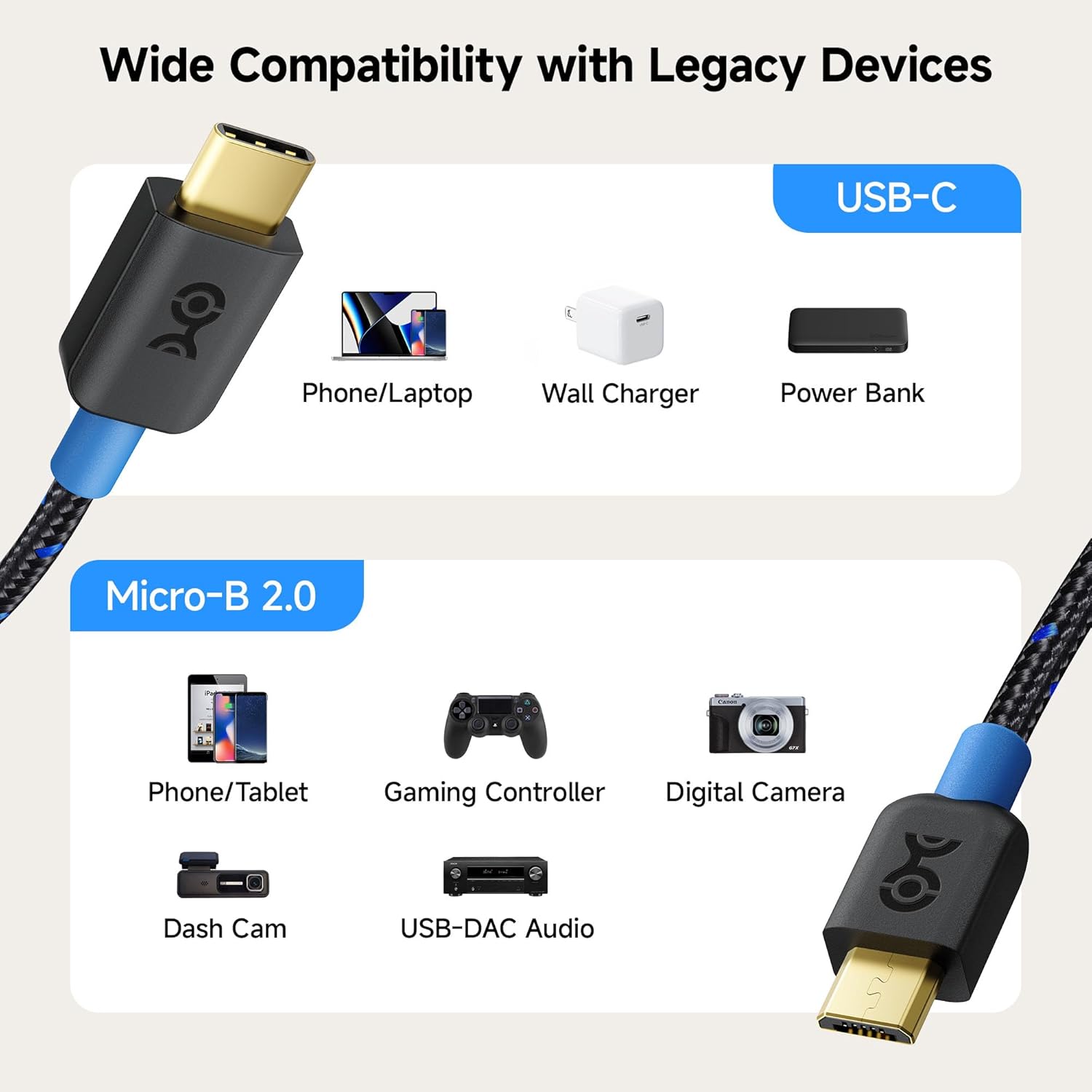
Figure 2.3: Wide compatibility with various USB-C and Micro-B 2.0 devices.

Figure 2.4: Built to last with premium components and design.
3. ترتیب کول
The Cable Matters Braided USB C to Micro USB Cable is designed for plug-and-play functionality. No drivers or software installation are required.
- Identify the Micro USB 2.0 port on your legacy device (e.g., smartphone, tablet, camera).
- Insert the Micro USB connector of the cable firmly into your legacy device's port.
- Identify the USB-C port on your modern device (e.g., laptop, wall charger, power bank).
- Insert the USB-C connector of the cable firmly into your modern device's port. The reversible design of the USB-C connector means it can be inserted in either orientation.
Once connected, your devices should recognize each other for charging or data transfer, depending on the device's capabilities and settings.
4. عملیاتي لارښوونې
4.1. د چارج کولو وسایل
To charge a Micro USB device using a USB-C power source:
- Connect the Micro USB end of the cable to your Micro USB device (e.g., phone, power bank).
- Connect the USB-C end of the cable to a USB-C wall charger, power bank, or laptop with a USB-C port.
- Ensure the power source is active. Your Micro USB device should begin charging.
4.2. د معلوماتو لیږد
To transfer data between a USB-C device and a Micro USB device:
- Connect the Micro USB end of the cable to your Micro USB device (e.g., camera, older smartphone).
- Connect the USB-C end of the cable to your USB-C computer or laptop.
- On your Micro USB device, you may need to select the 'File Transfer' or 'MTP' (Media Transfer Protocol) option from the notification shade or settings to allow the computer to access its storage.
- Your computer should now recognize the connected device, allowing you to transfer files at USB 2.0 speeds (up to 480 Mbps).

Figure 4.1: Powering a gaming controller while playing.

Figure 4.2: Ideal for connecting legacy devices to modern setups or in a car.
5. ساتنه
To ensure the longevity and optimal performance of your Cable Matters Braided USB C to Micro USB Cable, follow these simple maintenance guidelines:
- ذخیره کول: Store the cable in a cool, dry place away from direct sunlight and extreme temperatures. Use the included hook-and-loop cable tie to keep it neatly coiled when not in use.
- پاکول: If the cable or connectors become dirty, gently wipe them with a soft, dry, lint-free cloth. Avoid using harsh chemicals or abrasive materials.
- سمبالول: Always grasp the connector housing when plugging or unplugging the cable. Avoid pulling directly on the cable itself, as this can damage the internal wires or strain relief.
- د خړوبولو څخه ډډه وکړئ: Do not excessively bend or crimp the cable, especially near the connectors, to prevent internal wire damage.
6. ستونزه حل کول
If you encounter issues with your Cable Matters Braided USB C to Micro USB Cable, please refer to the following common troubleshooting steps:
- وسیله نه چارج کیږي:
- ډاډ ترلاسه کړئ چې د کیبل دواړه پایونه په بشپړ ډول او په خوندي ډول د دوی اړوندو بندرونو ته داخل شوي دي.
- Verify that the power source (wall charger, power bank, laptop) is functioning correctly and providing power.
- Check if your Micro USB device's charging port is clean and free of debris.
- Test the cable with another compatible device and power source to isolate the issue.
- ورو چارج کول:
- Ensure your power adapter provides sufficient output for your device. While the cable supports 3A/15W, the actual charging speed depends on the power source and the device's charging capabilities.
- د چارج کولو پرمهال د وسیلې له ډېر کارولو څخه ډډه وکړئ، ځکه چې دا کولی شي پروسه ورو کړي.
- Data Transfer Issues / Device Not Recognized:
- Confirm that the cable is connected to a data-enabled USB-C port on your computer (not just a charging port).
- On your Micro USB device, check the notification panel for USB connection options and select 'File Transfer' or 'MTP'.
- Restart both the computer and the connected device.
- په خپل کمپیوټر کې یو بل USB-C پورټ هڅه وکړئ.
- موقتي اړیکه:
- Inspect the connectors for any visible damage or bent pins.
- Ensure the ports on your devices are clean and free of lint or dust.
- Avoid excessive movement or strain on the cable during use.
If these steps do not resolve your issue, please contact Cable Matters customer support for further assistance.
7. مشخصات
| صفت | تفصیل |
|---|---|
| د ماډل شمیره | د 201003-BLK-0.3m معرفي کول |
| د نښلونکي ډول | USB Type C to Micro USB 2.0 |
| د ډیټا لیږد سرعت | تر ۴۸۰ Mbps پورې (USB ۲.۰) |
| د چارج کولو محصول | Up to 3A / 15W |
| د کیبل اوږدوالی | 1 Foot (0.3 meters) |
| رنګ | تور |
| د پای ډول | مټ |
| مطابقت لرونکې وسیلې | Laptop, PC, Tablet, Smartphone (with USB-C or Micro USB 2.0 ports) |
8. تضمین او ملاتړ
The Cable Matters Braided USB C to Micro USB Cable comes with a د ټول عمر تضمین, ensuring peace of mind regarding its quality and durability. If you experience any issues or have questions about your product, please do not hesitate to contact Cable Matters customer support.
For support, visit the official Cable Matters webسایټ ته مراجعه وکړئ یا د خپل محصول بسته بندۍ سره چمتو شوي د اړیکو معلوماتو ته مراجعه وکړئ.