
پیژندنه
The ARRIS SURFboard TM822G is a high-performance DOCSIS 3.0 cable modem and a 2-port telephony modem, designed for use with XFINITY from Comcast Internet & Voice service. This device provides a reliable connection for your internet and supports two Voice over IP (VoIP) telephone lines. By owning your modem, you can avoid monthly rental fees from your service provider.
د بسته محتويات
ډاډ ترلاسه کړئ چې ټول توکي ستاسو د محصول په کڅوړه کې شتون لري:
- ARRIS SURFboard TM822G Cable Modem
- ایترنیټ کیبل
- Coaxial Cable Splitter
- دوه کواکسیل کیبلونه
- د بریښنا تار
- د کارونکي لارښود (دا لاسوند)
وسیله ختمه شوهview
Familiarize yourself with the ARRIS SURFboard TM822G's components and indicators.
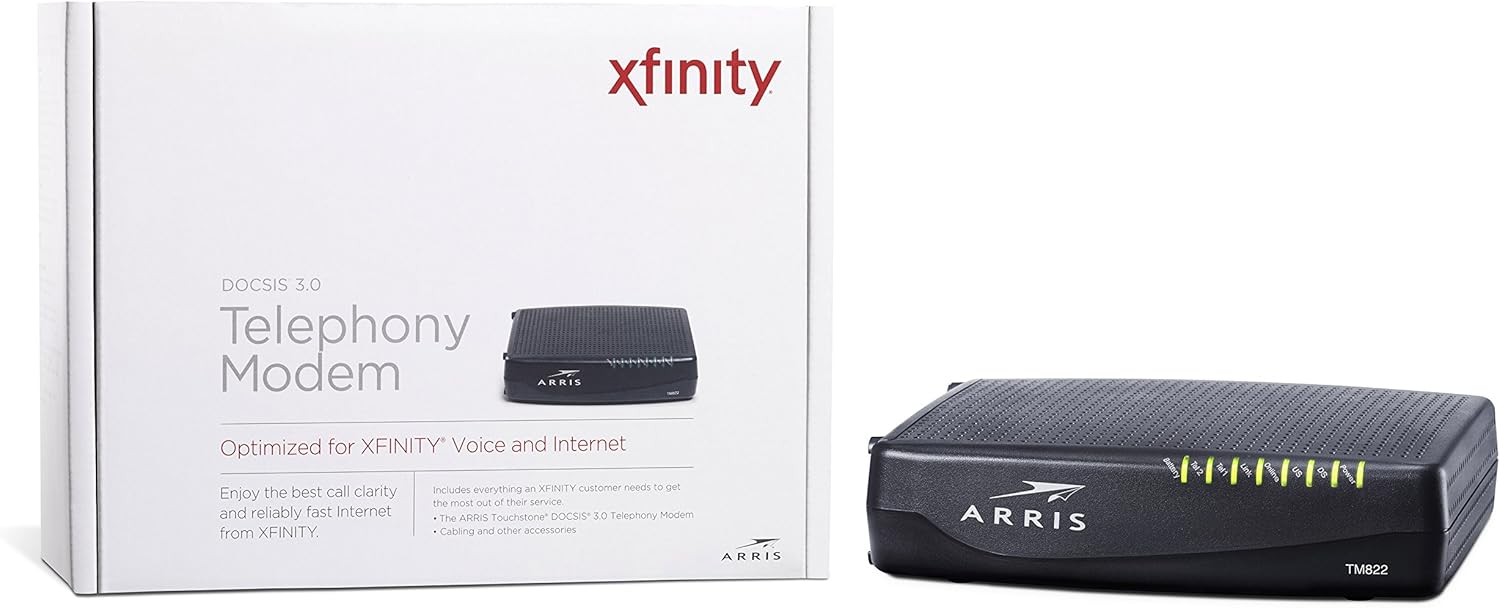
شکل 1: مخکی View of ARRIS SURFboard TM822G
This image shows the front panel of the ARRIS SURFboard TM822G cable modem, highlighting the status indicator lights.

شکل 2: شاته View of ARRIS SURFboard TM822G
This image displays the rear panel of the ARRIS SURFboard TM822G, detailing the coaxial input, Ethernet port, and two telephone line ports.
د LED حالت شاخصونه
د مخکینۍ پینل LEDs د موډیم د عملیاتي حالت په اړه معلومات چمتو کوي:
- ځواک: د موډیم د بریښنا حالت په ګوته کوي.
- DS (ښکته جریان): د ښکته جریان چینل اتصال په ګوته کوي.
- امریکا (پورته): د چینل د پورته برخې اتصال په ګوته کوي.
- آنلاین: د انټرنېټ بریالی اتصال په ګوته کوي.
- لینک: Indicates Ethernet connection status.
- Tel1 / Tel2: Indicate the status of the two telephone lines.
- بیټرۍ: Indicates the status of an optional battery backup (sold separately).
چمتو کول
Follow these steps to set up your ARRIS SURFboard TM822G cable modem:
- کواکسیل کیبل سره وصل کړئ: د کواکسیل کیبل یوه پای د کیبل دیوال آوټ لیټ سره او بله پای د موډیم په شا کې د "کیبل ان" پورټ سره وصل کړئ. ډاډ ترلاسه کړئ چې اړیکه د ګوتو سره ټینګه ده.
- د ایترنیټ کیبل سره وصل کړئ: Connect one end of the Ethernet cable to the Ethernet port on the back of the modem and the other end to your computer or wireless router.
- Connect Telephone Lines: If you have Xfinity Voice service, connect your telephone(s) to the "Tel1" and/or "Tel2" ports on the back of the modem.
- بریښنا وصل کړئ: Plug the power cord into the modem's power port and then into an electrical outlet.
- پاور آن: Wait for the modem to power on and for the front panel LEDs (Power, DS, US, Online, Link, Tel1/Tel2) to become solid green or blue, indicating a stable connection. This may take several minutes.
- خدمت فعال کړئ:
- For Xfinity Users: خلاص a web په وصل شوي وسیله کې براوزر او ته لاړ شئ xfinity.com غیر فعال. Follow the on-screen instructions to activate your modem. You may need your Xfinity account information.
- For Other ISPs: Refer to your Internet Service Provider's activation instructions or contact their customer support.
عملیاتي لارښوونې
Once successfully set up and activated, your ARRIS SURFboard TM822G will provide internet and telephone service. The modem operates continuously to maintain your connection. Monitor the front panel LEDs to ensure proper operation. Solid lights typically indicate a stable connection, while blinking lights or specific color changes may indicate activity or a problem.
For optimal performance, ensure the modem is placed in a well-ventilated area, away from direct sunlight or heat sources, and not obstructed by other objects.
ساتنه
Regular maintenance helps ensure the longevity and optimal performance of your modem:
- پاکول: د موډیم بهرنۍ برخه په وخت سره د نرم او وچ ټوکر سره پاک کړئ. د مایع پاکوونکو یا د کثافاتو موادو کارولو څخه ډډه وکړئ.
- وینټیلیشن: ډاډ ترلاسه کړئ چې د موډیم د هوا د تودوخی سوري بند شوي نه دي ترڅو د ډیر تودوخې مخه ونیول شي.
- د فرم ویئر تازه معلومات: د فرم ویئر تازه معلومات معمولا ستاسو د انټرنیټ خدماتو چمتو کونکي لخوا په اتوماتيک ډول اداره کیږي. هڅه مه کوئ چې فرم ویئر په لاسي ډول تازه کړئ پرته لدې چې ستاسو د ISP لخوا لارښوونه وشي.
- ریبوټ کول: If you experience connectivity issues, a simple reboot of the modem (unplugging the power for 30 seconds and plugging it back in) can often resolve minor problems.
د ستونزو حل کول
If you encounter issues with your ARRIS SURFboard TM822G, refer to the following common troubleshooting tips:
| ستونزه | احتمالي لامل | د حل لاره |
|---|---|---|
| د بریښنا LED نشته | Modem is not receiving power. | Check power cord connections to the modem and electrical outlet. Ensure the outlet is functional. |
| DS/US/Online LEDs are blinking or off | No connection to the cable network or internet. | Ensure coaxial cable is securely connected. Check for service outages in your area. Contact your ISP if the issue persists. |
| Link LED is off | No Ethernet connection to your computer/router. | Verify the Ethernet cable is securely connected to both the modem and your device/router. Try a different Ethernet cable. |
| Tel1/Tel2 LEDs are off or blinking | Telephone service issue. | Ensure telephone lines are correctly connected. Contact your Xfinity Voice service provider. |
| د انټرنیټ سرعت ورو | Network congestion, outdated router, or ISP issue. | Reboot the modem and router. Ensure your router is capable of handling your internet speed plan. Contact your ISP to check line quality and service plan. |
The ARRIS SURFboard TM822G supports Loop Diagnostics for remote testing and troubleshooting of in-house wiring, which can be utilized by your service provider.
مشخصات
Key technical specifications for the ARRIS SURFboard TM822G:
- نښه: ARRIS
- ماډل: TM822G
- د موډیم ډول: Cable Modem with Telephony Adapter
- د DOCSIS معیار: DOCSIS 3.0
- Downstream Channels: 8 bonded channels
- Upstream Channels: 4 bonded channels
- Maximum Downstream Speed: تر 343 Mbps پورې
- Maximum Upstream Speed: تر 131 Mbps پورې
- ایترنیټ بندرونه: 1 ګیګابایټ ایترنیټ بندر
- د تلیفون بندرونه: 2 (for Voice over IP)
- Compatible ISP: Certified for Comcast Xfinity Internet & Voice service only.
- د ارتباط ټیکنالوژي: ایترنیټ
- رنګ: تور
تضمین او ملاتړ
The ARRIS SURFboard TM822G comes with a د پرزو او کارګرانو لپاره د دوه کلن محدود تضمین. For technical assistance or warranty claims, please contact ARRIS customer support. You can find contact information and additional resources on the official ARRIS support webسایټ