
پیژندنه
The DJI Ronin-MX is a professional 3-axis gimbal stabilizer designed to provide smooth, stable footage for a variety of camera setups. Engineered for demanding environments, it offers precise control and adaptability for professional videography and filmmaking.
محصول پای ته ورسیدview
The Ronin-MX gimbal system is built for stability in high G-force environments, making it suitable for mounting on vehicles or aerial platforms like the DJI M600 (requires SRW-60G for video transmission, sold separately). It supports a wide range of cameras, including RED EPIC and ARRI ALEXA Mini, with a maximum weight recommendation of 9.92 pounds.
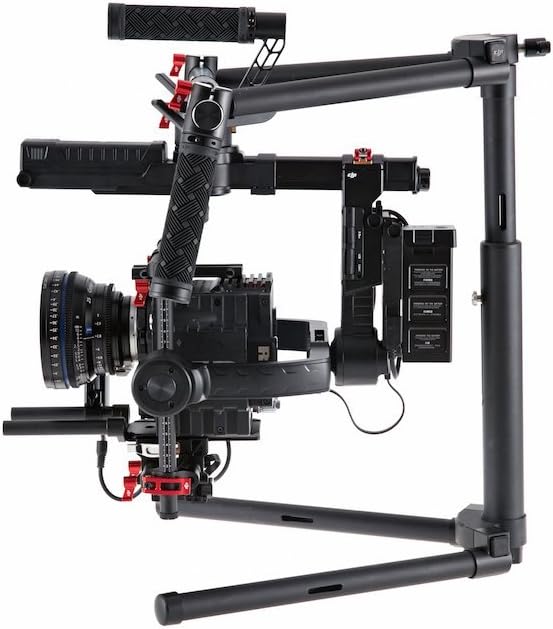
Image: DJI Ronin-MX 3-Axis Gimbal Stabilizer with a camera attached, showcasing its robust design and stabilization capabilities.
کلیدي ځانګړتیاوې:
- ۳-محور ثبات: Provides professional-grade smooth footage.
- High G-Force Stability: Designed for use in dynamic environments.
- د کیمرې پراخه مطابقت: Supports various professional cameras like RED EPIC and ARRI ALEXA Mini.
- Wireless Control and Transmission: Allows for remote operation and adjustments.
- د اپلیکیشن جامع کنټرول: Enables fine-tuning and mode selection via a dedicated application.
- ډیری عملیاتي طریقې: Includes Upright, Underslung, and Briefcase modes for versatile shooting.
- Auto Tune Stability (ATS): Facilitates rapid balancing of the gimbal.
- SmoothTrack™: Ensures fluid and controlled camera movements.
په بکس کې څه دي
The DJI Ronin-MX package includes the following components:
- ګیمبل
- لاسي بار
- ریموټ کنټرول
- د توننګ سټنډ
- چارجر
- DJI Intelligent Battery (x2)
- د کیبل بسته
- د مایکرو USB کیبل
- CAN کیبل
- د کیمرې پورته کولو پلیټ
- Camera Upper Mounting Plate
- د وایبریشن جذبونکی
- د لوازمو بسته

Image: Various components of the DJI Ronin-MX Gimbal Stabilizer, including the main unit, handles, and remote control.
چمتو کول
Proper setup and balancing are crucial for optimal performance of the Ronin-MX. The system is designed for a quick setup, often achievable within 5 minutes for experienced users.
لومړنۍ جرګه:
- Attach the handle bar to the gimbal frame.
- Mount the camera onto the Camera Mounting Plate and secure it with the Camera Upper Mounting Plate.
- Insert the DJI Intelligent Batteries into their designated slots.
- Place the gimbal on the Tuning Stand for balancing.
د ګیمبل توازن کول:
Achieving perfect balance is essential for smooth operation and to prevent motor strain. Use the Auto Tune Stability (ATS) feature via the comprehensive app control for rapid and precise balancing. Adjust the camera's position on the mounting plate until it remains level in all axes when powered off.

Image: The DJI Ronin-MX Gimbal Stabilizer resting on its tuning stand, ready for camera mounting and balancing.
عملیات
The Ronin-MX offers flexible operation modes and precise control for capturing dynamic shots.
عملیاتي طریقې:
- عمودی حالت: For standard handheld operation.
- Underslung Mode: Ideal for low-angle shots, holding the gimbal below the operator.
- Briefcase Mode: Allows for compact carrying and shooting in narrow spaces.
بې سیم کنټرول:
The included remote control provides wireless access to gimbal movements, allowing a second operator to control pan, tilt, and roll independently while the primary operator focuses on movement. This enhances shot precision and creative flexibility.

Image: The DJI Ronin-MX Gimbal Stabilizer configured for two-handed operation, demonstrating its ergonomic design.
د اپلیکیشن کنټرول:
Utilize the DJI Assistant app for comprehensive control over gimbal settings, including motor parameters, SmoothTrack tuning, and firmware updates. This app provides a detailed interface for customizing the gimbal's behavior to suit specific shooting requirements.
مشخصات
| فیچر | تفصیل |
|---|---|
| د ماډل نوم | Ronin-MX |
| د تولید کونکي برخې شمیره | CP.ZM.000377 |
| د توکي وزن | 6.1 پونډه (2.77 kg) |
| د اعظمي وزن سپارښتنه | 9.92 پونډه (4.5 kg) |
| د فولاد اندازه (L x W x H) | 300 mm x 180 mm x 120 mm |
| د انځور ثبات | 3-axis image stabilization |
| مطابقت لرونکې وسیلې | Camera (Supports RED EPIC, ARRI ALEXA Mini, etc.) |
| د شوټینګ طریقې | Upright, Underslung, Briefcase |
| بيسيم کنټرول | Yes, via included remote and app |
| رنګ | تور |
ساتنه
Regular maintenance ensures the longevity and optimal performance of your DJI Ronin-MX.
- پاکول: Use a soft, dry cloth to clean the gimbal body and motors. Avoid using liquid cleaners directly on electronic components.
- ذخیره کول: Store the gimbal in a dry, dust-free environment. When not in use for extended periods, remove the batteries.
- د بیټرۍ پاملرنه: Charge batteries fully before storage and periodically recharge them every three months to maintain battery health. Avoid over-discharging or over-charging.
- د فرم ویئر تازه معلومات: Regularly check for and install the latest firmware updates via the DJI Assistant app to ensure compatibility and access to new features.
د ستونزو حل کول
This section addresses common issues you might encounter with your Ronin-MX.
- Gimbal Not Activating/Balancing Issues:
- Ensure the camera is correctly mounted and balanced. Re-run the Auto Tune Stability (ATS) process.
- د ګیمبل محورونو د آزاد حرکت مخه نیولو لپاره د هر ډول خنډونو لپاره وګورئ.
- ډاډ ترلاسه کړئ چې فرم ویئر تازه دی.
- Remote Control Disconnection:
- Ensure the remote control batteries are charged.
- Re-pair the remote control with the gimbal according to the pairing instructions in the full manual.
- د نورو بېسیم وسیلو مداخله کمه کړئ.
- د بیټرۍ چارج نه کول:
- ډاډ ترلاسه کړئ چې چارجر په سمه توګه د بریښنا سرچینې او بیټرۍ سره وصل دی.
- بیټرۍ یا چارجر ته د کوم ښکاره زیان لپاره وګورئ.
- If issues persist, contact DJI Support for assistance.
تضمین او ملاتړ
د تفصيلي تضمین معلوماتو او تخنیکي ملاتړ لپاره، مهرباني وکړئ رسمي DJI ته مراجعه وکړئ webسایټ ته مراجعه وکړئ یا د دوی د پیرودونکو خدماتو سره اړیکه ونیسئ. د تضمین ادعاوو لپاره د پیرود ثبوت وساتئ.
آنلاین سرچینې: لیدنه وکړئ د ډي جي آی رسمي Webسایټ for product registration, FAQs, and the latest software downloads.