
1. پیژندنه
This manual provides essential information for the safe installation, operation, and maintenance of your CCEI Piccolo PIMT series power supply for pool projectors. The Piccolo PIMT series includes models such as PIMT31 (100W), PIMT33 (300W), and PIMT37 (600W), all operating at 230/12V. This device is designed to power pool projectors safely and efficiently.
Please read this manual thoroughly before installation and use to ensure proper function and to prevent potential hazards.
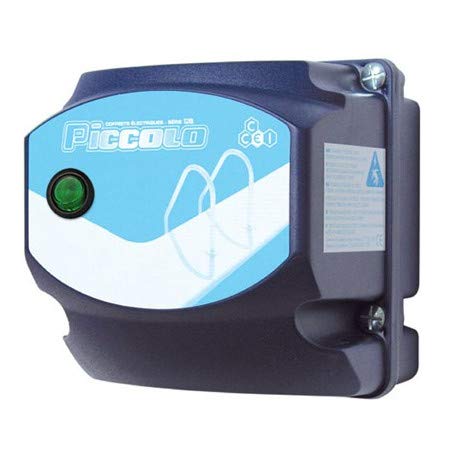
Figure 1: CCEI Piccolo PIMT Power Supply Unit, top view. This image shows the compact design and the rotary switch for operation.
2. د خوندیتوب لارښوونې
خبرداری: Electrical installation must be performed by a qualified electrician in accordance with all local and national electrical codes.
- تل د هر ډول نصبولو، ساتنې، یا ستونزو حل کولو دمخه بریښنا قطع کړئ.
- Ensure the power supply is installed in a dry, well-ventilated area, away from direct sunlight and excessive heat.
- The device is equipped with a waterproof on/off switch, but the main unit should not be submerged or exposed to direct water spray.
- The safety transformer complies with the NF EN61558 standard, ensuring safe operation when installed correctly.
- د اعظمي واټ څخه ډیر مه کوئtage rating of the specific model (e.g., 100W for PIMT31, 300W for PIMT33, 600W for PIMT37).
- Use only original CCEI parts and accessories for replacement or repair.
3. ترتیب او نصب کول
The CCEI Piccolo PIMT power supply is designed for easy installation. Follow these steps carefully:
- پورته کول: Select a suitable location for mounting the power supply unit. Use the provided mounting screws and plugs to securely attach the unit to a vertical surface. Ensure the location allows for adequate ventilation and access for wiring.
- Power Connection (230V AC Input):
- ډاډ ترلاسه کړئ چې د سرکټ بریکر کې د بریښنا اصلي رسولو بند دی.
- Connect the 230V AC input power cable to the designated terminals on the power supply unit. Refer to the wiring diagram inside the unit cover for correct polarity.
- ټولې اړیکې په کلکه وتړئ.
- Projector Connection (12V AC Output):
- Connect the 12V AC output cables from the power supply to your pool projector(s).
- Utilize the provided cable glands to ensure a watertight seal where cables enter and exit the unit.
- ډاډ ترلاسه کړئ چې ټول واټtage of all connected projectors does not exceed the maximum capacity of your Piccolo PIMT model.
- وروستۍ چکونه: Double-check all wiring connections for security and correctness. Ensure all covers are properly closed and sealed.

Figure 2: CCEI Piccolo PIMT Power Supply, showing connection points. This view highlights the input/output terminals and the waterproof switch.
4. عملیاتي لارښوونې
Once the power supply is correctly installed and wired, operating it is straightforward:
- پاور آن: Restore power to the unit at the main circuit breaker.
- Activate Projectors: Use the waterproof on/off switch located on the unit to turn your pool projectors ON or OFF. Rotate the switch to the 'ON' position to activate the projectors.
- بندول: To turn off the projectors, rotate the switch to the 'OFF' position. For extended periods of non-use or maintenance, it is recommended to disconnect power at the main circuit breaker.
5. ساتنه
Regular maintenance ensures the longevity and safe operation of your CCEI Piccolo PIMT power supply.
- پاکول: په دوره یي ډول د واحد بهرنۍ برخه د نرم، ډ سره پاکه کړئamp ټوکر. د کثافاتو پاکوونکي یا محلول مه کاروئ. ډاډ ترلاسه کړئ چې د پاکولو دمخه واحد بند دی.
- معاینات: Annually inspect all wiring connections for tightness and signs of corrosion or damage. Check cable glands for proper sealing.
- وینټیلیشن: Ensure that the ventilation openings (if any) are clear of debris to prevent overheating.
- مسلکي کتنه: It is recommended to have a qualified electrician inspect the unit and its connections every few years.
6. ستونزه حل کول
If you encounter issues with your CCEI Piccolo PIMT power supply, refer to the following table:
| ستونزه | احتمالي لامل | د حل لاره |
|---|---|---|
| Projectors do not turn ON. |
|
|
| Unit makes unusual noise or smells burnt. |
|
|
| Intermittent projector operation. |
|
|
If the problem persists after attempting these solutions, contact CCEI customer support or a qualified electrician.
7. مشخصات
| فیچر | تفصیل |
|---|---|
| جوړونکی | CCEI |
| ماډل لړۍ | Piccolo PIMT (PIMT31, PIMT33, PIMT37) |
| ننوتۍ جلدtage | 230V AC |
| د محصول Voltage | 12V AC |
| Power Output (PIMT31) | 100W |
| Power Output (PIMT33) | 300W |
| Power Output (PIMT37) | 600W |
| د خوندیتوب معیار | NF EN61558 |
| ځانګړتیاوې | Waterproof On/Off Switch, Cable Glands, Mounting Screws |
| د توکي وزن | 1.5 کیلو ګرامه |
| ASIN | B019YDRZ38 |
| د لومړي شتون نیټه | د فبروري ۴، ۲۰۲۳ |
8. تضمین او ملاتړ
CCEI products are manufactured to high-quality standards. For specific warranty information, please refer to the warranty card included with your product or visit the official CCEI webسایټ. د تضمین ادعاوو لپاره د پیرود ثبوت وساتئ.
For technical support, spare parts, or service inquiries, please contact your authorized CCEI dealer or visit the CCEI official webد تماس جزیاتو لپاره سایټ.