
1. پیژندنه
This manual provides essential information for the safe and efficient operation of your Philips 40PFL4609/F8 40-inch Full HD LED Smart TV. Please read these instructions carefully before using your television and retain them for future reference.
2. د خوندیتوب معلومات
د دې ټلویزیون کارولو پرمهال تل د خوندیتوب لومړني احتیاطي تدابیر تعقیب کړئ ترڅو د اور، بریښنا شاک او ټپي کیدو خطر کم کړئ.
- تلویزیون باران یا رطوبت ته مه ښکاره کوئ.
- الماری مه پرانیزئ؛ ټولې خدمتونه وړ پرسونل ته وسپارئ.
- د تلویزیون شاوخوا مناسب هوا ورکول ډاډمن کړئ.
- د بریښنا تار د چلولو یا پنچ کیدو څخه خوندي کړئ.
- د برېښنا د طوفانونو پر مهال یا کله چې د اوږدې مودې لپاره نه کارول کیږي، تلویزیون خلاص کړئ.
3. د بسته محتويات
ډاډ ترلاسه کړئ چې ټول توکي په بکس کې شتون لري:
- Philips 40PFL4609/F8 40-inch Full HD LED Smart TV
- ریموټ کنټرول (دوه AAA بیټرۍ ته اړتیا لري، شامل دي)
- د بریښنا تار
- Tabletop Stand and Screws
- د چټک پیل لارښود (په دې ډیجیټل لارښود کې شامل نه دی)
- د کارونکي لارښود (دا لاسوند)
4. ترتیب کول
4.1 پاکول او ځای پرځای کول
Carefully remove the television from its packaging. Inspect the TV for any physical damage. Place the television on a stable, flat surface or mount it on a wall using a compatible VESA 200x200mm wall mount (sold separately).
۲.۲ د ولاړې اسمبلۍ
If using the tabletop stand:
- د سکرین د زیان مخنیوي لپاره د تلویزیون مخ په نرم او پاک سطح کې کیږدئ.
- سټینډ د تلویزیون په ښکته برخه کې د نصب شوي سوري سره سم کړئ.
- د چمتو شوي پیچونو په کارولو سره سټینډ خوندي کړئ.
4.3 د نښلولو بریښنا
Connect the power cord to the TV's power input, then plug the other end into a 110 VAC, 60 Hz electrical outlet.
۲.۳ د بهرنیو وسایلو نښلول
Your Philips TV offers various connection options for external devices.
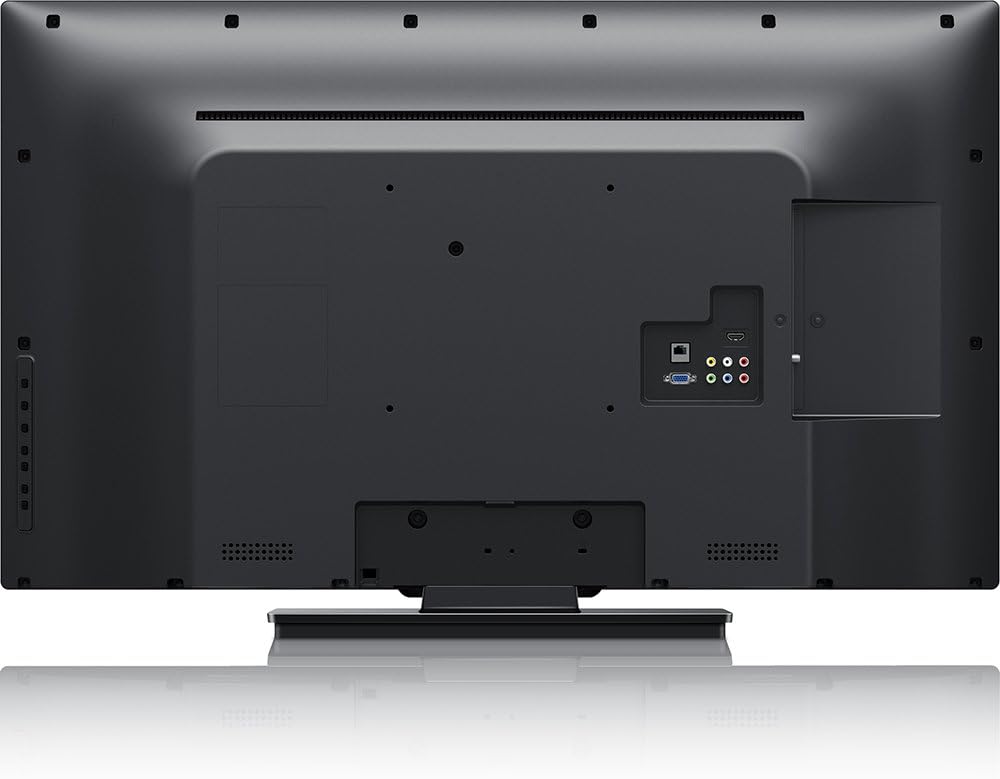
انځور: شاته view of the Philips 40PFL4609/F8 television, highlighting the input ports including HDMI, DVI, and other audio/video connections.
- HDMI: Connect Blu-Ray players, game consoles, or other HDMI-enabled devices. This model has 1 HDMI port.
- DVI: Connect computers or other DVI-enabled devices.
- USB: Connect USB storage devices for media playback. This model has 1 USB 2.0 port.
- انتن/کیبل: د نشراتي چینلونو لپاره انتن یا کیبل تلویزیون سیګنال وصل کړئ.
۳.۴ د ابتدايي تنظیم وزرډ
د لومړي ځل لپاره د بریښنا په فعالولو سره، تلویزیون به تاسو ته د لومړني تنظیم کولو پروسې له لارې لارښوونه وکړي:
- د ژبې انتخاب: خپله غوره ژبه غوره کړئ.
- د شبکې پیوستون: Connect to your home Wi-Fi network. The TV supports Wi-Fi connectivity.
- د چینل سکین: Scan for available broadcast channels (if an antenna or cable is connected).
۴. د تلویزیون چلول
5.1 ریموټ کنټرول اوورview
The included remote control allows you to navigate menus, adjust settings, and control playback. Insert two AAA batteries into the remote control, ensuring correct polarity.
5.2 اساسي دندې
- ځواک: د تلویزیون د چالانولو یا بندولو لپاره د بریښنا تڼۍ فشار ورکړئ.
- حجم: د غږ کچه تنظیمولو لپاره د حجم تڼۍ وکاروئ.
- چینل: Use the channel buttons to change TV channels.
- داخلول: Press the input button to select connected devices (HDMI, DVI, etc.).
5.3 Smart TV Features (Net TV)
Your Philips TV features Net TV, providing access to online content and applications.
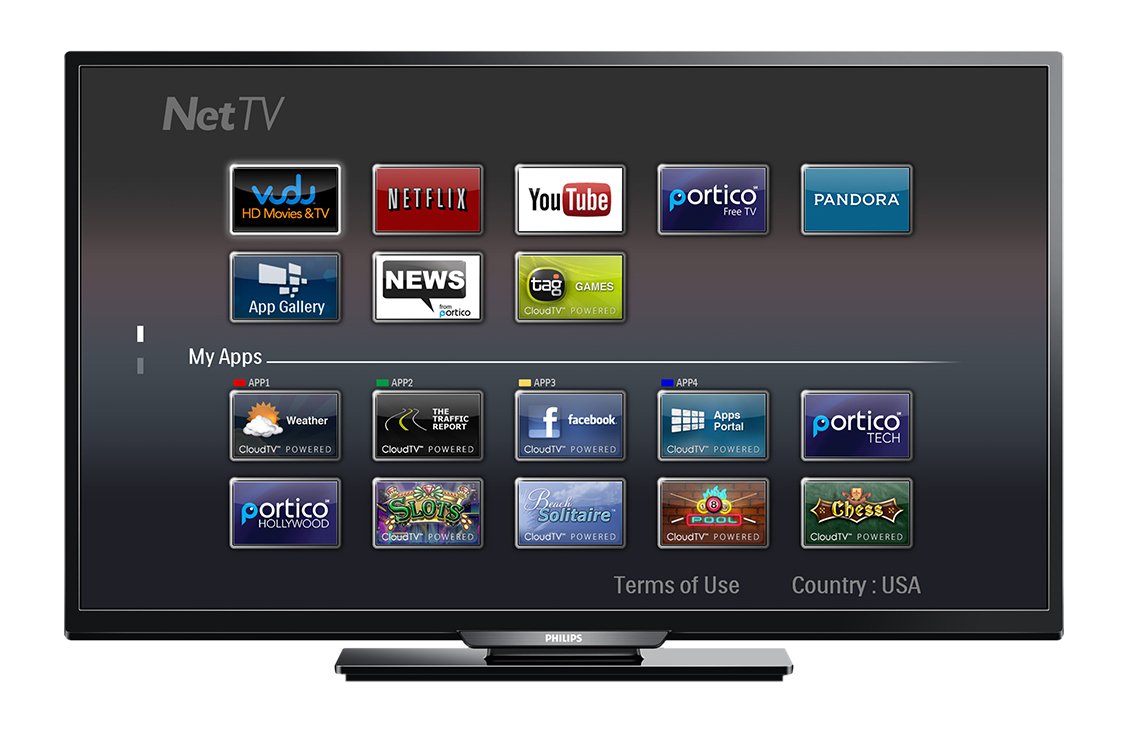
انځور: مخکی view of the Philips 40PFL4609/F8 television, showing the Net TV interface with various application icons such as Netflix, YouTube, and other streaming services.
- اپلیکیشنونو ته لاسرسی: Use the remote control to navigate to the Net TV menu and select applications like Netflix and YouTube.
- د وای فای اتصال: Ensure your TV is connected to a stable Wi-Fi network for optimal Smart TV performance.
5.4 د عکس تنظیمات
Adjust picture settings to enhance your viewتجربه:
- پکسل پلس ایچ ډي: This video engine enhances detail, depth, and clarity.
- 120Hz PMR (Perfect Motion Rate): Provides sharp images in fast-moving scenes.
- Access the picture menu to adjust brightness, contrast, color, and sharpness.
5.5 د غږ تنظیمات
Optimize audio output:
- د ایس آر ایس ټرو سراؤنډ: Enjoy immersive sound with this integrated surround sound format.
- Access the audio menu to adjust bass, treble, and sound modes.
۶.۲ د USB له لارې د رسنیو غږول
Connect a USB storage device to the TV's USB 2.0 port to view عکسونه واخلئ، موسیقي واورئ، یا ویډیوګانې وګورئ.
6. ساتنه
۵.۱ د پردې پاکول
په نرمۍ سره سکرین د نرم، لینټ نه پاک ټوکر سره پاک کړئ. د سختو نښو لپاره، dampپه ټوکر کې لږ مقدار اوبه یا د سکرین ځانګړي پاکوونکي واچوئ. مایع په مستقیم ډول په سکرین مه سپری کوئ.
۸.۲ د C پاکولasing
تلویزیون پاک کړئ جasing د نرم، وچ ټوکر سره. د کثافاتو پاکوونکو یا محلولونو کارولو څخه ډډه وکړئ.
6.3 د سافټویر تازه معلومات
This model may not support automatic software updates via the internet. Check the Philips support website for information on manual firmware updates, if available, to ensure optimal performance and access to the latest features.
7. ستونزه حل کول
که تاسو د خپل تلویزیون سره ستونزې سره مخ شئ، لاندې عام حلونو ته مراجعه وکړئ:
- ځواک نشته: Ensure the power cord is securely plugged into both the TV and the electrical outlet. Check the power outlet with another device.
- انځور/غږ نشته: Verify the correct input source is selected. Check all cable connections (HDMI, DVI, antenna).
- د شبکې اړیکه نشته: Ensure your Wi-Fi router is working correctly. Re-enter your Wi-Fi password if necessary.
- Net TV Limitations: Some users have reported that the Net TV functionality on this model can be basic or limited in terms of additional app installation or software updates. If you find the built-in Smart TV features insufficient, consider connecting an external streaming device.
- فزیکي زیانونه: Upon unboxing, carefully inspect the screen and casing for any damage, especially along the edges, which could affect display quality. Contact your retailer immediately if damage is found.
- ریموټ کنټرول کار نه کوي: د AAA بیټرۍ بدل کړئ. ډاډ ترلاسه کړئ چې د ریموټ او د تلویزیون د IR سینسر ترمنځ هیڅ خنډ شتون نلري.
8. مشخصات

انځور: اړخ view of the Philips 40PFL4609/F8 television, illustrating its slim profile and side-mounted connectivity options.
| فیچر | تفصیل |
|---|---|
| د ماډل نوم | د PHILIPS 40PFL4609/F8 لپاره تفتیش وسپارئ، موږ به په 24 ساعتونو کې له تاسو سره اړیکه ونیسو. |
| د سکرین اندازه | ۶.۵ انچه (۱۶.۵ سانتي متره) |
| ټیکنالوژي ښکاره کول | LED، LCD |
| قرارداد | 1080p بشپړ HD |
| د تازه کولو نرخ | 120 Hz (120Hz PMR) |
| د اړخ نسبت | 16:9 |
| د ارتباط ټیکنالوژي | وای فای |
| Compatible Internet Services | نیټ فلکس، یوټیوب |
| ځانګړي ځانګړتیاوې | Blu-Ray compatible, DVI Input, HDMI Input, Full HD, HD Compatible, Internet, Surround Sound |
| د HDMI بندرونه | 1 |
| د USB 2.0 بندرونه | 1 |
| د آډیو وتلې حالت | سټیریو، شاوخوا غږ |
| Integrated Surround Sound Format | SRS TruSurround |
| د سپیکر توضیحات | SRS TruSurround |
| د بریښنا مصرف | 89 واټ |
| والیtage | 110 VAC 60 Hz |
| د توکي وزن | 8200 ګرامه |
| د VESA نصبولو معیاري | 200 x 200 mm |
| رنګ | تور |
| مطابقت لرونکې وسیلې | Laptop, Tablet, Game Console, Headphones |
| د ماډل کال | 2016 |
9. د تضمین معلومات
This Philips television comes with a د 12 میاشتو محدود تضمین provided by the manufacturer. Please retain your proof of purchase for warranty claims. The warranty covers manufacturing defects under normal use conditions.
10. د پیرودونکي ملاتړ
For further assistance, technical support, or warranty inquiries, please contact Philips customer service. Refer to the official Philips website or your product packaging for contact details specific to your region.