
1. پیژندنه
This manual provides essential information for the proper setup, operation, and maintenance of your Sony SLV-FT5 VHS Video Cassette Recorder (VCR). Please read these instructions thoroughly before using the unit to ensure optimal performance and safety.
2. د خوندیتوب معلومات
د دې محصول کارولو پرمهال تل د خوندیتوب لومړني احتیاطي تدابیر تعقیب کړئ ترڅو د اور، بریښنا شاک او ټپي کیدو خطر کم کړئ.
- واحد باران یا رطوبت ته مه ښکاره کوئ.
- کابینه مه خلاصوئ. یوازې وړ پرسونل ته خدمت ته مراجعه وکړئ.
- د هوا مناسبه هوا ورکول ډاډمن کړئ؛ د هوا د لارې خلاصې لارې مه بندوئ.
- یوازې د دې واحد لپاره ټاکل شوي بریښنا رسولو څخه کار واخلئ.
- واحد د تودوخې سرچینو او مستقیم لمر څخه لرې وساتئ.
3. ترتیب کول
3.1 پیک کول
Carefully remove the VCR and all accessories from the packaging. Verify that all components are present: the SLV-FT5 VCR unit, remote control, and necessary connection cables (e.g., RCA audio/video cables).
۵.۱ د تلویزیون سره نښلول
To connect the VCR to your television, use the provided RCA audio/video cables. Match the colored plugs to the corresponding colored jacks on both the VCR and your TV (Yellow for Video, White for Left Audio, Red for Right Audio).

شکل 1: Rear panel of the Sony SLV-FT5 VCR. This image displays the various input and output ports, including RCA jacks for audio and video, and the power input. The product label with model number SLV-FT5 and power specifications (100V 18W 50/60Hz) is also visible.
3.3 د بریښنا نښلول
Plug the VCR's power cord into a standard electrical outlet (AC 100V, 50/60Hz). Ensure the power outlet is easily accessible.
د ریموټ کنټرول تنظیم
Open the battery compartment on the back of the remote control and insert two AA batteries, observing the correct polarity (+/-). Close the compartment securely.

شکل 2: The Sony RMT-V219 remote control, designed for the SLV-FT5 VCR. This image also shows the included RCA audio/video cables, which are typically used for connecting the VCR to a television.
4. Operating the VCR
4.1 بریښنا کول / بندول
فشار ورکړئ پاور button on the VCR's front panel or the remote control to turn the unit on or off.
4.2 Loading and Unloading a VHS Tape
- بارول: Insert a VHS cassette into the tape slot on the front of the VCR with the tape window facing forward. The VCR will automatically pull the tape in.
- پورته کول: فشار ورکړئ EJECT button on the VCR or remote control. The tape will be ejected.
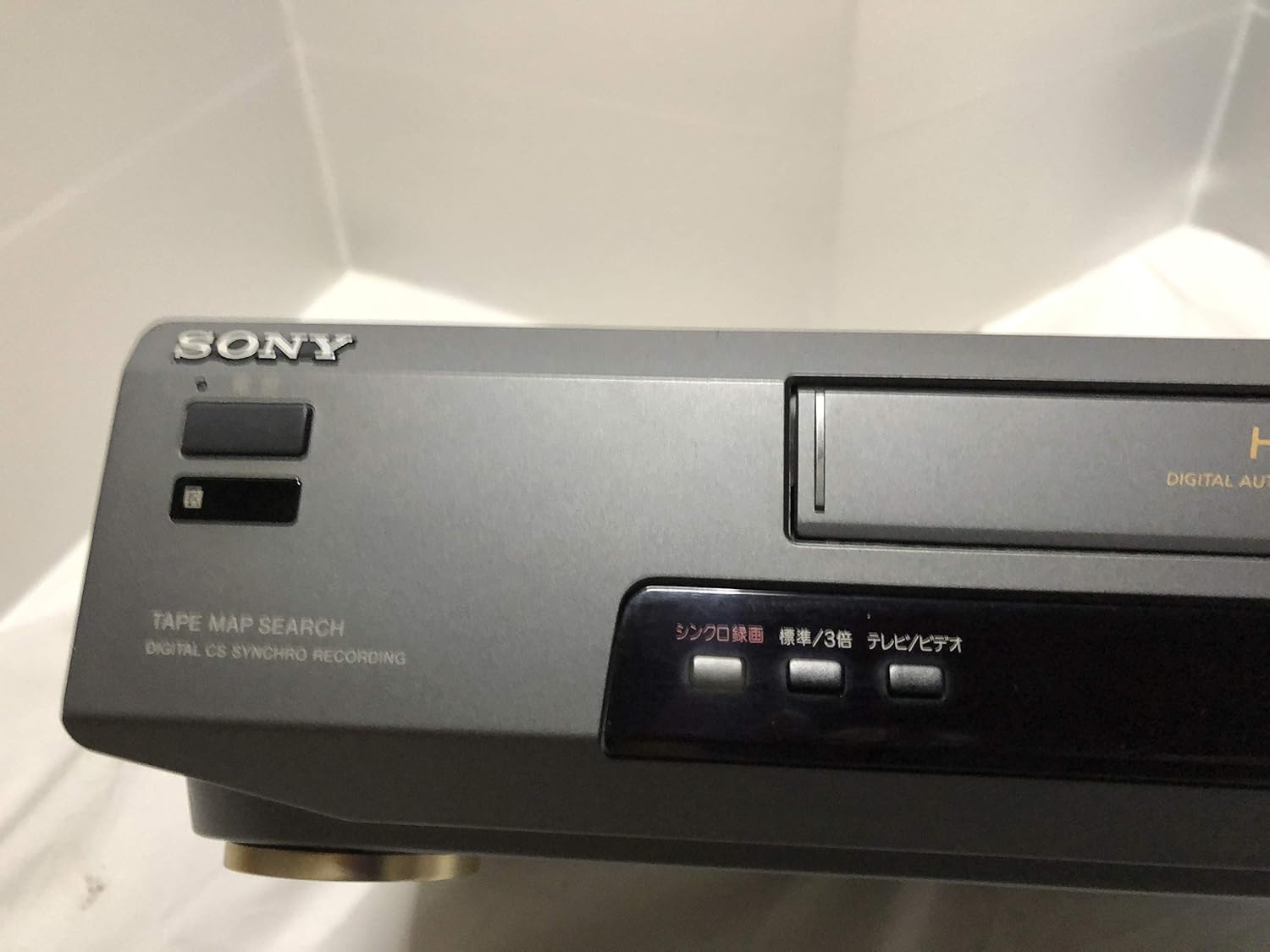
شکل 3: Front left section of the Sony SLV-FT5 VCR. This view highlights the tape loading slot and the 'TAPE MAP SEARCH' feature, which assists in navigating recorded content on a tape.
4.3 پلې بیک
After loading a tape, press the لوبه وکړئ button (►) on the VCR or remote control to begin playback. Use the وقفه (∥), ودروئ (■), REWIND (◀◀)، او ګړندی مخکی (►►) تڼۍ د پلې بیک کنټرولولو لپاره.

شکل 4: Front right section of the Sony SLV-FT5 VCR. This image displays the main playback controls (Play, Stop, Rewind, Fast Forward, Pause) and additional buttons for 'Quick Timer' and 'Tracking' adjustments.
4.4 ثبتول
To record, ensure a blank or recordable tape is inserted. Select the desired input source (e.g., TV channel). Press the REC (●) button on the VCR or remote control. Press ودروئ (■) to end recording.
4.5 Tracking Adjustment
If the picture quality during playback is poor (e.g., horizontal lines or noise), use the تعقیب buttons on the front panel or remote control to fine-tune the tape's alignment with the VCR's heads.
5. ساتنه
5.1 د واحد پاکول
Wipe the exterior of the VCR with a soft, dry cloth. For stubborn stains, use a cloth lightly dampد نرم صابون محلول سره مینځل، بیا وچ پاک کړئ. د کثافاتو پاکوونکي یا محلول مه کاروئ.
۴ د سر پاکول
Over time, VCR heads can accumulate dirt, leading to poor picture and sound quality. Use a commercially available dry-type VHS head cleaning cassette according to its instructions. Avoid wet-type cleaners as they can damage the heads.
5.3 ذخیره کول
When not in use for extended periods, disconnect the VCR from the power outlet. Store the unit in a cool, dry place, away from dust and direct sunlight.
6. ستونزه حل کول
If you encounter issues with your VCR, refer to the following common problems and solutions before seeking professional service.
| ستونزه | احتمالي لامل | د حل لاره |
|---|---|---|
| هیڅ ځواک نشته | د برېښنا تار پرې شوی؛ د برېښنا د رسولو ستونزه | د بریښنا د تار اتصال وګورئ؛ یو بل سوري هڅه وکړئ. |
| هیڅ عکس / غږ نشته | Incorrect TV input; loose A/V cables | Select correct TV input (e.g., Video 1, AV); ensure A/V cables are securely connected. |
| د انځور خراب کیفیت (واوره، کرښې) | Dirty VCR heads; tracking issue; old/damaged tape | Clean VCR heads; adjust tracking; try a different tape. |
| ټیپ به نه راوځي | Power issue; mechanical malfunction | Ensure power is on; try pressing EJECT multiple times. If issue persists, seek service. |
| ریموټ کنټرول کار نه کوي | Dead batteries; obstructed sensor | Replace batteries; ensure no obstacles between remote and VCR sensor. |
7. مشخصات
| فیچر | مشخصات |
|---|---|
| برانډ | سوني |
| د ماډل شمیره | SLV-FT5 |
| د رسنیو ډول | VHS |
| قرارداد | 720 x 480 پکسله |
| د محصول وزن | 4160 ګرامه |
| د آډیو وتلې حالت | سټیریو |
| ملاتړ شوي آډیو فارمیټونه | Monaural, Stereo |
| د ویډیو کوډ کول | انلاګ |
| مطابقت لرونکې وسیلې | ټلویزیون |
| د ان پټ ویډیو مطابقت | NTSC |
| د بریښنا اړتیاوې | 100V, 18W, 50/60Hz |
8. تضمین او ملاتړ
For warranty information and customer support, please refer to the documentation included with your purchase or visit the official Sony webسایټ. د تضمین ادعاوو لپاره د پیرود ثبوت وساتئ.