
Wstęp
This manual provides essential information for the safe and efficient use of your Samsung 43-Inch Class U8000H Series Crystal UHD 4K Smart TV. Please read all instructions carefully before using the product and retain this manual for future reference.
Co jest w pudełku
Sprawdź, czy w opakowaniu znajdują się wszystkie elementy:
- Samsung 43-Inch U8000H Series Crystal UHD 4K Smart TV
- Kabel zasilający
- Zdalne sterowanie
- Podstawka
- Instrukcja obsługi (ten dokument)
- Karta gwarancyjna

Image: Included components for the Samsung U8000H Series TV.
Organizować coś
1. Physical Setup (Stand or Wall Mount)
Before proceeding, ensure the TV is placed on a stable, level surface or securely mounted to a wall. Refer to the separate wall mount instructions if applicable.
- Mocowanie stojaka: Carefully place the TV screen-down on a soft, clean cloth. Align the stand with the designated slots on the bottom of the TV. Secure the stand using the provided screws.
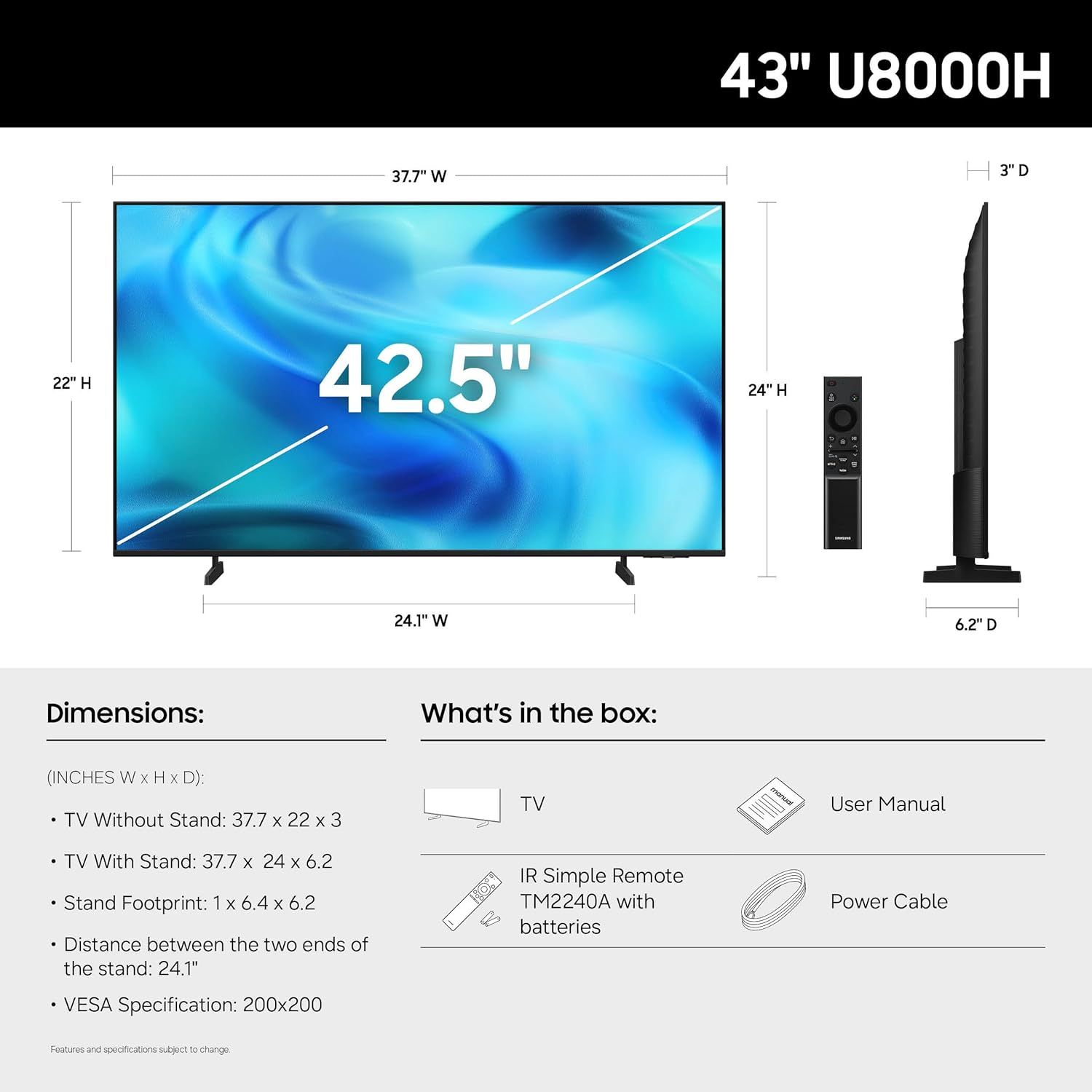
- Montaż na ścianie: If wall mounting, ensure you use a VESA-compatible mount (200 x 200 mm) and follow the mount manufacturer's instructions. Disconnect the stand if already attached.
Obraz: Tył view of the TV, highlighting VESA mounting points and input panel.
2. Podłączanie urządzeń
Connect your external devices (cable box, Blu-ray player, gaming console, etc.) to the TV's input ports.
- HDMI: Use HDMI cables for high-definition video and audio. The TV has 3 HDMI ports. HDMI 1 supports eARC for enhanced audio return.
- USB: Connect USB devices for media playback or power. The TV has 1 USB port.
- Ethernet (LAN): Dla stabilnego przewodowego połączenia internetowego.
- Antena/kabel: Connect an antenna or cable TV signal for over-the-air or cable channels.

Obraz: Szczegółowy view panelu łączności telewizora.
3. Pierwsze włączenie i konfiguracja sieci
- Podłącz kabel zasilający do telewizora, a następnie do gniazdka ściennego.
- Naciśnij przycisk zasilania na pilocie lub telewizorze.
- Postępuj zgodnie z instrukcjami wyświetlanymi na ekranie, aby dokończyć konfigurację początkową, obejmującą wybór języka, połączenie sieciowe (Wi-Fi lub Ethernet) i skanowanie kanałów.
- For smart features, you may be prompted to log in to or create a Samsung Account.
Obsługa telewizora
Zdalne sterowanie
Dołączony pilot zdalnego sterowania umożliwia nawigację po interfejsie telewizora, dostosowywanie ustawień i dostęp do funkcji inteligentnych. Zapoznaj się z układem przycisków, aby zapewnić optymalne użytkowanie.

Image: The standard remote control for the Samsung U8000H Series TV.
Główne cechy i funkcje
-
Procesor Crystal 4K: This powerful processor enhances colors and sharpens details, providing a vibrant 4K viewing experience. It also performs 4K upscaling for lower-resolution content.

Image: Visual representation of the Crystal Processor 4K technology.
-
Kontroler ruchu: Enjoy clear picture and smooth motion, especially in fast-paced scenes like sports and games. This technology estimates and adjusts frame transitions in real-time.

Image: Motion Xcelerator in action, demonstrating smooth visuals.
-
Wzmacniacz koloru: This feature enhances color intensity, making reds fiery and blues sparkling, transforming content into a visually rich experience.

Image: Demonstrating the enhanced colors with Color Booster.
-
Skalowanie do 4K: Upgrade your favorite shows and movies to crisp 4K clarity. This advanced technology enhances details and clarity even from lower-quality sources.

Image: Illustration of 4K Upscaling improving image detail.
-
Endless Free Content (Samsung TV Plus): Access over 2,700 free streaming options, including 750+ subscription-free channels. Content includes news, sports, movies, and more.

Image: Samsung TV Plus interface with free streaming options.
-
Samsung Gaming Hub: Play thousands of video games without a console. This central hub brings together games from consoles, cloud services, and gaming apps.

Image: Samsung Gaming Hub interface.
-
Vision AI Companion: Ask your TV questions and access powerful AI features. Get personalized answers with Bixby, and utilize AI agents like Microsoft Copilot for enhanced viewing.

Image: Vision AI Companion features.
-
One UI Tizen: The TV's operating system provides an intuitive smart TV platform tailored to you, with personal data secured by Samsung Knox. It also receives 7 years of automatic OS updates.

Image: One UI Tizen smart TV interface.
-
Bezpieczeństwo Samsung Knox: Enjoy peace of mind with built-in triple-layer data protection. Your TV experiences are secured against harmful apps and phishing sites.

Image: Samsung Knox Security features.
Konserwacja
- Czyszczenie ekranu: Delikatnie przetrzyj ekran miękką, suchą ściereczką z mikrofibry. W przypadku uporczywych zabrudzeń delikatnie przetrzyj.ampPrzetrzyj ściereczkę wodą lub specjalnym środkiem do czyszczenia ekranów. Unikaj silnych środków chemicznych i materiałów ściernych.
- Czyszczenie ramy: Do czyszczenia ramy i podstawy telewizora należy używać miękkiej, suchej ściereczki.
- Wentylacja: Zapewnij odpowiednią wentylację wokół telewizora, aby zapobiec przegrzaniu. Nie blokuj otworów wentylacyjnych.
- Przewód zasilający: Regularly check the power cord for any damage. If damaged, replace it immediately with an authorized Samsung part.
Rozwiązywanie problemów
| Problem | Możliwe rozwiązanie |
|---|---|
| Brak zasilania |
|
| Brak obrazu / Zniekształcony obraz |
|
| Brak dźwięku / Cichy dźwięk |
|
| Pilot nie działa |
|
| Smart Features Not Working / Network Issues |
|
Specyfikacje
| Funkcja | Szczegół |
|---|---|
| Nazwa modelu | U8000H |
| Numer modelu | UN43U8000HFXZA |
| Rozmiar ekranu | 43 cali |
| Technologia wyświetlania | PROWADZONY |
| Rezolucja | 4K UHD (3840 x 2160) |
| Częstotliwość odświeżania | 60 Hz |
| Edytor | Procesor kryształowy 4K |
| Obsługiwany format HDR | HDR10+ |
| Łączność | 3x HDMI, 1x USB, Ethernet (LAN), Wi-Fi, Bluetooth 5.3 |
| System operacyjny | Tizen |
| Metoda kontroli | Aplikacja, Pilot, Głos |
| Wyjście audio | Wbudowany głośnik |
| Standard mocowania VESA | 200x200mm |
| Wymiary produktu (Gł. x Szer. x Wys.) | 6.2" gł. x 37.7" szer. x 24" wys. (z podstawką) |
| Waga przedmiotu | 14.8 funta (z podstawą) |
| Kolor | Czarny |

Image: Dimensional diagram of the Samsung 43-inch U8000H TV.
Gwarancja i wsparcie
Your Samsung 43-Inch U8000H Series Crystal UHD 4K Smart TV comes with a 1-letnia gwarancja producenta. For warranty claims, technical support, or service inquiries, please contact Samsung Customer Service.
You can find additional support resources, FAQs, and contact information on the official Samsung support webstrona.
Wsparcie online: www.samsung.com/us/support/