
1. Konfiguracja
1.1 Rozpakowanie i wstępna inspekcja
Po otwarciu opakowania upewnij się, że wszystkie elementy są obecne i w dobrym stanie. Pudełko powinno zawierać:
- XIAOMI Redmi Note 15 Pro 5G AI Smartphone
- Wysuwacz tacy na kartę SIM
- Kabel USB
- Etui na telefon
1.2 Instalacja karty SIM
The Redmi Note 15 Pro 5G AI supports Dual SIM functionality (nano SIM + nano SIM or nano SIM + eSIM). It does nie have a Micro SD slot.
- Znajdź tackę na kartę SIM znajdującą się z boku urządzenia.
- Włóż dołączone narzędzie do wyjmowania tacki karty SIM do małego otworu obok tacki i delikatnie naciśnij, aż tacka wyskoczy.
- Place your nano SIM card(s) into the designated slots on the tray. Ensure the gold contacts face downwards and the card is correctly oriented.
- Ostrożnie włóż tackę karty SIM z powrotem do telefonu, aż zatrzaśnie się na swoim miejscu.
Notatka: For USA market, this phone is compatible with T-Mobile, Mint, Tello, or any network operating under the T-Mobile infrastructure. An already activated SIM card is required. Outside the USA, it works with any GSM carrier SIM.
1.3 Pierwsze ładowanie i włączanie
Before first use, it is recommended to fully charge your device. The phone supports 45W turbo charging.
- Connect the USB cable to the phone's USB Type-C port and to a compatible power adapter.
- Plug the power adapter into a wall outlet. The charging indicator will appear on the screen.
- Once sufficiently charged, press and hold the power button on the side of the device until the XIAOMI logo appears.
- Postępuj zgodnie z instrukcjami wyświetlanymi na ekranie, aby dokończyć konfigurację początkową, obejmującą wybór języka, połączenie Wi-Fi i konfigurację konta Google.
2. Instrukcja obsługi
2.1 Funkcje wyświetlacza
The device features a 6.83-inch AMOLED display with a 1.5K resolution (2772 x 1280) and a refresh rate of up to 120Hz. It offers a peak brightness of 3200 nits and is protected by Corning Gorilla Glass Victus 2.
Technologia Wet Touch 2.0: This feature intelligently detects water, oil, foam, or sweat, providing a smoother and more responsive touch experience even in challenging conditions.
2.2 Korzystanie z kamery
The Redmi Note 15 Pro 5G AI is equipped with an advanced camera system:
- Kamera tylna: 200MP main camera with Optical Image Stabilization (OIS) and an 8MP ultra-wide camera.
- Przednia kamera: 20 MP.
To access the camera, tap the camera icon on your home screen or lock screen. Select modes such as Photo, Video, Portrait, or Pro mode. The 200MP AI Engine supports features like AI Film Camera for cinematic effects and various AI image editing tools.
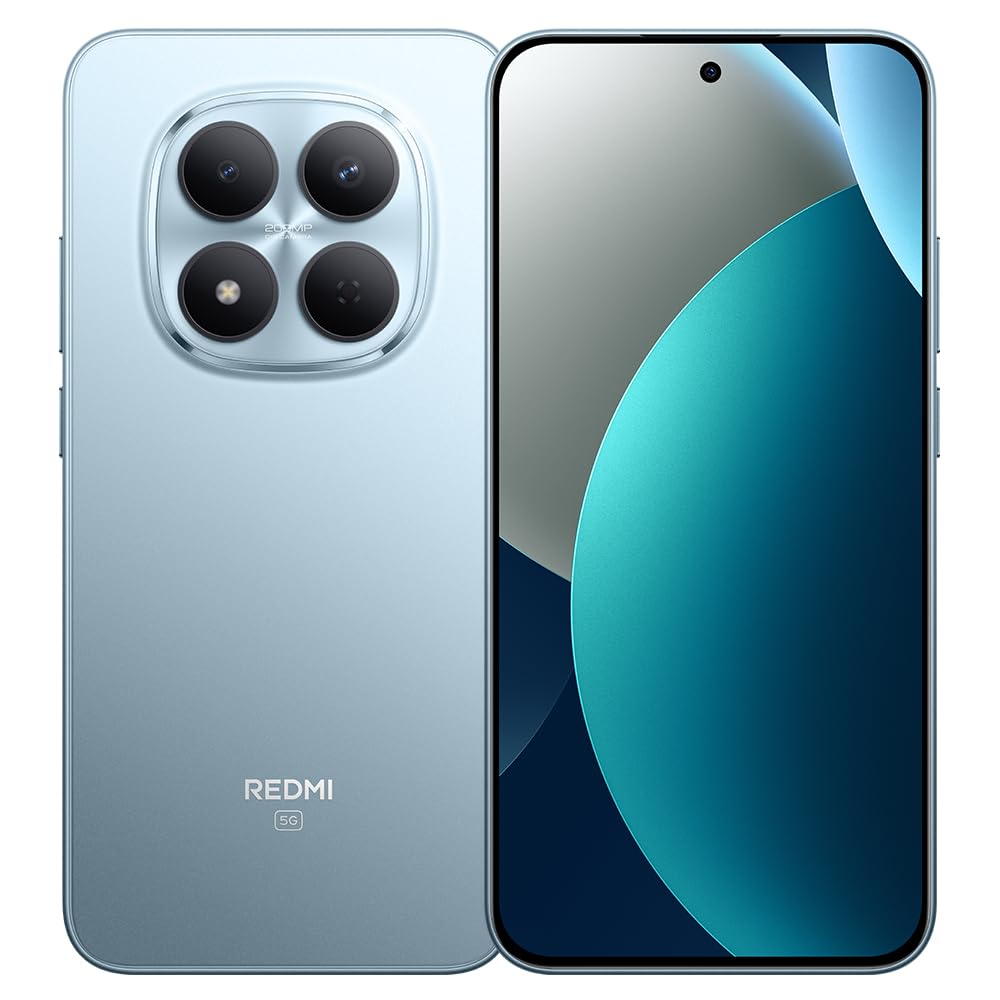
Image: XIAOMI Redmi Note 15 Pro 5G AI smartphone, black color, showing the front display and side profile.
2.3 Bezpieczeństwo biometryczne
The device offers two primary biometric security methods:
- Czytnik linii papilarnych wbudowany w ekran: Zarejestruj swój odcisk(i) palca(ów) w ustawieniach zabezpieczeń, aby umożliwić szybkie i bezpieczne odblokowywanie.
- Odblokowywanie twarzą AI: Set up face recognition in the Security settings to unlock your device by looking at the front camera.
2.4 Navigation and AI Features
The phone supports multiple global navigation satellite systems including GPS, GLONASS, BDS, Galileo, and QZSS for accurate positioning.
Integrated AI features enhance user experience:
- Zakreśl, aby wyszukać za pomocą Google: Szybko wyszukaj informacje, zakreślając treść na ekranie.
- Google Gemini: AI assistant for various tasks.
- AI Image Editing: Includes AI Erase Pro, AI Remove Reflection, AI Image Expansion, AI Sky, AI Bokeh, AI Cutouts, AI Image Enhancement, and AI Beautify.
3. Konserwacja
3.1 Pielęgnacja baterii
The device is equipped with a 6580mAh silicon-carbon battery designed for longevity, boasting a 6-year battery life guarantee. To maximize battery life:
- Unikaj ekstremalnych temperatur.
- Use the provided 45W turbo charger for optimal charging speed.
- The phone also supports up to 22.5W reverse charging to power other compatible devices.
3.2 Trwałość i ochrona
The Redmi Note 15 Pro 5G AI is built for durability:
- Odporność na upadek: Certified for 2.5-meter drop resistance.
- Ochrona ekranu: Features Corning Gorilla Glass Victus 2 for enhanced impact and scratch resistance.
- Odporność na wodę i kurz: Rated P66/IP68/IP69/IP69K for dust and water resistance, ensuring protection against various environmental challenges.
3.3 Czyszczenie urządzenia
To clean your smartphone:
- Do przecierania ekranu i obudowy należy używać miękkiej, niepozostawiającej włókien ściereczki.
- W przypadku uporczywych plam delikatnieampWyczyść ściereczkę wodą lub płynem do czyszczenia ekranów.
- Unikaj stosowania silnych środków chemicznych, materiałów ściernych i nadmiernej wilgoci.
4. Rozwiązywanie Problemów
4.1 Typowe problemy i rozwiązania
- Urządzenie się nie włącza: Ensure the battery is charged. Connect the phone to its charger for at least 15 minutes, then try powering it on again. If it still doesn't turn on, perform a forced restart by holding the power button for 10-15 seconds.
- Słaby sygnał sieciowy lub brak usługi: Check if your SIM card is properly inserted. Verify that airplane mode is off. Go to Settings > SIM cards & mobile networks and ensure your SIM is enabled. If issues persist, contact your mobile carrier.
- Ekran dotykowy nie reaguje: Restart the device. If the issue continues, ensure the screen is clean and dry. If using a screen protector, ensure it is properly applied and not interfering with touch sensitivity.
- Bateria szybko się rozładowuje: Reduce screen brightness, close unused apps running in the background, disable unnecessary notifications, and limit location services. Check battery usage in Settings to identify power-hungry apps.
- Aplikacje ulegają awarii lub zawieszają się: Clear the cache and data for the problematic app in Settings > Apps. If the issue persists, uninstall and reinstall the app. Ensure your device's software is up to date.
4.2 Przywracanie ustawień fabrycznych
Jeśli napotykasz uporczywe problemy z oprogramowaniem, których nie da się rozwiązać za pomocą innych metod rozwiązywania problemów, konieczne może być przywrócenie ustawień fabrycznych. Ostrzeżenie: Przywrócenie ustawień fabrycznych spowoduje usunięcie wszystkich danych z telefonu. Przed przystąpieniem do dalszych czynności wykonaj kopię zapasową ważnych danych.
- Go to Settings > About phone > Factory reset.
- Tap 'Erase all data' and follow the on-screen instructions.
5. Specyfikacje
| Marka | XIAOMI |
| Nazwa modelu | Uwaga 15 Pro 5G |
| Numer modelu | 25080RABDG |
| System operacyjny | HyperOS 2 |
| Model procesora | Mediatek Dimensity 7400-Ultra (Octa-core, up to 2.6GHz) |
| BARAN | 8 GB |
| Pojemność magazynowa | 256 GB |
| Rozmiar ekranu | 6.83 cala AMOLED |
| Rezolucja | 1.5K (2772x1280) |
| Częstotliwość odświeżania | Do 120 Hz |
| Maksymalna jasność | 3200 nitów |
| Kamera tylna | 200 MP (Main, OIS) + 8 MP (Ultra-wide) |
| Przednia kamera | 20 MP |
| Pojemność baterii | 6580 mAh |
| Ładowanie | 45W Turbo Charging, 22.5W Reverse Charging |
| Gniazdo karty SIM | Dual SIM (Nano SIM + Nano SIM or Nano SIM + eSIM) |
| Łączność | 5G, 4G LTE, Wi-Fi, Bluetooth, NFC, USB Type-C |
| Odporność na wodę | IP66/IP68/IP69/IP69K |
| Bezpieczeństwo biometryczne | In-screen Fingerprint, AI Face Unlock |
| Wymiary | Not specified in data |
6. Gwarancja i wsparcie
6.1 Informacje o gwarancji
The XIAOMI Redmi Note 15 Pro 5G AI comes with a 30-day Xiaomi Europe Warranty. Zachowaj dowód zakupu na wypadek roszczeń gwarancyjnych.
Additionally, spare parts for this device are available for a duration of 6 lata w UE.
6.2 Obsługa klienta
For technical assistance, warranty claims, or further inquiries, please contact XIAOMI customer support through their official website or authorized service centers. Refer to the official XIAOMI webwitryna zawierająca najnowsze informacje kontaktowe i zasoby pomocy technicznej.