
1. Koniec produktuview
The ATK N9 Tri-Mode Gaming Headset is designed for gamers requiring flexible connectivity, clear audio, and reliable communication across multiple devices. It supports 3.5 mm wired, 2.4G wireless, and Bluetooth connections, allowing seamless switching between gaming consoles, PC, and mobile devices. Stereo-tuned dynamic drivers deliver balanced sound, enhancing in-game audio cues such as footsteps, gunfire, and environmental effects. The detachable noise-canceling microphone improves voice clarity for team communication, online gaming, and voice calls. Its over-ear design, with soft ear cushions and an adjustable headband, ensures a comfortable fit for extended gaming sessions. The headset is compatible with PS5, PS4, PC, Nintendo Switch, and mobile devices. For Xbox Series X|S, audio and microphone functions are supported via the 3.5 mm wired connection.

2. Zawartość opakowania
Sprawdź, czy w przesyłce znajdują się wszystkie elementy wymienione poniżej:
- ATK N9 Pro/White Gaming Headset
- Odłączany mikrofon z redukcją szumów
- Kabel ładujący USB-C
- Kabel audio 3.5 mm
- 2.4G Wireless USB Adapter
- Instrukcja obsługi (ten dokument)

3. Konfiguracja początkowa
3.1. Ładowanie zestawu słuchawkowego
Before first use, fully charge the headset using the provided USB-C charging cable. Connect the USB-C end to the headset's charging port and the USB-A end to a compatible USB power source (e.g., PC, wall adapter). The LED indicator will show charging status.
3.2. Podłączanie mikrofonu
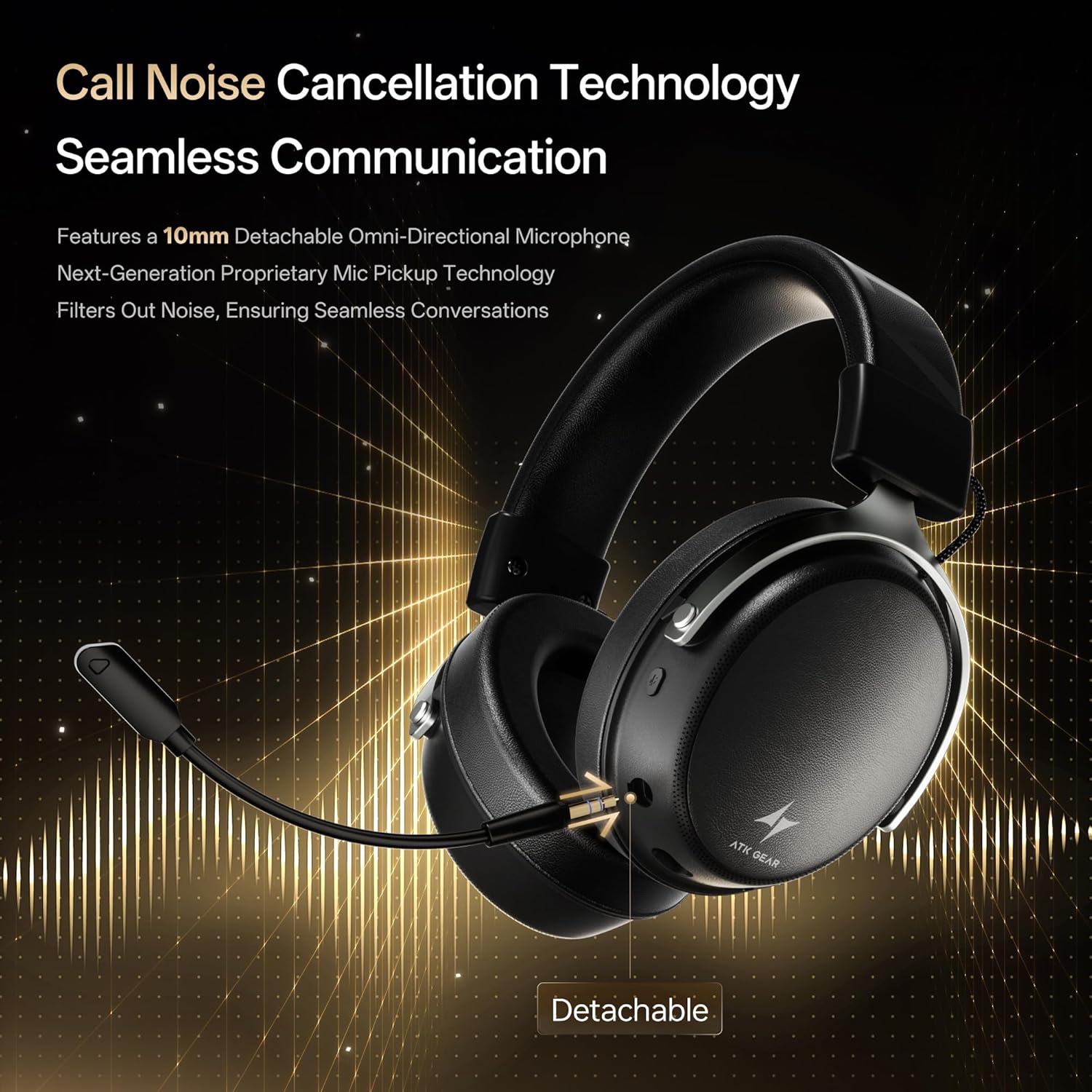
Insert the detachable boom microphone into the microphone port on the left earcup until it clicks into place. Ensure it is securely connected for optimal voice pickup.
3.3. Opcje łączności
The ATK N9 Pro/White headset offers three connectivity modes:
- Tryb bezprzewodowy 2.4G: For PC, PS4, PS5, and Nintendo Switch (docked mode).
- Plug the 2.4G wireless USB adapter into an available USB port on your device.
- Włącz zestaw słuchawkowy.
- Switch the headset to 2.4G mode using the mode switch. The headset will automatically pair with the adapter.
- Adjust audio output settings on your device if necessary to select the headset.
- Tryb Bluetooth: For mobile devices, PC, and Nintendo Switch (handheld mode).
- Power on the headset and switch to Bluetooth mode. The LED indicator will flash, indicating pairing mode.
- On your device, go to Bluetooth settings and select "ATK N9 Pro" from the list of available devices.
- Po nawiązaniu połączenia dioda LED zacznie świecić światłem ciągłym.
- Tryb przewodowy 3.5 mm: For Xbox Series X|S, PS4, PS5, PC, Nintendo Switch, and mobile devices.
- Podłącz jeden koniec kabla audio 3.5 mm do gniazda 3.5 mm zestawu słuchawkowego.
- Connect the other end to the 3.5mm audio port on your device (e.g., controller, PC audio jack).
- Zestaw słuchawkowy będzie działał w trybie przewodowym, pomijając funkcje bezprzewodowe.

4. Instrukcja obsługi
4.1. Sterowanie zestawem słuchawkowym
The ATK N9 Pro/White headset features intuitive controls located on the earcups:
- Przycisk zasilania: Press and hold to power on/off. Short press for play/pause (in 2.4G/Bluetooth mode).
- Zmiana trybu: Toggle between 2.4G wireless, Bluetooth, and wired modes.
- Pokrętło zwiększania/zmniejszania głośności: Obróć, aby dostosować głośność dźwięku.
- Przycisk wyciszenia mikrofonu: Naciśnij, aby wyciszyć/anulować wyciszenie mikrofonu.
- Spatial Audio Button: Press to activate/deactivate 3D Spatial Audio.
- Mic Monitoring Button: Press to enable/disable microphone monitoring (sidetone).
4.2. Użycie mikrofonu
The detachable noise-canceling microphone is designed for clear communication. Position the microphone approximately 1-2 inches from your mouth for optimal voice pickup. Use the microphone mute button on the headset to quickly mute your voice when needed.
4.3. Dopasowanie
The headset features an adjustable headband and soft ear cushions for comfort. Extend or retract the headband to achieve a snug yet comfortable fit. The earcups are designed to fully enclose your ears for passive noise isolation and comfort during long gaming sessions.
5. Specyfikacje techniczne
| Funkcja | Specyfikacja |
|---|---|
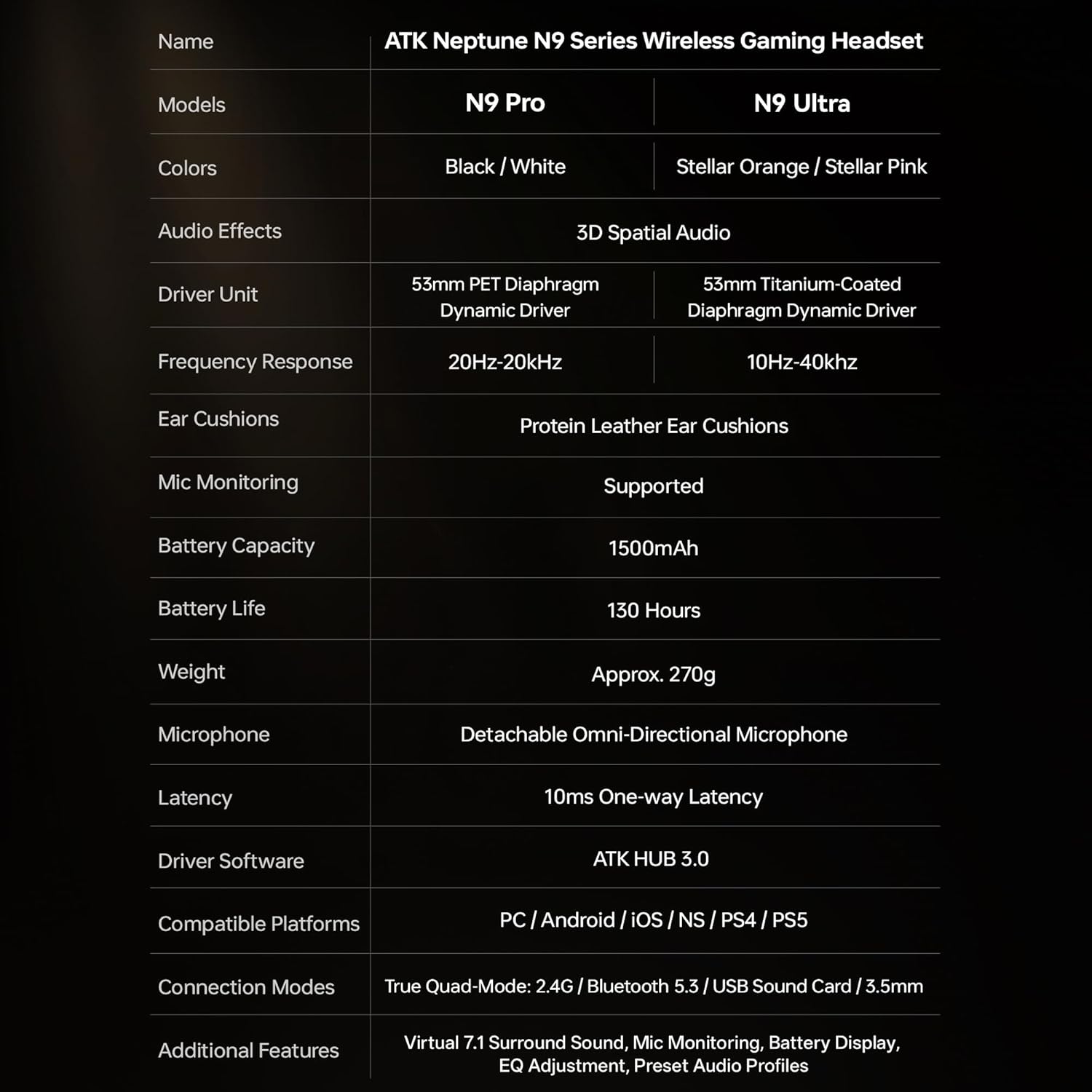
| Nazwa modelu | ATK N9 Pro |
| Łączność | 3.5mm Wired, 2.4G Wireless, Bluetooth 5.3 |
| Typ sterownika | Dynamiczny sterownik |
| Rozmiar kierowcy | 53 mm |
| Zakres częstotliwości | 20 Hz - 20 000 Hz |
| Impedancja | 64 omy |
| Mikrofon | Detachable Noise-Canceling Omni-Directional |
| Pojemność baterii | 1500 mAh |
| Żywotność baterii | Do 130 godzin |
| Opóźnienie (2.4G) | 10 Milliseconds (one-way) |
| Waga | 270 gram |
| Umieszczenie ucha | Na ucho |
| Kompatybilne urządzenia | PS5, PS4, PC, Nintendo Switch, Mobile Devices, Xbox Series X|S (wired) |
| Dodatkowe funkcje | 3D Spatial Audio, Mic Monitoring, Volume Control |

6. Pielęgnacja i konserwacja
- Czyszczenie: Do czyszczenia zestawu słuchawkowego używaj miękkiej, suchej ściereczki. Unikaj stosowania silnych środków chemicznych i materiałów ściernych.
- Składowanie: Przechowuj zestaw słuchawkowy w chłodnym, suchym miejscu, z dala od bezpośredniego światła słonecznego i ekstremalnych temperatur.
- Pielęgnacja baterii: Aby przedłużyć żywotność baterii, unikaj częstego całkowitego rozładowywania zestawu słuchawkowego. Ładuj go regularnie, nawet jeśli nie jest używany przez dłuższy czas.
- Wodoodporność: Zestaw słuchawkowy nie jest wodoodporny. Unikaj kontaktu z płynami.
7. Rozwiązywanie Problemów
7.1. No Audio / Low Volume
- Ensure the headset is powered on and connected in the correct mode (2.4G, Bluetooth, or 3.5mm wired).
- Sprawdź pokrętło głośności na zestawie słuchawkowym i ustawienia głośności w urządzeniu.
- For wireless modes, ensure the headset is paired correctly and selected as the audio output device in your system settings.
- If using 3.5mm wired, ensure the cable is fully inserted into both the headset and the device.
7.2. Mikrofon nie działa
- Sprawdź, czy mikrofon jest solidnie przymocowany do zestawu słuchawkowego.
- Sprawdź, czy przycisk wyciszenia mikrofonu w zestawie słuchawkowym jest włączony.
- Sprawdź, czy mikrofon zestawu słuchawkowego jest wybrany jako urządzenie wejściowe w ustawieniach dźwięku Twojego urządzenia.
- For Xbox Series X|S, ensure you are using the 3.5mm wired connection for microphone support.
7.3. Problemy z łącznością
- Łączność bezprzewodowa 2.4G: Ensure the USB adapter is firmly plugged in. Try a different USB port.
- Bluetooth: Ensure the headset is in pairing mode. Forget the device on your phone/PC and re-pair. Keep the headset within the 5-meter Bluetooth range.
- Ogólny: Power cycle both the headset and your connected device.
8. Gwarancja i wsparcie
8.1. Informacje o gwarancji
The ATK N9 Pro/White Gaming Headset comes with a 6-miesięczna gwarancja od daty zakupu. Niniejsza gwarancja obejmuje wady produkcyjne i wykonawcze wynikające z normalnego użytkowania. Nie obejmuje uszkodzeń spowodowanych niewłaściwym użytkowaniem, wypadkami, nieautoryzowanymi modyfikacjami ani normalnym zużyciem.
8.2. Obsługa klienta
For further assistance, technical support, or warranty claims, please contact ATK customer service through the retailer where the product was purchased or visit the official ATK webwitryna zawierająca informacje kontaktowe pomocy technicznej.