
1. Wprowadzenie
This manual provides detailed instructions for setting up, operating, maintaining, and troubleshooting your GMKtec M6 Ultra Mini PC. This compact and powerful desktop computer is equipped with an AMD Ryzen 5 7640HS processor, designed for a wide range of tasks from office productivity to 4K video editing and gaming.

Image: The GMKtec M6 Ultra Mini PC, showcasinze względu na kompaktową konstrukcję.
2. Zawartość opakowania
Sprawdź, czy w przesyłce znajdują się wszystkie wymienione poniżej elementy:
- Jednostka GMKtec M6 Ultra Mini PC
- Zasilacz
- Kabel HDMI
- Uchwyt montażowy VESA
- Screw Set for VESA Mount
- Instrukcja obsługi

Image: All items included in the GMKtec M6 Ultra Mini PC package.
3. Koniec produktuview
3.1. Procesor i grafika
The M6 Ultra is powered by the AMD Ryzen 5 7640HS processor, built on TSMC's 4nm FinFET process with Zen4 architecture. It integrates Radeon 760M graphics, utilizing the latest RDNA 3 architecture, providing performance comparable to a dedicated GTX 1650 Ti GPU.

Image: Diagram illustrating the AMD Ryzen 5 7640HS processor.
3.2. Porty i interfejsy
The Mini PC offers a comprehensive set of ports for connectivity:
- Wyjście wideo: 1x HDMI 2.0 (4K@60Hz), 1x DisplayPort (up to 8K@60Hz), 1x USB4.0 Type-C (full-featured, PD/DP/40Gbps)
- Porty USB: 2x USB-A 3.2 Gen2 (front, 10Gbps), 2x USB-A 3.2 Gen2 (rear), 2x USB-A 2.0 (rear)
- Sieć: 2x 2.5GbE LAN ports (Intel i226V)
- Bezprzewodowy: Wi-Fi 6E, Bluetooth 5.2
- Audio: 1x gniazdo słuchawkowe 3.5 mm
- Moc: DC WEJŚCIE
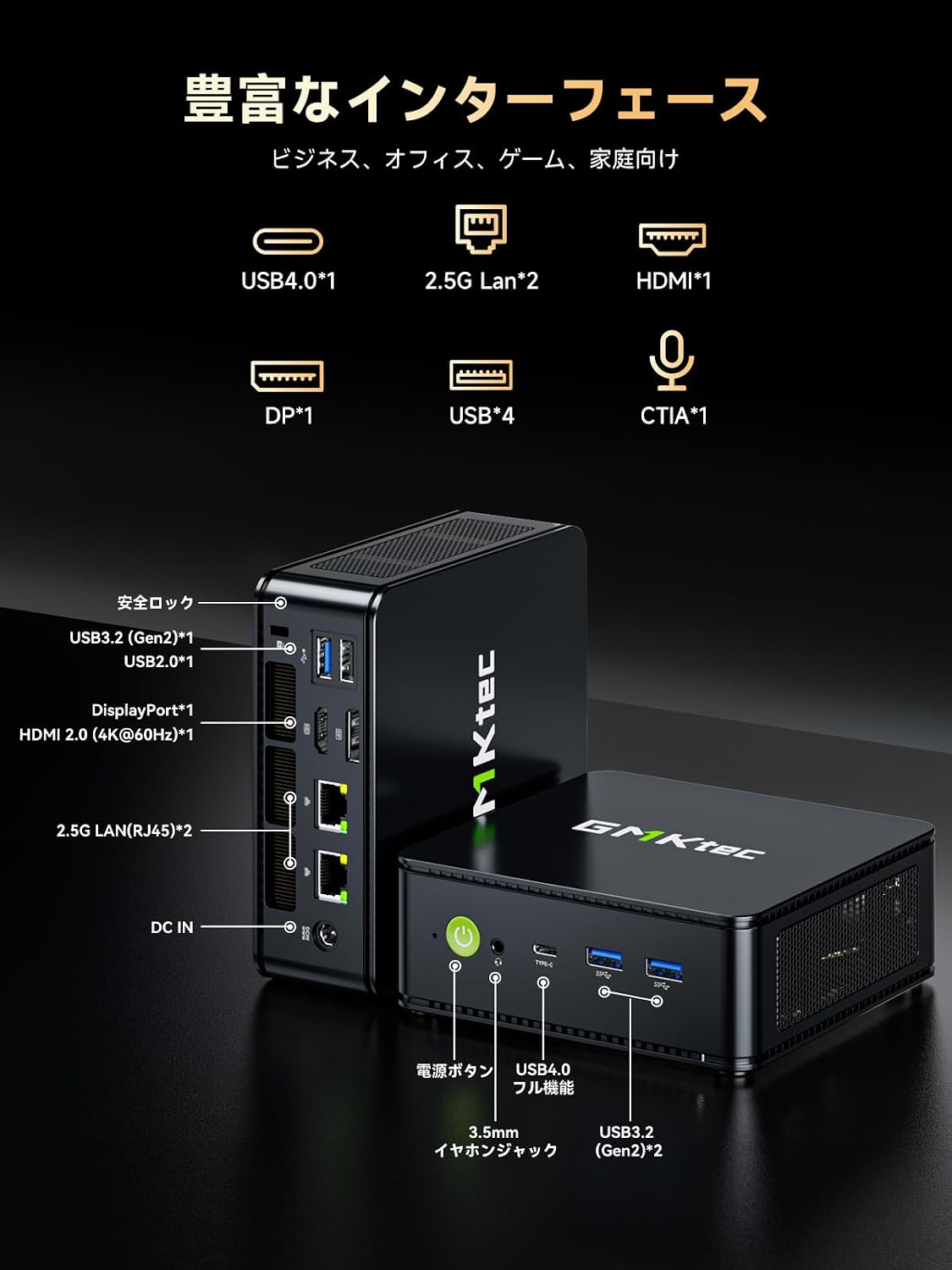
Obraz: Szczegółowy view of the GMKtec M6 Ultra Mini PC's front and rear ports.
4. Przewodnik konfiguracji
4.1. Połączenie początkowe
- Połącz z wyświetlaczem: Use the provided HDMI cable to connect the Mini PC to your monitor or TV. Alternatively, use a DisplayPort or USB4 Type-C cable for compatible displays.
- Podłącz urządzenia peryferyjne: Podłącz klawiaturę, mysz i inne urządzenia USB do dostępnych portów USB.
- Podłącz do zasilania: Podłącz zasilacz do portu DC IN w komputerze Mini PC, a następnie podłącz zasilacz do gniazdka elektrycznego.
- Włączanie: Naciśnij przycisk zasilania znajdujący się z przodu minikomputera. Zaświeci się kontrolka zasilania.
4.2. Montaż za pomocą uchwytu VESA
The included VESA mount allows you to attach the Mini PC to the back of a compatible monitor, saving desk space.
- Attach the VESA mount bracket to the back of your monitor using the provided screws. Ensure it is securely fastened.
- Wsuń Mini PC na uchwyt montażowy VESA, aż zatrzaśnie się na swoim miejscu.

Image: The Mini PC shown mounted on a monitor and its compact size for portability.
5. Instrukcja obsługi
5.1. Włączanie/wyłączanie zasilania
- Włączanie: Naciśnij przycisk zasilania raz.
- Zamknięcie: From the operating system, select "Shut down." Alternatively, press and hold the power button for 5 seconds to force a shutdown (not recommended for regular use).
5.2. Tryby wydajności
The Mini PC offers three TDP (Thermal Design Power) modes to optimize performance and noise levels:
- Tryb cichy (35 W): Prioritizes quiet operation and energy efficiency for light tasks.
- Tryb zrównoważony (45 W): Offers a good balance between performance and noise for everyday use.
- Tryb wydajności (50 W): Maximizes processing power for demanding applications like gaming or video editing.
These modes can typically be switched via the BIOS settings or a dedicated utility provided by GMKtec (refer to the operating system's documentation for specific instructions).

Image: Visual representation of the three performance modes and their TDPs.
5.3. Konfiguracja wielu wyświetlaczy
The M6 Ultra supports up to three simultaneous displays, enhancing productivity for various tasks.
- Connect your monitors to the HDMI 2.0, DisplayPort, and USB4 Type-C ports.
- Configure display settings within your operating system (e.g., Extend, Duplicate) to suit your workflow.

Image: The Mini PC connected to three external displays, demonstrating multi-screen capability.
5.4. Łączność sieciowa
The Mini PC offers both wired and wireless high-speed network options.
- wired: Connect Ethernet cables to the dual 2.5GbE LAN ports for ultra-fast and stable wired connections, ideal for NAS or large file przelewy.
- Bezprzewodowy: Utilize Wi-Fi 6E for stable wireless connectivity, especially on the less congested 6GHz band, suitable for online gaming and streaming.

Image: Illustration of the dual 2.5GbE LAN ports and their high-speed capabilities.
6. Rozszerzenie pamięci i pamięci masowej
The GMKtec M6 Ultra Mini PC provides flexible options for upgrading its memory and storage.
- Pamięć: The device comes with 32GB DDR5 memory and can be expanded up to a maximum of 128GB. It features dual-channel SO-DIMM slots, with each slot supporting up to 64GB.
- Składowanie: It includes a 512GB NVMe SSD. There are two PCIe 4.0 compatible M.2 2280 slots, allowing for expansion or replacement up to a total of 8TB (4TB x 2).
To access the memory and storage slots, carefully open the Mini PC casing. Refer to the detailed instructions in the full user manual for safe component installation.

Obraz: Wewnętrzny view of the Mini PC, highlighting the DDR5 RAM and M.2 SSD slots for expansion.
7. Układ chłodzenia
The M6 Ultra features an advanced dual-fan cooling system with an all-around airflow design. This ensures efficient heat dissipation and stable operation even under high loads, while maintaining a quiet environment (as low as 38dB).

Image: Illustration of the Mini PC's advanced dual-fan cooling system and 360-degree airflow.
8. Konserwacja
Regularna konserwacja pomaga zapewnić długowieczność i optymalną wydajność Twojego komputera Mini PC.
- Czyszczenie: Periodically clean the exterior of the Mini PC with a soft, dry cloth. Use compressed air to gently clear dust from ventilation openings. Do not use liquid cleaners directly on the device.
- Aktualizacje oprogramowania: Aktualizuj system operacyjny i sterowniki, aby zapewnić bezpieczeństwo i wydajność.
- Wentylacja: Ensure the Mini PC is placed in a well-ventilated area and that its air vents are not obstructed.
9. Rozwiązywanie Problemów
Jeśli masz problemy z komputerem Mini PC, zapoznaj się z poniższymi typowymi rozwiązaniami:
| Problem | Możliwa przyczyna | Rozwiązanie |
|---|---|---|
| Brak zasilania | Power cable not connected, faulty adapter, power outlet issue. | Check power connections, try a different outlet, ensure adapter is working. |
| Brak wyświetlacza | Monitor off, incorrect input, faulty cable, weak signal. | Ensure monitor is on and set to correct input. Check/replace display cable. If using an HDMI switch, ensure it is powered. |
| System jest powolny/nie odpowiada | Too many applications, low memory, overheating. | Close unnecessary programs. Check task manager for resource usage. Ensure proper ventilation. Consider upgrading RAM if frequently experiencing slowdowns. |
| Problemy z łącznością sieciową | Cable disconnected, Wi-Fi signal weak, driver issues. | Check Ethernet cable. Restart router/modem. Update network drivers. Ensure Wi-Fi signal is strong. |
Jeśli po wypróbowaniu tych rozwiązań problem nadal występuje, skontaktuj się z obsługą klienta.
10. Specyfikacje
| Funkcja | Szczegół |
|---|---|
| Marka | GMKtec |
| Model | M6 Ultra-7640HS |
| System operacyjny | Windows (Pre-installed) |
| Model procesora | Procesor AMD Ryzen 5 7640HS |
| Prędkość procesora | Do 5 GHz |
| Procesor graficzny | Radeon 760M (Integrated) |
| Zainstalowana pamięć RAM | 32 GB DDR5 (z możliwością rozbudowy do 128 GB) |
| Pojemność magazynowa | 512 GB NVMe SSD (Expandable up to 8 TB via 2x PCIe 4.0 M.2 slots) |
| Interfejsy wyjściowe wideo | HDMI 2.0, DisplayPort, USB4 Type-C |
| Maksymalna rozdzielczość wyświetlacza | 8K (7680x4320 pixels) @60Hz |
| Porty USB | 2x USB-A 3.2 Gen2 (front), 2x USB-A 3.2 Gen2 (rear), 2x USB-A 2.0 (rear), 1x USB4.0 Type-C |
| Sieć lokalna | Podwójny 2.5 GbE (Intel i226V) |
| Łączność bezprzewodowa | Wi-Fi 6E, Bluetooth 5.2 |
| Wymiary produktu | Wymiary: 128.8 x 127 x 47.8 mm |
| Waga | Około 523g |
| Dołączone akcesoria | Power Adapter, HDMI Cable, VESA Mount, Screws, Manual |
11. Gwarancja i wsparcie
Your GMKtec M6 Ultra Mini PC comes with a 1-letnia gwarancja producenta od daty zakupu. Niniejsza gwarancja obejmuje wady materiałowe i wykonawcze przy normalnym użytkowaniu.
For technical assistance, troubleshooting, or warranty claims, please contact GMKtec customer support. Our support team is available to provide assistance within 24 hours.
Zachowaj dowód zakupu w celu potwierdzenia gwarancji.


