
1. Wprowadzenie
The XTOOL IP500 is a professional diagnostic scan tool designed for Jeep, Dodge, and Chrysler vehicles. It offers comprehensive full system diagnostics, bi-directional control, and various special reset functions. This manual provides instructions for setting up, operating, maintaining, and troubleshooting your IP500 device.

Image 1.1: The XTOOL IP500 diagnostic tool, highlighting its key capabilities including bi-directional control, full system diagnostics, all services, and FCA CAN FD support.
2. Konfiguracja
2.1 Zawartość opakowania
Przed rozpoczęciem należy upewnić się, że wszystkie komponenty są obecne:
- XTOOL IP500 Main Unit
- Główny kabel OBD2
- 12+8 Adapter Cable (for 2018+ FCA vehicles)
- Zasilacz (jeśli dotyczy)
- Instrukcja obsługi (ten dokument)
2.2 Podłączanie urządzenia
- Znajdź port OBD2 pojazdu, zazwyczaj znajdujący się pod deską rozdzielczą po stronie kierowcy.
- For most vehicles, connect the OBD2 Main Cable directly to the vehicle's OBD2 port and the IP500 device.
- For 2018 and newer FCA (Fiat Chrysler Automobiles) vehicles (Jeep, Dodge, Chrysler, RAM), use the included 12+8 Adapter Cable. Connect the 12-pin and 8-pin connectors to the vehicle's respective ports, then connect the OBD2 male connector of the adapter to the OBD2 female connector of the main cable, and finally to the IP500 device.
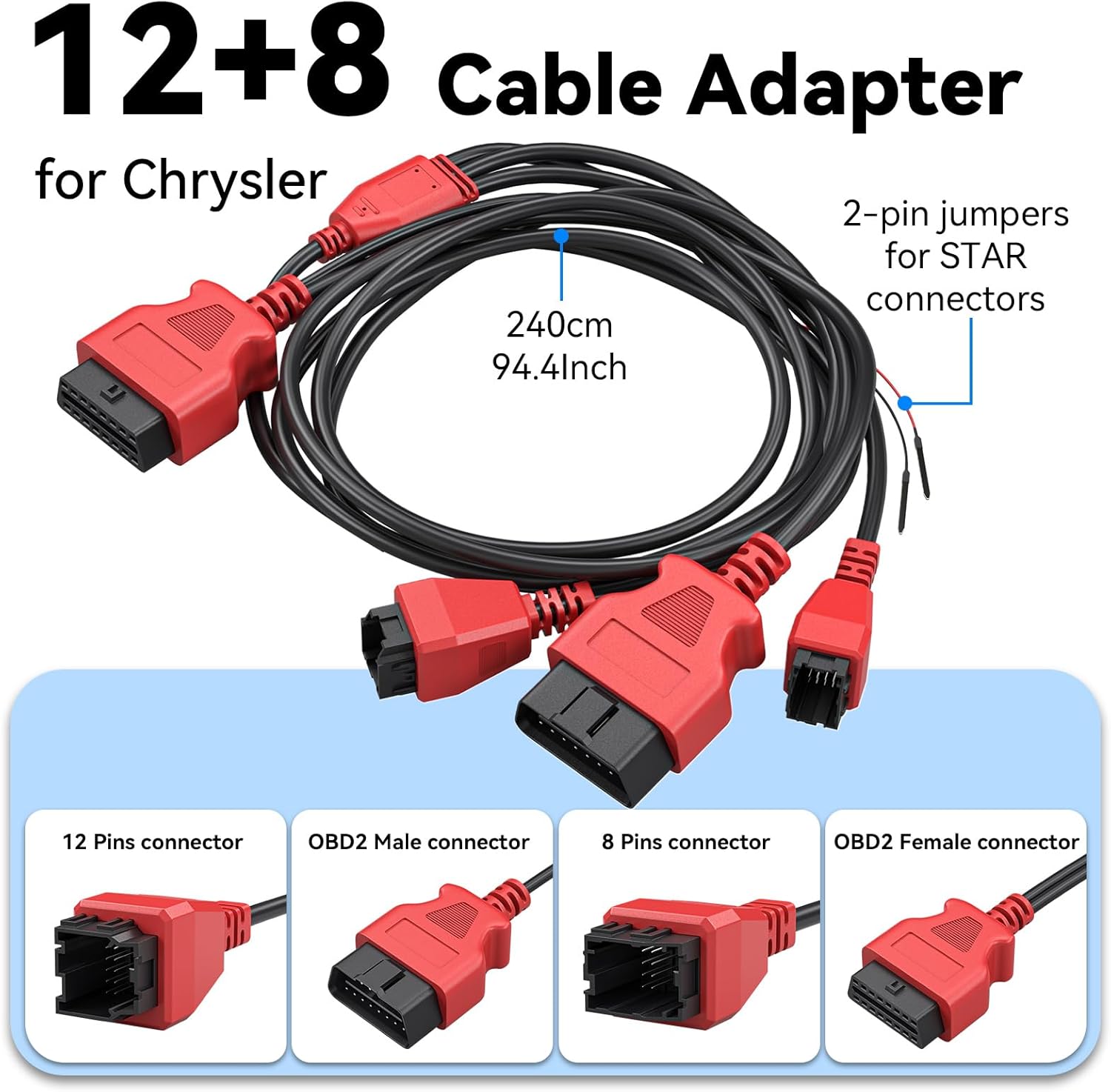
Rysunek 2.1: Szczegółowy view of the 12+8 Cable Adapter, illustrating its various connectors and overall length, essential for connecting to newer FCA vehicles.
2.3 Initial Power-On and Software Updates
- Once connected, the IP500 device should power on automatically. If not, press the power button.
- Follow the on-screen prompts to select your preferred language (23 languages supported).
- Podłącz urządzenie do sieci Wi-Fi.
- Navigate to the 'Updates' section on the main menu to download and install the latest software. Regular updates ensure optimal performance and vehicle compatibility.
3. Instrukcja obsługi
3.1 Nawigacja w menu głównym
The IP500 features a 5.45" HD touchscreen for intuitive navigation. The main menu typically includes options such as 'Auto Scan', 'Diagnosis', 'OBD II', 'Special Function', 'Updates', and 'More'.
3.2 Pełna diagnostyka systemu
This function allows you to access and diagnose all available electronic control modules within the vehicle. It supports comprehensive diagnostics for Fiat Group vehicles (Chrysler, Dodge, Jeep, RAM) from 1998 to 2024.
- Select 'Diagnosis' from the main menu.
- Wybierz markę i model pojazdu.
- Perform an 'Auto Scan' or manually select specific systems (e.g., Engine, Transmission, ABS, Airbag, HVAC, Suspension, Headlamp, Audio, A/C).
- View live data streams, read and clear Diagnostic Trouble Codes (DTCs).

Image 3.1: The IP500 device displaying a diagnostic menu, with an overlay showing various vehicle systems it can diagnose, such as engine, airbag, and transmission.
3.3 Funkcje specjalne i usługi resetowania
The IP500 provides access to 18+ special functions for various vehicle maintenance and repair tasks, including those for 2018+ FCA vehicles using the 12+8 adapter.
- Select 'Special Function' from the main menu.
- Choose the desired service from the list. Common services include:
- Reset EPB: Reset elektronicznego hamulca postojowego.
- Resetowanie SAS: Kalibracja czujnika kąta skrętu.
- Resetowanie BMS: Resetowanie systemu zarządzania baterią.
- Regulacja reflektorów: Adjusting headlight settings.
- Kodowanie wtryskiwacza: Coding new injector values.
- Dopasowanie przepustnicy: Throttle body relearn.
- Krwawienie z układu ABS: Performing ABS brake bleeding.
- Dopasowanie skrzyni biegów: Transmission adaptation.
- Układ zawieszenia: Suspension calibration.
- Inicjalizacja okna: Window motor relearn.
- Seat Matching: Seat position calibration.
- Resetowanie kontrolki serwisowej: Resetting service indicators.
- A/F Settings: Air/Fuel ratio adjustments.
- Tryb transportu: Deactivating/activating transport mode.

Image 3.2: A visual representation of the 'ALL RESET SERVICES' menu on the IP500, showing various available functions for vehicle maintenance.
3.4 Sterowanie dwukierunkowe (testy aktywne)
This feature allows the IP500 to send commands to vehicle components and receive feedback, enabling active testing of actuators and sensors. This helps in quickly pinpointing issues.
- Select 'Diagnosis' and then navigate to the specific system.
- Poszukaj opcji „Test aktywny” lub „Sterowanie dwukierunkowe”.
- Examples of components that can be tested include: Windows, Mirrors, Injectors, Door Locks, Braking systems, Wipers, Headlights, and Horns.

Image 3.3: The IP500 illustrating bi-directional control capabilities, showing how it can command and receive feedback from various vehicle components.
3.5 Pełne funkcje OBD2
The IP500 supports all 10 modes of OBD2 testing, providing essential diagnostic information for emissions-related issues.
- Select 'OBD II' from the main menu.
- Dostępne funkcje obejmują:
- Przeczytaj kody: Retrieve current, pending, and permanent DTCs.
- Wyczyść kody: Erase DTCs and turn off the Malfunction Indicator Light (MIL).
- Dane na żywo: View parametry danych w czasie rzeczywistym.
- Stopklatka: View a snapshot of vehicle operating conditions when an emission-related fault occurs.
- Gotowość I/M: Sprawdź gotowość systemów monitorowania emisji.
- Test monitora O2: Pobierz wyniki testu monitorowania czujnika O2.
- Test monitora pokładowego: Pobierz wyniki dotyczące komponentów i układów napędowych związanych z emisją.
- Test komponentów: Przeprowadź test szczelności układu EVAP pojazdu.
- Informacje o pojeździe: Pobierz numer identyfikacyjny pojazdu (VIN), identyfikator kalibracji (CALID) i numer weryfikacyjny kalibracji (CVN).

Image 3.4: The IP500's interface showing the comprehensive range of OBD2 functions available for vehicle diagnostics.
3.6 FCA Secure Gateway Access
For 2018+ FCA vehicles equipped with a Secure Gateway Module (SGM), the 12+8 adapter cable provides direct diagnostic access without requiring an FCA AutoAuth subscription. This allows full diagnostic capabilities on these newer models.

Image 3.5: The IP500 demonstrating FCA Secure Gateway Access, indicating its compatibility with 2018+ Chrysler, Dodge, and Jeep vehicles.
4. Konserwacja
4.1 Czyszczenie urządzenia
Użyj miękkiego, damp cloth to clean the device's screen and body. Avoid using abrasive cleaners or solvents that could damage the surface.
4.2 Aktualizacje oprogramowania
Regularly check for and install software updates via Wi-Fi. These updates provide new vehicle coverage, bug fixes, and improved functionality. The IP500 offers free lifetime functional updates.
4.3 Przechowywanie
Store the device in a cool, dry place away from direct sunlight and extreme temperatures. Keep it in its protective case when not in use to prevent damage.
5. Rozwiązywanie Problemów
5.1 Urządzenie się nie włącza
- Ensure the device is correctly connected to the vehicle's OBD2 port.
- Sprawdź pojemność akumulatora pojazdutage; a low battery might prevent the device from powering up.
- Verify the OBD2 port fuse in the vehicle.
5.2 Błędy komunikacyjne
- Confirm the ignition is in the ON position (engine off).
- Ensure the correct vehicle make, model, and year are selected in the device menu.
- For 2018+ FCA vehicles, verify the 12+8 adapter is correctly installed.
- Spróbuj podłączyć się do innego pojazdu, aby wykluczyć problem związany z danym pojazdem.
5.3 Oprogramowanie zawiesza się lub działa wolno
- Uruchom ponownie urządzenie.
- Upewnij się, że oprogramowanie jest aktualne.
- Clear cache or temporary files if the option is available in device settings.
6. Specyfikacje
| Funkcja | Opis |
|---|---|
| Edytor | 1.2 GHz dwurdzeniowy |
| Wyświetlacz | 5.45" HD Touchscreen |
| Bateria | 3150mAh |
| Składowanie | 32 GB |
| System operacyjny | Android oparte |
| Pokrycie pojazdu | Fiat Group (Chrysler, Dodge, Jeep, RAM) 1998-2024; 2018+ FCA with 12+8 adapter |
| Języki | Obsługiwanych jest 23 języków |
| Aktualizacje | Free Lifetime Functional Updates |
7. Gwarancja i wsparcie
7.1 Informacje o gwarancji
For detailed warranty information, please refer to the official XTOOL website or contact your point of purchase. The device includes free lifetime functional updates, ensuring ongoing software support.
7.2 Wsparcie techniczne
If you encounter any issues or require technical assistance, please contact XTOOL customer support. Contact details can typically be found on the official XTOOL webstronie lub w sekcji „Informacje” urządzenia.