1. Wprowadzenie
The Audizio Desio is a versatile digital radio that combines classic aesthetics with modern audio technology. It features DAB, DAB+, and FM tuning for clear radio reception, along with Bluetooth 5.0 for wireless streaming, a USB port for media playback, and a 3.5mm AUX input for wired connections. The radio is equipped with a 2.4-inch color LCD display and integrated stereo speakers, making it suitable for various environments such as living rooms, kitchens, or bedrooms.
This manual provides detailed instructions for setting up, operating, and maintaining your Audizio Desio radio. Please read it thoroughly before use to ensure proper functionality and to maximize your listening experience.
2. Informacje dotyczące bezpieczeństwa
- Sprawdź, czy zasilacz ma odpowiednią głośnośćtagPrzed podłączeniem sprawdź, czy urządzenie jest zgodne z lokalnym źródłem zasilania.
- Nie wystawiaj urządzenia na działanie deszczu, wilgoci ani ekstremalnych temperatur.
- Unikać umieszczania urządzenia w pobliżu źródeł ciepła lub w bezpośrednim świetle słonecznym.
- Nie otwierać casing; wszelkie prace serwisowe należy zlecać wykwalifikowanemu personelowi.
- Trzymaj urządzenie z dala od silnych pól magnetycznych.
- Urządzenie należy czyścić wyłącznie miękką, suchą szmatką.
3. Zawartość opakowania
Sprawdź, czy po rozpakowaniu znajdują się wszystkie elementy:
- Audizio Desio DAB/DAB+/FM Radio
- Zasilacz (prąd stały 5 V)
- Zdalne sterowanie
- Instrukcja obsługi
4. Sterowanie i połączenia
Elementy sterujące na panelu przednim
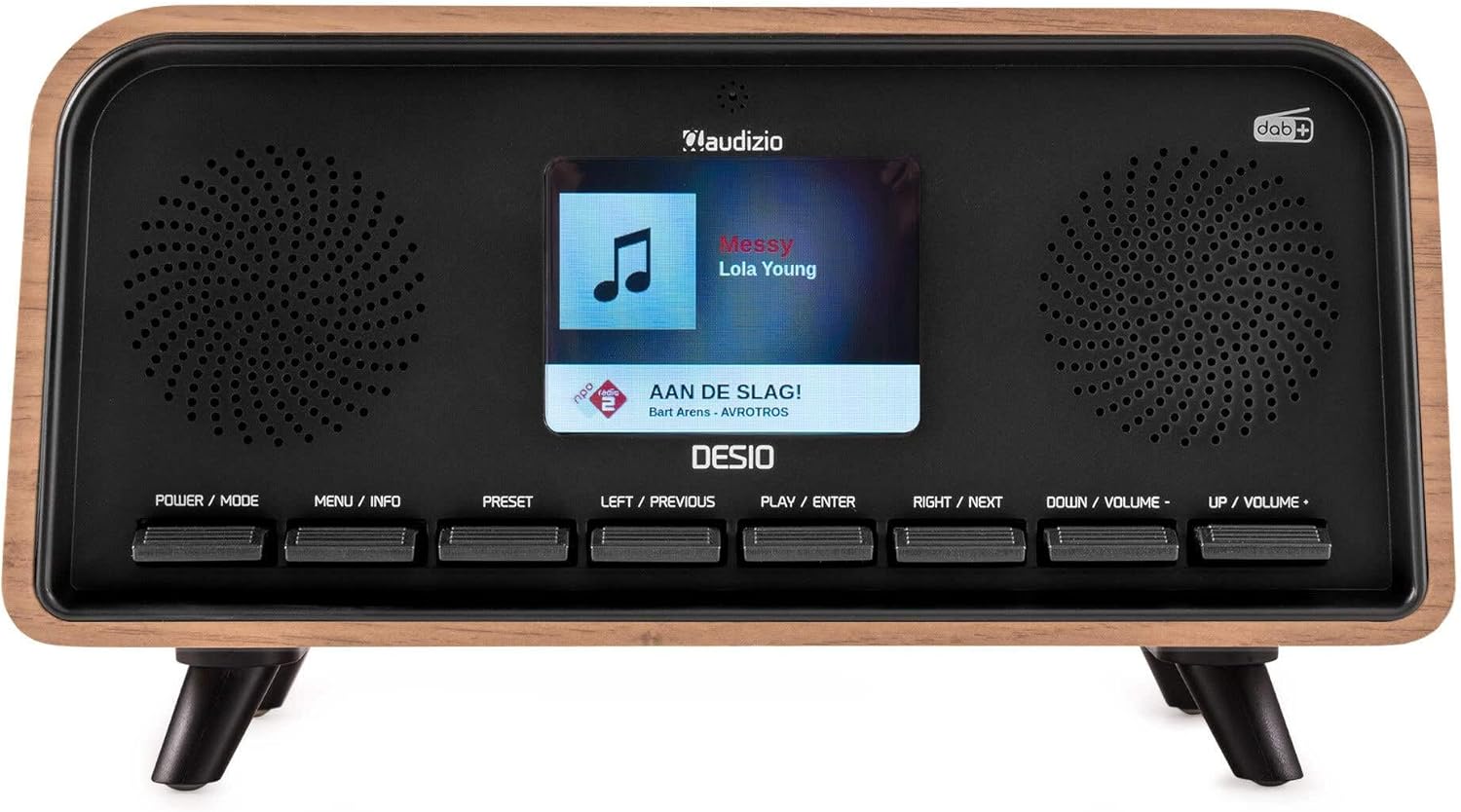
Przód view of the Audizio Desio radio, showing the display playing music with artist and track information. The control buttons are visible below the screen.
- POWER / MODE: Press to turn on/off. Press and hold to switch between DAB, FM, Bluetooth, USB, and AUX modes.
- MENU / INFO: Press to access menu options. In playback mode, press to cycle through information display.
- WSTĘPNE: Press to recall saved stations. Press and hold to save current station.
- LEFT / PREVIOUS: Navigate left in menus, or skip to previous track/station.
- PLAY / ENTER: Confirm selection in menus, or play/pause media.
- RIGHT / NEXT: Navigate right in menus, or skip to next track/station.
- DOWN / VOLUME -: Decrease volume, or navigate down in menus.
- UP / VOLUME +: Increase volume, or navigate up in menus.
Połączenia na tylnym panelu
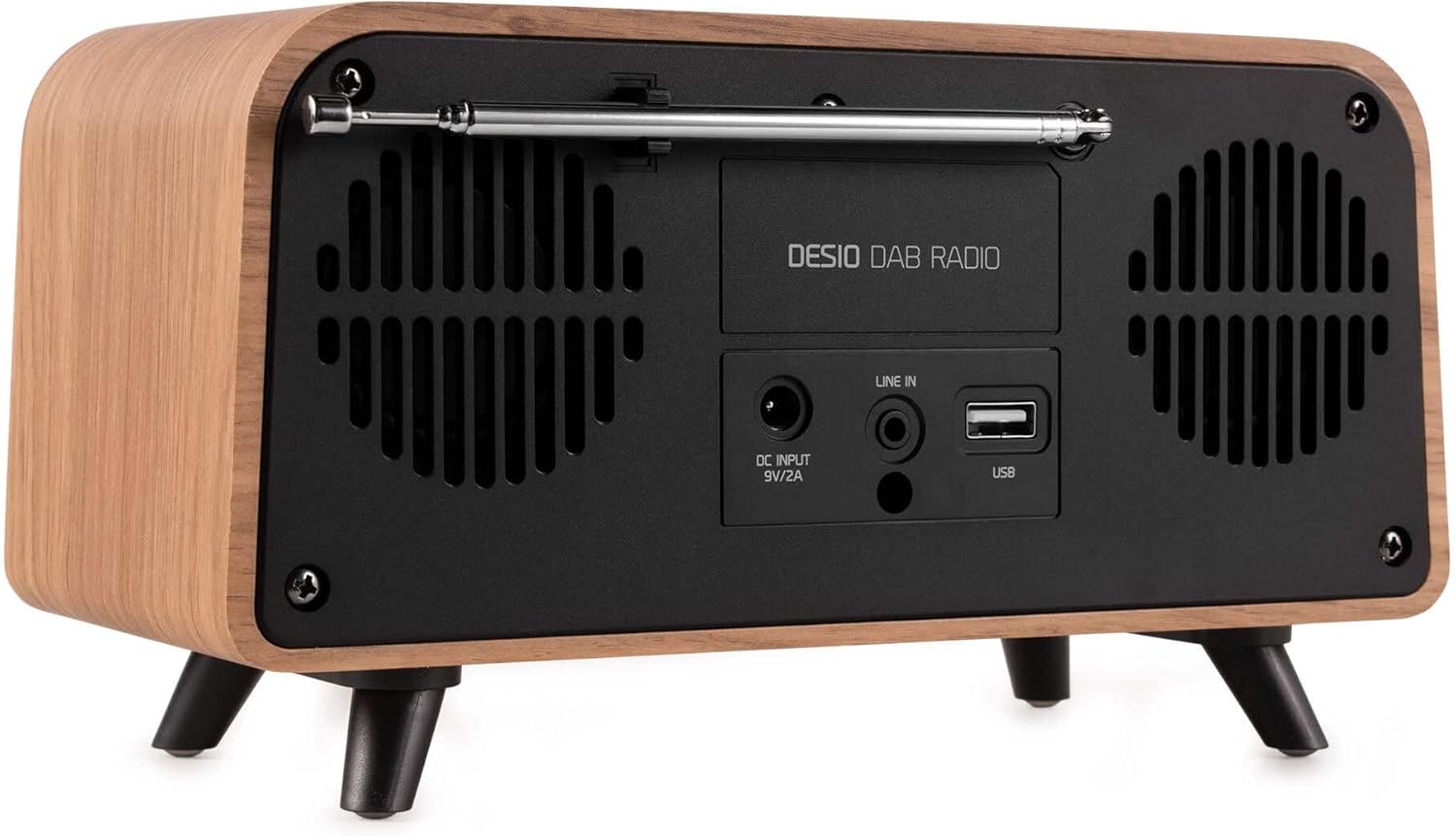
Tył view of the Audizio Desio radio, highlighting the DC INPUT 9V/2A, LINE IN (3.5mm AUX), and USB ports. The telescopic antenna is extended.
- DC INPUT 9V/2A: Podłącz tutaj dołączony zasilacz.
- LINE IN (3.5mm AUX): Podłącz zewnętrzne urządzenia audio za pomocą kabla audio 3.5 mm.
- USB: Podłącz pamięć USB, aby odtwarzać pliki MP3.
- Antena teleskopowa: Extend fully for optimal DAB/DAB+ and FM reception.
5. Konfiguracja początkowa
- Podłącz zasilanie: Plug the provided DC 5V power adapter into the DC INPUT port on the rear of the radio, then plug the adapter into a wall outlet.
- Przedłuż antenę: Fully extend the telescopic antenna located on the rear of the unit for best reception.
- Włączanie: Naciśnij TRYB ZASILANIA przycisk, aby włączyć radio.
- First-time DAB Scan: Upon first power-on, the radio will automatically perform a full scan for DAB/DAB+ stations. This may take a few minutes. The display will show the scanning progress.
- Ustaw czas/datę: The time and date will usually be set automatically via DAB signal. If not, you can manually set them via the menu.
6. Instrukcja obsługi
6.1 Obsługa radia DAB/DAB+

Przód view of the Audizio Desio radio, displaying a DAB radio station ('NPO Klassiek') and current time.
- Wybierz tryb DAB: Naciśnij TRYB ZASILANIA Naciskaj przycisk aż do wyświetlenia napisu „DAB”.
- Skanuj stacje: If no stations are found or you wish to rescan, press MENU / INFORMACJE, następnie użyj LEFT / PREVIOUS or PRAWO / NASTĘPNY to select 'Full Scan' and press PLAY / ENTER.
- Wybierz stację: Użyj LEFT / PREVIOUS or PRAWO / NASTĘPNY przyciski do przeglądania dostępnych stacji. Naciśnij PLAY / ENTER aby wybrać stację.
- Zapisz ustawienie wstępne: Aby zapisać stację, naciśnij i przytrzymaj USTAWIENIE WSTĘPNE przycisk. Posługiwać się LEFT / PREVIOUS or PRAWO / NASTĘPNY aby wybrać numer ustawienia wstępnego (1-50), a następnie naciśnij PLAY / ENTER aby potwierdzić.
- Przywołaj ustawienie wstępne: Aby przywołać zapisaną stację, naciśnij USTAWIENIE WSTĘPNE button (do not hold). Use LEFT / PREVIOUS or PRAWO / NASTĘPNY aby wybrać żądane ustawienie wstępne, a następnie naciśnij PLAY / ENTER.

Przód view of the Audizio Desio radio, showing the 'Preset Recall' menu on the display, indicating empty preset slots.
6.2 Obsługa radia FM
- Wybierz tryb FM: Naciśnij TRYB ZASILANIA Naciskaj przycisk aż do wyświetlenia napisu „FM”.
- Automatyczne skanowanie: Naciśnij i przytrzymaj PLAY / ENTER aby automatycznie wyszukać i zapisać dostępne stacje FM.
- Strojenie ręczne: Używać LEFT / PREVIOUS or PRAWO / NASTĘPNY aby dostroić częstotliwość.
- Save/Recall Presets: Follow the same procedure as for DAB radio (Section 6.1).
6.3 Bluetooth (BT) Operation

Przód view of the Audizio Desio radio, with the display showing 'BT' (Bluetooth) mode and 'Connected' status.
- Wybierz tryb BT: Naciśnij TRYB ZASILANIA button repeatedly until 'BT' is displayed. The radio will enter pairing mode, indicated by a flashing Bluetooth icon.
- Paruj urządzenie: On your smartphone, tablet, or laptop, enable Bluetooth and search for available devices. Select 'Audizio Desio' from the list.
- Łączyć: Once paired, the display will show 'Connected'. You can now stream audio from your device to the radio.
- Kontrola odtwarzania: Use your connected device or the radio's PLAY / ENTER, LEFT / PREVIOUS, I PRAWO / NASTĘPNY przyciski do sterowania odtwarzaniem.
6.4 Odtwarzanie USB

Przód view of the Audizio Desio radio, with the display showing 'USB' mode, current time, and details of an MP3 file jest odtwarzany.
- Włóż dysk USB: Włóż dysk flash USB (sformatowany w systemie FAT32) zawierający pliki MP3 filedo portu USB z tyłu radia.
- Wybierz tryb USB: Naciśnij TRYB ZASILANIA button repeatedly until 'USB' is displayed. The radio will automatically start playing the first compatible audio file.
- Nawigować Files: Używać LEFT / PREVIOUS or PRAWO / NASTĘPNY to skip tracks. Press PLAY / ENTER aby wstrzymać/wznowić odtwarzanie.
6.5 Wejście AUX
- Podłącz urządzenie: Connect an external audio device (e.g., MP3 player, smartphone) to the 'LINE IN' (3.5mm AUX) port on the rear of the radio using a 3.5mm audio cable (not included).
- Wybierz tryb AUX: Naciśnij TRYB ZASILANIA button repeatedly until 'AUX' is displayed.
- Sterowanie odtwarzaniem: Playback is controlled directly from your connected external device. Adjust volume using the radio's volume controls.
6.6 Funkcje alarmu i timera
- Ustawianie alarmów: Uzyskaj dostęp do ustawień alarmu za pomocą MENU / INFORMACJE button. You can set multiple alarms with customizable sources (DAB, FM, Buzzer), volume, and recurrence (daily, weekdays, weekends).
- Wyłącznik czasowy: The sleep timer allows the radio to turn off automatically after a set period. Access this function via the MENU / INFORMACJE button and select the desired duration.
- Funkcja drzemki: When an alarm sounds, press any button (except Power) to activate the snooze function for a short period.
7. Konserwacja
- Czyszczenie: Do czyszczenia powierzchni radia używaj miękkiej, suchej i niepozostawiającej włókien ściereczki. Nie używaj środków ściernych, wosków ani rozpuszczalników.
- Pielęgnacja anteny: Należy obchodzić się ostrożnie z anteną teleskopową, aby jej nie wygiąć ani nie złamać.
- Składowanie: Jeśli radio będzie przechowywane przez dłuższy czas, należy odłączyć je od zasilania i przechowywać w chłodnym, suchym miejscu.
8. Rozwiązywanie Problemów
| Problem | Możliwa przyczyna | Rozwiązanie |
|---|---|---|
| Brak zasilania | Zasilacz nie jest podłączony lub gniazdko jest uszkodzone. | Sprawdź podłączenie zasilacza i spróbuj użyć innego gniazdka. |
| Słaby odbiór DAB/FM | Antena nie jest całkowicie rozciągnięta lub sygnał jest słaby. | Fully extend the antenna. Try repositioning the radio. Perform a full scan. |
| Bluetooth nie łączy się | Radio not in BT mode, device not in pairing mode, or too far away. | Ensure radio is in BT mode. Put your device in pairing mode. Move device closer to the radio (within 10m). |
| Odtwarzanie USB nie działa | USB drive not inserted correctly, unsupported file format, or drive not FAT32. | Włóż ponownie dysk USB. Upewnij się, files are MP3. Check USB drive format (FAT32). |
| Brak dźwięku z AUX | Radio not in AUX mode, cable faulty, or external device volume low. | Select AUX mode. Check 3.5mm cable. Increase volume on both radio and external device. |
9. Specyfikacje techniczne
- Marka: Audizio
- Model: Desio
- Technologia tunera: UKF, DAB+
- Bluetooth: Version 5.0 (Range: 10m)
- Opcje odtwarzania: Bluetooth, USB, 3.5mm AUX input
- Zaprogramowane stacje: 50
- Wyświetlacz: Kolorowy wyświetlacz LCD 2.4 cala
- Funkcje: Alarm, Sleep Timer, Snooze, Dimming, Week/Weekend Alarm
- Max Speaker Power: 30 waty
- Zasilanie: DC 5V (Power Adapter)
- Wymiary produktu (wys. x szer. x gł.): Wymiary 32 x 16 x 18 cm
- Waga: 1.66 kilogramów
10. Gwarancja i wsparcie
This product comes with a standard manufacturer's warranty. For detailed warranty terms and conditions, please refer to the documentation provided at the time of purchase or contact your retailer.
For technical support, troubleshooting assistance, or service inquiries, please contact the Audizio customer support team or your local dealer. Please have your product model number (Desio) and purchase information ready when contacting support.