
Wstęp
Thank you for choosing the Rimoody 1 Din Autoradio. This device integrates advanced features such as Wireless CarPlay, Android Auto, a 6.9-inch IPS touchscreen, Bluetooth 5.2, FM radio, and various multimedia options to enhance your driving experience. This manual provides essential information for proper installation, operation, maintenance, and troubleshooting to ensure optimal performance and longevity of your device.
Informacje dotyczące bezpieczeństwa
- Przed instalacją i użytkowaniem przeczytaj uważnie wszystkie instrukcje.
- Aby zapobiec uszkodzeniu pojazdu lub urządzenia, montaż powinien zostać przeprowadzony przez wykwalifikowanego specjalistę.
- Nie używaj urządzenia w sposób, który odwraca Twoją uwagę od prowadzenia pojazdu. Zawsze priorytetowo traktuj bezpieczeństwo na drodze.
- Unikaj wystawiania urządzenia na działanie ekstremalnych temperatur, długotrwałego bezpośredniego światła słonecznego i wilgoci.
- Należy używać wyłącznie akcesoriów i części określonych przez producenta.
- Przed montażem odłącz akumulator pojazdu, aby zapobiec zwarciom elektrycznym.
Zawartość opakowania
Sprawdź, czy w opakowaniu znajdują się wszystkie elementy:
- 1 Car MP5 Player (Autoradio)
- 1 Kabel zasilający
- 1 Horn Cable
- 1 Pilot zdalnego sterowania
- 1 Instrukcja obsługi
- 1 Camera (Optional, if included in your purchase)

Obraz: Ponadview of the Rimoody 1 Din Autoradio package contents, including the main unit, various cables, remote control, user manual, and an optional reverse camera.
Produkt ponadview
The Rimoody 1 Din Autoradio (Model 6286W) is designed to fit standard 1 DIN dashboard openings (178x50 mm). It features a 6.9-inch IPS touchscreen with a resolution of 1280x480, offering vibrant colors and wide viewing angles. Key functionalities include:
- Wireless and Wired CarPlay & Android Auto
- Bluetooth 5.2 do prowadzenia rozmów w trybie głośnomówiącym i strumieniowego przesyłania dźwięku
- FM Radio with automatic search and preset stations
- Mirror Link for screen mirroring from smartphones
- Steering Wheel Control learning function
- Customizable EQ sound effects
- Multi-function USB and Type-C ports for media playback and charging
- Support for optional reverse camera and DVR functions
- Colorful backlight settings
Konfiguracja i instalacja
This autoradio is compatible with vehicles equipped with standard 1 DIN dashboard kits (178x50 mm). Professional installation is recommended.
Schemat okablowania
Refer to the detailed wiring diagram provided in the image below and in your physical user manual for correct connections. Ensure all connections are secure to prevent malfunctions.
Image: Detailed wiring diagram for the Rimoody 1 Din Autoradio, illustrating connections for power, speakers, audio outputs, camera input, and USB ports.
- Podłączenie zasilania: Connect the power cable (red and yellow wires) to the vehicle's power supply. The black wire is for ground.
- Połączenie głośnika: Connect the horn cable to your vehicle's speakers. Ensure correct polarity.
- Reverse Camera (Optional): Connect the reverse camera input (CVBS) to the designated port. The unit will automatically display the camera feed when reverse gear is engaged.
- Antena: Podłącz antenę radiową do urządzenia.
- USB/Type-C: Connect external devices or charging cables to the USB and Type-C ports.
Instrukcja obsługi
1. Bezprzewodowy CarPlay i Android Auto
Enjoy seamless smartphone integration. Connect your Apple or Android phone wirelessly via Bluetooth/Wi-Fi or wired via USB to access maps, music, calls, and apps. Activate voice control (Siri/Google Assistant) for navigation, messages, or calls, keeping your focus on the road.
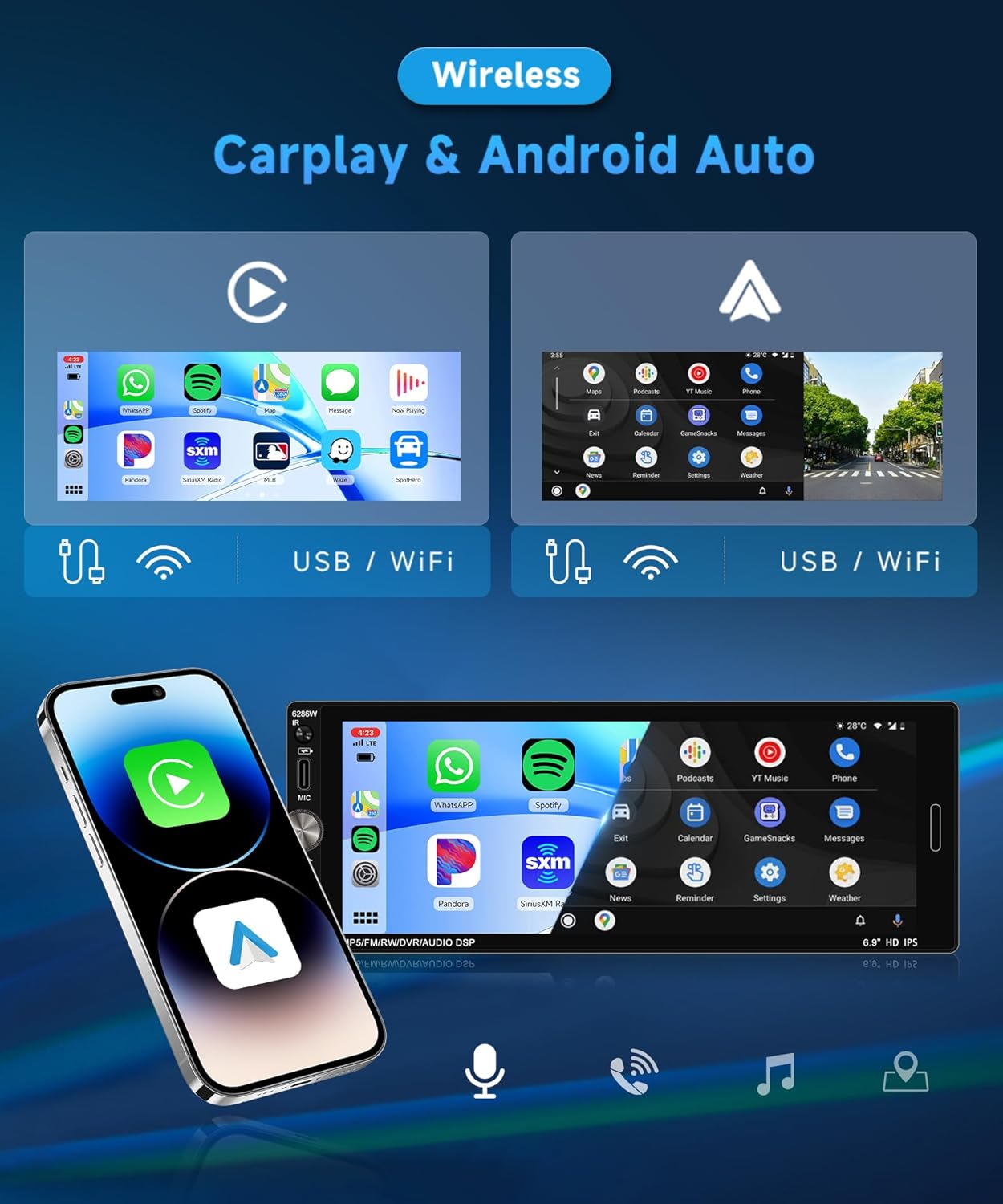
Image: Display of Wireless CarPlay and Android Auto interfaces on the 6.9-inch IPS touchscreen, demonstrating app access and connectivity options.
2.Bluetooth 5.2
Benefit from stable Bluetooth 5.2 connectivity for wireless music streaming, hands-free calls, and contact synchronization. Noise reduction technology ensures clear audio even in noisy environments. To pair, enable Bluetooth on your phone, search for the device (e.g., "Rimoody 6286W"), and connect.
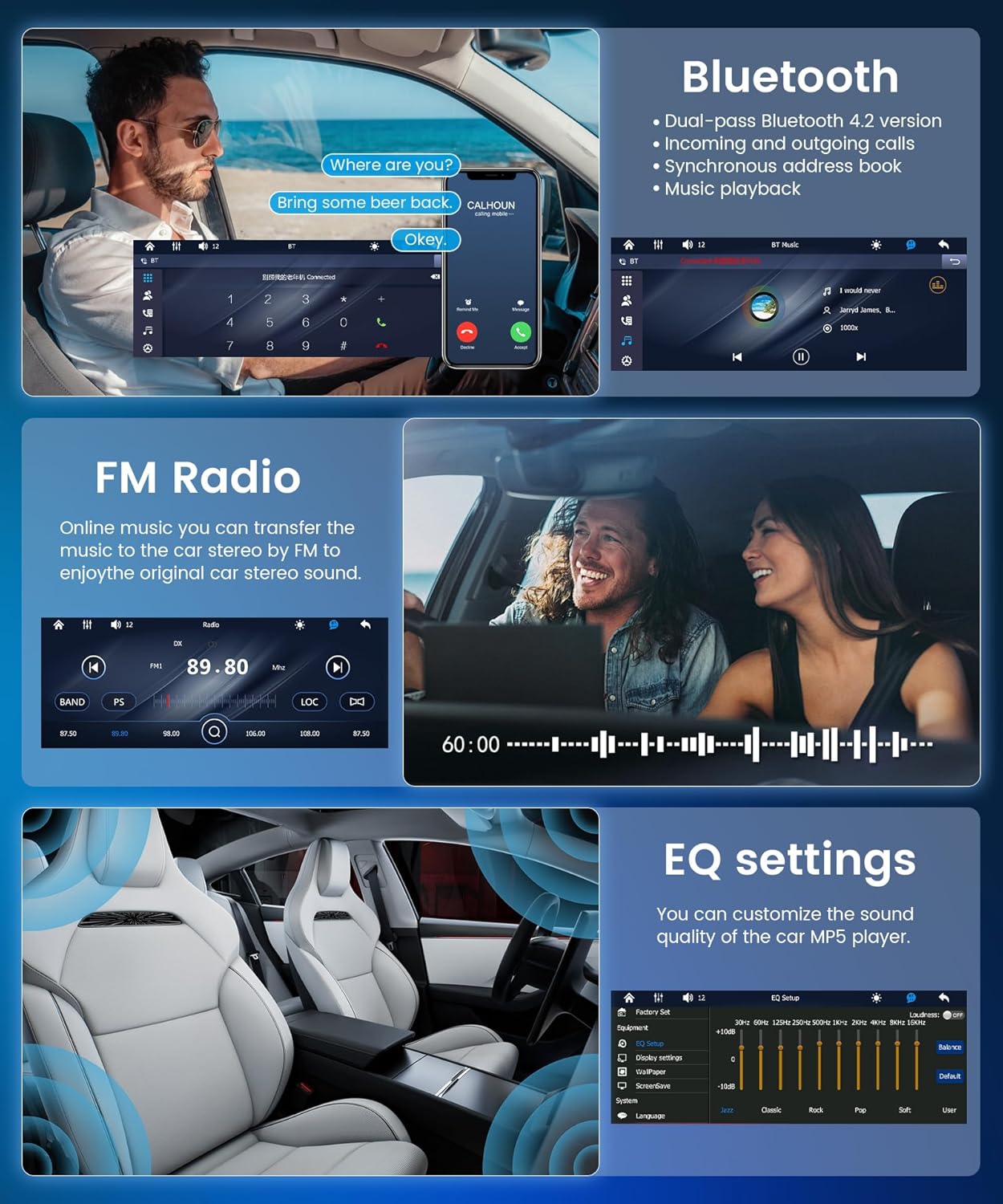
Image: The Bluetooth interface showing an active call, alongside the FM radio tuner and equalizer settings.
3.Radio FM
The integrated FM radio automatically searches and saves up to 18 preset stations. Listen to music, news, and traffic information. Use the auto-search, semi-automatic, or precise tuning functions to find your preferred stations.
4. Łącze lustrzane
Mirror Link duplicates your smartphone screen onto the car's display, providing seamless access to your apps and media. Connect wirelessly via Bluetooth/Wi-Fi or via USB to display maps, videos, or applications on the large touchscreen.

Image: A smartphone screen being mirrored onto the Rimoody Autoradio display, illustrating the Mirror Link feature via USB or WiFi connection.
5. Sterowanie z kierownicy
The unit supports a steering wheel button learning function, allowing you to control essential functions directly from your steering wheel for added convenience and safety. Follow the on-screen instructions in the settings menu to program your steering wheel controls.

Image: The steering wheel control setup menu on the autoradio, next to a visual representation of a car's reverse camera view.
6. Ustawienia korektora
Customize your audio experience with the 10-band equalizer. Adjust bass, treble, and other sound parameters to achieve optimal sound quality. The unit also features a bass filter for an immersive in-car audio experience.
7. Reverse Camera (Optional)
If a reverse camera is connected, the autoradio will automatically display the rear view when the vehicle is put into reverse. This feature enhances safety by providing a clear view of obstacles, aiding in parking and maneuvering.
8. Multimedia Input (USB & Type-C)
Connect your devices to the multi-function USB and Type-C ports to enjoy your favorite music, videos, and photos. These ports also support fast charging for your devices while driving. Compatible formats include MP3/WMA/WAV/APE/FLAC for audio and RM/RMVB/AVI/MP4/MKV/3GP for video.

Image: Visual representation of multimedia input options including TF card, USB, AUX IN, and fast charging, along with the customizable colorful backlight settings.
9. Colorful Backlight Settings
Customize the unit's button backlighting with various color options to match your vehicle's interior or your personal preference.
Konserwacja
- Czyszczenie ekranu: Delikatnie przetrzyj ekran dotykowy miękką, niepozostawiającą włókien ściereczką. Nie używaj środków czyszczących ani rozpuszczalników o działaniu ściernym.
- Ogólne sprzątanie: Keep the unit free from dust and debris. Use a dry cloth for cleaning the exterior.
- Aktualizacje oprogramowania: Sprawdź producenta webokresowo odwiedzaj witrynę w celu sprawdzenia dostępności aktualizacji oprogramowania, aby zapewnić optymalną wydajność i nowe funkcje.
- Unikaj płynów: Nie dopuść do przedostania się jakichkolwiek płynów do wnętrza urządzenia, gdyż może to spowodować poważne uszkodzenia.
Rozwiązywanie problemów
| Problem | Możliwa przyczyna | Rozwiązanie |
|---|---|---|
| Brak zasilania | Nieprawidłowe okablowanie; Przepalony bezpiecznik; Problem z akumulatorem pojazdu. | Check power cable connections; Inspect and replace fuses if necessary; Verify vehicle battery voltage. |
| Brak dźwięku | Odłączone przewody głośnikowe; Głośność zbyt niska; Funkcja wyciszenia aktywna; Nieprawidłowe źródło dźwięku. | Check speaker connections; Increase volume; Deactivate mute; Select correct audio source. |
| Połączenie Bluetooth nie powiodło się | Bluetooth not enabled on phone/unit; Device out of range; Interference. | Ensure Bluetooth is active on both devices; Move devices closer; Restart both devices. |
| CarPlay/Android Auto nie łączy się | Incorrect USB cable; Phone software outdated; App not installed/updated. | Use original or certified USB cable; Update phone OS and CarPlay/Android Auto app; Restart phone and unit. |
| Poor FM Radio Reception | Antena nie jest podłączona; Obszar o słabym sygnale; Zakłócenia. | Ensure antenna is properly connected; Try tuning manually; Move to an area with better signal. |
Specyfikacje
- Model: 6286 W
- Materiał ekranu: IPS
- Tomtage: Prąd stały 12 V
- Edytor: F133
- Rozmiar ekranu: 6.9 cali
- Rezolucja: 1280x480
- Link lustrzany: Zgodny
- Pasmo radiowe: FM
- Układ radiowy: QN8035
- Moc wyjściowa: 45W (per channel), 180W total
- Temperatura pracy: -10 ~ 60 °C
- Wersja Bluetooth: 5.2
- Kolorowe podświetlenie: Zgodny
- Odwrotne wejście: CVBS
- Moc Ampukład scalony: TDA7388
- Częstotliwość radiowa: 87.5-108MHz
- Formaty audio: MP3 / WMA / WAV / APE / FLAC
- Formaty wideo: RM/RMVB/AVI/MP4/MKV/3GP
- Formaty obrazów: JPG, BMP, PNG
- Obsługiwane języki: Angielski, chiński, hiszpański, portugalski, rosyjski, włoski, niemiecki, francuski, turecki, czeski, arabski, polski, hebrajski
- Technologia łączności: AUX, USB, Type C
- Rodzaj kontrolera: Manual Control, Remote Control
- Zgodne urządzenia: Smartphone, Tablet, Personal Computer, Game Console, Car Display
- Tryb wyjścia audio: Stereofoniczny
- Konfiguracja kanałów dźwięku przestrzennego: 4.0
Gwarancja i wsparcie
This Rimoody Autoradio comes with a 2-letnia gwarancja producenta. Zachowaj dowód zakupu na wypadek roszczeń gwarancyjnych.
For technical support, troubleshooting assistance, or warranty inquiries, please contact Rimoody customer service through the retailer where you purchased the product or visit the official Rimoody webwitryna do informacji kontaktowych.
When contacting support, please have your product model (6286W) and purchase details ready.