
Wstęp
This manual provides essential information for setting up, operating, and maintaining your TCL 32S5K 32-inch HD QLED Google Smart TV. Please read this manual thoroughly before using your television to ensure safe and optimal performance. Keep this manual for future reference.
Informacje dotyczące bezpieczeństwa
Podczas korzystania z telewizora należy zawsze przestrzegać podstawowych zasad bezpieczeństwa, aby zmniejszyć ryzyko pożaru, porażenia prądem i obrażeń. Nie wystawiać telewizora na działanie deszczu ani wilgoci. Nie otwierać telewizora.asing; refer all servicing to qualified personnel. Ensure proper ventilation and avoid placing the TV near heat sources. Use only the power cord and accessories specified by the manufacturer.
Zawartość opakowania
Sprawdź, czy w opakowaniu znajdują się wszystkie elementy:
- TCL 32S5K 32-inch HD QLED Google Smart TV
- Zdalne sterowanie
- Przewód zasilający
- Stojak pod telewizor (2 sztuki) i śruby
- Szybki przewodnik
- Karta gwarancyjna
Organizować coś
Instalacja fizyczna
Montaż stojaka: Place the TV screen-down on a soft, flat surface. Attach the two stand pieces to the designated slots on the bottom of the TV using the provided screws. Ensure the stand is securely fastened.
Montaż na ścianie: If wall-mounting, ensure you use a VESA-compatible wall mount (not included) and follow the wall mount manufacturer's instructions. Disconnect the power cord before mounting.
Podłączanie urządzeń
Connect your external devices to the appropriate ports on the TV. Refer to the image below for port locations and types.

Figure 1: Rear and Side Connectivity Ports. This image illustrates the various input and output ports available on the TCL 32S5K Smart TV, including USB 2.0, LAN, Antenna/Cable In, Digital Audio Out (Optical), HDMI 1, HDMI 2, and AV In adapter.
- HDMI Ports (1, 2): Podłącz odtwarzacze Blu-ray, konsole do gier, dekodery telewizji kablowej/satelitarnej i inne urządzenia obsługujące HDMI.
- Port USB 2.0: Podłącz urządzenia pamięci masowej USB w celu odtwarzania multimediów.
- Port LAN: Podłącz kabel Ethernet, aby uzyskać przewodowe połączenie z Internetem.
- Wejście antenowe/kablowe: Podłącz antenę lub sygnał telewizji kablowej.
- Cyfrowe wyjście audio (optyczne): Connect to an external audio receiver or soundbar for digital audio.
- Adapter wejściowy AV: Dostarczony adapter umożliwia podłączenie starszych urządzeń z wyjściami wideo kompozytowego i audio stereo.
Pierwsze włączenie i konfiguracja Google TV
After connecting all necessary cables, plug the power cord into an electrical outlet. Press the power button on the remote control or on the TV. Follow the on-screen instructions to complete the initial setup, which includes selecting your language, connecting to a Wi-Fi network, and signing in to your Google account to access Google TV features.
Operacyjny
Funkcje pilota zdalnego sterowania
The remote control allows you to navigate the Google TV interface, adjust volume, change channels, access apps, and control playback. Familiarize yourself with the button layout for easy operation.
Interfejs Google TV
Google TV organizes your favorite movies, shows, and live TV from across your apps and subscriptions. Use the remote to browse recommendations, search for content, and manage your watch list. Access the Google Play Store to download additional applications.
Funkcje łączności
- Wi-Fi: Connects your TV to your home wireless network for internet access and streaming.
- Bluetooth: Pair Bluetooth-enabled devices such as headphones or game controllers for a personalized experience.
- Googlecast (Chromecast built-in): Cast content from your compatible mobile devices or computer directly to your TV screen.
Ustawienia obrazu i dźwięku
Your TCL 32S5K TV features QLED technology, Full HD resolution, HDR10 support, and Dolby Audio for an enhanced viewing and listening experience. Adjust picture modes (e.g., Standard, Vivid, Movie) and sound modes (e.g., Standard, Music, Movie) through the TV settings menu to suit your preferences.

Figure 2: Image Quality Features. This image highlights the key display technologies of the TCL 32S5K Smart TV, including QLED for vibrant colors, FHD (Full High Definition) for clear resolution, and HDR10 for enhanced contrast and brightness.
Konserwacja
Czyszczenie telewizora
Zawsze odłączaj telewizor od zasilania przed czyszczeniem. Do przecierania ekranu i obudowy używaj miękkiej, suchej ściereczki. W przypadku uporczywych zabrudzeń delikatnie przetrzyj.ampen the cloth with water or a mild, non-abrasive screen cleaner. Never spray cleaner directly onto the screen or allow liquids to enter the TV's openings.
Aktualizacje oprogramowania
Your Google TV may receive automatic software updates. Ensure your TV is connected to the internet to receive these updates, which can improve performance and add new features. You can also manually check for updates in the TV's settings menu.
Rozwiązywanie problemów
Jeśli masz problemy z telewizorem, zapoznaj się z poniższymi typowymi rozwiązaniami:
- Brak zasilania: Sprawdź, czy przewód zasilający jest prawidłowo podłączony do telewizora i gniazdka elektrycznego. Spróbuj użyć innego gniazdka.
- No Picture/Poor Picture: Ensure all cables are correctly connected. Check the input source. Adjust picture settings. If using an antenna, check signal strength.
- Brak dźwięku/słaby dźwięk: Check volume levels and mute settings. Ensure external audio devices are properly connected and selected as the audio output.
- Pilot nie działa: Wymień baterie. Upewnij się, że między pilotem a czujnikiem podczerwieni telewizora nie ma żadnych przeszkód.
- Problemy z połączeniem sieciowym: Zrestartuj router i modem. Połącz się ponownie z siecią Wi-Fi w ustawieniach telewizora. W przypadku połączeń przewodowych upewnij się, że kabel Ethernet jest prawidłowo podłączony.
- Google TV Slow/Unresponsive: Restart the TV by unplugging it for a few minutes and plugging it back in. Clear cache for problematic apps in settings.
W przypadku powtarzających się problemów należy skontaktować się z pomocą techniczną TCL webodwiedź witrynę lub skontaktuj się z obsługą klienta.
Specyfikacje
Below are the technical specifications for the TCL 32S5K Smart TV:
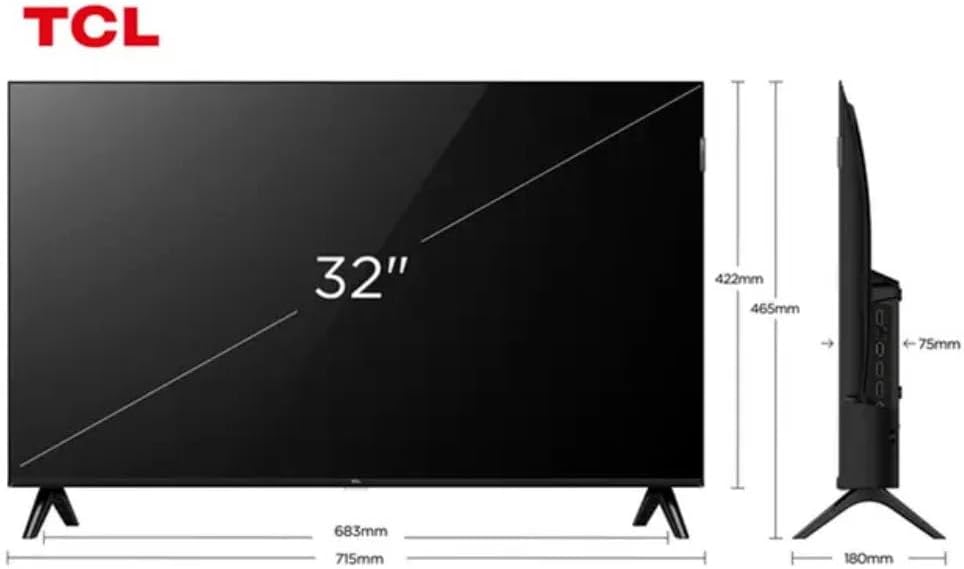
Figure 3: TV Dimensions. This image provides a detailed diagram of the TCL 32S5K Smart TV's physical dimensions, including screen size (32 inches), width (715mm), height (422mm without stand, 465mm with stand), and depth (75mm).
| Funkcja | Opis |
|---|---|
| Nazwa modelu | 32S5K |
| Rozmiar ekranu | 32 cali |
| Technologia wyświetlania | QLED |
| Rezolucja | 1080p (Pełna rozdzielczość HD) |
| Częstotliwość odświeżania | 60 Hz |
| Łączność | Bluetooth, Ethernet, HDMI, USB, Wi-Fi |
| Wszystkie porty HDMI | 2 |
| Cechy specjalne | Integrated Speaker, Google TV, Googlecast Integrated, HDR10, Dolby Audio |
| Wymiary produktu (Gł. x Szer. x Wys.) | 7.6P x 71.6L x 42.3A centimeters (approx. 3 x 28.2 x 16.7 inches) |
| Producent | TCL |
| Kraj pochodzenia | Brazylia |
Gwarancja i wsparcie
Informacje o gwarancji
The TCL 32S5K Smart TV comes with a 1-letnia gwarancja producenta. This warranty covers defects in materials and workmanship under normal use. Please retain your proof of purchase for warranty claims. For specific terms and conditions, refer to the warranty card included in your package or visit the official TCL webstrona.
Obsługa klienta
If you require technical assistance, have questions about your product, or need to initiate a warranty claim, please contact TCL customer support. You can typically find contact information on the TCL official webstronie lub w dokumentacji produktu.
Before contacting support, please have your TV model number (32S5K) and serial number ready, along with a detailed description of the issue.


