
Dexnor Samsung Galaxy Tab A9+ Plus 11 inch (SM-X210/X216/X218)
Dexnor Rugged Protective Case for Samsung Galaxy Tab A9+ Plus 11 inch - Instruction Manual
Model: Samsung Galaxy Tab A9+ Plus 11 inch (SM-X210/X216/X218)
Brand: Dexnor
1. Wprowadzenie
This manual provides detailed instructions for the installation, operation, maintenance, and troubleshooting of your Dexnor Rugged Protective Case, specifically designed for the 11-inch Samsung Galaxy Tab A9+ Plus (2023) tablet. This case offers comprehensive protection with a built-in screen protector, 360° rotating hand strap, and a steady kickstand.
Zgodność: This case is exclusively compatible with the 11-inch Samsung Galaxy Tab A9+ (2023) models SM-X210, SM-X216, and SM-X218. It is not compatible with other tablet models or sizes.
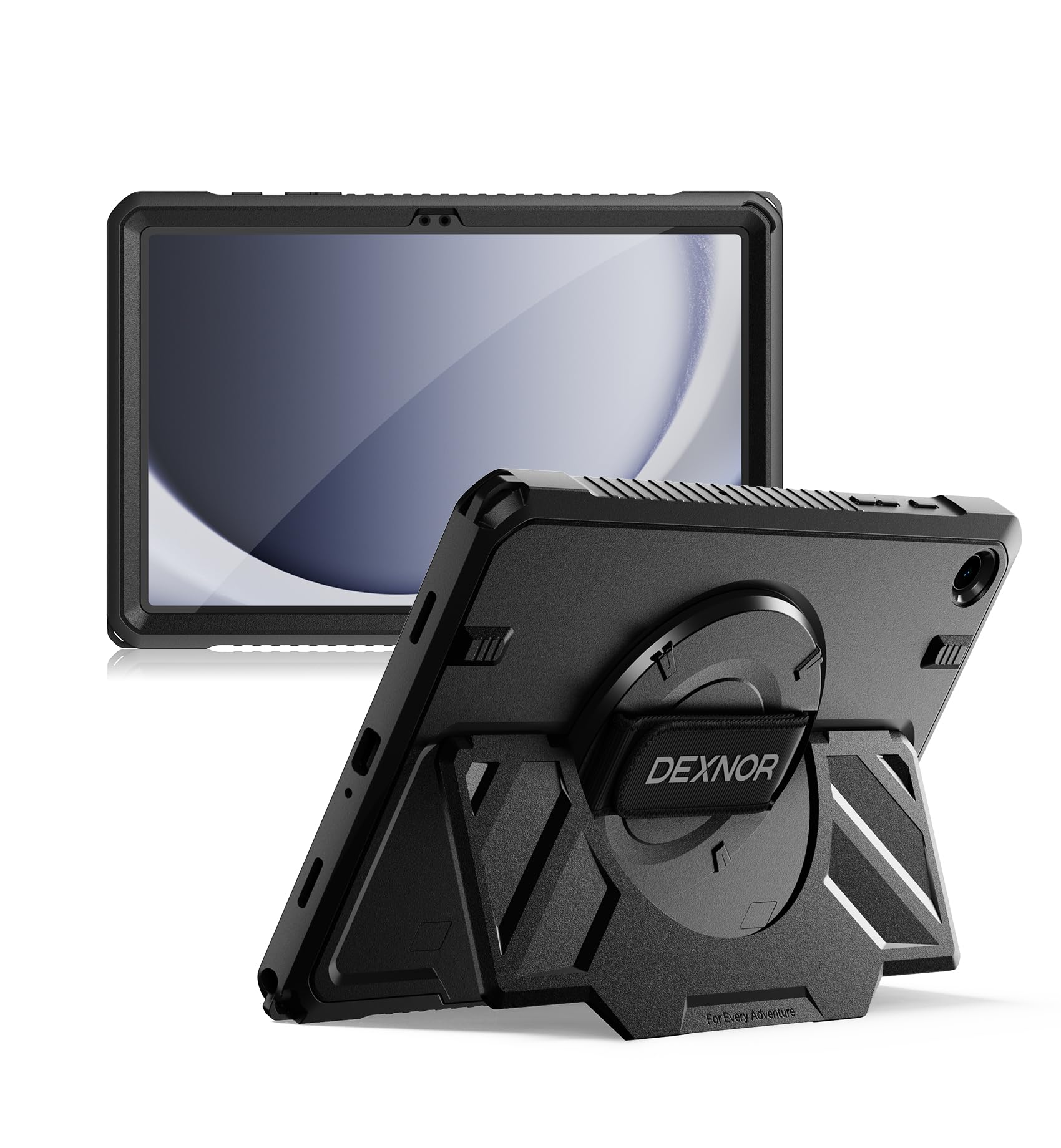
Image: Dexnor Rugged Protective Case for Samsung Galaxy Tab A9+ Plus 11 inch.

Image: Compatibility chart showing the 11-inch Samsung Galaxy Tab A9+ Plus as compatible, and other models as incompatible.
2. Konfiguracja i instalacja
Follow these steps to properly install your Dexnor protective case onto your Samsung Galaxy Tab A9+ Plus 11 inch tablet. A plastic pry tool is included to assist with separating the case components.
2.1 Disassembling the Case
- Locate the small notch on the side of the case.
- Insert the provided plastic pry tool into the notch.
- Carefully work the tool around the edges of the case to separate the front frame (with the built-in screen protector) from the back cover. Apply gentle pressure to avoid damage.
- Once separated, remove any protective films from both sides of the built-in screen protector on the front frame.
2.2 Installing the Tablet
- Place your Samsung Galaxy Tab A9+ Plus 11 inch tablet into the front frame, ensuring all edges align correctly with the frame's cutouts for buttons, ports, and camera.
- Once the tablet is securely seated in the front frame, align the front frame with the back cover.
- Press firmly along all edges of the case until you hear a click, indicating that the front frame and back cover are securely snapped together. Ensure there are no gaps.
2.3 Przewodnik wideo po instalacji
Aby zapoznać się z wizualnym przewodnikiem dotyczącym procesu instalacji, obejrzyj oficjalny film poniżej:
Video: Official Dexnor installation guide for the Tab A9+ Plus 11 inch case. This video demonstrates how to properly disassemble the case, insert the tablet, and reassemble the case for a secure fit.
3. Instrukcja obsługi
3.1 Using the 360° Rotating Hand Strap
The integrated 360° rotating hand strap provides a secure and comfortable grip for one-handed use. This feature is ideal for browsing, presenting, or working on the go.
- Adjust the strap to fit your hand comfortably. The strap is located on the back of the case.
- Slide your hand through the strap to secure your grip.
- The central mechanism allows the tablet to rotate 360 degrees, enabling easy switching between portrait and landscape orientations without removing your hand.

Image: A hand holding the tablet securely using the 360-degree rotating hand strap on the back of the case.
3.2 Utilizing the Ultra-Steady Kickstand
The robust kickstand allows for hands-free viewing and typing in various environments. It is designed for stability on diverse surfaces.
- Locate the foldable kickstand on the back of the case.
- Delikatnie pociągnij podpórkę na zewnątrz, aż zablokuje się w pozycji otwartej.
- Place the tablet on a flat surface. The kickstand supports both horizontal and vertical viewkąty.
- To close, push the kickstand back into its recessed position until it lies flush with the case.

Image: A tablet case with its kickstand deployed, resting on a person's lap for hands-free viewing.

Image: The tablet case with its kickstand supporting the tablet on a wooden table.
4. Konserwacja
Proper care will extend the life and effectiveness of your Dexnor protective case.
- Czyszczenie: Użyj miękkiego, damp cloth to wipe down the exterior of the case. For stubborn dirt, a mild soap solution can be used. Avoid harsh chemicals or abrasive cleaners, as these can damage the material and finish.
- Screen Protector Care: The built-in screen protector can be cleaned with a microfiber cloth. If necessary, use a screen cleaner solution designed for electronics. Avoid touching the inside surface of the screen protector to prevent smudges or dust accumulation.
- Kontrola: Periodically inspect the case for any signs of wear, cracks, or damage, especially around the edges and corners. If significant damage is present, consider replacing the case to ensure continued protection for your tablet.
5. Rozwiązywanie Problemów
Here are solutions to common issues you might encounter with your Dexnor case.
- Difficulty Installing/Removing the Case: The case is designed for a snug fit to provide maximum protection. Use the provided plastic pry tool to carefully separate the front and back components. For installation, ensure the tablet is perfectly aligned before pressing the two halves together. Do not force the case, as this may cause damage.
- Screen Protector Issues (Scratches, Reflectivity): The built-in screen protector is designed for basic protection. If you experience excessive reflectivity or find it scratches easily, you may consider using a separate tempered glass screen protector directly on your tablet and carefully removing the built-in plastic screen protector from the case's front frame.
- Przyciski nie odpowiadają: Ensure the tablet is correctly seated within the case and that the case's button covers align perfectly with the tablet's physical buttons. Re-seat the tablet if necessary.
- Ports Not Accessible: Verify that the case is fully closed and that the port covers are properly aligned. If using third-party accessories (e.g., magnetic USB connectors), some may be too bulky to fit with the case on.
6. Specyfikacje
| Funkcja | Szczegół |
|---|---|
| Marka | Dexnor |
| Kompatybilne urządzenia | Samsung Galaxy Tab A9+ Plus 11 inch (SM-X210/X216/X218) |
| Kolor | Czarny |
| Współczynnik kształtu | Etui zderzakowe |
| Typ powłoki | Hard Case with Built-in Screen Protector |
| Tworzywo | Poliwęglan, poliuretan termoplastyczny (TPU) |
| Dodatkowe funkcje | 360° Rotating Hand Strap, Ultra-Steady Kickstand, Military-Grade Protection |
| Waga przedmiotu | 0.55 kilograma |
7. Gwarancja i wsparcie
Dexnor products typically come with a 1-year warranty. For specific warranty details and customer support, please refer to the documentation included with your product or visit the official Dexnor brand store.
Wsparcie online: Dodatkowe informacje o produkcie i pomocy technicznej można znaleźć na stronie Dexnor Brand Store on Amazon.
Kontakt: For any inquiries or assistance, please contact Dexnor customer service through their official channels.
Powiązane dokumenty - Samsung Galaxy Tab A9+ Plus 11 inch (SM-X210/X216/X218)
 |
Promocja tabletu Samsung Galaxy Tab: Bundelvoordeel i Actievoorwaarden Promocja na Samsung Galaxy Tab obejmuje aż 30% rabatu na wybrane modele. Lees de actievoorwaarden, deelnamecriteria en meer. |
 |
Samsung Galaxy Tab A9 Brugervejledning: Kombinuj i kupuj na tablecie din Pełne wsparcie dla tabletów Samsung Galaxy Tab A9 (modele SM-X130, SM-X135F, SM-X110, SM-X115, SM-X210, SM-X210R, SM-X216B, SM-X216R). Lær om opsætning, funktioner, indstillinger i fejlfinding. |
 |
Uchwyt Samsung Galaxy Tab dla SM-X110, SM-X115, SM-X130, SM-X135F, SM-X210, SM-X210R, SM-X216B, SM-X216R Utforska funktionerna och inställningarna för din Samsung Galaxy Tab surfplatta med denna omfattande användarhandbok. Lär dig allt från grundläggande användning till avancerade inställningar för modellerna SM-X110, SM-X115, SM-X130, SM-X135F, SM-X210, SM-X210R, SM-X216B och SM-X216R. |
 |
Samsung Galaxy Tab A9+ and A9+ 5G User Guide: Setup, Features, and Apps Comprehensive user guide for the Samsung Galaxy Tab A9+ and Galaxy Tab A9+ 5G (models X210, X218). Learn about device setup, features, camera, apps, settings, and troubleshooting. Includes information on Samsung Care+. |
 |
Korisnički priručnik: Seria Samsung Galaxy Tab A9 Detaljan korisnički priručnik dla Samsung Galaxy Tab A9 seriju (uključujući modele SM-X130, SM-X135F, SM-X110, SM-X115, SM-X210, SM-X210R, SM-X216B, SM-X216R) koji pokriva početno postavljanje, značajke, postavke mam problem. |
 |
Samsung Galaxy Tab A9+ and A9+ 5G User Guide Comprehensive user guide for the Samsung Galaxy Tab A9+ and Galaxy Tab A9+ 5G, covering setup, features, apps, settings, and troubleshooting. Learn how to maximize your tablet's capabilities. |
Ask a question about this manual
Ask about setup, troubleshooting, compatibility, parts, safety, or missing instructions. Manuals+ will review the question and use this page’s manual context to help answer it.