
VOOPEAK TC27-1
VOOPEAK 4G LTE Trail Camera TC27-1 User Manual
Model: TC27-1 | Brand: VOOPEAK
1. Wprowadzenie
This manual provides essential instructions for the setup, operation, and maintenance of your VOOPEAK 4G LTE Trail Camera TC27-1. Please read this guide thoroughly before using the device to ensure optimal performance and longevity.
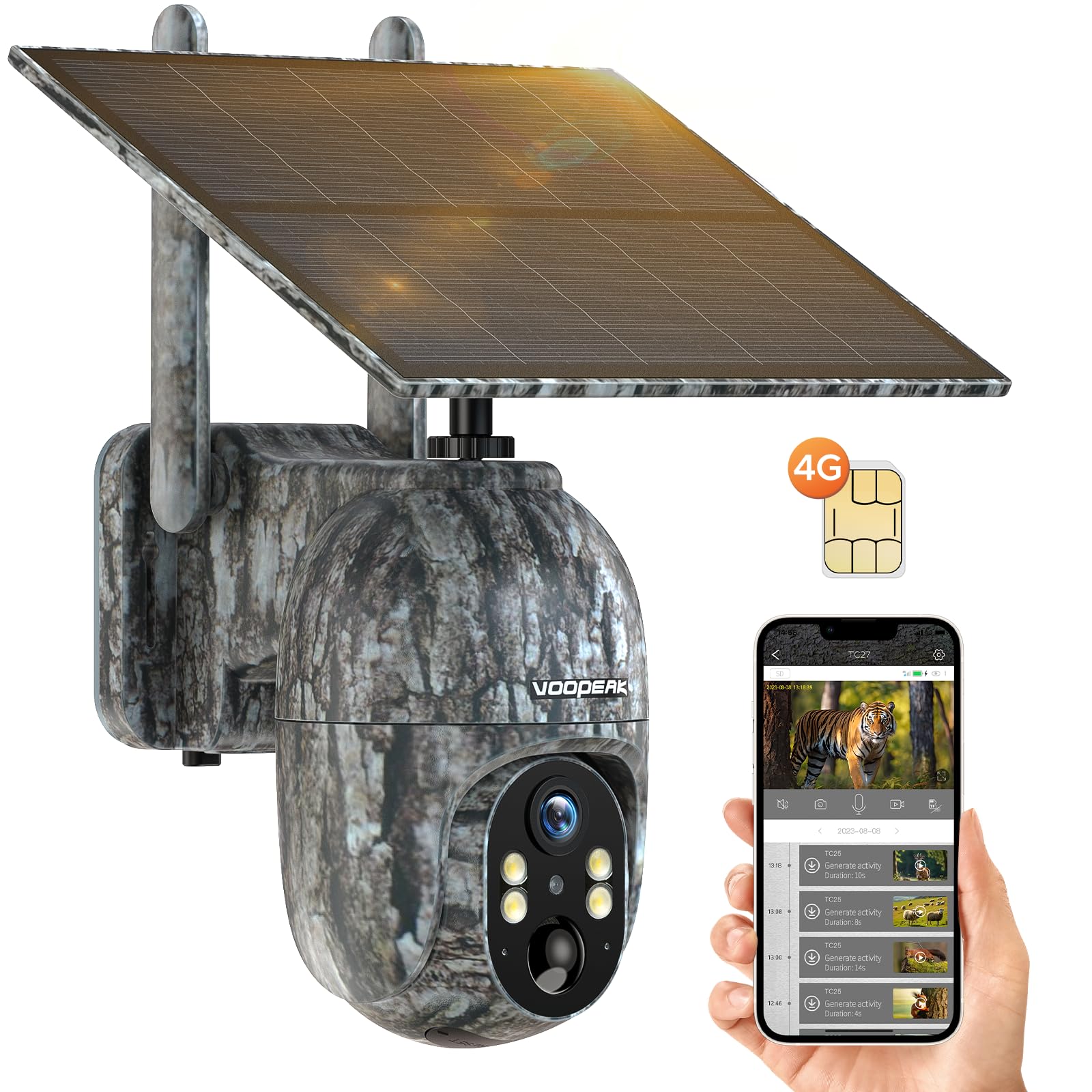
Figure 1: VOOPEAK 4G LTE Trail Camera TC27-1
2. Główne cechy
- Łączność komórkowa 4G LTE: Built-in SIM card compatible with major US carriers (Verizon, T-Mobile, AT&T). No Wi-Fi required. Includes trial data for new users.
- 2.5K HD Video & Color Night Vision: Captures high-definition 2560x1440 video. Offers color night vision when ambient brightness exceeds 0.5 lux, otherwise switches to infrared black and white.
- Solar Powered with Built-in Battery: Equipped with a 6W solar panel and a 10400mAh battery for extended operation, providing up to one year of standby time.
- 360° Pan & 90° Tilt Remote Control: Adjust camera direction (355° pan, 90° tilt) remotely via the UCon app for optimal wildlife monitoring.
- Motion-Activated Notifications & Playback: Receives real-time alerts on your phone. Supports video and image storage on Micro SD card (up to 128GB) or cloud service (30-day free trial).
- Trwała i wodoodporna konstrukcja: Klasa wodoodporności IP66, nadaje się do stosowania w różnych warunkach zewnętrznych.

Figure 2: AI Animal Recognition feature in action.
3. Zawartość opakowania
Upon unboxing, verify that all items listed below are present and in good condition:
- VOOPEAK 4G LTE Trail Camera (TC27-1)
- Panel słoneczny (zintegrowany)
- Mounting Hardware (screws, wall anchors, tree strap)
- Kabel ładujący USB
- Instrukcja obsługi (ten dokument)
- Built-in SIM Card (non-removable, pre-installed)
- (Karta Micro SD nie jest dołączona)
Video 1: Demonstrates how to connect the solar panel to the camera.
4. Przewodnik konfiguracji
4.1. Ładowanie początkowe
Before first use, ensure the camera's built-in battery is fully charged. Connect the camera to a power source using the provided USB cable. The solar panel will maintain charge during outdoor use.
4.2. SIM Card Activation & Data Plan
Your camera comes with a built-in, non-removable SIM card. New users receive 100MB trial data for 7 days. To activate and manage your data plan, download the UCon app and follow the in-app instructions. Data plans are required for cellular functionality.

Figure 3: Information regarding the built-in SIM card and data plans.
4.3. Instalacja karty Micro SD (opcjonalnie)
The camera supports a Micro SD card up to 128GB for local storage. Locate the SD card slot, insert the card with the contacts facing down, and gently push until it clicks into place. Ensure the waterproof cover is securely closed after installation.
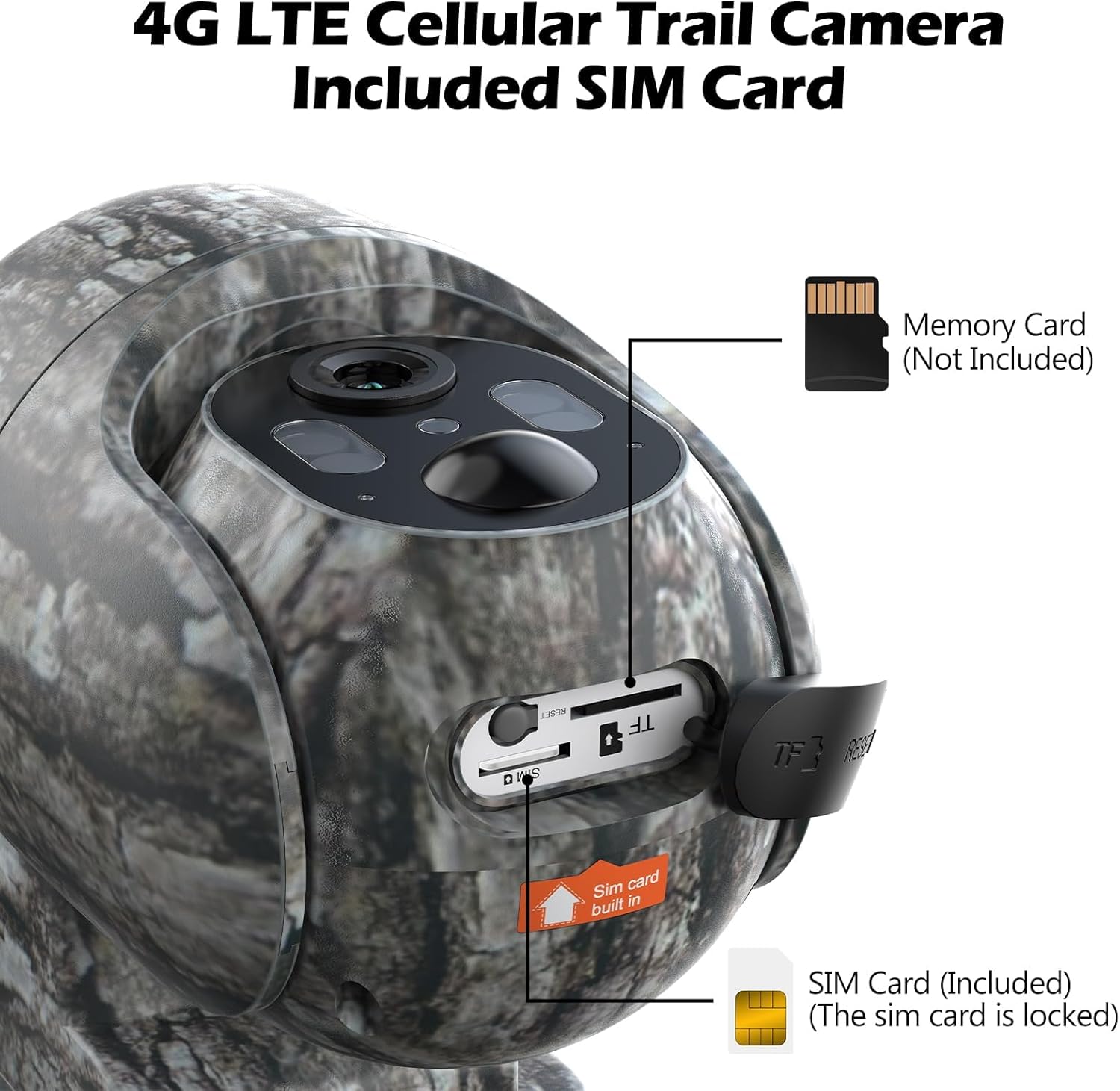
Figure 4: Location of the built-in SIM card and Micro SD card slot.
4.4. Montaż kamery
Choose a suitable location with good cellular signal and direct sunlight exposure for the solar panel. Use the provided mounting hardware (screws, wall anchors, or tree strap) to secure the camera. Ensure the camera is stable and has a clear view pożądanego obszaru monitorowania.

Figure 5: Trail camera installed on a tree, powered by its solar panel.
5. Instrukcja obsługi
5.1. Downloading the UCon App
Szukaj "UCon" in your smartphone's app store (iOS or Android) and download the application. Follow the on-screen instructions to register an account and add your camera device.
5.2. Na żywo View i zdalne sterowanie
Once connected, you can access live video streaming from your camera through the UCon app. Use the pan (355°) and tilt (90°) controls within the app to adjust the camera's viewzdalnie pod kątem.
Video 2: Guide on adjusting the camera's angle using the UCon app.

Figure 6: Live 2.5K video view from the UCon app.

Figure 7: Remote pan and tilt control via the app.
5.3. Motion Detection & Notifications
The camera features motion-activated recording. Ensure app notifications are enabled on your phone to receive real-time alerts when motion is detected. You can review recorded videos and images directly from the app.

Figure 8: Real-time motion notifications on a smartphone.

Figure 9: Motion detection of a squirrel.
5.4. Tryby widzenia nocnego
The camera offers two night vision modes: color night vision (when ambient light > 0.5 lux) and infrared black & white night vision. The camera automatically switches between modes based on lighting conditions.

Rysunek 10: Example of colorful video capture at night.

Figure 11: Day and Color Night Vision comparison.
6. Konserwacja
- Czyszczenie: Regularnie czyść obiektyw aparatu i panel słoneczny miękką, miękką szmatką.amp ściereczka zapewniająca wyraźne obrazy i efektywne ładowanie.
- Sprawdzenie baterii: Monitor battery levels via the UCon app. While solar-powered, extreme weather or prolonged low light may require manual charging.
- Aktualizacje oprogramowania układowego: Check the UCon app periodically for firmware updates to ensure your camera has the latest features and security enhancements.
- Data Plan Monitoring: Keep track of your cellular data usage through the UCon app to avoid service interruptions.
7. Rozwiązywanie Problemów
| Problem | Możliwe rozwiązanie |
|---|---|
| Kamera nie łączy się z siecią 4G. | Check cellular signal strength in the camera's location. Ensure your data plan is active and has sufficient balance via the UCon app. |
| App screen appears black after several days. | This may indicate depleted cellular data. Recharge the SIM card through the UCon app or the website mentioned on the SIM packaging. |
| Brak alertów o wykryciu ruchu. | Verify that motion detection is enabled in the UCon app settings. Ensure app notifications are allowed in your phone's system settings. Check camera placement for obstructions. |
| Słaba jakość obrazu/wideo. | Clean the camera lens. Ensure the camera is securely mounted and not vibrating. Check lighting conditions, especially for night vision. |
| Akumulator się nie ładuje. | Ensure the solar panel is receiving direct sunlight. Check the USB charging cable connection. Verify the solar panel is clean and free of debris. |
8. Specyfikacje produktu
| Funkcja | Szczegół |
|---|---|
| Numer modelu | TC35 (Note: Product title refers to TC27-1, but specifications list TC35. Please verify with manufacturer if discrepancy exists.) |
| Źródło zasilania | Solar Powered (with built-in 10400mAh Lithium Metal battery) |
| Protokół łączności | Sieć komórkowa (4G LTE) |
| Kompatybilni operatorzy | Verizon, T-Mobile, AT&T (tylko w USA) |
| Typ kontrolera | Android (via UCon App, also iOS compatible) |
| Efektywna rozdzielczość wideo | 2.5K (2560x1440) |
| Zakres obrotu/pochylenia | Pan 355 °, pochylenie 90 ° |
| Wizja nocna | Color Night Vision (>0.5 lux), Infrared Black & White Night Vision |
| Składowanie | Micro SD Card (up to 128GB, not included), Cloud Service (30-day free trial) |
| Stopień wodoodporności | IP66 |
| Wymiary produktu | 10 x 2 x 2.7 cala |
| Waga przedmiotu | 2.51 funta |
| UPC | 758918449212 |
9. Dodatkowe media
9.1. Wildlife Footage
Wideo 3: Byłyample footage captured by the VOOPEAK Trail Camera, showing deer in a natural habitat.
Wideo 4: Ponadview of the TC27 Cellular Trail Camera features.
Video 5: Demonstration of the 4G LTE Cellular Trail Camera, highlighting solar power capabilities.
Video 6: Detailed look at the VOOPEAK 4G LTE Cellular Trail Camera.
Video 7: Features of the 4G Trail Camera.
Video 8: Additional features of the 4G Cellular Trail Camera.
10. Gwarancja i wsparcie
VOOPEAK is committed to providing high-quality products and professional service. For any inquiries or support needs:
- Obsługa klienta: Responses typically within 24 hours.
- Zwroty i wymiany: Hassle-free returns and exchanges within 30 days of purchase.
- Wsparcie produktu: Lifetime continuous support for VOOPEAK trail cameras.
Aby uzyskać dalszą pomoc, odwiedź stronę VOOPEAK Store on Amazon lub skontaktuj się bezpośrednio z obsługą klienta.
Ask a question about this manual
Ask about setup, troubleshooting, compatibility, parts, safety, or missing instructions. Manuals+ will review the question and use this page’s manual context to help answer it.