
WESEARY WG2
Instrukcja obsługi przewodowego zestawu słuchawkowego do gier WESEARY WG2
Model: WG2
1. Wprowadzenie
Thank you for choosing the WESEARY WG2 Wired Gaming Headset. This manual provides detailed instructions for setting up, operating, and maintaining your headset to ensure an optimal gaming experience. The WG2 headset is designed for immersive audio and clear communication across multiple gaming platforms.
2. Co znajduje się w pudełku
- WESEARY WG2 Gaming Headset (1 unit)
- 1 to 2 3.5mm Audio Jack Splitter Cable (1 unit)
- Instrukcja obsługi (ten dokument)
3. Koniec produktuview
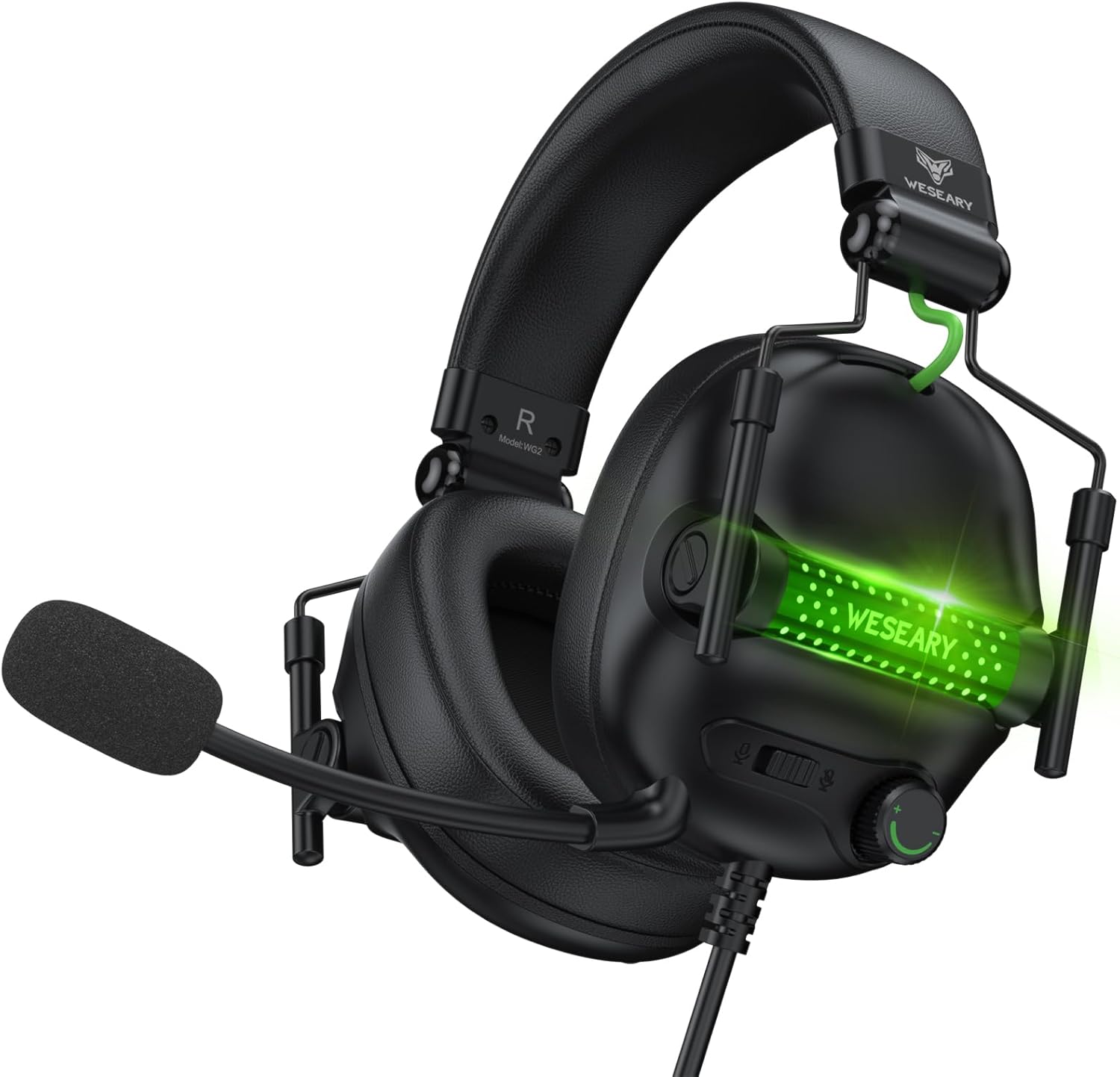
The WESEARY WG2 headset features 50mm drivers for rich stereo sound, an omnidirectional noise-canceling microphone for clear communication, and comfortable memory foam earcups. It is designed for multi-platform compatibility.
3.1 Główne cechy
- Wciągający dźwięk stereo: 50mm high-density neodymium drivers deliver detailed 3D stereo audio.
- Mikrofon z redukcją szumów: 360° rotatable omnidirectional microphone with advanced noise cancellation for clear voice pickup.
- Ergonomiczny komfort: Lightweight design with soft memory foam earcups and an adjustable headband for extended wear.
- Łatwe sterowanie: In-line rotary volume control and one-button microphone mute.
- Trwała konstrukcja: Features a strong braided cable for longevity.
3.2 Elementy zestawu słuchawkowego


4. Instrukcje konfiguracji
The WESEARY WG2 headset connects via a 3.5mm audio jack. Follow these steps to connect your headset to your device.
4.1 Connecting to PC/Laptop/Mac (with separate audio/mic ports)
- Locate the 3.5mm audio output port (headphone icon) and microphone input port (microphone icon) on your computer.
- Connect the 1 to 2 3.5mm Audio Jack Splitter Cable to the headset's 3.5mm jack.
- Plug the green connector of the splitter into your computer's audio output port.
- Plug the pink connector of the splitter into your computer's microphone input port.
- For LED lighting, connect the USB cable to an available USB port on your computer.
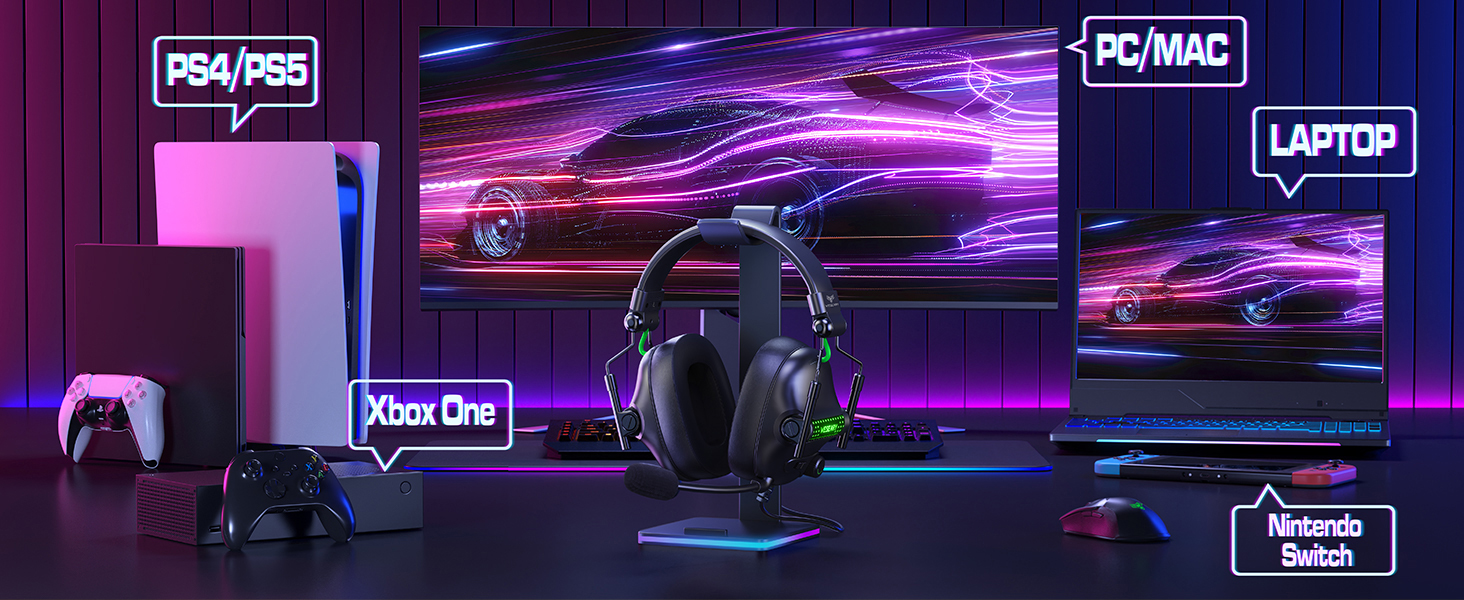
4.2 Connecting to PS4/PS5, Nintendo Switch, Xbox Series X|S, Mobile/Tablet (with single 3.5mm port)
- Plug the headset's 3.5mm jack directly into the 3.5mm audio port on your controller (PS4/PS5, Xbox Series X|S), console (Nintendo Switch), or mobile device.
- For LED lighting, connect the USB cable to an available USB port on your console or a USB power adapter.
- Note for Xbox One (older controllers): A Microsoft adapter (not included) is required for older Xbox One controllers that do not have a built-in 3.5mm jack.
- Uwaga dotycząca zgodności: This headset is not compatible with PS3 (without a 3.5mm adapter) or Xbox 360.

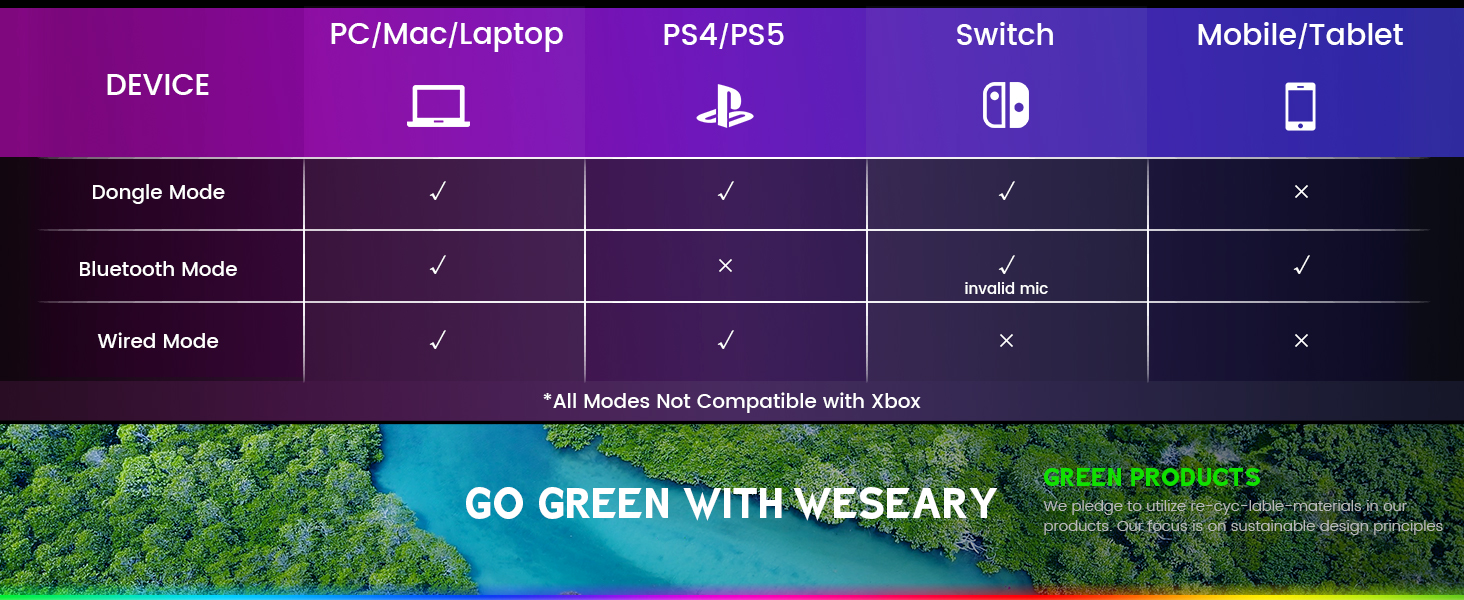
Ważna uwaga: The WESEARY WG2 is a przewodowy gaming headset. Any references to "Dongle Mode" or "Bluetooth Mode" in external diagrams or marketing materials are not applicable to this specific model (WG2) which connects solely via its 3.5mm audio jack and USB for LED power.
5. Instrukcja obsługi
5.1 Regulacja głośności
- Locate the rotary volume control wheel on the left earcup or in-line control.
- Obróć pokrętło w górę, aby zwiększyć głośność.
- Obróć pokrętło w dół, aby zmniejszyć głośność.

5.2 Wyciszanie mikrofonu
- Locate the microphone mute button on the left earcup or in-line control.
- Naciśnij przycisk raz, aby wyciszyć mikrofon.
- Aby włączyć mikrofon, naciśnij przycisk ponownie.
5.3 Regulacja mikrofonu
- The microphone is 360° rotatable. Adjust its position for optimal voice pickup.
- Position the microphone approximately 1-2 inches from your mouth for best clarity.


5.4 Adjusting Headset Fit
- Adjust the headband by sliding the earcups up or down until the headset fits comfortably over your ears.
- Ensure the earcups fully enclose your ears for optimal sound isolation and comfort.
6. Zgodność z wieloma platformami
The WESEARY WG2 Wired Gaming Headset is compatible with a wide range of devices:
- Konsole do gier: PlayStation 5 (PS5), PlayStation 4 (PS4), Xbox Series X|S, Nintendo Switch.
- Komputery: PC, Laptops, Mac.
- Urządzenia mobilne: Mobile phones, Tablets.
Ważne uwagi:
- For older Xbox One controllers without a 3.5mm jack, a Microsoft adapter (not included) is required.
- The headset is not compatible with PS3 or Xbox 360 without additional adapters.
- The USB connection is solely for powering the LED lighting and does not transmit audio.
7. Konserwacja
- Czyszczenie: Do czyszczenia zestawu słuchawkowego używaj miękkiej, suchej ściereczki. Nie używaj silnych środków chemicznych ani materiałów ściernych.
- Składowanie: Przechowuj zestaw słuchawkowy w chłodnym, suchym miejscu, z dala od bezpośredniego światła słonecznego i ekstremalnych temperatur. Składana konstrukcja pozwala na kompaktowe przechowywanie.
- Pielęgnacja kabli: Aby zapobiec uszkodzeniom, należy unikać ostrego zginania i nadmiernego ciągnięcia kabla.
8. Rozwiązywanie Problemów
8.1 Brak dźwięku w słuchawkach
- Sprawdź, czy wtyczka audio 3.5 mm jest dokładnie włożona do portu audio urządzenia.
- Sprawdź pokrętło regulacji głośności na zestawie słuchawkowym i upewnij się, że jest ustawione na maksymalny poziom.
- Verify the audio output settings on your device (console, PC, etc.) are configured to use the headset.
- If using the splitter cable, ensure both green and pink jacks are correctly connected to their respective ports.
8.2 Mikrofon nie działa
- Sprawdź, czy przycisk wyciszenia mikrofonu w zestawie słuchawkowym nie jest wciśnięty.
- Check the microphone input settings on your device (console, PC, etc.) to ensure the headset microphone is selected and its volume is not muted.
- Ensure the 3.5mm audio jack (and pink splitter jack if applicable) is fully inserted.
- Dostosuj położenie mikrofonu bliżej ust.
8.3 Diody LED nie działają
- Ensure the USB cable is securely connected to a powered USB port on your device or a USB power adapter.
- Spróbuj podłączyć kabel USB do innego portu USB.
9. Specyfikacje
| Nazwa modelu | WG2 |
| Technologia łączności | Wired (3.5mm Audio Jack, USB for LED) |
| Typ sterownika audio | Przetwornik dynamiczny (50 mm neodymowy) |
| Impedancja | 32 omy |
| Umieszczenie ucha | Na ucho |
| Kontrola hałasu | Sound Isolation, Noise Cancellation (Microphone) |
| Mikrofon | Omnidirectional, Noise-Canceling, 360° Rotatable |
| Tworzywo | Composite, Plastic (with Memory Foam Earcups) |
| Wymiary produktu | 5.5 x 2.98 x 5.5 cala |
| Waga przedmiotu | 14.8 uncji |
| Kolor | Rock Black |
| Producent | WESEARY |
10. Gwarancja i wsparcie
For warranty information and technical support, please refer to the documentation provided with your purchase or visit the official WESEARY webZachowaj dowód zakupu na wypadek roszczeń gwarancyjnych.
Wsparcie online: Visit the WESEARY Store on Amazon
11. Film o produkcie
Wideo 1: WESEARY Wired Gaming Headset Overview. Ten film przedstawia krótki przegląd wizualnyview of the headset's features and design, demonstrating its immersive sound and clear communication capabilities.
Ask a question about this manual
Ask about setup, troubleshooting, compatibility, parts, safety, or missing instructions. Manuals+ will review the question and use this page’s manual context to help answer it.