
Wstęp
This manual provides detailed instructions for the installation, operation, and maintenance of your Fortdows 12.1-inch IPS Touchscreen Car Stereo. This advanced multimedia system is designed to enhance your driving experience with features such as wireless CarPlay, Android Auto, GPS navigation, and a high-resolution display. Please read this manual thoroughly before installation and use to ensure proper function and safety.
Zgodność pojazdu
The Fortdows 12.1-inch IPS Touchscreen Car Stereo is specifically designed for the following vehicles:
- Ford F150 models: 2015, 2016, 2017, 2018, 2019, 2020
- Ford F250, F350, F450 models: 2017, 2018, 2019, 2020
It is compatible with vehicles equipped with SYNC 1 or SYNC 2 systems and supports both manual and automatic air conditioning versions. This ensures a seamless fit and integration with your factory setup.
Important Note: This car stereo is NOT compatible with vehicles equipped with the original B&O audio system. Please check for a B&O logo on your door speakers to confirm compatibility.

Image: Vehicle compatibility overview, illustrating various Ford F-Series dashboards and indicating compatibility, with a clear warning against B&O audio systems.
Konfiguracja i instalacja
Zawartość opakowania
Przed rozpoczęciem instalacji należy sprawdzić, czy wszystkie komponenty są obecne:
- Main Head Unit (12.1-inch IPS Touchscreen)
- Kabel zasilający
- Oryginalny kabel USB
- Antena GPS
- Kabel RCA
- Dekoder CanBus
- Kable USB (x2)
- Reversing Ling (Video Input Cable)
- Backup Camera (Full HD AHD with night vision)
- Mikrofon zewnętrzny
- Łom (narzędzie instalacyjne)

Image: Visual representation of the complete package contents, including the main unit and all accessory cables and tools.
Wytyczne dotyczące instalacji
Professional installation is highly recommended for this product to ensure correct wiring and integration with your vehicle's electrical system. Incorrect installation can lead to damage to the unit or the vehicle.
- Przygotowanie: Przed rozpoczęciem jakichkolwiek prac elektrycznych należy odłączyć akumulator pojazdu.
- Usuwanie: Carefully remove the factory radio and trim panels using the provided crowbar tool.
- Okablowanie: Connect the power cable, original USB, GPS antenna, RCA cables, and CanBus decoder to the corresponding ports on the new head unit and vehicle harness. Ensure all connections are secure.
- Kamera cofania: Install the backup camera at the rear of the vehicle and route its cable to the head unit, connecting it to the 'Reversing Ling' input.
- Mikrofon zewnętrzny: Podłącz zewnętrzny mikrofon, aby poprawić jakość rozmów.
- Montowanie: Zamontuj stabilnie nowy moduł główny w otworze deski rozdzielczej.
- Testowanie: Reconnect the battery and test all functions before reassembling the trim panels.
Instrukcja obsługi
Wyświetlacz i interfejs
The unit features a stunning 12.1-inch IPS touchscreen with a resolution of 1024 x 768 pixels and 2.5D tempered glass. This provides crisp, vivid, and realistic images from any viewing angle. It supports full 1080P video playback for crystal-clear picture quality.

Image: Visual comparison demonstrating the enhanced clarity and color saturation of the 1024x768P IPS touchscreen.
Funkcja podzielonego ekranu: Utilize the split-screen feature to run two applications simultaneously, such as navigation and music, for seamless multitasking.
CarPlay i Android Auto
Connect your smartphone effortlessly via wireless CarPlay or wired Android Auto for seamless in-car integration. Access navigation, make calls, send messages, and play music using voice commands, ensuring a safer, smarter, and hands-free driving experience.

Image: Display of Apple CarPlay and Android Auto interfaces, illustrating their functionalities for navigation, music, and phone calls.
Nawigacja i łączność
- Nawigacja GPS: Stay on track with integrated GPS supporting both online and offline navigation. Get real-time traffic updates with apps like Google Maps or Waze, or switch to offline maps when outside signal range.
- Łączność WiFi: With WiFi hotspot support, you can download applications, stream music on Spotify, or watch YouTube videos directly from the stereo.
- Bluetooth 5.0: Enjoy hands-free calling and wireless music streaming with BT5.0 connectivity.
Funkcje audio
- Professional DSP Sound: Experience high-quality sound effects with professional Digital Signal Processing (DSP) technology.
- Korektor: Customize your audio experience with 48 equalizer adjustments.
- Radio: Built-in FM/AM/RDS radio tuner.

Image: Professional DSP Sound interface, showing equalizer controls and sound staging for optimized audio performance.
Backup Camera and Steering Wheel Controls
- Kamera cofania: The unit includes a Full HD AHD backup camera with night vision, a 170° wide-angle lens, and IP69 waterproof protection. The display automatically switches to the rear view when reversing, ensuring safe parking. It supports both OEM camera input and the included camera.
- Sterowanie z kierownicy (SWC): Maintain focus on the road by operating the center screen via your vehicle's steering wheel controls. This allows for hands-free operation for a safer and more convenient driving experience.

Image: Steering wheel controls integration, illustrating how the car stereo can be operated safely using existing vehicle controls.
Konserwacja
Aby zapewnić długą żywotność i optymalną pracę radia samochodowego, należy przestrzegać poniższych wskazówek dotyczących konserwacji:
- Czyszczenie: Use a soft, dry cloth to clean the touchscreen and unit exterior. For stubborn smudges, lightly dampPrzetrzyj ściereczkę wodą lub środkiem do czyszczenia ekranów. Unikaj materiałów ściernych i silnych środków chemicznych.
- Aktualizacje oprogramowania: Periodically check for available software updates to ensure you have the latest features and bug fixes. Updates can typically be performed via WiFi.
- Temperatura: Unikaj wystawiania urządzenia na działanie ekstremalnych temperatur, zarówno wysokich, jak i niskich, przez dłuższy czas.
- Znajomości: Upewnij się, że wszystkie kable i połączenia są bezpieczne. Luźne połączenia mogą powodować sporadyczne problemy.
Rozwiązywanie problemów
If you encounter issues with your Fortdows car stereo, please refer to the following common problems and solutions:
- Brak zasilania:
- Check all power connections and ensure they are securely plugged in.
- Sprawdź, czy bezpiecznik pojazdu odpowiadający za radioodbiornik nie jest przepalony.
- Sprawdź, czy akumulator pojazdu jest prawidłowo podłączony i naładowany.
- Brak dźwięku:
- Sprawdź połączenia przewodów głośnikowych.
- Sprawdź, czy głośność nie jest wyciszona lub ustawiona na bardzo niskim poziomie.
- Verify audio settings in the system menu (e.g., equalizer, balance, fader).
- Confirm compatibility: The unit is not compatible with original B&O audio systems.
- GPS nie działa / jest niedokładny:
- Upewnij się, że antena GPS jest prawidłowo zainstalowana i ma zapewnioną przejrzystość. view of the sky (e.g., mounted on the dashboard).
- Sprawdź ustawienia GPS w menu systemowym.
- W razie konieczności zaktualizuj dane mapy.
- Problemy z połączeniem CarPlay / Android Auto:
- For wireless connection, ensure Bluetooth and WiFi are enabled on your phone and the stereo.
- For wired connection, try a different USB cable. Ensure the cable is a high-quality data cable, not just for charging.
- Uruchom ponownie telefon i radio samochodowe.
- Kamera cofania nie jest wyświetlana:
- Check the 'Reversing Ling' video input cable connection at both the camera and the head unit.
- Upewnij się, że kamera jest zasilana.
- Sprawdź, czy pojazd jest włączony wsteczny bieg.
- Brak reakcji ekranu dotykowego:
- Perform a system reset (refer to the system settings for reset options).
- Upewnij się, że ekran jest czysty i wolny od zanieczyszczeń.
Jeśli wykonanie tych czynności nie rozwiąże problemu, skontaktuj się z działem obsługi klienta, aby uzyskać dalszą pomoc.
Specyfikacja produktu
| Marka | Fortdows |
| Rozmiar ekranu | 12.1 cali |
| Typ wyświetlacza | IPS LCD Capacitive Touchscreen |
| Rezolucja | 1024 x 768 pikseli |
| System operacyjny | Android |
| Edytor | 8-rdzeniowy |
| BARAN | 4 GB |
| Pamięć wewnętrzna | 64 GB |
| Technologia łączności | Bluetooth 5.0, USB, 5G WiFi |
| Cechy specjalne | Wireless/Wired CarPlay, Android Auto, Mirroring, 1080P Backup Camera, Professional DSP, SWC Support, GPS Navigation (Online/Offline), FM/AM/RDS Radio, 48 EQ Adjustments, Split-Screen Function |
| Kompatybilne urządzenia | Smartfon |
| Metoda kontroli | Dotykać |
| Obsługiwany system nawigacji satelitarnej | GPS |
| UPC | 754148691506 |
| ASIN | B0FP82W8P6 |
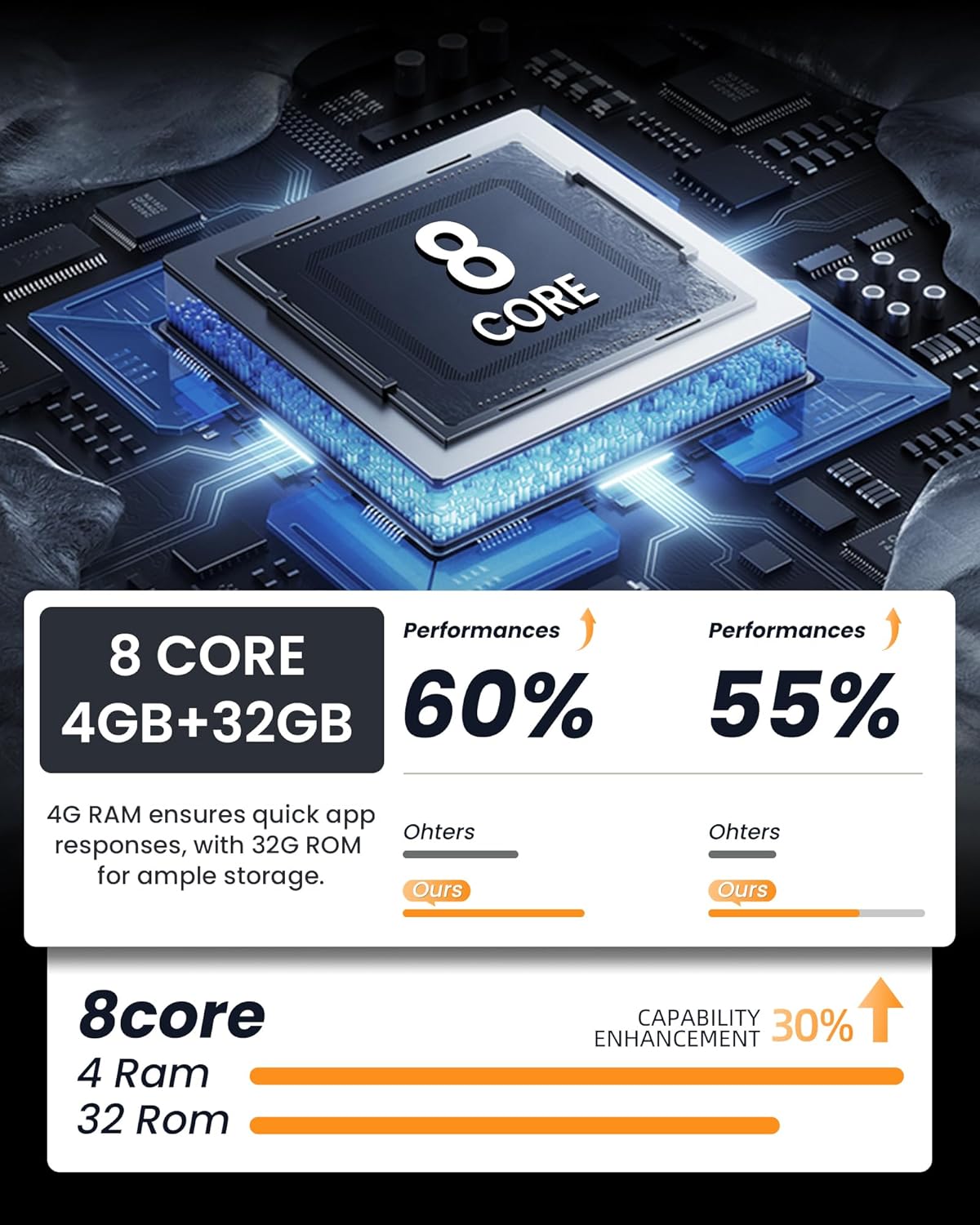
Image: Performance comparison highlighting the 8-core processor with 4GB RAM and its capability enhancement.
Informacje o gwarancji
Specific warranty details are not provided in the product description. Please refer to the product packaging or contact Fortdows customer support for information regarding warranty coverage and terms.
Obsługa klienta
Fortdows is committed to providing reliable after-sales support. Our professional technical support team is available to assist you with any installation or usage questions you may have. Enjoy worry-free service with prompt and friendly support whenever you need it.
For technical assistance or inquiries, please refer to the contact information provided on the product packaging or the official Fortdows webstrona.