
1. Koniec produktuview
The STUDIOFINIX In-Wall Audio Control Amplifier Receiver Wall Plate is designed to integrate seamlessly into your home or office audio system. This 4-channel amplifier provides versatile audio input options and Bluetooth wireless streaming, allowing for flexible control of your sound environment.
Główne cechy:
- Wyjście 4-kanałowe: Supports up to two pairs of speakers.
- Łączność Bluetooth 5.0: Wireless audio streaming from compatible devices with a range of up to 30 feet (10 meters).
- Wiele wejść audio: Includes front 3.5mm AUX jack, rear line-level pigtail leads, USB port for flash drives, and a 1/4" microphone input.
- Zintegrowane sterowanie: Master volume knob with power ON/OFF function, and input selection switch.
- Kompaktowa konstrukcja: All-in-one unit designed for in-wall installation.
2. Informacje dotyczące bezpieczeństwa
Please read and understand all safety instructions before installing and operating this device. Retain this manual for future reference.
- Bezpieczeństwo elektryczne: Ensure power is disconnected before installation or servicing. All wiring should be performed by a qualified professional if you are unsure.
- Wentylacja: Nie zasłaniaj otworów wentylacyjnych. Zapewnij odpowiedni przepływ powietrza wokół urządzenia.
- Wilgoć: Nie wystawiaj urządzenia na działanie wody ani nadmiernej wilgoci.
- Temperatura: Avoid extreme temperatures. Operate the device within recommended environmental conditions.
- Połączenie głośnika: Always match positive (+) and negative (-) terminals correctly to prevent damage to the ampfiltr i głośniki.
3. Co jest zawarte
Sprawdź, czy w opakowaniu znajdują się wszystkie komponenty:
- 1 x In-Wall Audio Control Amplifier Receiver Wall Plate
- 1 x zasilacz sieciowy
- 2 x śruby montażowe
- 1 x Instrukcja obsługi
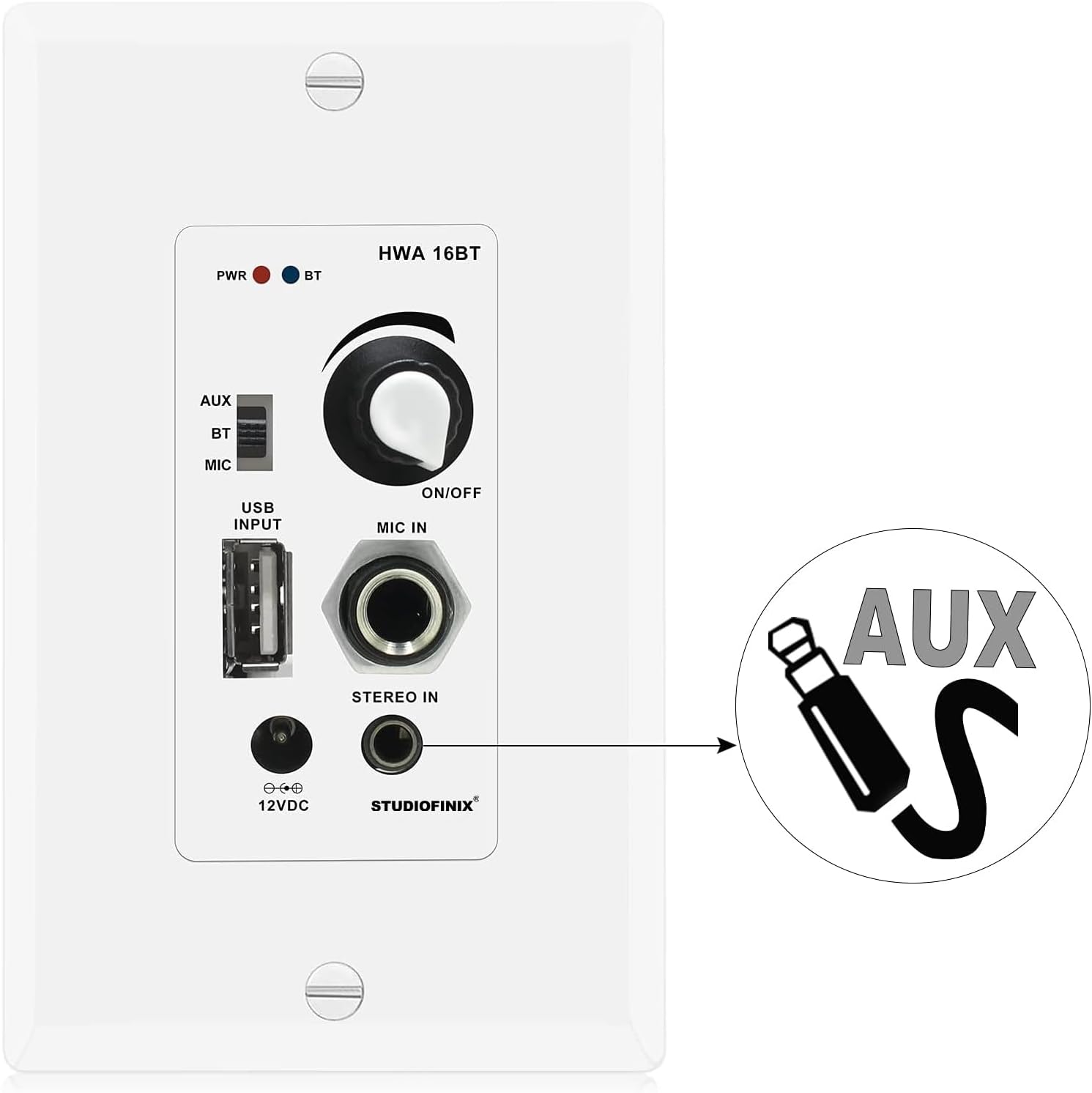
Image: Package contents showing the in-wall amplifier, power supply, screws, and user manual.
4. Konfiguracja i instalacja
This section outlines the steps for installing and connecting your in-wall ampliyfikator.
4.1 Podłączenie głośników
Ten amplifier supports up to two pairs of speakers (4 channels). Ensure correct polarity when connecting speaker wires.
- Zidentyfikuj zaciski dodatnie (+) i ujemne (-) głośników.
- Connect the speaker wires from your speakers to the corresponding terminals on the amplifier's rear terminal block. Match positive to positive (red) and negative to negative (black).
- Upewnij się, że wszystkie połączenia są solidne, aby zapobiec zwarciom.

Image: Speaker wiring diagram for the 4-channel in-wall amplifier, showing connections for four speakers.
4.2 Połączenie zasilania
Connect the included AC power adapter to the DC 12V input on the amplifier. The power adapter can be connected via the front access port or the rear board pigtail leads.
4.3 In-Wall Mounting
Ten amplifier is designed to fit into a standard single-gang wall box. Secure the unit using the provided mounting screws.
5. Instrukcja obsługi
Familiarize yourself with the controls and functions of your STUDIOFINIX in-wall ampliyfikator.

Image: Front panel layout of the 4-channel in-wall amplifier, detailing each control and port.
5.1 Power ON/OFF and Master Volume
The large knob on the front panel controls both power and master volume. Rotate clockwise to turn the unit ON and increase volume. Rotate counter-clockwise to decrease volume and turn the unit OFF.
5.2 Wybór wejścia
Use the slide switch located on the left side of the front panel to select your desired audio source:
- AUX: For connecting external devices via the 3.5mm AUX input.
- BT: For Bluetooth wireless audio streaming.
- MIKROFON: Do wejścia mikrofonowego.
5.3 parowanie Bluetooth
- Set the input selection switch to BT. The Bluetooth Signal LED will blink, indicating pairing mode.
- Na swoim urządzeniu mobilnym (smartfonie, tablecie itp.) włącz Bluetooth i wyszukaj dostępne urządzenia.
- Select "STUDIOFINIX" from the list of devices.
- Once paired, the Bluetooth Signal LED will illuminate steadily. You can now stream audio wirelessly.
5.4 Odtwarzanie USB
Włóż dysk flash USB zawierający dźwięk w formacie MP3 files into the USB port. The unit will automatically detect and play audio from the drive. The USB port also provides 5V/1A for charging devices.

Image: USB port on the amplifier, used for MP3 flash drive playback or device charging.
5.5 Wejście AUX
Connect an external audio source (e.g., smartphone, media player) to the 3.5mm AUX input jack using a standard audio cable. Set the input selection switch to AUX.

Image: 3.5mm AUX input jack for connecting external audio devices.
5.6 wejście mikrofonowe
Connect a dynamic microphone to the 1/4" MIC IN jack. Set the input selection switch to MIKROFON for microphone use.
6. Konserwacja
To ensure the longevity and optimal performance of your STUDIOFINIX in-wall amplifier, postępuj zgodnie z poniższymi wskazówkami dotyczącymi konserwacji:
- Czyszczenie: Use a soft, dry cloth to clean the surface of the unit. Do not use liquid cleaners or abrasive chemicals.
- Wentylacja: Okresowo sprawdzaj, czy otwory wentylacyjne są wolne od kurzu i zanieczyszczeń.
- Znajomości: Ensure all cable connections remain secure. Loose connections can affect audio quality.
7. Rozwiązywanie Problemów
If you encounter issues with your in-wall amplifier, zapoznaj się z poniższymi typowymi problemami i rozwiązaniami:
- Brak zasilania:
- Ensure the AC power adapter is securely connected to both the ampgniazdko elektryczne i działające gniazdko elektryczne.
- Verify the master volume knob is turned ON.
- Brak dźwięku:
- Sprawdź, czy przewody głośnikowe są prawidłowo podłączone i mają prawidłową biegunowość.
- Confirm the correct input source (AUX, BT, MIC) is selected via the slide switch.
- Dostosuj głośność główną.
- If using Bluetooth, ensure the device is paired and playing audio.
- If using AUX, ensure the cable is fully inserted and the external device's volume is up.
- Rozłączenie Bluetooth/Nie można sparować:
- Zapewnij amplifier's input is set to BT.
- Przesuń urządzenie Bluetooth bliżej amplifier (within 30 feet/10 meters).
- Wyłącz i włącz ponownie Bluetooth w swoim urządzeniu, a następnie spróbuj sparować ponownie.
- Jeśli urządzenie zostało już wcześniej sparowane, spróbuj zapomnieć je w telefonie i sparować je ponownie.
- Zniekształcony dźwięk:
- Zmniejsz głośność w obu urządzeniach amplifier i źródło dźwięku.
- Check speaker impedance compatibility (minimum 4 Ohm).
- Ensure speaker wires are not frayed or touching each other.
8. Specyfikacje
Technical specifications for the STUDIOFINIX In-Wall Audio Control Amplifier Receiver Wall Plate:
| Numer modelu | ST-HWA16BT-4CH-CA |
| Moc wyjściowa | 100 Watt Peak, 40 Watt RMS x 4 Ch. @ 4 Ohm |
| Wersja Bluetooth | 5.0 |
| Zasięg bezprzewodowej | 30 stóp (10 metrów) |
| Typ wejścia mikrofonowego | Dynamiczny |
| Moc AmpTyp lifier | Klasa stereofoniczna D |
| Minimalna rezystancja obciążenia | 4 omy |
| Całkowite zniekształcenia harmoniczne (THD) | 0.03% (8 Ohm, 1KHz) |
| Pobór mocy | 12 V 3Amps |
| Zasilacz | DC 100-240V, 50/60Hz (12V DC Adapter) |
| Tworzywo | Plastikowy |
| Kolor | Biały |
| Waga przedmiotu | 9.6 uncji |
| Typ instalacji | Wkręcane |

Image: Technical specifications of the in-wall Bluetooth ampliyfikator.
9. Gwarancja i wsparcie
For warranty information or technical support, please contact STUDIOFINIX directly through their official webOdwiedź witrynę lub sklep, w którym zakupiono produkt. Zachowaj paragon jako dowód zakupu.