
1. Wprowadzenie
Thank you for choosing the DazzlingStage 60W 9LED RGBW Stage Wall Wash Bar Light. This manual provides essential information for the safe and effective operation of your lighting fixture. Please read it thoroughly before installation and use, and retain it for future reference.
To jesttage light bar features 9 high-power RGBW LEDs, offering a wide spectrum of colors and dynamic lighting effects suitable for various events and venues.

Obraz 1.1: Koniecview of the DazzlingStage 60W 9LED RGBW Stage Wall Wash Bar Lights in various colors.
2. Instrukcje bezpieczeństwa
- Bezpieczeństwo elektryczne: Upewnij się, że napięcie zasilaniatage matches the specifications of the fixture. Always disconnect power before cleaning, servicing, or moving the unit.
- Instalacja: Install the fixture in a well-ventilated area, away from heat sources. Ensure secure mounting to prevent accidental falls.
- Działanie: Do not look directly into the light source when the fixture is operating, as it can cause eye damage. Avoid operating the unit in wet or damp warunki.
- Konserwacja: Wszelkie prace serwisowe powierzaj wykwalifikowanemu personelowi. Nie próbuj samodzielnie naprawiać urządzenia.
- Dzieci: Przechowywać urządzenie w miejscu niedostępnym dla dzieci.
3. Zawartość opakowania
Po rozpakowaniu sprawdź, czy wszystkie wymienione poniżej przedmioty znajdują się w przesyłce i są w dobrym stanie:
- DazzlingStage 60W 9LED RGBW Stage Wall Wash Bar Light (x1 per pack)
- Power Cord (x1 per pack)
- Remote Control (x1 per pack)
- Mounting Bracket (x1 per pack)
- Knobs (x2 per pack)
- Black Gaskets (x2 per pack)
- Instruction Manual (x1 per pack)

Ilustracja 3.1: Zawartość opakowania produktu.
4. Składniki produktu
Familiarize yourself with the main components of the light bar:
- Tablica LED: 9 RGBW LEDs for color mixing.
- Panel sterowania: Features a 4-digit LED display and control buttons (MENU, UP, DOWN, ENTER) for mode selection and parameter adjustment.
- Porty DMX IN/OUT: For connecting to a DMX controller or linking multiple units.
- Wejście/wyjście zasilania: For power connection and daisy-chaining power to other units.
- Uchwyt montażowy: Adjustable bracket for floor standing or truss mounting.
- Radiator: Integrated cooling system to maintain optimal operating temperature.

Image 4.1: Key components and dimensions of the light bar.
5. Konfiguracja i instalacja
The DazzlingStage Wall Wash Bar Light offers flexible installation options:
5.1 Montaż wspornika
Attach the included mounting bracket to the light bar using the provided knobs and gaskets. Ensure the bracket is securely fastened.
5.2 Opcje rozmieszczenia
- Podłoga stojąca: The bracket allows the light bar to stand upright on a flat surface. Adjust the angle as needed.
- Montaż kratownicy: Użyj odpowiedniego clamps (not included) to attach the bracket to a lighting truss. Ensure the truss and clamps can support the weight of the fixture.
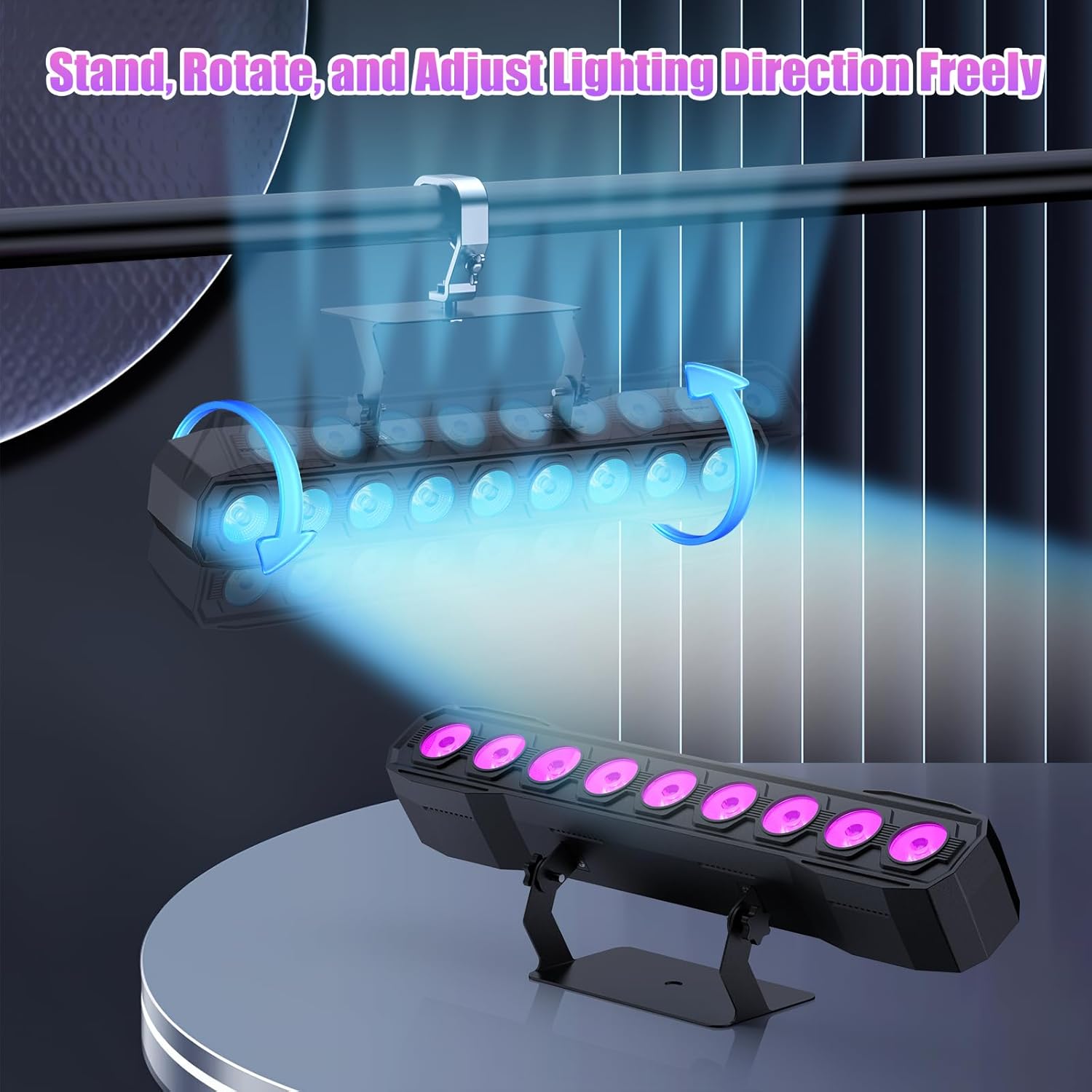
Image 5.1: Illustration of mounting and angle adjustment options.
5.3 Połączenie zasilania
Connect the power cord to the Power IN port on the back of the fixture and then to a suitable power outlet. Multiple units can be daisy-chained using the Power OUT port to simplify wiring for larger setups.
6. Tryby pracy
The DazzlingStage Wall Wash Bar Light supports several control modes:
- Sterowanie DMX512: For professional control via a DMX console.
- Tryb automatyczny: Pre-programmed lighting sequences.
- Sound-Activated Control: Lights react to ambient sound.
- Zdalne sterowanie: Convenient wireless control using the included remote.
- Tryb Master-Slave: Link multiple units where one acts as a master and others as slaves, synchronizing effects.
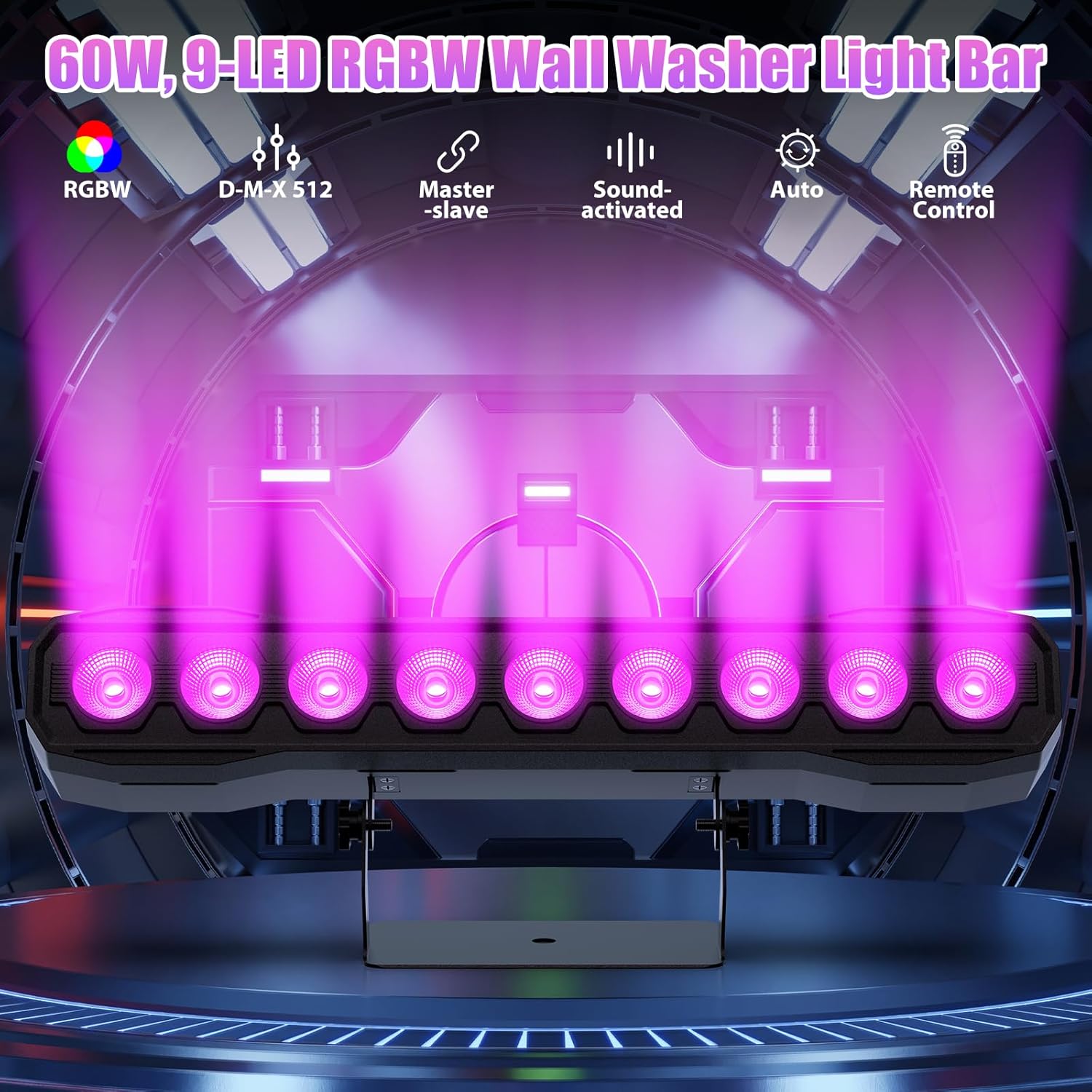
Obraz 6.1: Koniecview dostępnych trybów sterowania.
6.1 Display Panel Operation
Use the buttons on the back of the fixture to navigate the menu and select modes:
- MENU: Przełącza pomiędzy opcjami menu głównego.
- GÓRA DÓŁ: Adjusts values or navigates sub-menus.
- WCHODZIĆ: Potwierdza wybór.
6.2 efektów świetlnych
The fixture supports various dynamic effects:
- Mieszanie kolorów: Over 16.7 million color combinations with 0-100% linear dimming.
- Stroboskop: Efekt migania.
- Skok: Instant color changes.
- Zgasnąć: Płynne przejścia między kolorami.
- Puls: Gradual changing effects.
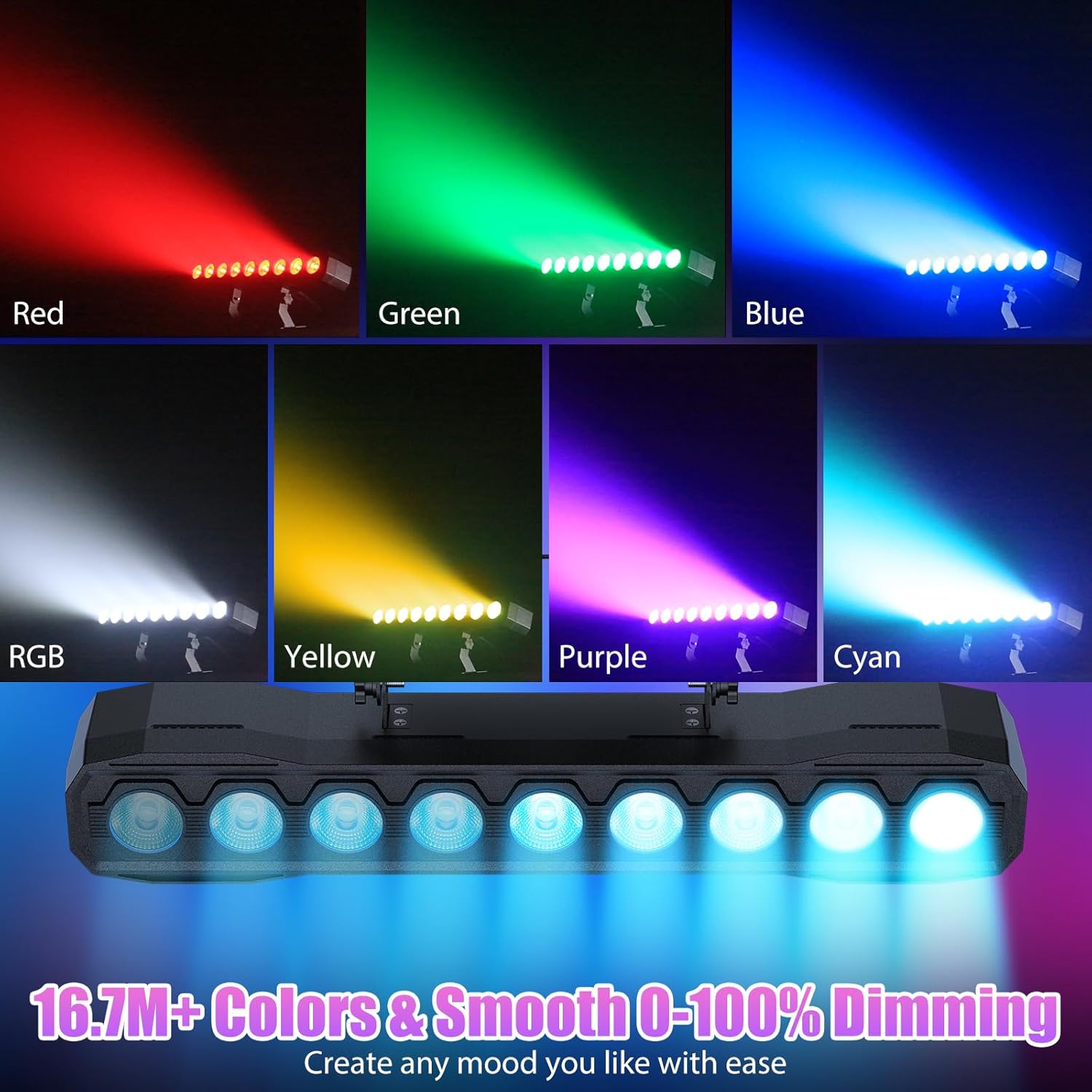
Obraz 6.2: Examples of color mixing and dimming capabilities.

Image 6.3: Visual representation of Strobe, Jump, Fade, and Pulse effects.
7. Funkcje pilota
Dołączony pilot zdalnego sterowania umożliwia wygodny dostęp do różnych funkcji:
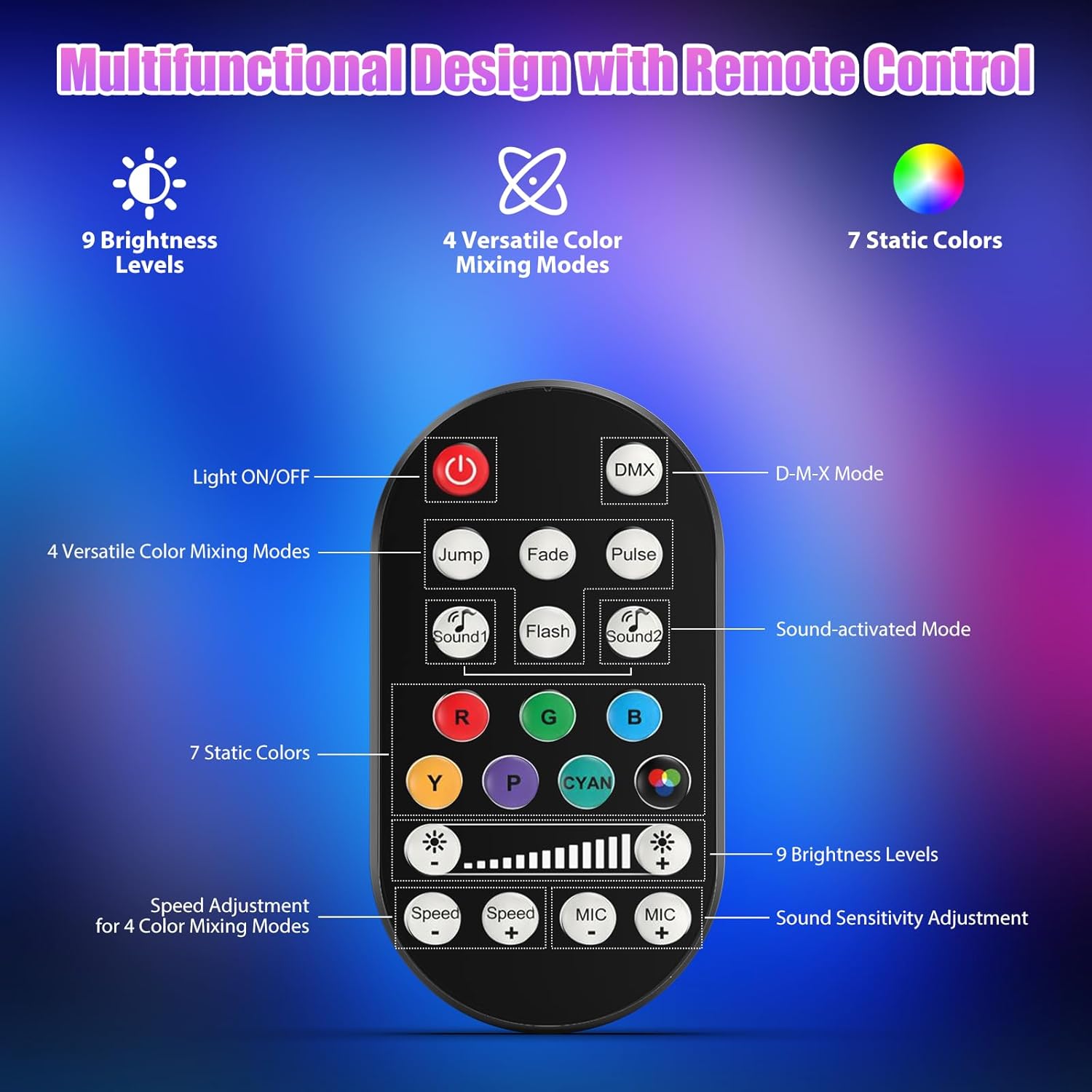
Rysunek 7.1: Układ i funkcje pilota zdalnego sterowania.
- Światło WŁ./WYŁ.: Włącza i wyłącza urządzenie.
- DMX: Activates DMX control mode.
- Jump, Fade, Pulse, Flash: Selects different color mixing modes.
- Sound1, Sound2: Activates sound-activated modes with different sensitivities.
- R, G, B, Y, P, Cyan, White: Selects static colors.
- Poziomy jasności: Adjusts the overall intensity of the light (9 levels).
- Prędkość +/-: Adjusts the speed of dynamic effects.
- MIKROFON +/-: Adjusts the sound sensitivity for sound-activated modes (15 levels).
8. DMX512 Control
For advanced control, connect the fixture to a DMX512 controller. The light bar typically uses 4 or 8 DMX channels. Refer to the display panel for DMX address setting and channel assignments.
8.1 Ustawienie adresu DMX
Use the MENU, UP, DOWN, and ENTER buttons on the fixture's display panel to set the DMX starting address. The display will show 'AXXX' where XXX is the address (e.g., A001).
8.2 DMX Channel Functions (Example - 8 Channel Mode)
| Kanał | Funkcjonować | Zakres wartości | Opis |
|---|---|---|---|
| CH1 | Mistrz ściemniacza | 0-255 | Ogólna jasność (0% do 100%) |
| CH2 | Intensywność czerwieni | 0-255 | Red LED brightness (0% to 100%) |
| CH3 | Intensywność zieleni | 0-255 | Green LED brightness (0% to 100%) |
| CH4 | Intensywność błękitu | 0-255 | Blue LED brightness (0% to 100%) |
| CH5 | Intensywność bieli | 0-255 | White LED brightness (0% to 100%) |
| CH6 | Strobe/Effect | 0-255 | 0-10: No function; 11-255: Strobe speed (slow to fast) |
| CH7 | Program automatyczny | 0-255 | Selects and controls speed of built-in auto programs |
| CH8 | Dźwięk aktywny | 0-255 | Activates sound mode and adjusts sensitivity |
Tabela 8.1: Example DMX Channel Functions (may vary slightly by firmware version).
9. Konserwacja
Regularna konserwacja zapewnia optymalną wydajność i wydłuża żywotność urządzenia.
- Czyszczenie: Periodically clean the lens and housing with a soft, lint-free cloth. Do not use abrasive cleaners or solvents. Ensure the fixture is powered off and cool before cleaning.
- Kontrola: Regularnie sprawdzaj kable zasilające, kable DMX i elementy montażowe pod kątem oznak zużycia lub uszkodzeń. Uszkodzone elementy należy natychmiast wymienić.
- Składowanie: When not in use for extended periods, store the fixture in a dry, dust-free environment.
10. Rozwiązywanie Problemów
Jeśli napotkasz problemy, zapoznaj się z poniższymi typowymi problemami i rozwiązaniami:
| Problem | Możliwa przyczyna | Rozwiązanie |
|---|---|---|
| Brak zasilania | Power cable disconnected; No power from outlet; Blown fuse | Check power cable connection; Test outlet with another device; Replace fuse if necessary |
| Brak strumienia świetlnego | Dimmer channel at 0%; Incorrect mode selected; DMX signal issue | Increase dimmer level; Select desired operating mode; Check DMX cable and address settings |
| Incorrect colors/effects | Incorrect DMX channel values; Remote control interference | Verify DMX channel settings; Ensure remote is pointed directly at the sensor; Check for other IR interference |
| Tryb aktywowany dźwiękiem nie działa | Microphone sensitivity too low; No sound input | Increase MIC sensitivity via remote or display; Ensure sufficient sound is present near the fixture |
| Przegrzanie oprawy | Poor ventilation; Blocked heat sink | Ensure adequate airflow around the unit; Clean any dust or debris from the heat sink fins |
11. Specyfikacje
| Funkcja | Szczegół |
|---|---|
| Marka | DazzlingStage |
| Numer modelu | ZQ06190 |
| Źródło światła | 9 x 60W diod LED RGBW |
| Mieszanie kolorów | RGBW 4-in-1, 16.7 million colors |
| Ściemnianie | 0-100% liniowe ściemnianie elektroniczne |
| Kąt wiązki | 35° szeroki kąt |
| Tryby sterowania | DMX512, Auto, Sound-Activated, Remote Control, Master-Slave |
| Kanały DMX | 4 or 8 Channels (selectable) |
| Wyświetlacz | 4-cyfrowy wyświetlacz LED |
| Tworzywo | Akrylonitryl-butadien-styren (ABS) |
| Wymiary produktu | 18.1 x 5.5 x 5.1 cala (46 x 14 x 13 cm) |
| Waga przedmiotu | Około 1.98 funta (0.9 kg) |
| Moc wejściowa | Prąd zmienny 100-240 V, 50/60 Hz |
| Producent | Shenzhen Zhuoqiong Technology Co., Ltd. |
12. Gwarancja i wsparcie
DazzlingStage products are designed for reliability and performance. For warranty information, please refer to the terms and conditions provided at the time of purchase or contact your retailer.
If you require technical assistance or have questions not covered in this manual, please contact DazzlingStage customer support through the retailer's platform or the official brand website. Please have your model number (ZQ06190) and purchase details ready when contacting support.