
1. Wprowadzenie
Welcome to the user manual for your MBG line Q85 Compact Voice Recorder. This professional digital voice recorder is designed for discreet and high-quality audio capture, ensuring important conversations, lectures, or personal memos are recorded with exceptional clarity. Its innovative design operates without visible lights or audible sounds, making it ideal for various recording environments. This manual provides essential information on setting up, operating, maintaining, and troubleshooting your device to ensure optimal performance.
2. Koniec produktuview
2.1 Główne cechy
- Dźwięk wysokiej rozdzielczości: Records at 192kbps for clear sound quality.
- Voice Activated Recording (VOS): Automatically starts recording when sound is detected, conserving battery and memory.
- Duża pojemność pamięci: 32GB internal memory, capable of storing up to 380 hours of audio.
- Dłuższa żywotność baterii: Integrated 1750mAh battery provides up to 300 hours of recording autonomy.
- Dyskretny design: No visible lights or sounds during operation.
- Mocowanie magnetyczne: Powerful integrated magnet for versatile and discreet placement.
- Czasamp Funkcjonować: Automatically adds date and time to recordings for easy organization.
- Łatwy File Kierownictwo: Connects directly to computers via USB and supports OTG connection for smartphones (adapter not included).
2.2 Komponenty urządzenia
The MBG line Q85 recorder features a compact design with essential controls and ports.

Figure 1: MBG line Q85 Compact Voice Recorder. The image displays the device's sleek black rectangular form factor, highlighting its compact size and textured surface. A smaller depiction shows the device comfortably held in a hand, emphasizing its portability.
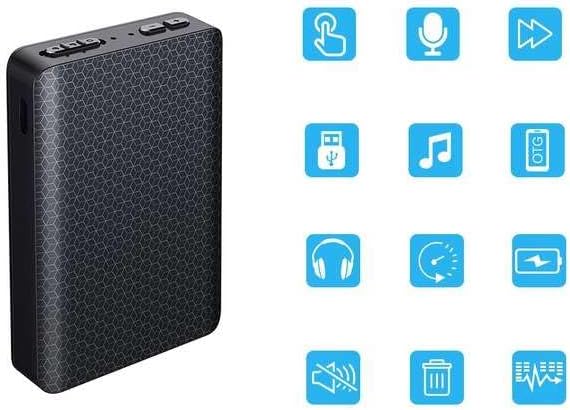
Figure 2: The MBG line Q85 Voice Recorder shown alongside a grid of blue icons representing its various functions. These icons indicate features such as playback, microphone input, track skipping, USB connectivity, music playback, OTG support, headphone output, time setting, battery status, mute function, file deletion, and equalizer settings.
While specific button labels may vary, the device typically includes:
- Przełącznik zasilania/nagrywania: A slide switch to turn the device on/off and initiate/stop recording.
- Port USB-C: For charging and connecting to computers or smartphones.
- Mikrofon: Integrated high-sensitivity microphone.
- Indicator Light (Internal): A small, internal LED that may briefly illuminate during power-on or charging, but remains off during recording for discretion.
3. Konfiguracja
3.1 Pierwsze ładowanie
Before first use, fully charge the device. Connect the MBG line Q85 to a USB power source (e.g., computer USB port, USB wall adapter) using the provided USB-C cable. The charging time is approximately 5 hours.

Figure 3: The MBG line Q85 Voice Recorder is shown connected to a USB wall adapter via a white cable, indicating that the device is currently charging. A blue lightning bolt icon in the upper left corner further signifies the charging status.
3.2 Synchronizacja czasu
Aby zapewnić dokładny czasamps on your recordings, synchronize the device's internal clock with your computer's time. Connect the recorder to your computer. The device will appear as a removable drive. Locate and run the time synchronization utility (often a small executable file or a text file with instructions) found on the device's internal storage. Follow the on-screen prompts to set the correct date and time.
4. Instrukcja obsługi
4.1 Włączanie/wyłączanie zasilania
- Włączanie: Slide the power switch to the 'ON' position. The device may briefly show an internal indicator light before entering standby mode.
- Aby wyłączyć: Slide the power switch to the 'OFF' position. Ensure all recordings are saved before powering off.
4.2 Standard Recording
Aby rozpocząć nagrywanie:
- Upewnij się, że urządzenie jest włączone.
- Slide the record switch to the 'RECORD' position. The device will start recording immediately. No external lights or sounds will indicate recording is in progress.
- To stop recording, slide the record switch back to the 'OFF' or 'SAVE' position. The recording will be saved automatically.
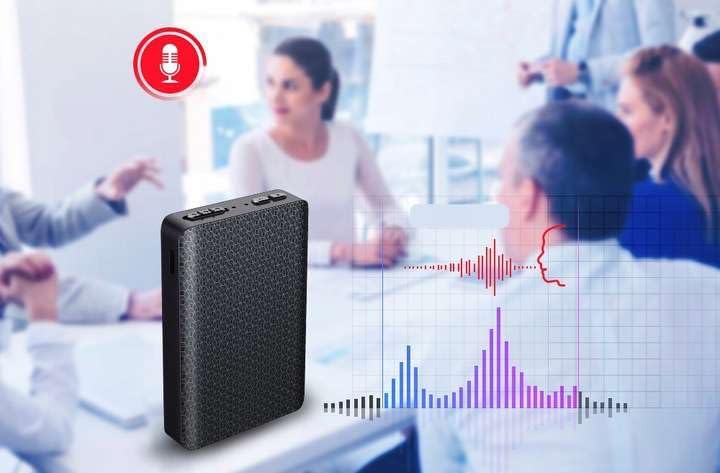
Figure 4: The MBG line Q85 Voice Recorder is depicted on a table in what appears to be a meeting or discussion setting. A red microphone icon with a sound wave graphic overlays the image, symbolizing active audio recording. A visual representation of a sound wave with peaks and troughs extends from the device, illustrating the capture of speech.
4.3 Voice Activated Recording (VOS)
The VOS feature allows the recorder to start recording only when sound is detected, pausing during silence to save memory and battery. Refer to the device's internal instructions (often a text file on the device when connected to a computer) for specific steps to enable or disable VOS mode. Typically, this involves a specific sequence of switch movements or a setting file modyfikacja.
4.4 Odtwarzanie i File Kierownictwo
The MBG line Q85 does not have an integrated speaker for direct playback. Recordings must be accessed via a computer or smartphone.
- Podłączanie do komputera: Connect the recorder to your computer using the USB-C cable. The device will be recognized as a removable drive. Navigate to the 'RECORD' folder to find your audio files (format WAV).
- Connecting to a Smartphone (OTG): For direct access from a smartphone, you will need an OTG adapter (not included). Connect the recorder to your smartphone via the OTG adapter. Your phone's file manager app can then be used to access and play the recordings.

Figure 5: The MBG line Q85 Voice Recorder is shown connected to a smartphone with a USB-C cable. The smartphone's screen displays a file management interface, showing folders labeled 'LOST.DIR', 'MUSIC', and 'RECORD', indicating that the recorder's storage is accessible on the phone.
5. Konserwacja
- Czyszczenie: Do czyszczenia urządzenia należy używać miękkiej, suchej ściereczki. Unikaj stosowania płynnych środków czyszczących i rozpuszczalników.
- Składowanie: Przechowywać urządzenie w chłodnym i suchym miejscu, z dala od bezpośredniego światła słonecznego, ekstremalnych temperatur i wilgoci.
- Pielęgnacja baterii: Aby przedłużyć żywotność baterii, unikaj częstego całkowitego rozładowywania baterii. Regularnie ładuj urządzenie, nawet jeśli nie jest używane przez dłuższy czas.
- Kopia zapasowa danych: Regularly back up important recordings to your computer or cloud storage to prevent data loss.
6. Rozwiązywanie Problemów
- Urządzenie się nie włącza:
Upewnij się, że bateria jest naładowana. Podłącz urządzenie do źródła zasilania i pozwól mu się ładować przez co najmniej 30 minut, zanim spróbujesz je ponownie włączyć. - No Sound Recorded:
Check if the device was in recording mode. Ensure the microphone is not obstructed. Verify that the VOS feature is not set too high, preventing recording of low-level sounds. - Cannot Connect to Computer/Smartphone:
Try a different USB-C cable or USB port. Ensure the device is powered on when connecting. For smartphones, confirm your phone supports OTG functionality and that the OTG adapter is working correctly. - Słaba jakość dźwięku:
Ensure the device is placed in an optimal location, not too far from the sound source and away from excessive background noise. - Akumulator nie ładuje się:
Verify the USB cable and power adapter are functional. Try charging from a different USB port or power source.
7. Specyfikacje
| Funkcja | Specyfikacja |
|---|---|
| Model | Q85 Compact |
| Jakość nagrywania | 192 kbps |
| Recording Autonomy | Do 300 godzin |
| File Rozmiar (w przybliżeniu) | 1.4MB per minute |
| Maximum Capacity (32GB) | Do 380 godzin |
| Format audio | WAV |
| Voice Activation (VOS) | Tak |
| Pamięć wewnętrzna | 32 GB |
| Czasamp | Tak |
| USB Drive Function | Tak |
| Czas ładowania | Do 5 godzin |
| Zasilacz | 5 V (USB) |
| Zasięg mikrofonu | Do 10m |
| Bateria | Zintegrowana bateria 1750 mAh |
| Wymiary | 72 mm (wys.) X 54 mm (szer.) X 12 mm (gł.) |
| Waga | 65 gram |
| Kompatybilne urządzenia | Personal computer, Smartphone |
| Porty USB | 1 (USB typu C) |
| Współczynnik kształtu mikrofonu | Zintegrowany |
8. Gwarancja i wsparcie
The MBG line Q85 Compact Voice Recorder comes with a 1-letnia gwarancja producenta. Zachowaj dowód zakupu na wypadek roszczeń gwarancyjnych.
For technical support, troubleshooting assistance beyond this manual, or warranty inquiries, please contact your retailer or the MBG line customer service directly. Contact information can typically be found on the product packaging or the seller's webstrona.