
Wstęp
The ATK VXE Dragonfly R1 Wireless Gaming Mouse is engineered for high-performance gaming, offering a lightweight design, advanced sensor technology, and versatile connectivity. This manual provides detailed instructions for setting up, operating, and maintaining your R1 gaming mouse to ensure optimal performance.

Obraz: Góra view of the ATK VXE Dragonfly R1 Wireless Gaming Mouse in black, showcasing its ergonomic shape and button layout.
Zawartość opakowania
Sprawdź, czy w przesyłce znajdują się wszystkie elementy:
- ATK VXE Dragonfly R1 Wireless Gaming Mouse
- Kabel USB-C do ładowania/przesyłania danych
- Odbiornik bezprzewodowy 2.4 GHz (klucz USB)
- Instrukcja obsługi (ten dokument)
- Nonstandard Battery (pre-installed)
Organizować coś
1. Ładowanie myszy
Przed pierwszym użyciem zaleca się pełne naładowanie myszy. Podłącz dołączony kabel USB-C do portu ładowania myszy, a drugi koniec do źródła zasilania USB (np. portu USB komputera, zasilacza sieciowego USB).
2. Opcje łączności
The ATK VXE Dragonfly R1 supports multiple connection modes:
- Łączność bezprzewodowa 2.4 GHz: For optimal gaming performance. Insert the 2.4GHz USB receiver into an available USB port on your computer. The mouse should automatically connect.
- Bluetooth: For general use and compatibility with various devices. Activate Bluetooth pairing mode on the mouse (refer to operating instructions for specific button combinations) and select "ATK VXE R1" from your device's Bluetooth settings.
- Przewodowy (USB-C): Connect the mouse directly to your computer using the USB-C cable. This mode also charges the mouse.

Image: Diagram illustrating the Tri-Mode connectivity options: Bluetooth, 2.4GHz wireless, and wired USB-C connection for the ATK VXE Dragonfly R1 mouse.
Instrukcja obsługi
1. Włączanie/wyłączanie zasilania
Locate the power switch on the underside of the mouse. Slide it to the "ON" position to power on and "OFF" to power off.
2. Regulacja DPI
The mouse features adjustable DPI settings. Press the DPI button (usually located on the underside or top of the mouse, depending on the model) to cycle through preset DPI levels. An indicator light may change color to show the current DPI setting.
3. Programowalne klawisze makr
The ATK VXE Dragonfly R1 includes programmable macro keys. To customize these keys, download and install the official ATKGEAR software from the manufacturer's website. The software allows you to assign functions, macros, and adjust other mouse settings.
Główne cechy
- Lightweight Design (48g): The R1 mouse is designed for agility and comfort during extended gaming sessions.
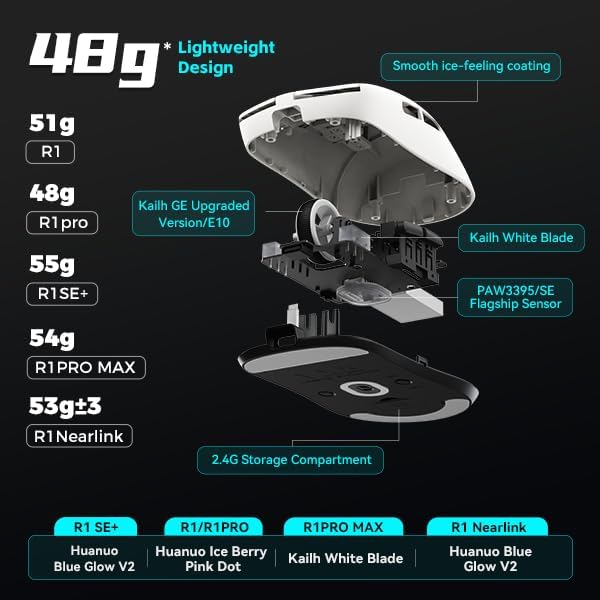
Obraz: Wybuchowy view of the ATK VXE Dragonfly R1 mouse highlighting its lightweight internal components and showing weight comparisons for different R1 series models.
- PAW3395/SE Flagship Sensor: Equipped with a high-end optical sensor for precise tracking and accuracy, essential for competitive gaming.
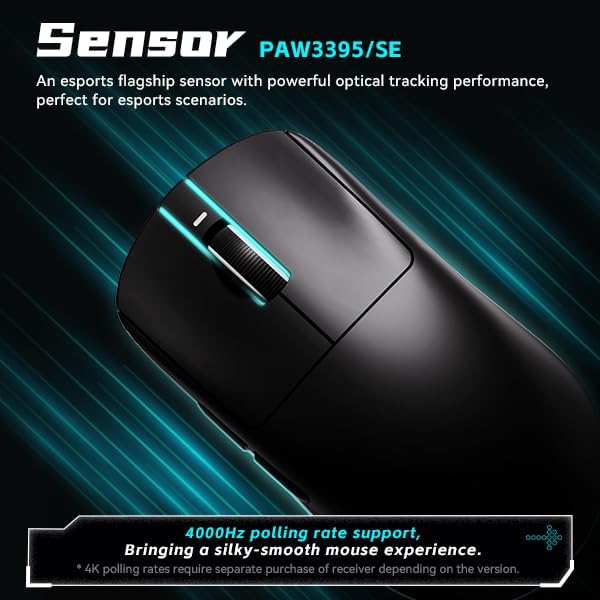
Image: Close-up of the ATK VXE Dragonfly R1 mouse, emphasizing the PAW3395/SE sensor and indicating 4000Hz polling rate support.
- Smart Speed X Transmission Technology: VXE's proprietary wireless technology ensures ultra-low latency and enhanced signal stability, even in environments with interference.

Image: Depiction of the ATK VXE Dragonfly R1 mouse with text highlighting "Smart Speed X" wireless transmission technology for low latency.
- Nordic/BEKEN(compx)/Hisilicon Nearlink MCU: Features a flagship-level chip for powerful performance, low power consumption, and improved interference resistance.

Image: Graphic showing the ATK VXE Dragonfly R1 mouse and its MCU, emphasizing 4K polling rate capability for both office and gaming.
- ATK Micro Switches (Kailh White Blade / Ice Berry Pink Dot): Designed for a consistent click feel and long lifespan.
- Kailh White Blade: 100 Million Click Lifespan, balanced feel.
- Ice Berry Pink Dot: 90 Million Click Lifespan, soft bounce feel.

Image: Detailed illustration comparing Kailh White Blade and Ice Berry Pink Dot micro switches, showing their click lifespan and feel characteristics.
- Smooth Ice-Feeling Coating: A dirt-resistant and easy-to-clean surface that provides a comfortable and grippy feel.

Image: Visual representation of the smooth ice-feeling coating on the ATK VXE Dragonfly R1 mouse, contrasting smooth and matte textures available on different R1 series models.
Konserwacja
- Czyszczenie: Do czyszczenia powierzchni myszy użyj miękkiej, suchej ściereczki. W przypadku uporczywych zabrudzeń, delikatnie przetrzyj powierzchnię.amp cloth with mild soap can be used, ensuring no liquid enters the mouse. The "Ice-Feel" coating is designed to be dirt-resistant and easy to clean.
- Pielęgnacja baterii: To prolong battery life, avoid fully discharging the mouse frequently. Charge the mouse when the battery indicator is low. Store the mouse in a cool, dry place when not in use for extended periods.
- Konserwacja czujnika: Keep the optical sensor on the underside of the mouse clean and free from dust or debris for accurate tracking.
Rozwiązywanie problemów
- Mysz nie odpowiada:
- Upewnij się, że mysz jest włączona.
- Sprawdź poziom naładowania akumulatora i w razie potrzeby naładuj.
- For 2.4GHz wireless, ensure the USB receiver is securely plugged in and within range.
- W przypadku technologii Bluetooth upewnij się, że Bluetooth jest włączony w Twoim urządzeniu i mysz jest sparowana.
- Spróbuj podłączyć się za pomocą kabla USB-C, aby wykluczyć problemy z łącznością bezprzewodową.
- Inconsistent tracking:
- Wyczyść czujnik optyczny znajdujący się na spodzie myszy.
- Upewnij się, że używasz myszy na odpowiedniej powierzchni (np. podkładce pod mysz).
- Check for software updates for the mouse driver or ATKGEAR software.
- Problemy z łącznością:
- Move the mouse closer to the 2.4GHz receiver or Bluetooth device.
- Avoid sources of strong electromagnetic interference (e.g., Wi-Fi routers, other wireless devices).
- Re-pair the Bluetooth connection or re-insert the 2.4GHz receiver.
Specyfikacje
| Funkcja | Szczegół |
|---|---|
| Model | R1 |
| Wymiary | 6.3 x 4.72 x 2.36 cala (opakowanie) |
| Waga przedmiotu | 7 ounces (approx. 48g for mouse only) |
| Transduktor | PAW3395/SE Optical |
| Łączność | Bluetooth, bezprzewodowy 2.4 GHz, przewodowy USB-C |
| Współczynnik sondowania | Up to 4000Hz (requires separate receiver for some versions) |
| Mikroprzełączniki | Kailh White Blade (100M clicks) / Ice Berry Pink Dot (90M clicks) |
| Powłoka | Smooth Ice-Feeling |
| Bateria | Niestandardowa bateria (w zestawie) |
| Producent | ATKGEAR |

Image: Detailed table outlining specifications for various models within the VXE Dragonfly R1 series, including dimensions, coating, sensor, chip, polling rate, battery life, weight, microswitches, scroll wheel, mouse feet, and connection methods.
Gwarancja i wsparcie
For warranty information and technical support, please refer to the official ATKGEAR website or contact their customer service. Specific warranty terms may vary by region and retailer. Keep your proof of purchase for warranty claims.
Manufacturer: ATKGEAR