
Wstęp
This manual provides detailed instructions for the installation, operation, and maintenance of your Generic HI-M505 Radio Receiver. Designed for 12V and 24V systems, this unit features DAB, AM, FM radio, USB connectivity, and Bluetooth, making it suitable for various applications, including compatibility with Komatsu, Kobelco, and Sumitomo excavator parts.
Zawartość opakowania
Sprawdź, czy w przesyłce znajdują się wszystkie elementy wymienione poniżej:
- 1 x Car Radio Stereo With Frame
- 1 x kabel GPS
- 2 x kabel USB
- 1 x Power Cable With Canbus
- Kabel 1 x RCA
- 1 x kabel wejściowy kamery
- 1 x kabel adaptera radiowego
- 1 x Instrukcja obsługi (ten dokument)
Konfiguracja i instalacja
Proper installation is crucial for optimal performance. If you are unsure about any steps, consult a qualified technician.
1. Środki ostrożności
- Przed rozpoczęciem instalacji odłącz akumulator pojazdu, aby zapobiec zwarciom elektrycznym.
- Ensure the unit is compatible with your vehicle's electrical system (12V or 24V).
- Do not install the unit where it may obstruct the driver's view lub zakłócać działanie pojazdu.
2. Montaż urządzenia
- Carefully remove the existing radio or blank panel from the dashboard.
- Insert the HI-M505 radio stereo with its frame into the dashboard opening.
- Secure the unit using appropriate mounting hardware (not included unless specified).
3. Połączenia okablowania
Podłącz dostarczone kable w następujący sposób:
- Power Cable with Canbus: Connect to the vehicle's power supply and ground. Ensure correct polarity. The Canbus connection facilitates communication with the vehicle's system.
- Kabel adaptera radiowego: Connect to the vehicle's antenna input.
- Kabel GPS: Connect the GPS antenna to the unit and mount the antenna in a location with a clear view nieba.
- Kable USB (x2): Connect to the unit's USB ports. These can be routed to a convenient location for connecting USB devices.
- Kabel RCA: Do podłączenia zewnętrznego ampodtwarzaczy multimedialnych i innych urządzeń audio/wideo.
- Kabel wejściowy kamery: Do podłączenia tyłuview aparat fotograficzny (aparat nie jest dołączony).
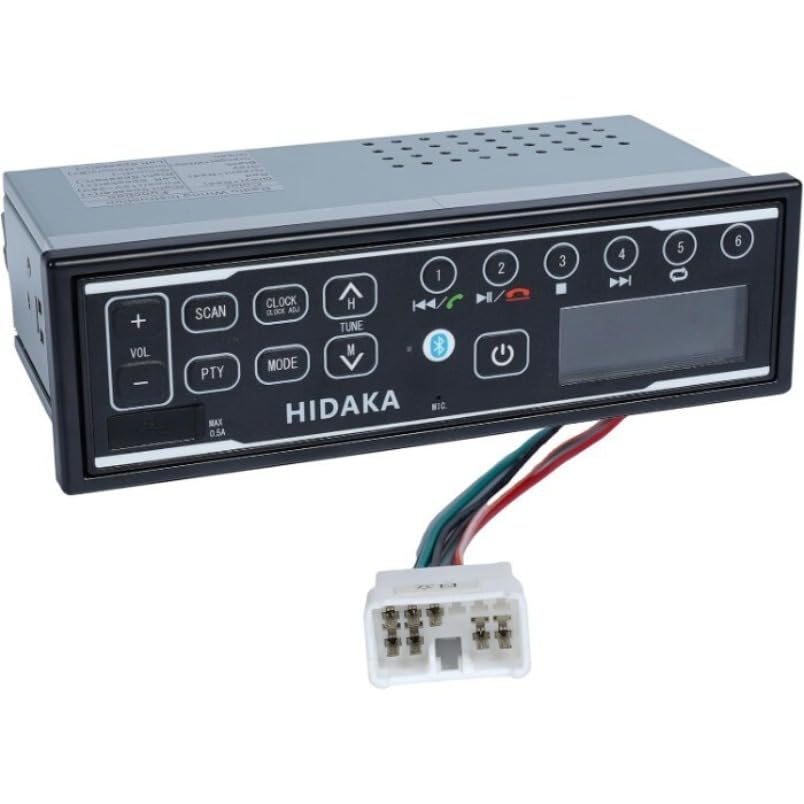
Obraz: Przód view of the HI-M505 Radio Receiver, showing the display and control buttons. This image illustrates the general appearance of the unit.
Instrukcja obsługi
The HI-M505 operates on an Android platform, offering a user-friendly interface.
1. Włączanie/wyłączanie zasilania
Press and hold the power button (usually marked with a power symbol) to turn the unit on or off. A short press typically mutes the audio or changes the source.
2. Radio Functions (DAB, AM, FM)
- Wybór źródła: Tap the "Radio" icon on the main screen or use the source button to select AM, FM, or DAB (if available in your region).
- Łów: Use the seek buttons to automatically scan for available stations.
- Ustawienia wstępne: Zapisz swoje ulubione stacje pod przyciskami ustawień wstępnych, aby mieć do nich szybki dostęp.
3. Odtwarzanie USB
Insert a USB drive into one of the provided USB ports. The unit will automatically detect the drive and display its contents. Use the media player application to browse and play audio or video files.
4. Łączność Bluetooth
- Go to the unit's settings menu and select "Bluetooth".
- Enable Bluetooth and make the unit discoverable.
- On your mobile device, search for available Bluetooth devices and select "HI-M505" (or similar name).
- Jeśli zostaniesz o to poproszony, potwierdź kod parowania.
- Po sparowaniu możesz przesyłać strumieniowo dźwięk i wykonywać połączenia w trybie głośnomówiącym.
5. Wi-Fi and Apple CarPlay
- Wi-Fi: Access the Wi-Fi settings to connect to a local Wi-Fi network or a mobile hotspot. This enables internet access for apps and updates.
- Apple CarPlay: Connect your iPhone via USB to activate Apple CarPlay. This allows you to use compatible iPhone apps directly on the unit's display.
Konserwacja
Regular maintenance ensures the longevity and optimal performance of your HI-M505 radio receiver.
- Czyszczenie: Do czyszczenia wyświetlacza i obudowy używaj miękkiej, suchej ściereczki. Unikaj środków czyszczących o właściwościach ściernych i rozpuszczalników.
- Aktualizacje oprogramowania: Regularnie sprawdzaj dostępność aktualizacji oprogramowania przez Wi-Fi, aby mieć pewność, że posiadasz najnowsze funkcje i poprawki błędów.
- Połączenia kablowe: Sprawdź, czy wszystkie kable są solidnie podłączone i nie są uszkodzone.
Rozwiązywanie problemów
Jeśli napotkasz problemy, zapoznaj się z poniższymi typowymi problemami i rozwiązaniami:
- Brak zasilania:
- Check the power cable connections and ensure they are secure.
- Sprawdź, czy bezpiecznik radia w pojeździe nie jest przepalony.
- Ensure the vehicle's battery is charged and connected.
- Brak dźwięku:
- Check the volume level and ensure the unit is not muted.
- Sprawdź połączenia głośników.
- Jeśli korzystasz z zewnętrznego amplifier, sprawdź jego zasilanie i połączenia.
- Słaby odbiór radia:
- Ensure the radio antenna is properly connected and not damaged.
- Check for obstructions or interference in the area.
- Problemy z parowaniem Bluetooth:
- Upewnij się, że Bluetooth jest włączony zarówno w urządzeniu, jak i w urządzeniu mobilnym.
- Usuń poprzednie sparowania na obu urządzeniach i spróbuj sparować ponownie.
- Move closer to the unit to ensure a strong signal.
- Urządzenie USB nie zostało rozpoznane:
- Ensure the USB device is formatted correctly (e.g., FAT32).
- Spróbuj użyć innego urządzenia USB lub kabla.
- Check if the USB port is damaged.
Jeśli problem będzie się powtarzał, skontaktuj się z obsługą klienta.
Specyfikacje
| Funkcja | Szczegół |
|---|---|
| Model | HI-M505 |
| Marka | Ogólny |
| Technologia łączności | Bluetooth, WiFi |
| Typ kontrolera | Android |
| Cechy specjalne | Apple CarPlay, Built-In Wi-Fi |
| Kompatybilne urządzenia | Ampżywsze |
| Typ złącza | USB typu A |
| Tryb wyjścia audio | Stereofoniczny |
| Waga przedmiotu | 4.4 funtów |
| Moc wejściowa | 12V / 24V DC (as per product description) |
Informacje o gwarancji
Specific warranty terms and conditions for the Generic HI-M505 Radio Receiver are provided by the seller at the time of purchase. Please refer to your purchase documentation or contact the seller directly for detailed warranty coverage, duration, and claim procedures.
Obsługa klienta
For technical assistance, troubleshooting beyond this manual, or inquiries regarding your HI-M505 Radio Receiver, please contact the seller or retailer from whom you purchased the product. They will be able to provide the most accurate and timely support.