
1. Wprowadzenie
Thank you for choosing the La Crosse Technology WS6281 Thermo-Hygrometer Station. This device is designed to provide accurate indoor temperature and humidity readings, along with time display and comfort level indication. Its compact design allows for versatile placement, either on a tabletop or mounted on a wall. Please read this manual carefully to ensure proper setup and operation of your new device.
Główne cechy obejmują:
- Accurate indoor temperature and humidity display.
- Min/Max record for temperature and humidity.
- Strzałki wskazujące trend temperatury i wilgotności.
- Comfort level indicator.
- Możliwość wyboru skali temperatury: Celsjusza lub Fahrenheita.
- Podświetlenie dla łatwego viewing.
- Versatile placement: tabletop stand or wall mount with removable self-adhesive fixation.
2. Zawartość opakowania
- 1 x La Crosse Technology WS6281 Thermo-Hygrometer Station
- 2 baterie CR2032
- 1 x Instrukcja obsługi (ten dokument)
3. Koniec produktuview
Familiarize yourself with the main components of your WS6281 station:
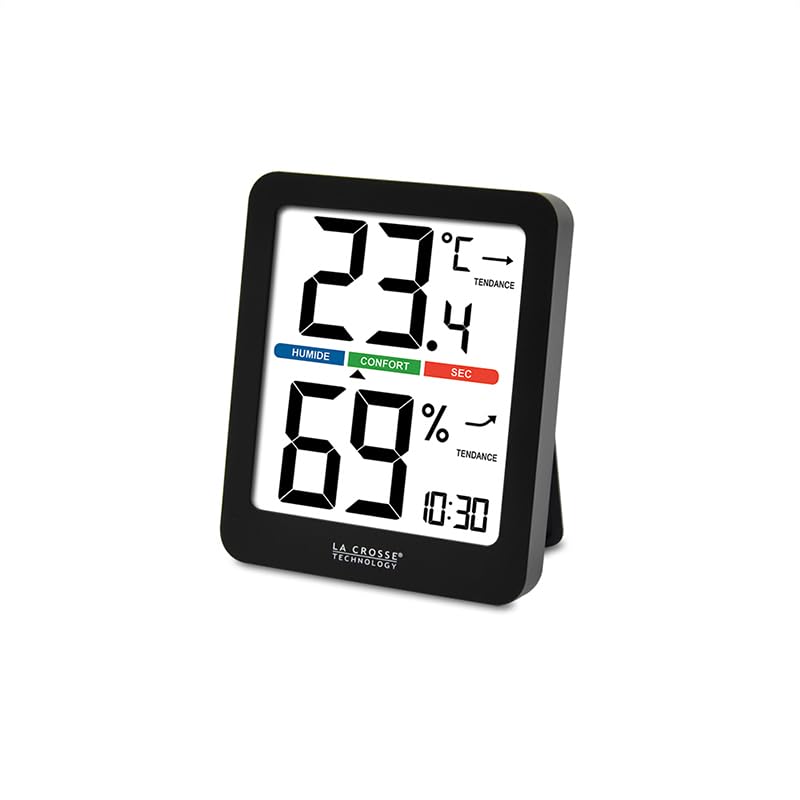
Rysunek 1: Przód view of the La Crosse Technology WS6281 Thermo-Hygrometer Station. The display shows indoor temperature (23.4°C), indoor humidity (69%), time (10:30), and comfort level indicators (Humide, Confort, Sec) along with temperature and humidity trend arrows.
Wyświetlane elementy:
- Wyświetlacz czasu: Pokazuje aktualny czas.
- Temperatura wewnętrzna: Displays the current indoor temperature in Celsius or Fahrenheit.
- Temperature Trend Arrow: Indicates if the temperature is rising, falling, or stable.
- Wilgotność wewnętrzna: Displays the current indoor relative humidity.
- Humidity Trend Arrow: Indicates if the humidity is rising, falling, or stable.
- Wskaźnik poziomu komfortu: Shows the current indoor comfort level (Humid, Comfort, Dry).
- MIN/MAX Indicator: Pojawia się, gdy viewing minimum or maximum recorded values.
- Wskaźnik baterii: Shows when batteries are low.
Buttons (typically on the back or side):
- Przycisk MODE/SET: Służy do przełączania trybów wyświetlania i wprowadzania ustawień.
- UP/+/C/F Button: Used to adjust values in settings or switch temperature units.
- DOWN/-/MIN/MAX Button: Used to adjust values in settings or view Min/Max records.
- Przycisk ŚWIATŁA: Włącza podświetlenie.
4. Konfiguracja
4.1. Instalacja baterii
- Znajdź komorę baterii z tyłu urządzenia.
- Otwórz pokrywę komory baterii.
- Insert 2 new CR2032 batteries, observing the correct polarity (+ and - markings).
- Dokładnie zamknij pokrywę komory baterii.
- Urządzenie włączy się automatycznie i wyświetli wstępne odczyty.
4.2. Ustawianie czasu
- Naciśnij i przytrzymaj TRYB/USTAW button for approximately 3 seconds to enter time setting mode. The hour digit will flash.
- Użyj W GÓRĘ/+ or W DÓŁ/- przyciski do regulacji godziny.
- Naciśnij TRYB/USTAW button again to confirm the hour and move to minute setting. The minute digit will flash.
- Użyj W GÓRĘ/+ or W DÓŁ/- przyciski do ustawienia minut.
- Naciśnij TRYB/USTAW button to confirm the minute and exit time setting mode.
4.3. Umieszczenie
The WS6281 offers flexible placement options:
- Umiejscowienie blatu: Extend the integrated stand on the back of the unit and place it on any flat surface.
- Montaż na ścianie: Use the removable self-adhesive fixation provided. Ensure the wall surface is clean and dry before applying. Avoid placing the unit in direct sunlight, near heat sources, or in areas with high drafts, as this can affect accuracy.
5. Działanie
5.1. Reading Temperature and Humidity
Once powered on, the current indoor temperature and humidity will be displayed automatically on the main screen.
5.2. Przełączanie jednostek temperatury (°C/°F)
Naciśnij W GÓRĘ/+ button (often labeled C/F) to toggle between Celsius (°C) and Fahrenheit (°F) temperature display.
5.3. Viewing Minimum and Maximum Records
The device records the minimum and maximum temperature and humidity values over a period. To view te rekordy:
- Naciśnij W DÓŁ/- button (often labeled MIN/MAX) once to display the maximum recorded temperature and humidity. The "MAX" indicator will appear.
- Naciśnij W DÓŁ/- button again to display the minimum recorded temperature and humidity. The "MIN" indicator will appear.
- Naciśnij W DÓŁ/- button a third time to return to the current temperature and humidity display.
- To clear the MIN/MAX records, press and hold the W DÓŁ/- przycisk przez około 3 sekundy, podczas gdy viewing the MIN or MAX values.
5.4. Temperature and Humidity Trend Arrows
Next to the temperature and humidity readings, you will see trend arrows:
- ↑ (Strzałka w górę): Indicates the temperature/humidity is rising.
- ↓ (Strzałka w dół): Indicates the temperature/humidity is falling.
- → (Horizontal Arrow): Indicates the temperature/humidity is stable.
5.5. Comfort Level Indicator
The comfort level indicator provides a quick visual reference for indoor conditions:
- HUMID: Oznacza wysoką wilgotność.
- KOMFORT: Indicates ideal temperature and humidity conditions.
- SUCHY: Oznacza niską wilgotność.
5.6. Podświetlenie
Naciśnij ŚWIATŁO button to activate the display backlight for a few seconds, improving visibility in low-light conditions.
6. Konserwacja
6.1. Wymiana baterii
When the low battery indicator appears on the display, it is time to replace the batteries. Follow the steps in Section 4.1. Battery Installation, ensuring to use 2 new CR2032 batteries.
6.2. Czyszczenie
Wyczyść urządzenie miękką, damp ściereczką. Nie używaj środków czyszczących ani rozpuszczalników o działaniu ściernym, ponieważ mogą one uszkodzić wyświetlacz lubasing. Avoid submerging the unit in water.
7. Rozwiązywanie Problemów
| Problem | Możliwa przyczyna | Rozwiązanie |
|---|---|---|
| Brak wyświetlacza lub słaby wyświetlacz | Rozładowane lub nieprawidłowo zainstalowane baterie. | Wymień baterie na nowe baterie CR2032, zwracając uwagę na prawidłową biegunowość. |
| Niedokładne odczyty temperatury/wilgotności | Unit placed in direct sunlight, near heat/cold sources, or in a draft. | Relocate the unit to a stable indoor environment away from extreme conditions. Allow 20-30 minutes for readings to stabilize. |
| Wyświetlacz jest zamrożony lub nie odpowiada | Tymczasowa awaria elektroniczna. | Remove batteries for 1 minute, then reinsert them to perform a soft reset. |
8. Specyfikacje
| Funkcja | Specyfikacja |
|---|---|
| Numer modelu | WS6281 (Manufacturer Reference: WS6236-BLA) |
| Marka | Technologia La Crosse |
| Zakres temperatury wewnętrznej | -9.9°C do 50°C (14.2°F do 122°F) |
| Dokładność temperatury | ±1°C |
| Zakres wilgotności w pomieszczeniu | 20% RH do 95% RH |
| Źródło zasilania | 2 baterie CR2032 |
| Wymiary podstawy (dł. x szer. x wys.) | 83.3 x 106 x 16.8 mm (około 3.28 x 4.17 x 0.66 cala) |
| Screen Dimensions (L x W) | 64.5 x 76 mm (ok. 2.54 x 2.99 cala) |
| Waga | 130 gramów (ok. 0.29 funta) |
9. Gwarancja i wsparcie
La Crosse Technology products are manufactured to high-quality standards. For specific warranty information, please refer to the warranty card included with your product or visit the official La Crosse Technology website. If you encounter any issues or require technical assistance, please contact La Crosse Technology customer support through their official channels.
Aby uzyskać dalszą pomoc, odwiedź stronę: www.lacrossetechnology.com/support