AULA WIN60 HE PRO 60% Mechanical Gaming Keyboard User Manual
Model: WIN60 HE PRO | Brand: AULA
1. Wprowadzenie
This manual provides detailed instructions for the AULA WIN60 HE PRO 60% Mechanical Gaming Keyboard. Designed for high-performance gaming, this keyboard features Hall Effect magnetic switches, rapid trigger mode, an 8000Hz polling rate, and customizable RGB lighting. Please read this manual thoroughly to ensure proper setup, operation, and maintenance of your keyboard.
Figure 1: AULA WIN60 HE PRO 60% Mechanical Gaming Keyboard with highlighted features.
2. Konfiguracja
2.1 Rozpakowywanie
Ostrożnie wyjmij wszystkie elementy z opakowania. Upewnij się, że znajdują się w nim następujące elementy:
AULA WIN60 HE PRO Keyboard
Kabel USB-C
Ściągacz nasadek klawiszy
Extra Switches (if included)
Video 1: Unboxing the AULA WIN60 HE Gaming Keyboard, showing the contents including the keyboard, USB-C cable, and switch puller.
2.2 Podłączanie klawiatury
Znajdź port USB-C z tyłu klawiatury.
Podłącz dołączony kabel USB-C do klawiatury.
Podłącz drugi koniec kabla USB-C do wolnego portu USB w komputerze.
The keyboard will automatically be recognized by your operating system (Windows PC/Laptop compatible).
Note: This keyboard is not compatible with PlayStation 5/4 (PS5/PS4) and OBOX.
2.3 Instalacja sterownika (Web-Based)
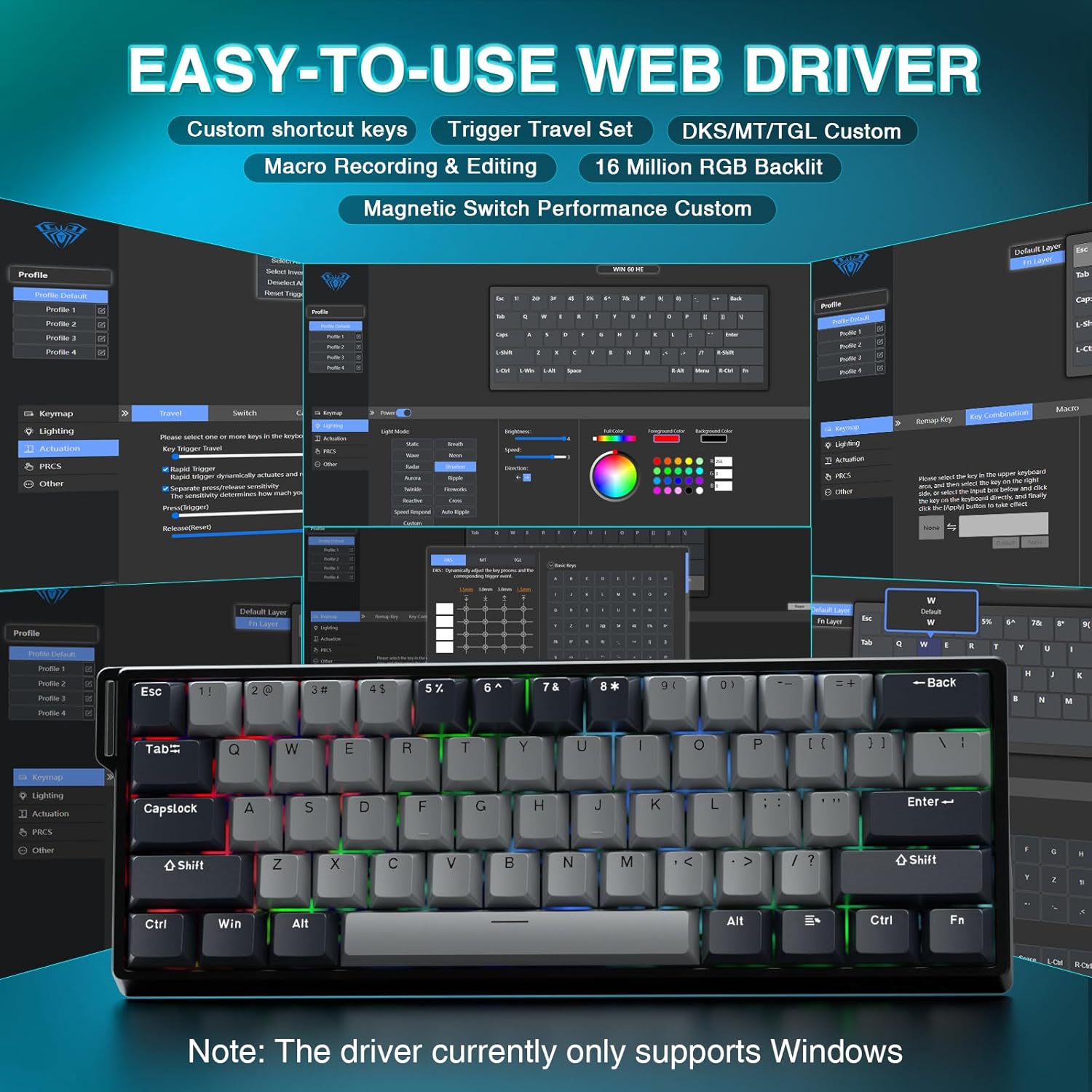
The AULA WIN60 HE PRO utilizes a web-based driver for customization, eliminating the need for software downloads.
Upewnij się, że komputer jest podłączony do Internetu.
Otwórz preferowany web przeglądarka.
Navigate to the official AULA web driver portal (refer to the product packaging or manufacturer's webstrona dla dokładnego URL).
Ten web interface will allow you to customize settings directly.
Rysunek 2: Łatwy w użyciu web interfejs sterownika umożliwiający personalizację.
Uwaga: web driver currently only supports Windows operating systems.
3. Działanie
3.1 Hall Effect Magnetic Switches & Rapid Trigger
The AULA WIN60 HE PRO features advanced Hall Effect magnetic switches, which detect key presses using magnetic fields rather than physical contact. This design provides:
Regulowana aktywacja: Customize the actuation point of each key to your preference for faster response or more deliberate presses.
Tryb szybkiego wyzwalania: Allows keys to activate and deactivate based on movement rather than a fixed actuation point, enabling ultra-fast repeated inputs and precise control, especially beneficial for FPS games. The ultra-low RT step distance is 0.02mm.
Trwałość: Absence of physical contact reduces wear and tear.
Figure 3: Rapid Trigger technology for enhanced gaming performance.
Video 2: Demonstrating the hot-swappable magnetic switches, including Gray Wood Magnetic Switch and Wing Chun Magnetic Switch variants.
3.2 Częstotliwość odpytywania 8000 Hz
The keyboard features an 8000Hz polling rate, meaning it reports key presses to your computer 8000 times per second. This results in:
Ultra-Fast Response Times: Minimizes input lag for immediate in-game actions.
Precyzyjna kontrola: Ensures every keystroke is registered accurately and without delay.
Figure 4: 8000Hz Hyper-Polling Technology for minimal latency.
3.3 Dynamiczne oświetlenie RGB
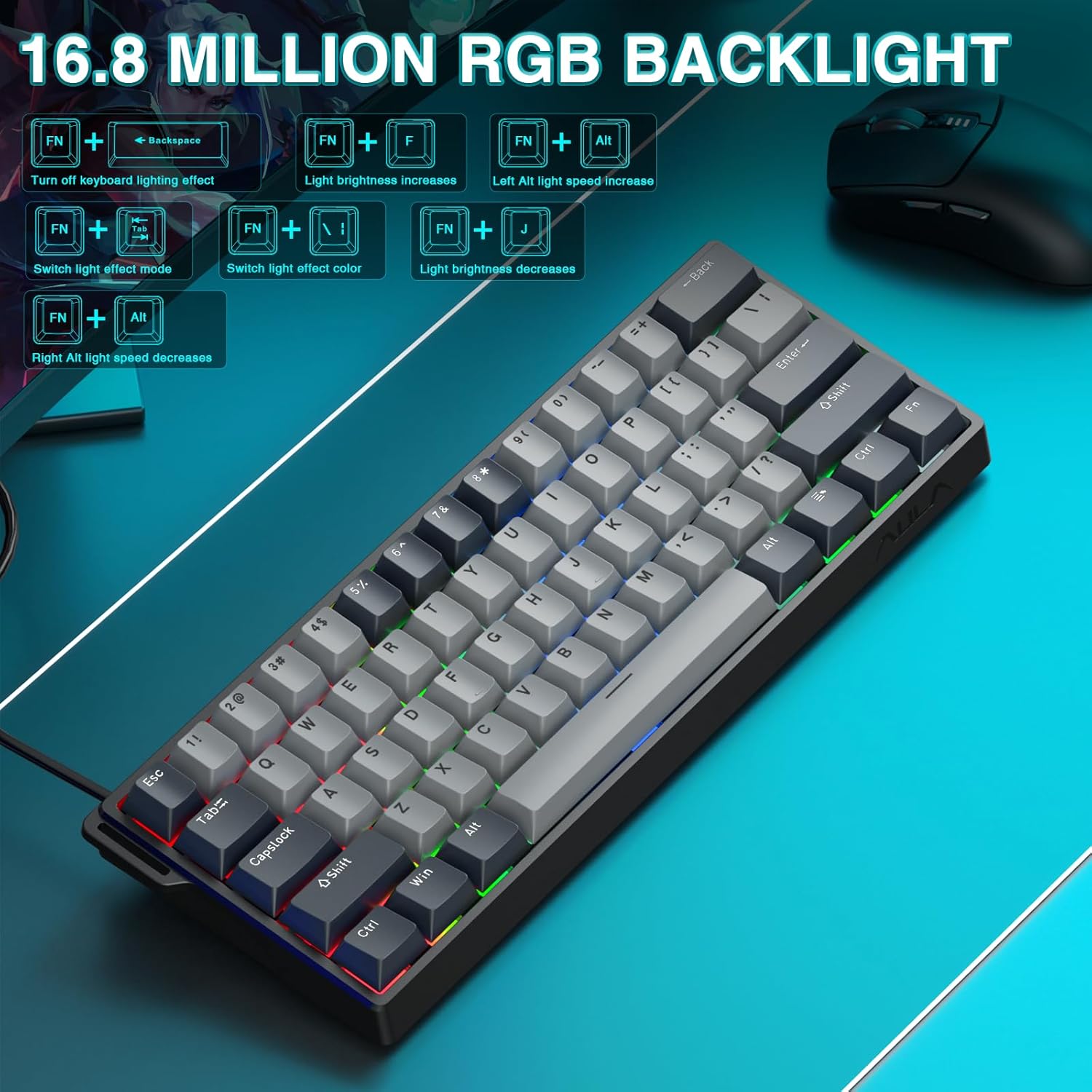
The keyboard offers 16.8 million customizable RGB color options and various lighting effects. Use the following key combinations for quick adjustments:
RGB Lighting Control Hotkeys
Kombinacja klawiszy
Funkcjonować
FN + Backspace
Turn off keyboard lighting effect
FN + [
Zwiększa się jasność światła
FN + ]
Jasność światła maleje
FN + {
Left Alt light speed increase
FN + }
Right Alt light speed decrease
FN + \
Przełącz tryb efektu świetlnego
FN + Alt
Zmień kolor efektu świetlnego
Figure 5: RGB Backlight controls and effects.
3.4 Dostosowywanie za pomocą Web Kierowca
Ten web-based driver provides extensive customization options:
Zmiana przypisania klawiszy: Przypisz dowolną funkcję do dowolnego klawisza.
Tworzenie makr: Record and assign complex sequences of commands to a single key.
Personalizacja oświetlenia RGB: Fine-tune lighting effects, colors, and patterns beyond the basic hotkeys.
Regulacja punktu aktywacji: Precisely set the actuation distance for each magnetic switch.
Uzyskaj dostęp do web driver as described in Section 2.3.
4. Konserwacja
4.1 Czyszczenie klawiatury
Aby zachować optymalną wydajność i wygląd:
Przed czyszczeniem odłącz klawiaturę od komputera.
Użyj miękkiej, niestrzępiącej się ściereczki, lekko wyczyśćampPrzetrzyj klawisze i obudowę wodą lub łagodnym środkiem czyszczącym.
Do usuwania kurzu i zanieczyszczeń spomiędzy klawiszy należy użyć sprężonego powietrza.
Unikaj ostrych środków chemicznych i materiałów ściernych.
4.2 Przełączniki z możliwością wymiany na gorąco
The AULA WIN60 HE PRO features hot-swappable magnetic switches, allowing for easy replacement or customization without soldering.
Use the provided keycap puller to gently remove the keycap.
Use a switch puller (not explicitly mentioned as included, but implied by "hot-swappable" and video) to carefully remove the switch.
Align the new switch with the socket and press firmly until it clicks into place.
Załóż z powrotem nakładkę klawisza.
Caution: Apply gentle force to avoid damaging the switch sockets.
5. Rozwiązywanie Problemów
5.1 Klawiatura nie odpowiada
Sprawdź, czy kabel USB-C jest prawidłowo podłączony do klawiatury i komputera.
Spróbuj podłączyć klawiaturę do innego portu USB w komputerze.
Przetestuj klawiaturę na innym komputerze, aby wykluczyć problemy specyficzne dla systemu.
Uruchom ponownie komputer.
5.2 Oświetlenie RGB nie działa
Check if the lighting is turned off using the FN + Backspace klawisz skrótu.
Dostosuj jasność za pomocą FN + [ or FN + ].
Zapewnij web driver settings haven't disabled lighting.
5.3 Keys Sticking or Not Registering
Wyczyść obszar wokół uszkodzonego klawisza, aby usunąć wszelkie zanieczyszczenia.
If a specific switch is faulty, consider replacing it using the hot-swappable feature (refer to Section 4.2).
Sprawdź ustawienia punktu aktywacji w web driver; it might be set too high or too low for your preference.
6. Specyfikacje
Funkcja
Szczegół
Model
WIN60 HE PRO
Typ klawiatury
60% Mechaniczna klawiatura do gier
Typ przełącznika
Hall Effect Magnetic Switch, Hot-Swappable
Łączność
USB-C przewodowy
Współczynnik sondowania
8000 Hz
Cechy specjalne
Rapid Trigger Mode, Adjustable Actuation, RGB Backlit, Programmable Keys, Hotkeys and Media Keys, Portable
Kompatybilne urządzenia
Laptop, PC Windows (Not compatible with PS5/PS4, OBOX)
Wymiary produktu
11 x 5 x 1.1 cala (27.94 x 12.7 x 2.79 cm)
Waga przedmiotu
2.18 funtów (0.99 kg)
Producent
AULA
Figure 6: Detailed comparison of AULA WIN60 HE series magnetic switches.
7. Gwarancja i wsparcie
For warranty information, technical support, or service inquiries, please refer to the warranty card included with your product or visit the official AULA/CORBOBO webMożesz również skontaktować się ze sprzedawcą bezpośrednio za pośrednictwem swojej platformy zakupowej, aby uzyskać pomoc.