

Wstęp
This manual provides essential information for the safe and efficient operation of your Philips PLD2030P7 DVD Player. Please read these instructions thoroughly before using the device and retain them for future reference.
1. Konfiguracja
1.1 Rozpakowanie
Ostrożnie wyjmij wszystkie elementy z opakowania. Upewnij się, że wszystkie wymienione poniżej elementy są obecne:
- Philips PLD2030P7 DVD Player
- Zdalne sterowanie
- Kabel HDMI
- Kabel RCA
1.2 Podłączanie do telewizora
The Philips PLD2030P7 DVD Player offers both HDMI and RCA connections for video and audio output.
HDMI Connection (Recommended for HD TVs)
- Connect one end of the HDMI cable to the HDMI OUT port on the DVD player.
- Podłącz drugi koniec kabla HDMI do wolnego portu HDMI IN w telewizorze.
- Za pomocą pilota telewizora wybierz odpowiednie wejście HDMI.
Illustration of the HDMI connection process, highlighting the 1080P upconversion capability from 480P resolution.
RCA Connection (For older TVs or alternative audio)
- Connect the red, white, and yellow RCA plugs from the RCA cable to the corresponding color-coded AV OUT jacks on the DVD player.
- Connect the other end of the RCA cable to the matching color-coded AV IN jacks on your television or home stereo system.
- Select the corresponding AV input on your television or stereo system.

Visual guide to various connection types, including HDMI for Smart TVs, projectors, and monitors, and RCA for older TVs, speakers, soundbars, amplifiers, and tuners.
1.3 Włączanie
After connecting the player to your TV, plug the power cord into an electrical outlet. Press the Power button on the front panel or the remote control to turn on the DVD player.
1.4 Region Free Setup Guide
This DVD player supports multiple regions (1,2,3,4,5,6). To adjust region settings:
- Connect your DVD player to a TV.
- Ensure no disc is in the compartment, or press the OTWÓRZ/ZAMKNIJ button to eject the disc tray. The TV screen should display 'NO DISC'.
- Using the remote control, input the number "5168" to access the Super Setup Mode.
- Naciśnij UP button to highlight "REGION". Press the PRAWIDŁOWY button to highlight the region code. Press the UP button to highlight "TEST 0". Press the WCHODZIĆ przycisk aby potwierdzić.
- Naciskać ORGANIZOWAĆ COŚ wyjść.
Visual instructions detailing the process to configure the DVD player for region-free playback, including remote control input and screen prompts.
2. Instrukcja obsługi
Odtwarzanie płyt 2.1
The Philips PLD2030P7 is compatible with CD, (S),VCD,DVD,DVD+R/RW,DVD-R/RW, or MP3 discs.
- Naciśnij OTWÓRZ/ZAMKNIJ przycisk, aby otworzyć tacę na płytę.
- Place a disc gently onto the tray with the label side facing up.
- Naciśnij OTWÓRZ/ZAMKNIJ button again to close the tray. The player will automatically begin playback or display a disc menu.
- Use the remote control to navigate menus and control playback (Play, Pause, Stop, Skip, Fast Forward/Rewind).
2.2 Odtwarzanie multimediów USB
The player supports media playback from USB devices for JPEG, MP3, and MP4 files.
- Insert your USB device into the USB port on the front of the DVD player.
- The player should automatically detect the USB device and display a media browser. If not, press the USB przycisk na pilocie.
- Poruszaj się po swoim fileza pomocą pilota i naciśnij GRAĆ or WCHODZIĆ aby rozpocząć odtwarzanie.

Demonstration of the USB input functionality, illustrating how to connect a USB device and the supported media formats including video (AVI, DIVX, MPG, MPEG, VOB), images (JPG), and music.
2.3 Screen Fit Feature
To optimize the picture to fill your screen, press the Dopasowanie ekranu button on the remote control during playback. This feature adjusts the aspect ratio to match your display.
2.4 Audio and Video Quality
The player features a 10-bit/108 MHz video DAC for superior picture quality and a built-in Dolby decoder chip for immersive audio.

Visual representation emphasizing the DAC/Dolby audio technology, which provides an immersive audio experience.

Description of the 10-bit/108 MHz video processing, ensuring sharp and natural images.
3. Konserwacja
3.1 Czyszczenie urządzenia
To clean the exterior of the DVD player, use a soft, dry cloth. Do not use liquid or aerosol cleaners, as they may damage the finish. Ensure the unit is unplugged before cleaning.
3.2 Pielęgnacja dysków
Handle discs by their edges to avoid fingerprints. Store discs in their cases when not in use to prevent scratches and dust accumulation. Clean discs with a soft, lint-free cloth, wiping from the center outwards.
4. Rozwiązywanie Problemów
Jeśli masz problemy z odtwarzaczem DVD, zapoznaj się z poniższymi typowymi problemami i ich rozwiązaniami:
| Problem | Możliwa przyczyna | Rozwiązanie |
|---|---|---|
| Brak zasilania | Przewód zasilający nie jest podłączony; gniazdko elektryczne nie jest aktywne | Sprawdź, czy przewód zasilający jest prawidłowo podłączony; sprawdź gniazdko za pomocą innego urządzenia |
| Brak obrazu w telewizorze | Incorrect input selected on TV; Loose video cable connection | Select correct HDMI/AV input on TV; Check HDMI/RCA cable connections |
| Brak dźwięku | TV/receiver volume too low; Loose audio cable connection | Increase volume; Check HDMI/RCA audio cable connections |
| Dysk nie odtwarza się | Disc is dirty or scratched; Incorrect disc type; Region code mismatch | Clean disc; Ensure disc is compatible (DVD, CD, VCD); Verify region settings (refer to 1.4) |
| Pilot nie działa | Baterie są rozładowane lub nieprawidłowo włożone; Przeszkoda między pilotem a odtwarzaczem | Replace batteries; Ensure correct polarity; Remove obstructions; Point remote directly at player |
5. Specyfikacje
Below are the technical specifications for the Philips PLD2030P7 DVD Player:
| Funkcja | Szczegół |
|---|---|
| Marka | Philips |
| Nazwa modelu | PLD2030P7 |
| Typ nośnika | CD, DVD, VCD |
| Funkcja specjalna | Compact, Progressive Scan |
| Rezolucja | 1280x800 (Internal processing), Video Output: 1080p |
| Typ złącza | HDMI |
| Technologia łączności | HDMI |
| Kolor | Czarny |
| Waga przedmiotu | 2.3 funtów |
| Tryb wyjścia audio | Otaczać |
| Obsługiwany format audio | Dolby Digital |
| Konfiguracja kanału dźwięku przestrzennego | 5.1 |
| Total Number of HDMI Ports | 1 |
| Kodowanie wideo | MPEG-2 |
| Kompatybilne urządzenia | AV Receiver, Home Stereo System, Television |
| File Formatowanie (USB) | JPEG, MP3, MP4 |
| Wbudowane media | DVD Player, HDMI Cable, RCA Cable, Remote Control |
| UPC | 850041387796 |
| ASIN | B0F4F53JSS |
| GTIN | 850041387796 |

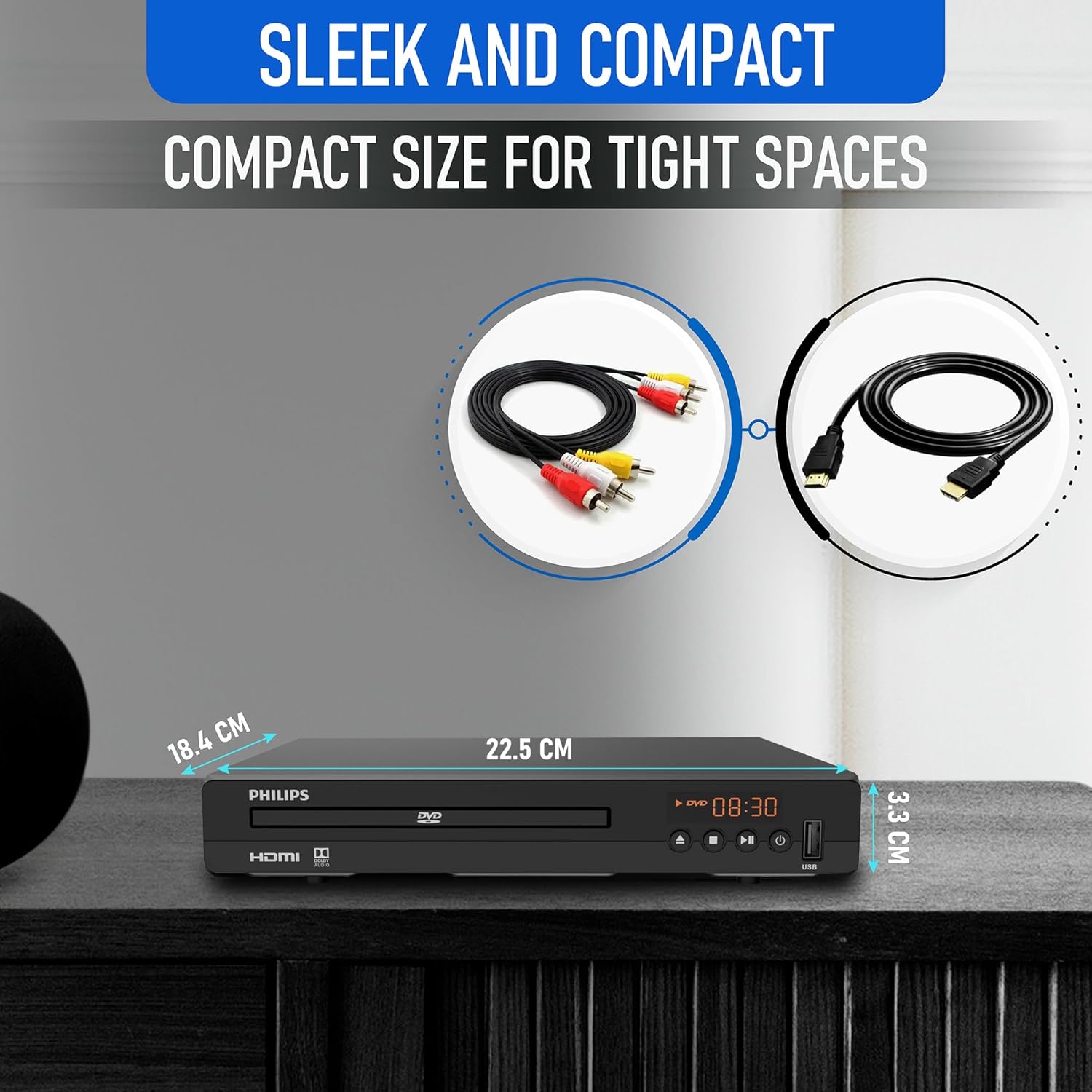
Diagram illustrating the compact dimensions of the DVD player: 22.5 cm (width), 18.4 cm (depth), and 3.3 cm (height).
6. Informacje o gwarancji
For detailed warranty information, please refer to the warranty card included in your product packaging or contact Philips customer support. The manufacturer's warranty covers defects in materials and workmanship under normal use.
7. Obsługa klienta
If you require further assistance or have questions not covered in this manual, please contact Philips customer support through their official webwitrynę lub dane kontaktowe podane w dokumentacji produktu.