
1. Informacje dotyczące bezpieczeństwa
Przed instalacją lub uruchomieniem produktu prosimy o zapoznanie się ze wszystkimi instrukcjami. Nieprzestrzeganie tych instrukcji może spowodować porażenie prądem, pożar lub inne zagrożenia, które mogą spowodować uszkodzenie mienia lub obrażenia ciała.
- Przed przystąpieniem do instalacji lub serwisowania należy zawsze wyłączyć zasilanie wyłącznikiem automatycznym.
- Jeśli nie masz pewności co do procesu instalacji, skonsultuj się z wykwalifikowanym elektrykiem.
- Upewnij się, że wszystkie połączenia elektryczne są bezpieczne i zgodne z lokalnymi przepisami i rozporządzeniami.
- Do not install on a dimmer switch.
- Osprzęt ten jest przeznaczony do stosowania na zewnątrz i jest wodoodporny.
2. Zawartość opakowania
Przed rozpoczęciem instalacji sprawdź, czy wszystkie komponenty są obecne.
- LED Outdoor Flood Wall Light (1 unit)
- Sprzęt montażowy (śruby, złącza kablowe)
- Uszczelka
- Instrukcja obsługi

Figure 2.1: Product components and adjustable parts.
3. Funkcje produktu
The Maxxima LED Outdoor Flood Wall Light is designed for reliable outdoor security and illumination.
- Potężne oświetlenie: Delivers 950 lumens of 3000K warm white light with an energy-efficient 13W design.
- Zaawansowana detekcja ruchu: PIR motion sensor with up to a 70 ft range.
- Adjustable Timers: Choose from 1, 5, or 10 minutes for how long the light stays on after motion detection.
- Czujnik zmierzchu i świtu: Photocell sensor automatically operates at night and conserves energy during the day.
- Regulowana głowica: Easily direct the light beam with a 180° vertical tilt.
- Adjustable Arm and Sensor: 90° vertical arm tilt and 180° vertical tilt & horizontal swivel for the motion sensor, with 360° sensor rotation.
- Trwała konstrukcja: Built with aluminum, rated for 50,000 lifetime hours, ETL listed.
Wideo 3.1: Ponadview of Maxxima LED Outdoor Flood Light features and adjustability.
4. Instalacja
4.1 Montaż Urządzenia
- Przed rozpoczęciem instalacji wyłącz zasilanie wyłącznikiem automatycznym.
- Remove the existing fixture (if any) and disconnect wiring.
- Attach the mounting plate to the junction box using the provided screws. Ensure the gasket is properly seated between the fixture and the mounting surface for a weather-tight seal.
- Feed the electrical wires from the junction box through the center hole of the mounting plate.
4.2 połączeń przewodów
Podłącz przewody w następujący sposób:
- Połącz Czarny przewód od oprawy do Czarny (Live/Hot) wire from the junction box.
- Połącz Biały przewód od oprawy do Biały Przewód (neutralny) ze skrzynki przyłączeniowej.
- Połącz Zielony Przewód (uziemiający) od oprawy do Zielony or bare copper (Ground) wire from the junction box.
- Zabezpiecz wszystkie połączenia za pomocą dołączonych złączek przewodowych.

Figure 4.1: Wiring connections for the flood light.
4.3 Montaż końcowy
- Ostrożnie włóż wszystkie przewody do skrzynki przyłączeniowej.
- Align the fixture with the mounting plate and secure it with the remaining screws.
- Przywróć zasilanie za pomocą wyłącznika obwodu.
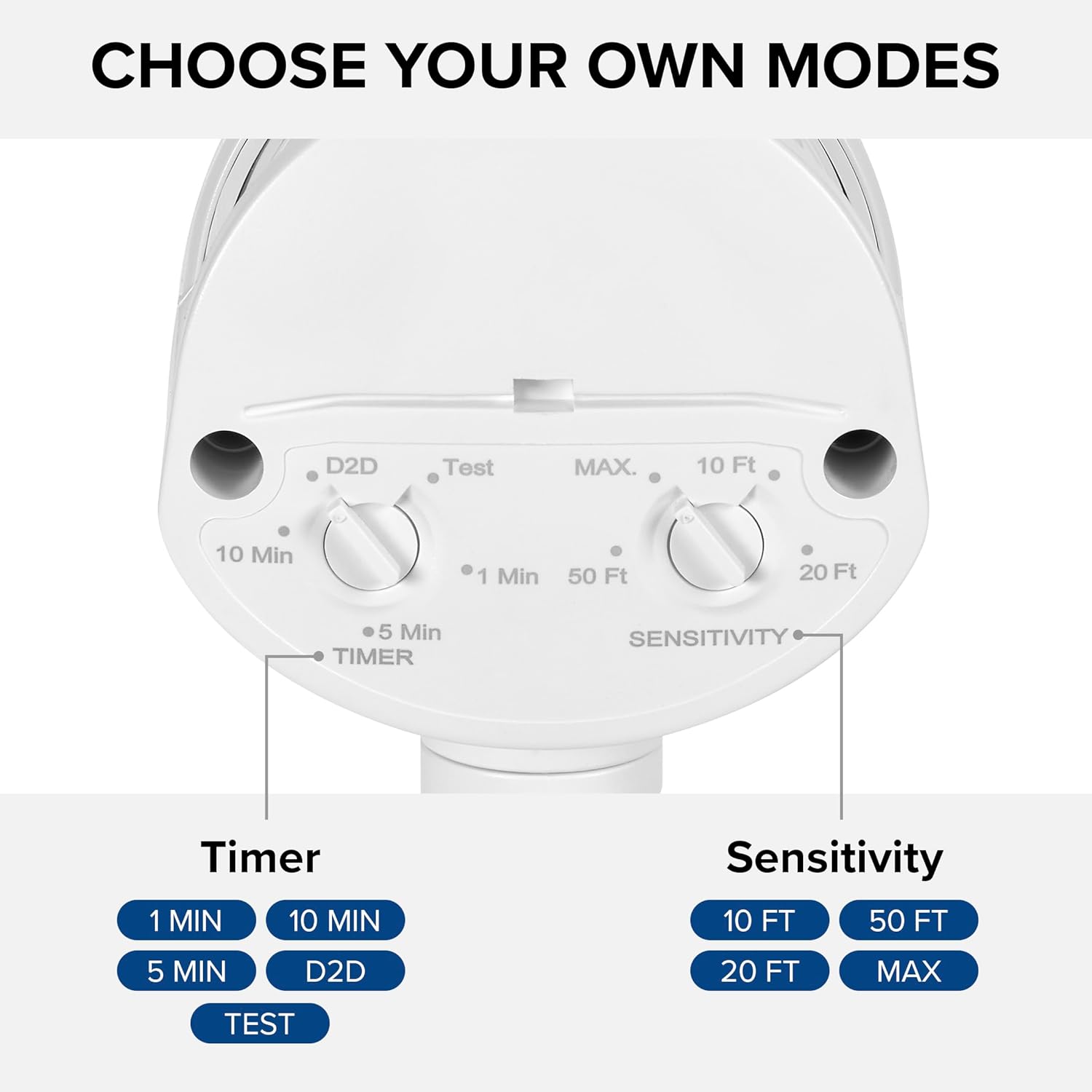
Figure 4.2: Installed flood light on an exterior wall.
5. Konfiguracja i regulacja
The flood light features adjustable settings for the motion sensor and timer.
5.1 Adjusting the Sensor and Timer
The sensor unit has two adjustable dials located on its underside:
- TIMER Dial: Controls how long the light stays on after motion is detected. Options include 1 minute, 5 minutes, 10 minutes, or Dusk-to-Dawn (D2D).
- SENSITIVITY Dial: Adjusts the motion detection range. Options include 10 ft, 20 ft, 50 ft, or MAX (up to 70 ft).
To adjust, gently rotate the dials to your desired setting. The 'Test' mode on the TIMER dial allows for quick testing of motion detection during daylight hours.
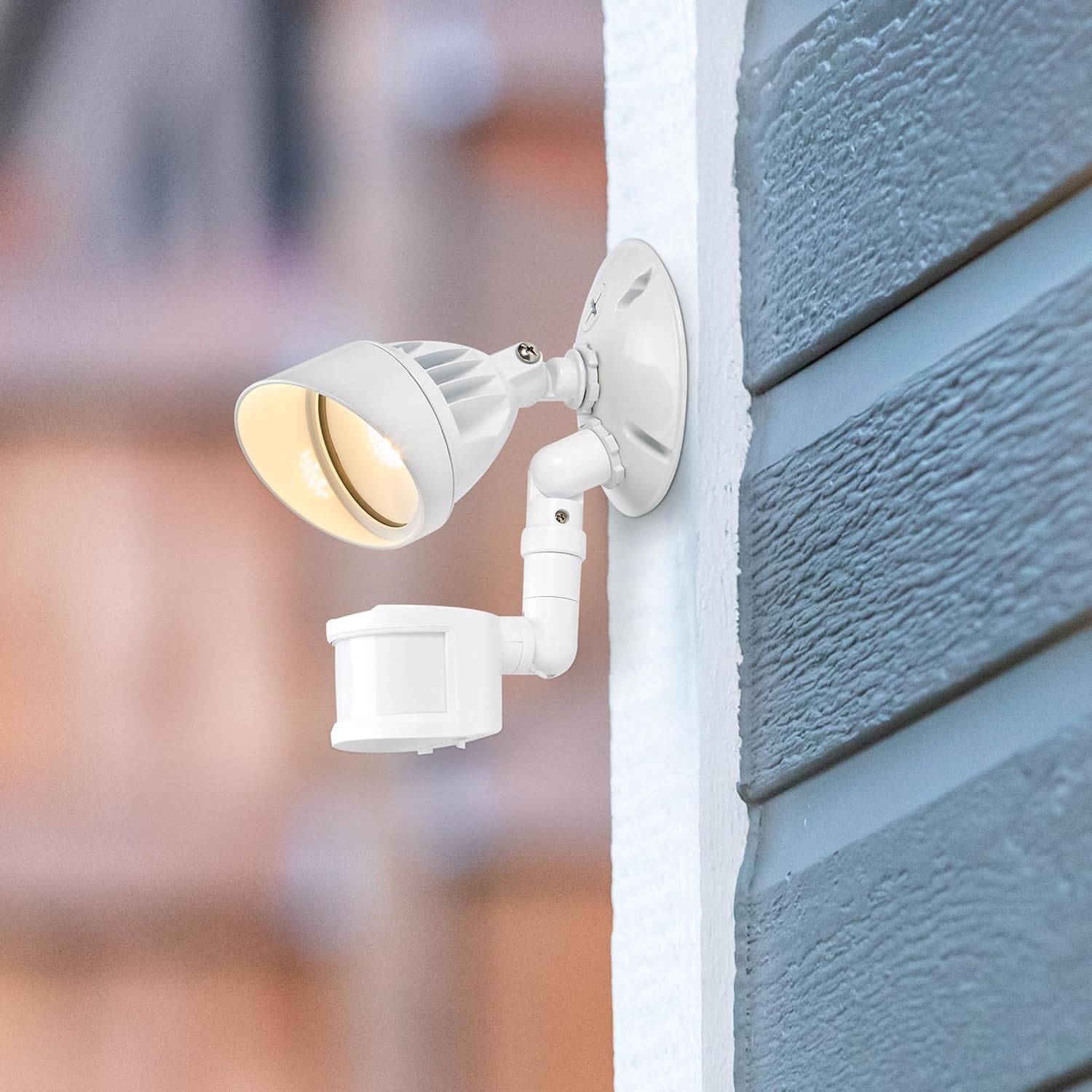
Figure 5.1: Timer and Sensitivity adjustment dials.
5.2 Adjusting Light Head and Sensor Position
The light head and motion sensor can be adjusted to cover specific areas:
- The light head can be tilted up to 180° vertically.
- The arm connecting the sensor to the base can tilt 90° vertically.
- The motion sensor itself can tilt 180° vertically and swivel 180° horizontally, with a full 360° rotation capability.

Figure 5.2: Adjustable light head and motion sensor.
6. Instrukcja obsługi
Once installed and configured, the Maxxima LED Outdoor Flood Wall Light operates automatically based on its sensor settings.
- Dusk-to-Dawn Mode (D2D): When the TIMER dial is set to D2D, the light will automatically turn on at dusk and remain on until dawn, regardless of motion.
- Tryb czujnika ruchu: When the TIMER dial is set to 1, 5, or 10 minutes, the light will activate when motion is detected within the set sensitivity range and ambient light conditions (typically at night). The light will remain on for the selected duration after the last motion is detected, then turn off.
- Tryb testowania: Setting the TIMER dial to 'Test' allows you to verify motion detection during daylight. The light will turn on for a few seconds when motion is detected, then turn off. This mode is useful for positioning the sensor.
7. Konserwacja
This LED flood light requires minimal maintenance.
- Czyszczenie: Okresowo przecieraj urządzenie miękką,amp Ściereczką usuń brud i zanieczyszczenia. Nie używaj środków czyszczących ani rozpuszczalników o działaniu ściernym.
- Kontrola: Regularly check for any loose connections or damage to the wiring or housing.
- The integrated LED light source is not user-replaceable.
8. Rozwiązywanie Problemów
If you experience issues with your flood light, refer to the following table for common problems and solutions.
| Problem | Możliwa przyczyna | Rozwiązanie |
|---|---|---|
| Światło się nie włącza. | No power; incorrect wiring; sensor settings. | Check circuit breaker. Verify wiring connections. Adjust sensor to 'Test' mode to confirm functionality. Ensure ambient light is low enough for operation (if not in D2D). |
| Światło pozostaje włączone w sposób ciągły. | Sensor in D2D mode; constant motion detected; faulty sensor. | Check if TIMER dial is set to D2D. Ensure no objects are causing continuous motion detection. If problem persists, contact support. |
| Światło włącza się zbyt często lub zbyt rzadko. | Sensitivity setting; sensor obstruction. | Adjust SENSITIVITY dial. Clear any obstructions from the sensor's field of view. |
| Światło migocze. | Loose wiring; power fluctuations. | Turn off power and check all wiring connections. Consult an electrician if power fluctuations are suspected. |
9. Specyfikacje
| Atrybut | Wartość |
|---|---|
| Nazwa modelu | MEL-S1013100W |
| Marka | Maxxima |
| Moc światła | 950 lumenów |
| Cotage | 13 watów |
| Temperatura barwowa | 3000 Kelwinów (ciepła biel) |
| Tomtage | 120 wolty |
| Tworzywo | Aluminium |
| Rodzaj wykończenia | Namalowany |
| Zakres czujnika ruchu | Do 70 stóp |
| Rozpiętość wiązki | 220° |
| Ocena dożywotnia | 50,000 godziny |
| Orzecznictwo | Wpisany na listę ETL |
| Wymiary produktu | 4.4" dł. x 6" szer. x 6" wys. |
| Waga przedmiotu | 11.2 uncji (0.7 funta) |
10. Gwarancja
This Maxxima LED Outdoor Flood Wall Light is backed by a 3-letnia gwarancja od daty zakupu. Niniejsza gwarancja obejmuje wady materiałowe i wykonawcze wynikające z normalnego użytkowania. Prosimy zachować dowód zakupu na wypadek roszczeń gwarancyjnych.
11. Wsparcie
For technical assistance, troubleshooting, or warranty inquiries, please contact Maxxima customer service.
Visit the Maxxima Store: MaxximaLEDLighting on Amazon
Maxxima is an American company with USA-based offices and customer service.