1. Urządzenie ponadview
The Samsung Galaxy A56 5G is a powerful smartphone designed for reliable performance and a rich user experience. It features a 6.7-inch FHD+ Super AMOLED display, a 50MP camera system, and IP67 dust and water resistance. This manual provides essential information for setting up, operating, and maintaining your device.
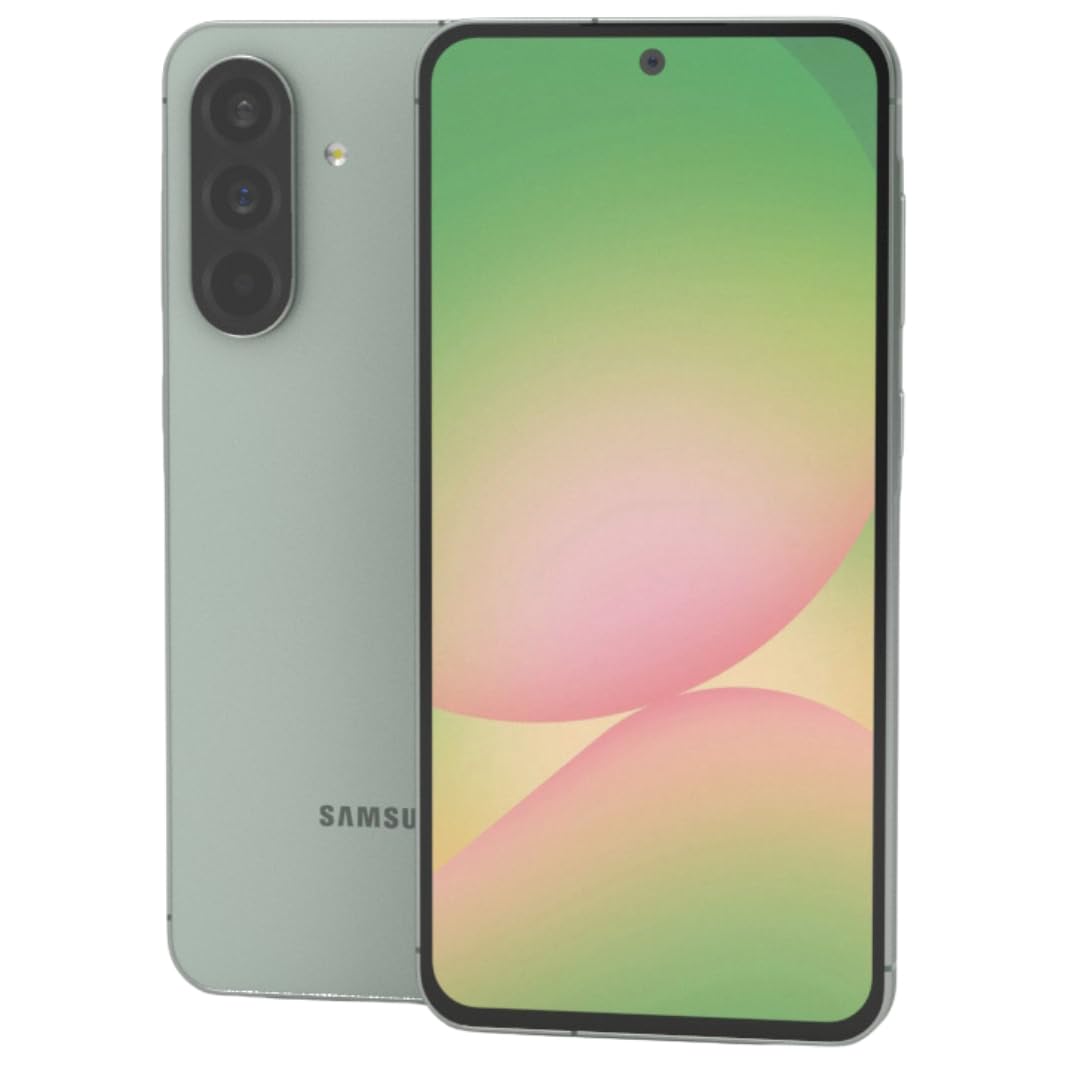
Rysunek 1: Przód view smartfona Samsung Galaxy A56 5G, pokażasinz dużym wyświetlaczem.
2. Przewodnik konfiguracji
2.1. Rozpakowanie i wstępna inspekcja
Ostrożnie wyjmij wszystkie elementy z opakowania. Sprawdź, czy znajdują się w nim następujące elementy:
- Smartfon Samsung Galaxy A56 5G
- Kabel USB-C do USB-C
- 25W Samsung Super Fast Charger
- Narzędzie do wyjmowania karty SIM
- Szybki przewodnik (jeśli dołączony)
Przed kontynuacją sprawdź, czy urządzenie nie ma uszkodzeń fizycznych.
2.2. Inserting SIM Card(s) and eSIM
The Galaxy A56 5G supports Dual SIM functionality and eSIM. You can use two physical Nano-SIM cards or one physical Nano-SIM and one eSIM simultaneously.
- Znajdź tackę na kartę SIM znajdującą się z boku urządzenia.
- Włóż narzędzie do wyjmowania karty SIM do małego otworu obok tacki i delikatnie naciskaj, aż tacka wyskoczy.
- Włóż kartę(y) Nano-SIM do tacki złotymi stykami do dołu. Upewnij się, że są prawidłowo osadzone.
- Ostrożnie włóż tackę karty SIM z powrotem do urządzenia.
- For eSIM activation, follow the on-screen prompts during initial setup or navigate to Ustawienia > Połączenia > Menedżer kart SIM.
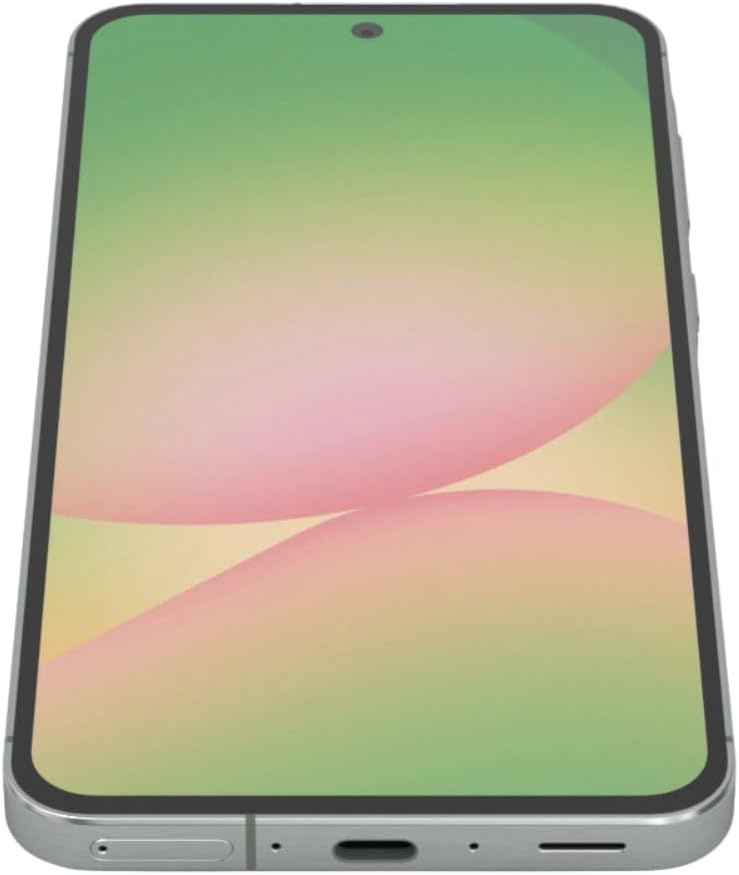
Rysunek 2: Strona view of the Samsung Galaxy A56 5G, showing the location of the SIM card tray and USB-C port.
2.3. Ładowanie akumulatora
Before first use, fully charge the device battery. Use only the provided 25W Samsung Super Fast Charger and USB-C cable.
- Podłącz kabel USB-C do portu ładowania znajdującego się na dole telefonu.
- Podłącz drugi koniec kabla do zasilacza 25 W.
- Podłącz zasilacz do gniazdka ściennego.
- Na ekranie pojawi się wskaźnik ładowania.
Notatka: The device supports 25W Super Fast Charging. Using a lower wattage charger may result in slower charging times.
2.4. Włączanie/wyłączanie zasilania
- Włączanie: Naciśnij i przytrzymaj przycisk boczny (przycisk zasilania), aż pojawi się logo Samsung.
- Aby wyłączyć: Press and hold the Side key and Volume Down button simultaneously, then tap "Power off" on the screen. Alternatively, swipe down from the top of the screen to open the Quick Panel, tap the Power icon, and select "Power off".
- Zrestartować: Follow the power off steps, but select "Restart".
2.5. Początkowa konfiguracja urządzenia
Upon first power-on, the device will guide you through the initial setup process. This includes:
- Wybór języka
- Połączenie z siecią Wi-Fi
- Logowanie do konta Google
- Data transfer from an old device (using Samsung Smart Switch)
- Konfigurowanie blokady ekranu (PIN, wzór, hasło, odcisk palca)
- Reviewing and agreeing to terms and conditions
3. Obsługa urządzenia
3.1. Nawigacja i interfejs użytkownika
The Galaxy A56 5G runs on Android 15 with Samsung's One UI 7. Navigation is primarily touch-based.
- Ekran główny: Twoje centralne centrum aplikacji i widżetów.
- Szuflada aplikacji: Przesuń palcem w górę na ekranie głównym, aby uzyskać dostęp do wszystkich zainstalowanych aplikacji.
- Quick Panel: Przesuń palcem w dół od góry ekranu, aby uzyskać dostęp do szybkich ustawień i powiadomień.
- Ostatnie aplikacje: Swipe up and hold from the bottom of the screen (if using gesture navigation) or tap the Recent Apps button (if using navigation buttons) to view ostatnio używane aplikacje.
3.2. Google Circle to Search Feature
The Circle to Search with Google feature allows for quick information retrieval. Simply circle, highlight, or tap an object or text on your screen to initiate a Google Search.
3.3. Wykonywanie połączeń i wysyłanie wiadomości
- Połączenia: Otwórz Telefon aplikację, wprowadź numer i dotknij ikony połączenia.
- Wiadomości: Otwórz Wiadomości app, tap the new message icon, enter the recipient's number or select from contacts, type your message, and tap send.
3.4. Korzystanie z aparatu
The device features a 50MP main camera, 12MP ultra-wide, 5MP macro, and a 12MP front camera. The camera system includes AI enhancements that optimize image quality by recognizing elements like sky, skin, and hair. The front camera supports Super HDR for high-resolution selfie videos with optimized colors and contrast. The camera app also includes an Object Eraser tool that allows you to remove unwanted elements from your photos.
- Otwórz Kamera aplikacja.
- Wybierz żądany tryb (Zdjęcie, Wideo, Portret, Pro itp.).
- Naciśnij przycisk migawki, aby zrobić zdjęcie lub rozpocząć/zatrzymać nagrywanie wideo.
- Aby dostosować powiększenie, użyj elementów sterujących powiększeniem na ekranie.
- Przełączaj się między przednim i tylnym aparatem za pomocą ikony przełączania aparatów.
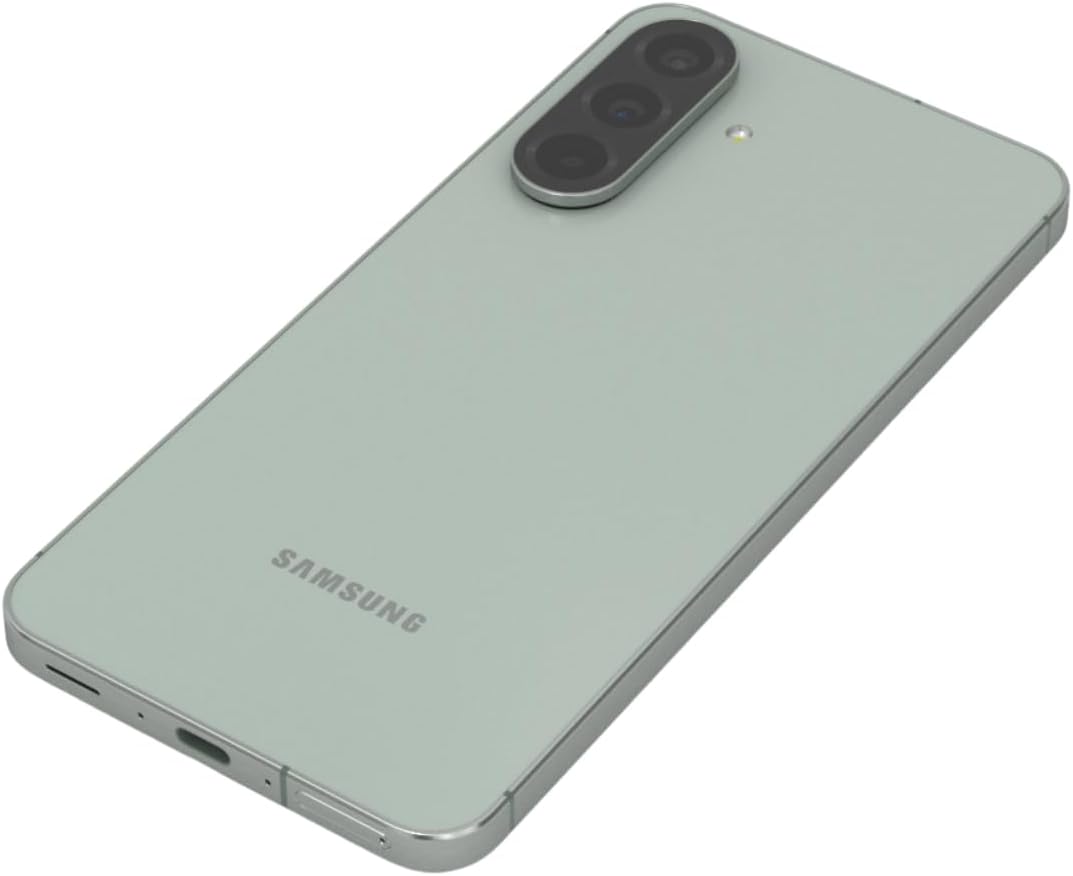
Rysunek 3: Tył view of the Samsung Galaxy A56 5G, highlighting the triple camera system.
3.5. Internet i łączność
- Wi-Fi: Idź do Ustawienia > Połączenia > Wi-Fi aby połączyć się z dostępnymi sieciami.
- Dane mobilne: Upewnij się, że dane mobilne są włączone w Ustawienia > Połączenia > Użycie danych.
- Bluetooth: Sparuj z innymi urządzeniami za pomocą Ustawienia > Połączenia > Bluetooth.
- NFC: Use for contactless payments and quick sharing via Ustawienia > Połączenia > Płatności NFC i zbliżeniowe.
3.6. Funkcje bezpieczeństwa
The Galaxy A56 5G includes an in-display optical fingerprint sensor for secure unlocking.
- Idź do Settings > Security and privacy > Biometrics > Fingerprints.
- Postępuj zgodnie z instrukcjami wyświetlanymi na ekranie, aby zarejestrować swój odcisk(i) palca(ów).
- You can also set up Face Recognition for convenient unlocking.
4. Konserwacja i pielęgnacja
4.1. Optymalizacja baterii
To maximize battery life (5000mAh capacity):
- Dostosowanie jasności ekranu.
- Włącz tryb oszczędzania energii (Ustawienia > Bateria i pielęgnacja urządzenia > Bateria).
- Zamknij nieużywane aplikacje działające w tle.
- Ogranicz użycie danych w tle przez niektóre aplikacje.
4.2. Aktualizacje oprogramowania
Keep your device's software up to date for optimal performance and security. Samsung provides up to 6 major Android upgrades for this model.
- Idź do Ustawienia > Aktualizacja oprogramowania.
- Uzyskiwać Pobierz i zainstaluj.
- Postępuj zgodnie z instrukcjami wyświetlanymi na ekranie.
4.3. Czyszczenie urządzenia
Use a soft, lint-free cloth to clean the screen and body of the phone. Avoid harsh chemicals or abrasive materials. The device has an IP67 rating for dust and water resistance, meaning it can withstand immersion in up to 1 meter of fresh water for up to 30 minutes. However, it is not recommended for beach or pool use and water resistance may decrease over time with normal wear.
5. Rozwiązywanie Problemów
5.1. Typowe problemy i rozwiązania
| Problem | Rozwiązanie |
|---|---|
| Urządzenie nie włącza się | Upewnij się, że bateria jest naładowana. Naciśnij i przytrzymaj przycisk zasilania przez co najmniej 10 sekund, aby wymusić ponowne uruchomienie. |
| Słaba łączność sieciowa | Check SIM card insertion. Toggle Airplane mode on/off. Restart the device. Verify network settings with your carrier. |
| Aplikacje ulegają awarii lub zawieszają się | Wyczyść pamięć podręczną aplikacji (Ustawienia > Aplikacje > [Nazwa aplikacji] > Pamięć > Wyczyść pamięć podręczną). Update the app. Restart the device. |
| Bateria szybko się rozładowuje | Review zużycie baterii w Ustawienia > Bateria i pielęgnacja urządzenia > Bateria. Reduce screen brightness. Close background apps. |
| Czujnik odcisku palca nie działa | Ensure your finger and the screen are clean and dry. Re-register your fingerprint if necessary. |
6. Specyfikacje
| Funkcja | Szczegół |
|---|---|
| Nazwa modelu | Galaxy A56 5G |
| Numer modelu | A566E/DS |
| Wyświetlacz | 6.7-inch FHD+ Super AMOLED, 120Hz Refresh Rate, 1080 x 2340 Resolution |
| Edytor | Exynos 1580 (4nm), Octa-core, 2.9 GHz CPU Speed |
| BARAN | 12 GB |
| Składowanie | 256 GB (bez gniazda na kartę SD) |
| Kamera tylna | 50MP (f/1.8) Main, 12MP (f/2.2) Ultra-wide, 5MP (f/2.4) Macro |
| Przednia kamera | 12 MP (f/2.2) |
| Bateria | 5000 mAh, 25W Super Fast Charging |
| System operacyjny | Android 15 (with up to 6 major Android upgrades) |
| Łączność | 5G, 4G LTE, Wi-Fi, Bluetooth 5.3, GPS, NFC |
| Typ karty SIM | Dual SIM + eSIM |
| Odporność na wodę/kurz | IP67 |
| Wymiary | 6 x 4 x 2 cala |
| Waga | 10.6 uncji |
| Cechy specjalne | Fingerprint (under display, optical), Accelerometer, Internet Browser, Music Player, Speakerphone, Touchscreen, Unlocked |
7. Gwarancja i wsparcie
This is an International Model and may not include a U.S. manufacturer warranty. Please refer to the seller's return policy for details regarding returns and exchanges.
For technical assistance, you can visit the official Samsung support website or contact their customer service. For issues related to your purchase, please contact your seller directly.
Optional protection plans may be available for purchase to extend coverage beyond the standard return policy. Please check with your retailer for details on available plans.
8. Filmy produktowe
Watch these official videos for additional guidance and feature demonstrations.
Video 1: Device Overview
Ten film przedstawia krótki przeglądview of the Samsung Galaxy A56 5G, highlighting its key features and design. (Duration: 0:17)
Video 2: Advanced Features
A detailed video demonstrating some of the advanced functionalities and user interface elements of the device. (Duration: 1:25)
Video 3: Camera Capabilities
Explore the various camera modes and features available on the Galaxy A56 5G. (Duration: 0:36)
Video 4: Performance and Gaming
This video showcases the device's performance, including its capabilities for gaming and multitasking. (Duration: 0:48)
Video 5: Durability and Design
Learn about the robust design and IP67 water resistance of the Samsung Galaxy A56 5G. (Duration: 1:27)
Video 6: Display Features
This video highlights the vibrant 6.7-inch FHD+ Super AMOLED display and its Vision Booster technology. (Duration: 1:17)
Video 7: Software Experience
Ponadview of the Android 15 operating system and Samsung's One UI 7 interface. (Duration: 0:36)
Video 8: Quick Features
A short video highlighting some quick and convenient features of the device. (Duration: 0:10)
Video 9: Connectivity Options
This video explains the various connectivity options, including 5G, Wi-Fi, and Bluetooth. (Duration: 1:12)
Video 10: Ecosystem Integration
Discover how the Galaxy A56 5G integrates with the broader Samsung ecosystem. (Duration: 1:04)


