
1. Koniec produktuview
The Hisense 65E7Q QLED Smart TV offers a premium viewing experience with its 65-inch QLED display. This television integrates advanced technologies such as Dolby Vision and Dolby Atmos for immersive audio-visuals, AI Smooth Motion for fluid images, and dedicated modes for gaming and sports. Powered by the VIDAA operating system, it provides easy access to a wide range of streaming content and smart features, including voice control.

Przód view of the Hisense 65E7Q QLED Smart TV.
Główne cechy:
- Kolor QLED: Experience rich, vibrant, and realistic colors.
- Płynny ruch AI: Advanced MEMC and 3D Noise Reduction for fluid, blur-free images.
- Dolby Vision i Dolby Atmos: Cinematic picture and immersive sound for an enhanced entertainment experience.
- Tryb gry Plus: Reduces input lag to 16ms, with 60Hz VRR and ALLM for ultra-fluid gaming.
- Tryb sportowy AI: Optimizes picture and sound for sports content, reducing motion blur and enhancing stadium-like audio.
- Skaler AI 4K: Enhances blurry images to near-4K quality.
- VIDAA Smart TV OS: Fast, secure, and intuitive operating system with access to popular streaming applications.
- Sterowanie głosowe: Integrated Alexa and VIDAA Voice for convenient operation.
2. Informacje dotyczące bezpieczeństwa
Please read all safety instructions carefully before using your TV. Keep this manual for future reference. Always ensure the TV is placed on a stable surface to prevent tipping. Do not expose the TV to rain or moisture. Refer to the full safety guidelines in the included safety manual.
3. Zawartość opakowania
Sprawdź, czy w pudełku znajdują się wszystkie elementy:
- Telewizor Smart TV Hisense 65E7Q QLED
- Kabel zasilający
- Pilot zdalnego sterowania (z 1 baterią AAAA w zestawie)
- Stojak pod telewizor (2 sztuki)
- Śruby do montażu stojaka
- Instrukcja obsługi (ten dokument)
- Karta gwarancyjna
4. Konfiguracja
4.1 Montaż stojaka
- Ostrożnie połóż telewizor ekranem do dołu na miękkiej, płaskiej powierzchni, aby zapobiec jego uszkodzeniu.
- Dopasuj elementy podstawy do odpowiednich otworów na spodzie telewizora.
- Przymocuj elementy stojaka za pomocą dołączonych śrub. Upewnij się, że są mocno dokręcone.

Diagram illustrating TV dimensions and stand installation points.
4.2 Montaż na ścianie
If you plan to wall mount your TV, ensure you use a VESA-compatible wall mount kit (not included). The Hisense 65E7Q supports a VESA mounting standard of 600 x 400 mm. Follow the instructions provided with your wall mount kit for safe installation.
4.3 Podłączanie urządzeń peryferyjnych
Connect your external devices to the TV's ports as needed. Refer to the port diagram below:

Tył view showing available ports and connections.
- Porty HDMI (x3): Connect Blu-ray players, game consoles, and other HDMI devices. One port supports eARC for enhanced audio return.
- Porty USB (x2): Connect USB flash drives for media playback. (1x USB 3.0, 1x USB 2.0)
- Antenna Inputs (x2): Podłącz antenę naziemną lub kablową.
- Ethernet (LAN): Do przewodowego połączenia sieciowego.
- Optyczne wyjście audio: Podłącz do soundbara lub odbiornika audio, aby uzyskać dźwięk cyfrowy.
- Gniazdo słuchawkowe: Do prywatnego słuchania.
- Wejścia AV: Do podłączania starszych urządzeń za pomocą kabli kompozytowych wideo i stereofonicznych audio.
4.4 Pierwsze włączenie zasilania
- Podłącz kabel zasilający do telewizora, a następnie do gniazdka elektrycznego.
- Naciśnij przycisk zasilania na pilocie lub telewizorze.
- Postępuj zgodnie z instrukcjami wyświetlanymi na ekranie, aby dokończyć konfigurację początkową, obejmującą wybór języka, nawiązanie połączenia sieciowego i skanowanie kanałów.
5. Obsługa telewizora
5.1 Pilot zdalnego sterowania
The included remote control allows you to navigate the TV's features. Insert the provided AAAA battery into the remote. The remote supports voice control for convenient operation.
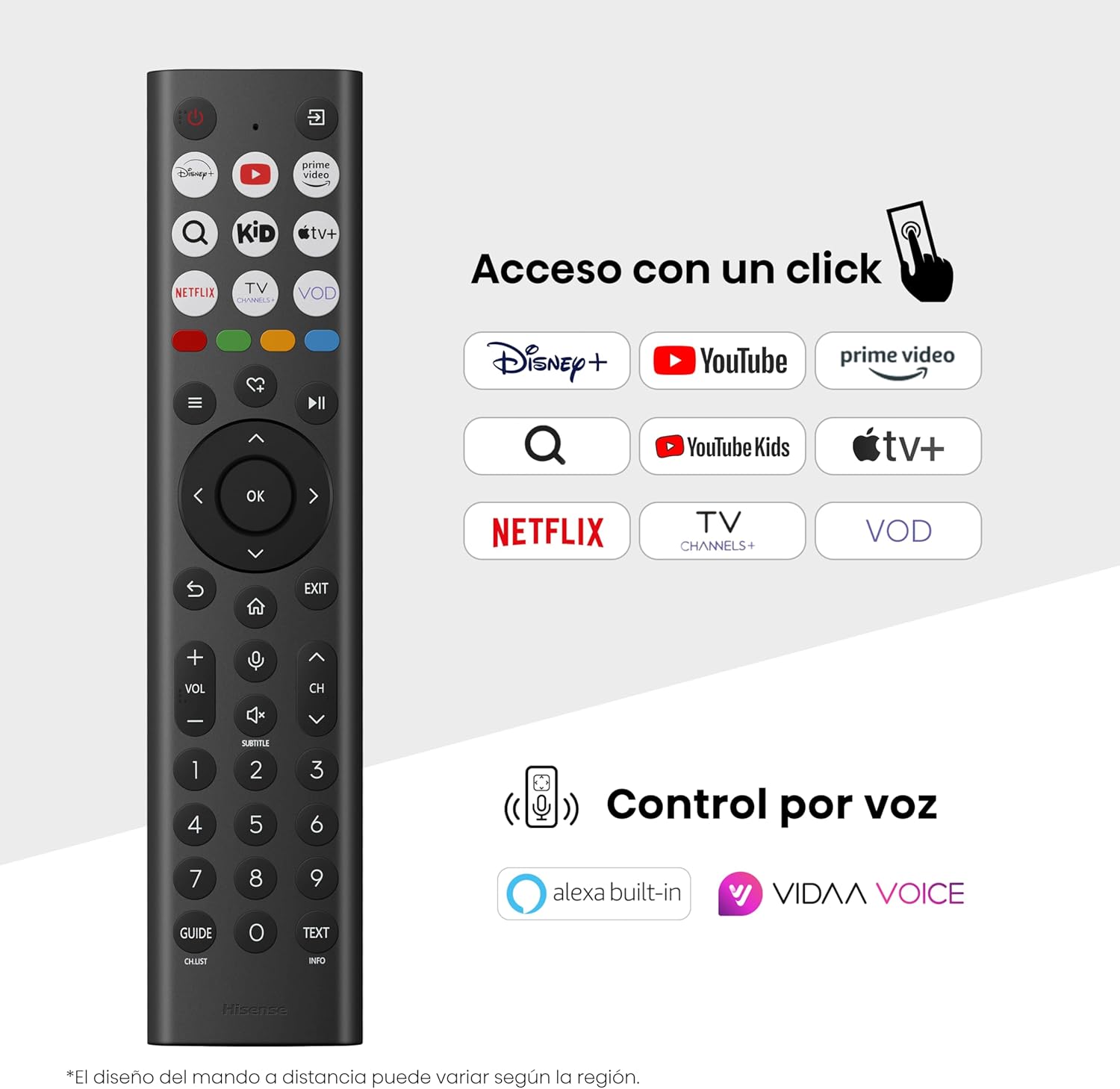
Hisense Smart TV remote control with dedicated app buttons and voice control.
5.2 Funkcje Smart TV (system operacyjny VIDAA)
Your Hisense TV runs on the VIDAA operating system, offering a user-friendly interface for accessing various applications and services.

The VIDAA Smart TV interface with popular streaming applications.
- Zastosowania: Access pre-installed apps like Netflix, YouTube, Prime Video, and more.
- Sterowanie głosowe: Use the remote's voice function to search for content, adjust settings, or interact with Alexa built-in and VIDAA Voice.
- Screen Mirroring (AirPlay): Share content from your Apple devices directly to the TV.
- Udostępnij w telewizji: Easily send content from your mobile devices to the TV.
5.3 Ustawienia obrazu
Zoptymalizuj swoje viewing experience with various picture enhancement technologies:
- Kolor QLED: Delivers over a billion shades of vibrant, lifelike colors.
- Skaler AI 4K: Automatically enhances lower-resolution content to near-4K quality.
- Płynny ruch AI: Reduces motion blur in fast-paced scenes, ensuring clear and fluid visuals.
- Dolby Vision: Provides stunning brightness, contrast, and color for a dramatic visual experience.
- Tryb filmowca: Zachowuje oryginalne proporcje obrazu, kolory i liczbę klatek na sekundę, aby wyświetlać filmy zgodnie z zamierzeniami reżysera.
- Czujnik światła AI: Intelligently adjusts screen brightness based on ambient light for optimal viewi efektywności energetycznej.
- Tryb pielęgnacji oczu: Redukuje emisję niebieskiego światła, minimalizując zmęczenie oczu.
- Tryb oszczędzania energii: Optimizes power consumption without significantly compromising picture quality.

QLED technology delivers over a billion vibrant color tones.

AI 4K Upscaler enhances lower resolution content to near 4K clarity.

AI Smooth Motion ensures fluid images without blur, especially in fast-moving scenes.

Filmmaker Mode presents content exactly as the director intended.
5.4 Ustawienia dźwięku
Ulepsz swoje wrażenia dźwiękowe dzięki:
- Dolby Atmos: Immersive, multi-dimensional sound that fills your room.
- Zintegrowany głośnik: Built-in speakers with a maximum output of 1 Watt per channel.
- EzPlay: Seamlessly control compatible Hisense soundbars directly from your TV screen.

Dolby Vision and Dolby Atmos combine for a spectacular audio-visual experience.
5.5 Funkcje gier
For gamers, the TV offers:
- Tryb gry Plus: Reduces input lag to 16ms, ensuring responsive gameplay.
- 60Hz VRR (zmienna częstotliwość odświeżania): Synchronizes the TV's refresh rate with the game console's output to prevent screen tearing.
- ALLM (tryb automatycznego niskiego opóźnienia): Automatically switches the TV to low-latency mode when a game is detected.
- Pasek gier: An integrated control center for quick access to game settings and real-time performance monitoring.

Game Mode Plus provides ultra-fluid, lag-free gaming.

The Game Bar offers centralized control for game settings.
5.6 Sports Features
- Tryb sportowy AI: Automatically detects sports content and optimizes picture and sound settings for a stadium-like experience, enhancing clarity and audio effects.
6. Konserwacja
6.1 Czyszczenie telewizora
- Zawsze odłączaj telewizor od zasilania przed czyszczeniem.
- Do delikatnego przecierania ekranu i obudowy telewizora używaj miękkiej, suchej i niepozostawiającej włókien ściereczki.
- W przypadku uporczywych plam delikatnieampPrzetrzyj ściereczkę wodą lub specjalnym środkiem do czyszczenia ekranów (nie spryskuj bezpośrednio ekranu).
- Unikaj stosowania środków czyszczących o właściwościach ściernych, alkoholu, benzenu i rozcieńczalników, gdyż mogą one uszkodzić powierzchnię telewizora.
6.2 Aktualizacje oprogramowania
Telewizor może okresowo otrzymywać aktualizacje oprogramowania w celu poprawy wydajności i dodania nowych funkcji. Aby pobrać te aktualizacje, upewnij się, że telewizor jest podłączony do internetu. Dostępność aktualizacji zazwyczaj można sprawdzić ręcznie w menu ustawień telewizora.
7. Rozwiązywanie Problemów
Jeśli masz problemy z telewizorem, zapoznaj się z poniższymi typowymi rozwiązaniami:
- Brak zasilania: Sprawdź, czy kabel zasilający jest prawidłowo podłączony i czy gniazdko elektryczne działa. Spróbuj użyć innego gniazdka.
- Brak obrazu/dźwięku: Upewnij się, że wybrano prawidłowe źródło sygnału. Sprawdź wszystkie połączenia kablowe (HDMI, antena).
- Pilot nie działa: Check the battery (1 AAAA battery). Ensure there are no obstructions between the remote and the TV.
- Problemy z połączeniem sieciowym: Verify your Wi-Fi password or Ethernet cable connection. Restart your router.
- Słaba jakość obrazu: Dostosuj ustawienia obrazu (jasność, kontrast, ostrość). Upewnij się, że źródło sygnału wejściowego zapewnia wysoką jakość.
- Zniekształcenie dźwięku: Check audio settings. If using external speakers, ensure they are connected correctly.
For more detailed troubleshooting, consult the full electronic user manual or contact Hisense customer support.
8. Specyfikacje
Szczegółowe dane techniczne telewizora Hisense 65E7Q QLED Smart TV:
| Funkcja | Specyfikacja |
|---|---|
| Numer modelu | 65E7Q |
| Rozmiar ekranu | 65 cali |
| Technologia wyświetlania | QLED |
| Rezolucja | 4K (3840x2160) |
| Częstotliwość odświeżania | 60 Hz |
| Obsługa formatu HDR | Wizja Dolby |
| Motion Enhancement Technology | Płynny ruch AI |
| Poprawa jakości obrazu | AI 4K Upscaler, AI Smooth Motion, QLED Colour |
| Czas reakcji | 100 milisekund |
| Konfiguracja podświetlenia | Direct Illumination, Dimming |
| Opis głośnika | Integrated speaker with Dolby Atmos |
| Maksymalna moc wyjściowa głośnika | 1 waty |
| Kanały audio | Wielokanałowy |
| Surround Sound Format | Dolby Atmos |
| System operacyjny | WIDAA |
| Pojemność pamięci masowej | 1 GB |
| Metoda kontroli | Głos |
| Technologia łączności | Bluetooth, HDMI, Wi-Fi |
| Internet Applications | Netflix, YouTube, Prime Video, AirPlay 2 |
| Porty HDMI | 3 (including HDMI 2.1 with eARC) |
| Porty USB | 2 (1x USB 3.0, 1x USB 2.0) |
| Technologia bezprzewodowa | Wi-Fi |
| Screen Mirroring Technology | Odtwarzanie AirPlay |
| Standard montażowy VESA | 600x400mm |
| Wymiary produktu (gł. x szer. x wys.) | Wymiary 7.6 x 145.3 x 83.8 cm |
| Waga produktu | 15.2 kg (z podstawą) |
| Klasa efektywności energetycznej | E |
| Roczne zużycie energii | 84 kWh/1000 godz. (SDR), 160 kWh/1000 godz. (HDR) |
| Moc | 1 Watt (standby) |
| Tomtage | 100-240 VCA 50-60 Hz |
| Zawarte komponenty | Kabel zasilający, pilot, stojak |
| Rok modelowy | 2025 |
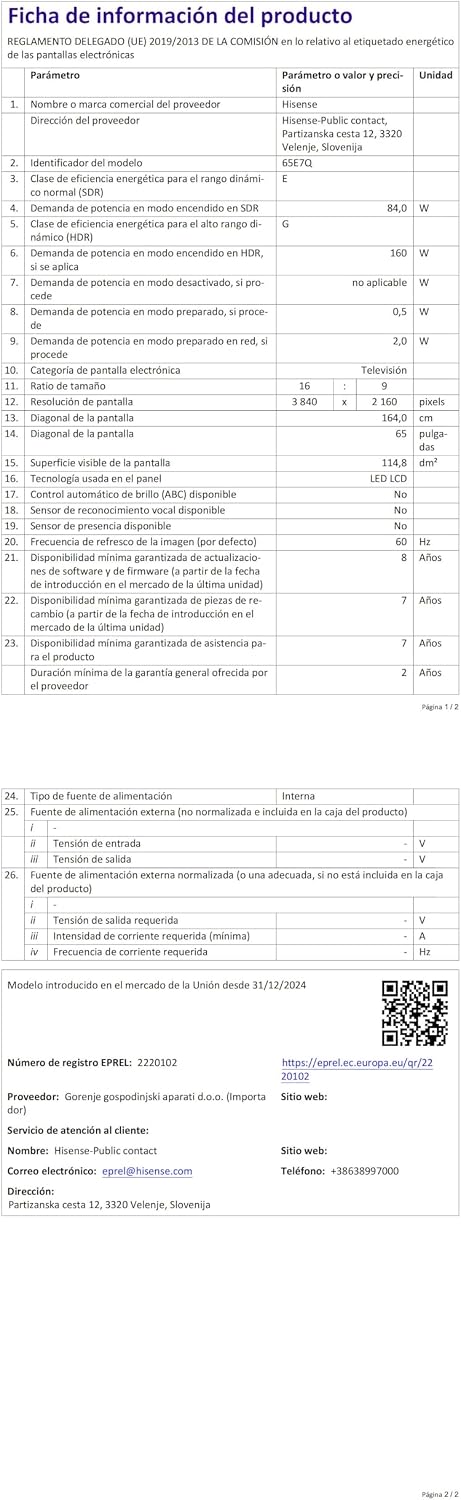
Energy label for the Hisense 65E7Q TV.
Więcej szczegółowych informacji o produkcie znajdziesz w bazie danych EPREL: https://eprel.ec.europa.eu/qr/2220102
9. Gwarancja i wsparcie
9.1 Gwarancja na produkt
Ten telewizor Hisense jest wyposażony w 3-letnia gwarancja na produkt. Zachowaj dowód zakupu na wypadek roszczeń gwarancyjnych.
9.2 Dostępność części zamiennych
Spare parts for this model are guaranteed to be available in the EU for a duration of 10 lata from the product's market introduction.
9.3 Obsługa klienta
For technical assistance, troubleshooting, or warranty service, please contact Hisense customer support. Refer to the contact information provided in your warranty card or visit the official Hisense webwitryna dla Twojego regionu.