
Inkbird Inkbird-IAQM
Inkbird 10-in-1 Air Quality Monitor
Model: Inkbird-IAQM User Manual
1. Wprowadzenie
The Inkbird 10-in-1 Air Quality Monitor (Model Inkbird-IAQM) is designed to provide comprehensive indoor air quality analysis. This device continuously tracks ten key environmental parameters: Carbon Dioxide (CO2), Particulate Matter (PM2.5/PM10), Total Volatile Organic Compounds (TVOC), Formaldehyde (HCHO), Air Quality Index (AQI), temperature, humidity, and time/date. It offers real-time monitoring with high accuracy, smart WiFi integration for remote access, and customizable alerts to help maintain a healthy indoor environment.
This manual provides detailed instructions for the proper setup, operation, maintenance, and troubleshooting of your Inkbird Air Quality Monitor.
2. Koniec produktuview
Główne cechy
- 10-in-1 Air Analysis: Monitors CO2, PM2.5/PM10, TVOC, HCHO, AQI, temperature, humidity, time, and date.
- Wysoka dokładność: Provides readings with a typical accuracy of ±5%.
- Smart WiFi Integration: Connects to 2.4GHz WiFi for remote monitoring via the INKBIRD app.
- Długoterminowe przechowywanie danych: Stores over 700 days of historical data, exportable as CSV reports.
- Proactive Dual Alarms: Customizable thresholds for CO2, PM2.5, and AQI with instant light and sound warnings.
- 6.1-calowy wyświetlacz IPS: Sunlight-readable screen with auto-brightness, 6 display modes, °C/°F switching, and 12/24hr clock.
- 10-Hour ECO Mode: Tryb oszczędzania energii wydłużający czas pracy baterii.
- Elastyczna instalacja: Supports magnetic wall mount and desk stand options with cable management.
Komponenty i elementy sterujące
Familiarize yourself with the device's components and control buttons as illustrated below:

Rysunek 1: Inkbird 10-in-1 Air Quality Monitor with labeled components and control buttons.
- 1. ECO Mode & Power On Button: Press and hold to power on/off. Short press to toggle ECO mode.
- 2. Upper & WiFi Button & Backlight: Used for navigation, initiating WiFi connection, and adjusting backlight.
- 3. Lower & Alarm & °C/°F Switch: Used for navigation, setting alarms, and switching temperature units.
- 4. Set Button & Warning Light Bar: Used to enter settings menu. The light bar indicates air quality status.
- 5. Przycisk resetowania: Recessed button to reset the device (use a pin).
- 6. Port ładowania: USB-C port for power and charging.
3. Konfiguracja
3.1 Pierwsze ładowanie i włączanie
- Connect the provided USB-C cable to the charging port (6) on the monitor and plug the other end into a compatible USB power adapter (not included).
- Allow the device to charge fully before first use, or keep it connected for continuous power. The built-in 2700mAh Li-Po battery provides up to 10 hours of operation in ECO mode.
- Press and hold the ECO Mode & Power On button (1) for a few seconds until the display illuminates.

Rysunek 2: The Inkbird Air Quality Monitor connected via USB-C for charging or continuous power.
3.2 WiFi Connection and App Setup
To enable remote monitoring and data logging, connect your monitor to the INKBIRD app via WiFi.
- Pobierz aplikację INKBIRD ze sklepu z aplikacjami na swoim smartfonie (iOS lub Android).
- Register or log in to your INKBIRD account.
- On the monitor, press and hold the Upper & WiFi Button (2) to enter WiFi pairing mode. The WiFi icon on the display will flash.
- In the INKBIRD app, follow the on-screen instructions to add a new device. Ensure your phone is connected to a 2.4GHz WiFi network.
- Once connected, the WiFi icon on the monitor's display will become solid. You can now monitor air quality remotely and access historical data.

Rysunek 3: Remote monitoring via the INKBIRD app, showing historical data graphs.
3.3 Umieszczenie
For optimal performance, place the monitor in a central location within the room you wish to monitor, away from direct airflow from vents, windows, or doors. Avoid placing it near heat sources, strong electromagnetic fields, or in areas with high humidity unless specifically monitoring those conditions.
4. Instrukcja obsługi
4.1 Zrozumienie wyświetlacza
The 6.1-inch IPS display provides a clear overview of all monitored parameters. The display can be customized with six different modes. The main screen typically shows:
- Temperatura (TEMP): In °C or °F.
- Humidity (HUMI): Jako procenttage.
- CO2: In parts per million (ppm).
- HCHO: Stężenie formaldehydu w mg/m³.
- LZO: Całkowita zawartość lotnych związków organicznych w mg/m³.
- PM2.5: Particulate Matter 2.5 in μg/m³.
- PM10: Particulate Matter 10 in μg/m³.
- Wskaźnik jakości jakości: Wskaźnik jakości powietrza.
- Czas i data: Aktualny czas i data.

Rysunek 4: The monitor's display showing all 10 air quality parameters simultaneously.
4.2 Interpreting Air Quality Levels
The monitor provides visual indicators and comfort levels for key parameters to help you quickly assess air quality.

Rysunek 5: Comfort level indicators for CO2, PM2.5, and AQI, with corresponding color codes and ranges.
4.3 Ustawianie alarmów
The monitor features a dual alarm mechanism (light and sound) that activates when air quality parameters exceed user-defined thresholds. You can set personalized safety limits for CO2, PM2.5, and AQI.
- Press the Set Button (4) to enter the settings menu.
- Use the Upper (2) and Lower (3) buttons to navigate to the alarm settings for CO2, PM2.5, or AQI.
- Press the Set Button (4) again to select the parameter and adjust its threshold using the Upper (2) and Lower (3) buttons.
- Confirm your selection by pressing the Set Button (4).
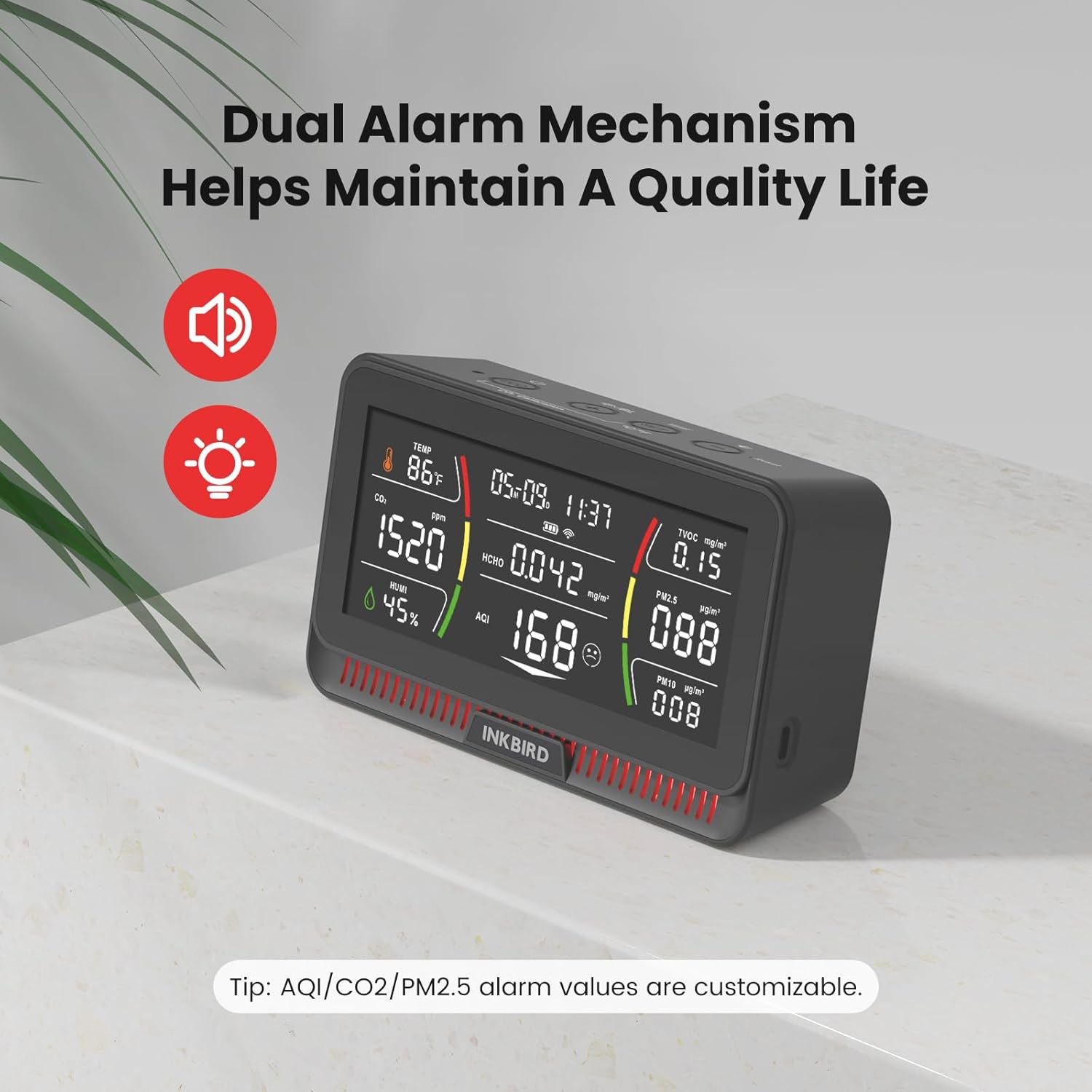
Rysunek 6: The monitor indicating high CO2 and AQI levels, triggering the dual alarm mechanism.
4.4 CO2 Calibration
For accurate CO2 readings, periodic calibration is recommended. The monitor supports easy CO2 calibration.
- Place the monitor in a well-ventilated outdoor area for at least 10 minutes to ensure ambient CO2 levels are stable (approximately 400-450 ppm).
- Refer to the device's on-screen menu or the INKBIRD app for the specific CO2 calibration option.
- Follow the prompts to initiate calibration. The process may take a few minutes.
4.5 Tryb EKO
To conserve battery life, short press the ECO Mode & Power On button (1) to toggle ECO mode. In this mode, the display may dim or update less frequently, but core detection functions continue.
5. Konserwacja
5.1 Czyszczenie
To ensure accurate readings and prolong the life of your monitor:
- Przetrzyj urządzenie miękką, suchą ściereczką.
- Nie należy używać środków czyszczących o działaniu ściernym, rozpuszczalników ani silnych środków chemicznych.
- Avoid getting moisture into the sensor openings or charging port.
5.2 Aktualizacje oprogramowania
Inkbird provides free lifetime software updates for the monitor. Ensure your device is connected to WiFi and regularly check the INKBIRD app for available firmware updates to benefit from improved features and performance.
6. Rozwiązywanie Problemów
If you encounter issues with your Inkbird Air Quality Monitor, refer to the following common problems and solutions:
| Problem | Możliwa przyczyna | Rozwiązanie |
|---|---|---|
| Urządzenie nie włącza się. | Low battery or power cable issue. | Ensure the device is charged or connected to a power source. Check the USB-C cable and adapter. |
| Niedokładne odczyty. | Zakłócenia czujnika, konieczność kalibracji lub czynniki środowiskowe. | Ensure proper placement away from direct airflow. Perform CO2 calibration as described in Section 4.4. Allow the device to stabilize for 5-10 minutes after powering on. |
| Nie można połączyć się z siecią Wi-Fi. | Incorrect WiFi password, 5GHz network, or distance from router. | Verify WiFi password. Ensure your router is broadcasting a 2.4GHz network. Move the monitor closer to the WiFi router. Restart the monitor and try pairing again. |
| Częste uruchamianie alarmu. | High pollutant levels or alarm thresholds set too low. | Ventilate the area. Review and adjust alarm thresholds in the settings menu (Section 4.3) if necessary. |
| Wyświetlacz jest słaby lub nie reaguje. | ECO mode active or device malfunction. | Short press the ECO Mode & Power On button (1) to exit ECO mode. If unresponsive, try resetting the device using a pin in the Reset button (5). |
If the problem persists, please contact Inkbird customer support for further assistance.
7. Specyfikacje
| Parametr | Wartość |
|---|---|
| Numer modelu | Inkbird-IAQM |
| Dokładność pomiaru | ±0.5% |
| Waga przedmiotu | 1.5 funta (około 680 g) |
| Wymiary opakowania | 9.06 x 5.08 x 2.91 cala (ok. 23 x 12.9 x 7.4 cm) |
| Kolor | Czarny |
| Zawarte komponenty | 1 air quality monitor |
| Bateria | Built-in 2700mAh Li-Po (No external batteries required) |

Rysunek 7: Dimensions and weight of the Inkbird 10-in-1 Air Quality Monitor.
8. Gwarancja i wsparcie
Inkbird is committed to providing high-quality products and customer service.
- Lifetime Software Updates: Benefit from continuous improvements and new features through free lifetime software updates.
- 24/7 Air Quality Consultation: For any questions or concerns regarding your air quality monitor or indoor air quality, Inkbird offers 24/7 consultation services.
For technical support, warranty claims, or further assistance, please visit the official Inkbird website or contact their customer service team directly. Contact information can typically be found on the product packaging or the Inkbird official webstrona.
Ask a question about this manual
Ask about setup, troubleshooting, compatibility, parts, safety, or missing instructions. Manuals+ will review the question and use this page’s manual context to help answer it.