
1. Wprowadzenie
Thank you for choosing the MTAKYA 5-in-1 Wireless CarPlay and Android Auto Adapter. This device is designed to convert your car's original wired CarPlay system into a wireless one, offering seamless integration with both Apple CarPlay and Android Auto. Additionally, it provides built-in access to popular streaming services like Netflix and YouTube, along with support for offline media playback via TF card or USB disk. This manual will guide you through the setup, operation, and maintenance of your new adapter to ensure an optimal user experience.

Figure 1: MTAKYA 5-in-1 Wireless CarPlay and Android Auto Adapter and its interface.
2. Główne cechy
- Bezprzewodowy CarPlay i Android Auto: Converts wired CarPlay to wireless, supporting both Apple CarPlay and Android Auto in one device for cable-free convenience.
- Streaming Video Experience: Built-in Netflix and YouTube for in-car entertainment.
- Odtwarzanie multimediów offline: Integrated TF card and USB slot for playing videos or music offline (TF card support up to 256GB).
- Stabilna łączność: Features powerful 2.4GHz Bluetooth and 5.8GHz WIFI modules for quick and automatic phone connection.
- Podłącz i graj: Simple setup, connecting in 10-15 seconds without extra drives or apps.
- Full CarPlay Functionality Retention: Supports original car control methods including voice control, steering wheel control, touch screen control, and knob operation.
- Kompaktowa konstrukcja: Lightweight and stylish, designed to be easily carried and placed without obstructing view.

Figure 2: Enjoy streaming video with built-in Netflix and YouTube.

Figure 3: Offline media playback via TF card or USB disk.
3. Przewodnik konfiguracji
Follow these steps to set up your MTAKYA Wireless CarPlay & Android Auto Adapter:
- Podłącz adapter: Plug the AI Box into your car's USB port. Ensure your car has factory wired CarPlay.
- Access Car Screen: On your car's screen, click the "CarPlay/Android Auto" option.
- Sparuj swój telefon: On your smartphone, open the Wi-Fi and Bluetooth settings. Select "Pair" and "Allow" when prompted to connect to the adapter.
- Start Wireless Connection: Wait for the wireless CarPlay or Android Auto to start. This typically takes 10-15 seconds for the first connection. Subsequent connections will be automatic.
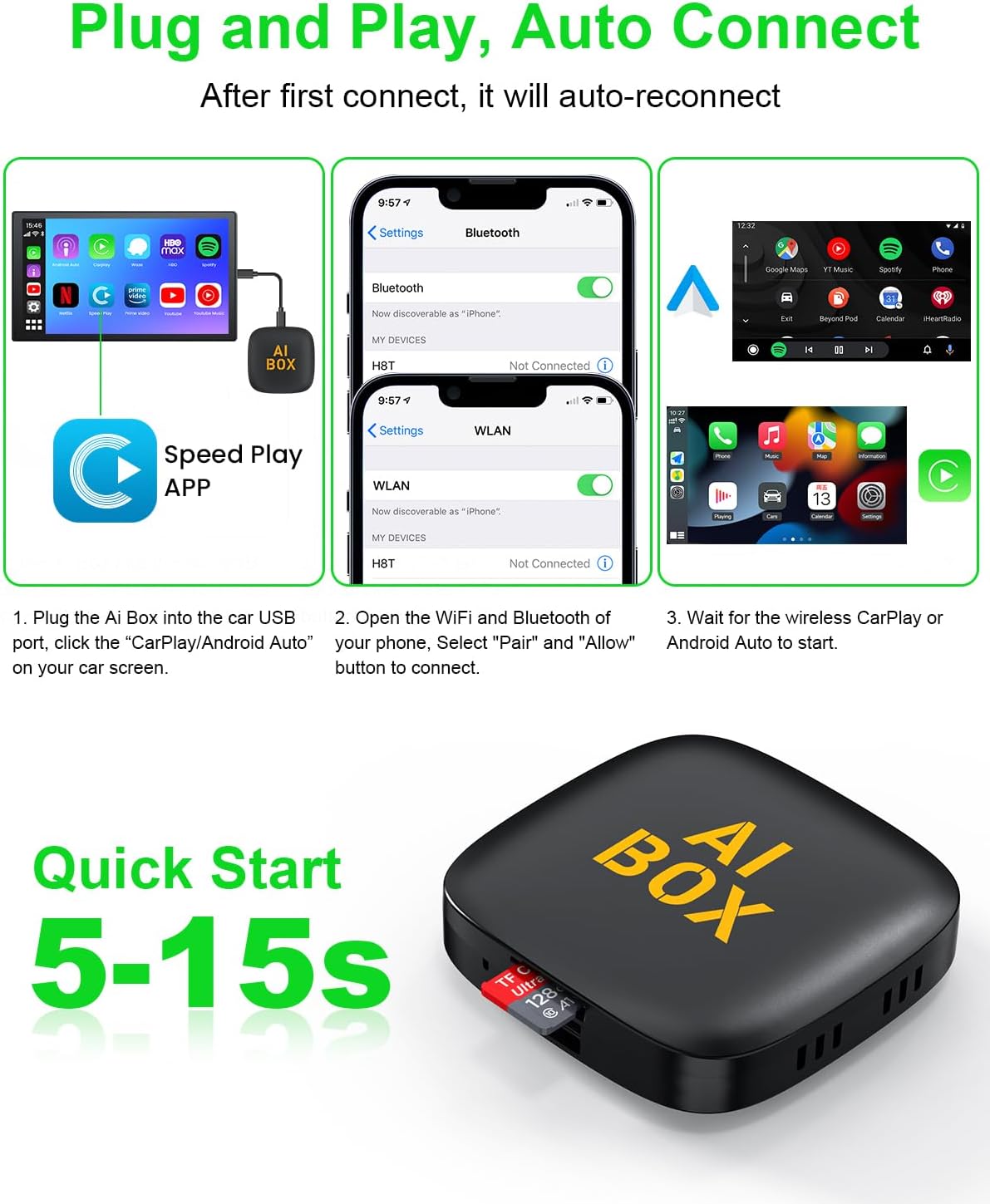
Figure 4: Quick start guide for connecting the adapter.
4. Instrukcja obsługi
Once connected, the adapter allows you to utilize your car's existing controls for a seamless experience.
4.1 Korzystanie z bezprzewodowego CarPlay/Android Auto
- Your car's display will mirror your phone's CarPlay or Android Auto interface.
- Navigate through apps, make calls, send messages, and use navigation directly from your car's screen.
- Metody kontroli: The adapter fully supports your car's original control methods:
- Sterowanie głosowe: Use your car's built-in voice assistant (e.g., Siri, Google Assistant) for hands-free operation.
- Sterowanie z kierownicy: Use the buttons on your steering wheel to control audio playback, calls, and navigation.
- Sterowanie za pomocą ekranu dotykowego: Korzystaj bezpośrednio z ekranu dotykowego samochodu.
- OEM Knob Operation: If your car has a control knob, it will function as usual for menu navigation.
4.2 Using Streaming Services (Netflix/YouTube)
- The adapter has Netflix and YouTube pre-installed. Access these apps from the main interface.
- An internet connection (via Wi-Fi hotspot from your phone or a separate Wi-Fi source) is required for streaming.
- Notatka: You can connect to either Apple CarPlay/Android Auto OR streaming services like YouTube/Netflix, but not both simultaneously.
4.3 Odtwarzanie multimediów offline
- Insert a TF card or USB disk containing media files (videos, music) into the adapter's designated slot.
- Access the media player application on the adapter's interface to browse and play your offline content.
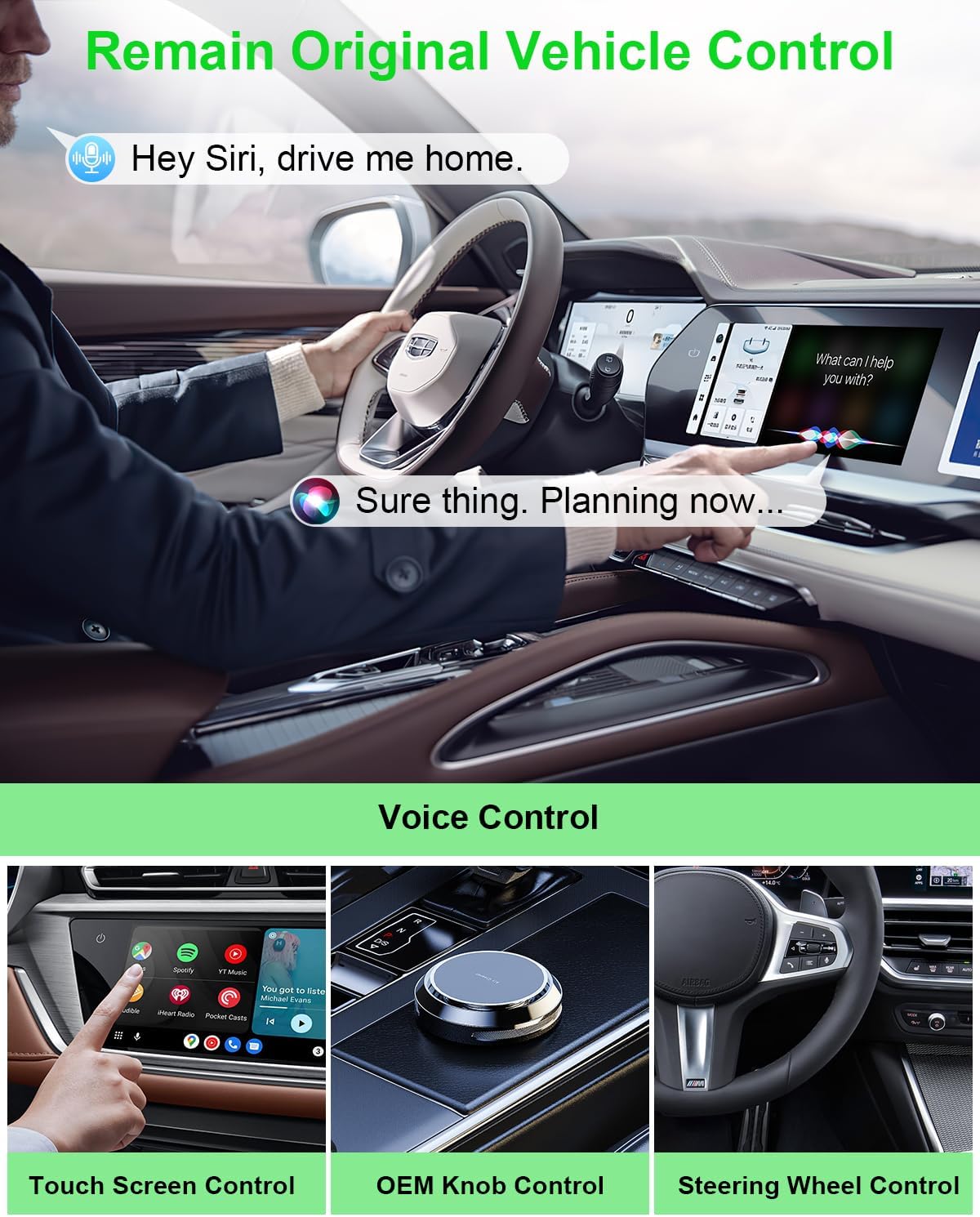
Figure 5: Retain original vehicle control methods.
5. Zgodność
The MTAKYA Wireless CarPlay & Android Auto Adapter is designed for wide compatibility:
- Kompatybilne samochody: Suitable for more than 800 car models manufactured after 2016 that come with factory wired CarPlay.
- Incompatible Cars: Not compatible with BMW or Tesla vehicles. Also, not compatible with cars that have built-in wireless CarPlay or cars without a touch screen.
- Kompatybilne telefony:
- Apple CarPlay: Supports iPhones with iOS version 10.0 and above.
- Android Auto: Supports Android phones with Android 11.0 and above.

Figure 6: Wide compatibility with various car models and phone OS versions.
6. Specyfikacje
| Funkcja | Szczegół |
|---|---|
| Wymiary produktu | 3.98 x 3.39 x 0.71 cala (80 x 50 x 12 mm) |
| Waga przedmiotu | 2.85 uncji |
| Numer modelu | A11 |
| Wersja Androida | Android 13.0 |
| Pamięć masowa systemu | 2GB LPDDR3X RAM + 16GB eMMC ROM |
| Obsługa kart pamięci | TF Card/U Disk (up to 256GB) |
| Wersja Bluetooth | BLE5.0 |
| Wi-Fi | 2.4G WIFI, 5.8GHz WIFI |
| Obsługiwane funkcje | Wireless CarPlay, Wireless Android Auto, Wired Android Auto, Netflix, YouTube |
| Zdalne sterowanie | BT Remote control (if applicable) |
| Interfejs | Type-C/USB A |
| Rezolucja | 1080p (Video Output Resolution: 1920x1080) |
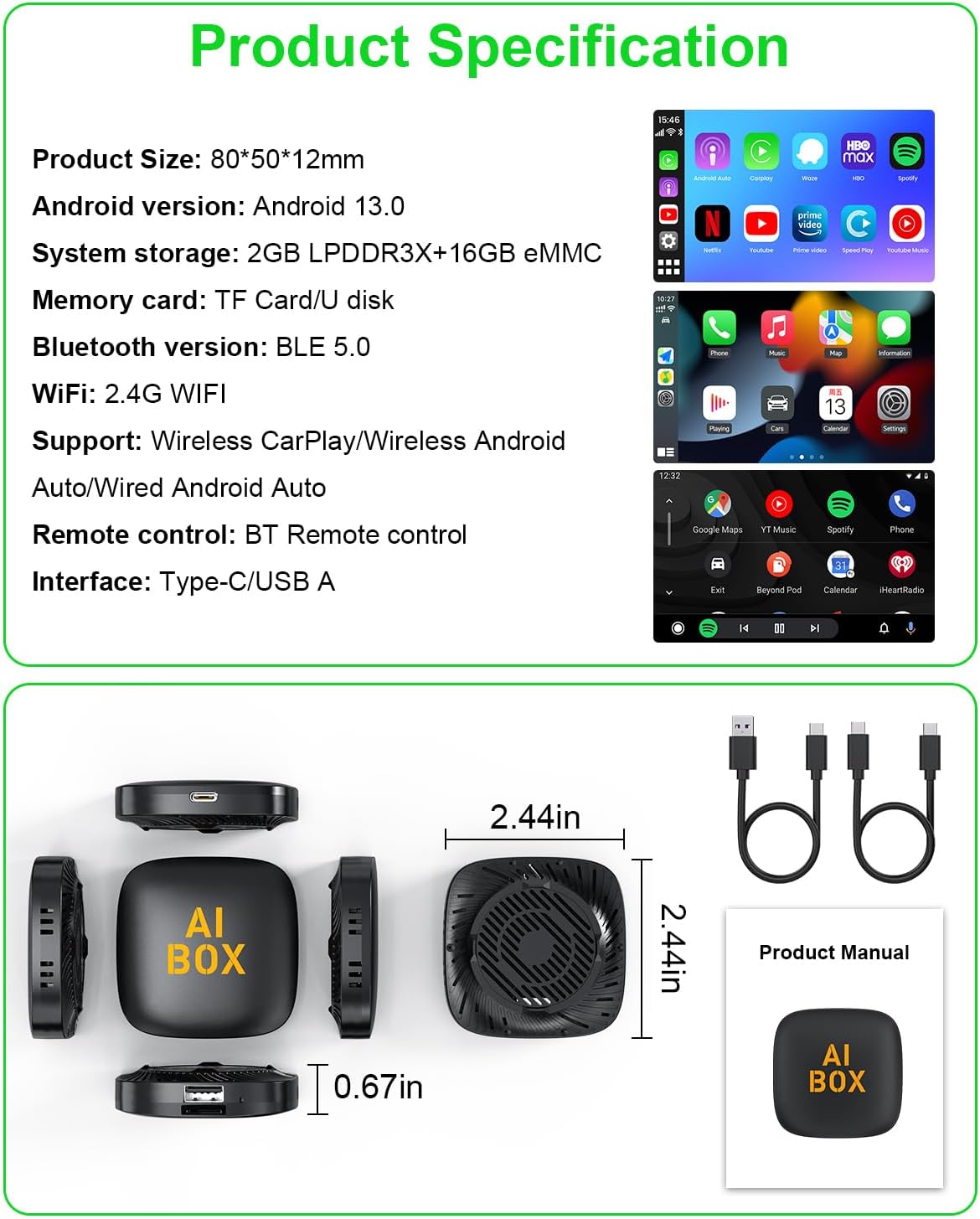
Figure 7: Product dimensions and interface overview.
7. Konserwacja
To ensure the longevity and optimal performance of your adapter, follow these simple maintenance guidelines:
- Czyszczenie: Do czyszczenia zewnętrznej części urządzenia należy używać miękkiej, suchej ściereczki. Unikaj stosowania płynnych środków czyszczących i materiałów ściernych.
- Składowanie: Przechowywać adapter w chłodnym i suchym miejscu, z dala od bezpośredniego światła słonecznego i ekstremalnych temperatur.
- Obsługiwanie: Obchodź się z urządzeniem ostrożnie. Unikaj upuszczania go i narażania na silne uderzenia.
- Łączność: Ensure cables are connected securely to prevent intermittent disconnections.
8. Rozwiązywanie Problemów
If you encounter issues with your MTAKYA adapter, please refer to the following common solutions:
- Brak połączenia/Częste rozłączenia:
- Ensure your car has factory wired CarPlay and is compatible (post-2016 models, not BMW/Tesla).
- Verify your phone's Wi-Fi and Bluetooth are enabled and correctly paired with the adapter.
- Check the USB cable connection between the adapter and your car. Try a different USB port if available.
- Uruchom ponownie system informacyjno-rozrywkowy w samochodzie i telefon.
- Ensure your phone's operating system is up to date (iOS 10.0+ or Android 11.0+).
- Netflix/YouTube Not Working:
- Confirm you have an active internet connection (Wi-Fi hotspot) for the adapter.
- Remember that streaming services cannot be used simultaneously with CarPlay/Android Auto. Switch modes as needed.
- Check if the apps require updates.
- Niska wydajność/opóźnienia:
- Ensure a strong Wi-Fi signal for streaming.
- Zamknij niepotrzebne aplikacje działające w tle w telefonie.
- The adapter may take a few seconds to fully boot up after car ignition.
- Brak dźwięku:
- Check the volume levels on both your car's system and your phone.
- Ensure the car's audio input is set to the correct source (e.g., USB, CarPlay/Android Auto).
9. Gwarancja i obsługa klienta
Your MTAKYA CarPlay Ai Box comes with 24 months of worry-free after-sales customer service.
If you have any questions, require further assistance, or encounter issues not covered in this manual, please do not hesitate to contact our customer support team. You can reach us through Amazon's messaging system, and we commit to replying within 24 hours to provide a satisfactory solution.