
ZPSHYD XY-SK150
ZPSHYD XY-SK150 Buck Boost DC Power Supply User Manual
Model: XY-SK150
1. Wprowadzenie
The ZPSHYD XY-SK150 is a high-performance digital adjustable DC power supply module designed for a wide range of applications. It features a buck-boost function, allowing for both step-up and step-down voltage conversion, and incorporates Maximum Power Point Tracking (MPPT) for efficient solar charging. With its full-color LCD display and multiple protection features, it provides a safe, precise, and user-friendly experience for various electrical tasks.

Figure 1.1: ZPSHYD XY-SK150 Buck Boost DC Power Supply front view.
2. Specyfikacje
The following table outlines the key technical specifications of the XY-SK150 power supply:
| Parametr | Wartość |
|---|---|
| Wejście Voltage | DC 6-36V |
| Objętość wyjściatage | DC 0-36V |
| Prąd wyjściowy | 0-7A |
| Moc wyjściowa | 0-150W |
| Tomtage Dokładność | ±0.5%+1 digit |
| Dokładność bieżąca | ±0.5%+3 cyfry |
| Tomtage Rozdzielczość | 0.01 V |
| Aktualna rozdzielczość | 0.001A |
| Wyświetlacz | Pełny-view VA Color LCD |
| Chłodzenie | Intelligent Temperature-Controlled Fan, Thickened Heat Sink |
| Ochrona | Anti-reverse, Anti-backflow, Under/Overvoltage, Overcurrent, Overtemperature, Overpower, Timeout |
| Cechy specjalne | MPPT Solar Charging Function, External Temperature Probe Support |

Figure 2.1: Display showing key specifications and capabilities.

Rysunek 2.2: Wymiary produktu (79 mm x 39 mm x 23 mm).
3. Konfiguracja i połączenia
Before operating the device, ensure all connections are secure and correct. The module requires a DC input power source within the specified range.
3.1 Podłączenie zasilania
Connect your DC input power source (6-36V) to the input terminals of the XY-SK150 module. Observe polarity: positive to positive, negative to negative. The module has anti-reverse connection protection, but correct polarity is always recommended.
3.2 Output Load Connection
Connect your load to the output terminals. Ensure the load's voltage and current requirements are within the module's 0-36V and 0-7A output range. The module features anti-backflow protection to prevent current from flowing back into the power supply.
3.3 External Temperature Probe (Optional)
For precise overheating management, an external temperature probe can be connected to the designated NTC temperature probe interface. This allows the device to automatically stop charging or operation if the temperature exceeds a safe limit.

Rysunek 3.1: Example connection diagram for MPPT solar charging with external temperature probe.
4. Instrukcja obsługi
The XY-SK150 features an intuitive interface with a full-color LCD and several control buttons and an encoder knob.
4.1 Main Interface and Display
The LCD simultaneously displays real-time voltage, current, and power. It provides clear and bright readings for easy monitoring.

Rysunek 4.1: Pełnyview color LCD screen displaying voltage, prąd i moc.
4.2 Funkcje przycisków
- Przycisk VSET:
Krótkie naciśnięcie: Ustaw objętość wyjściowątage.
Długie naciśnięcie: Enter or exit the data group interface. - Przycisk SW:
Krótkie naciśnięcie: Switch input and output voltage or shift display.
Długie naciśnięcie: Enter or exit the system settings interface. - Przycisk ISET:
Krótkie naciśnięcie: Set output current.
Długie naciśnięcie: Enter or exit the data group interface. - Encoder Key (Rotary Knob):
Krótkie naciśnięcie: Switch output power (W), capacity (Ah/energy Wh), time (h), or temperature (C) display.
Długie naciśnięcie: Turn on/off the lock function. - Power Key (Yellow Button):
Krótkie naciśnięcie: Turn on/off the power output.
Długie naciśnięcie: Long press on the capacity (Ah/energy Wh) or time (h) interface to clear the value.

Figure 4.2: Introduction to key functions and controls.
5. Główne cechy
5.1 Versatile Power Range and High Precision
The XY-SK150 offers a wide adjustable DC input range of 6-36V and an output range of 0-36V, capable of handling up to 7A current and 150W power. Its precise voltage and current accuracy (±0.5%+1 digit for voltage, ±0.5%+3 digits for current) with resolutions of 0.01V and 0.001A make it suitable for detailed and delicate electrical tasks, ensuring reliable performance for sensitive applications.
5.2 Full-View Kolorowy wyświetlacz LCD
Equipped with a state-of-the-art VA color LCD display, the power supply simultaneously shows voltage, current, and power. This display provides clear and bright readings, reducing the need to switch between different display modes and enhancing overall user convenience and efficiency.
5.3 Robust Safety Features
The adjustable DC power supply incorporates comprehensive protection mechanisms to ensure safe and secure operations. These include:
- Zabezpieczenie przed odwrotnym podłączeniem
- Zabezpieczenie przed cofaniem się przepływu
- Objętość poniżejtagochrona elektroniczna
- Przepełnienietagochrona elektroniczna
- Zabezpieczenie nadprądowe
- Zabezpieczenie przed przegrzaniem
- Ochrona przed przeciążeniem
- Zabezpieczenie przed przekroczeniem limitu czasu
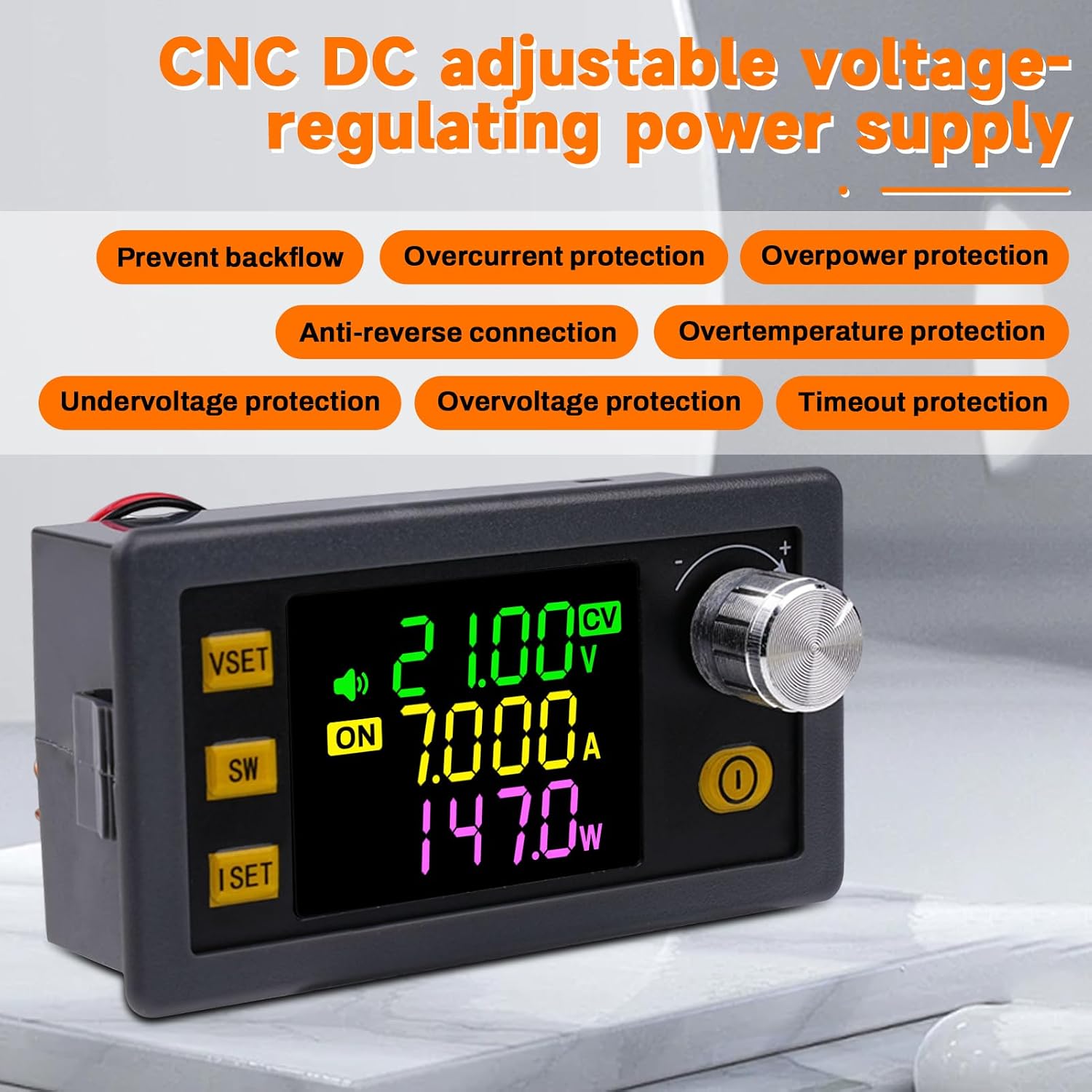
Rysunek 5.1: Koniecview of multiple protection functions.
5.4 Efficient Cooling and Upgrade Features
The Buck Boost power supply features an intelligent temperature-controlled fan and a thickened heat sink, secured with screws, for excellent heat dissipation. This design ensures stable performance even under demanding conditions. Additionally, it includes integrated buzzer alerts, button prompts, and alarm signals for enhanced safety and usability. The module also supports external temperature probe connections for precise overheating management.

Figure 5.2: Illustration of the intelligent cooling system.
5.5 MPPT Solar Charging Capability
A key feature of the XY-SK150 is its integrated MPPT (Maximum Power Point Tracking) function. This allows the power supply to efficiently utilize solar energy, making it an ideal solution for outdoor applications such as camping, as well as for powering devices in laboratories, electric scooters, or golf carts.
6. Aplikacje
The ZPSHYD XY-SK150 is highly versatile and can be used in a variety of settings:
- Laboratory Power Supply: Provides precise and stable power for electronic experiments and circuit testing.
- Na zewnątrz Camping: Ideal for charging batteries and powering devices using solar panels, thanks to its MPPT function.
- Electric Scooters and Golf Carts: Can be used for charging or powering these vehicles.
- DIY Electronics Projects: Suitable for hobbyists and makers requiring adjustable DC power.
- Zastosowania przemysłowe: For various industrial electrical needs within its power range.

Figure 6.1: Diverse applications of the XY-SK150 power supply.
7. Konserwacja
To ensure the longevity and optimal performance of your ZPSHYD XY-SK150 power supply, follow these maintenance guidelines:
- Czyszczenie: Regularly clean the exterior of the device with a soft, dry cloth. Do not use abrasive cleaners or solvents. Ensure ventilation openings are free from dust and debris.
- Składowanie: Gdy nie jest używane, przechowuj urządzenie w chłodnym, suchym miejscu, z dala od bezpośredniego światła słonecznego i ekstremalnych temperatur.
- Znajomości: Periodically check all input and output connections to ensure they are secure and free from corrosion.
- Wentylacja: Ensure adequate airflow around the device during operation to prevent overheating. Do not block the fan or ventilation holes.
8. Rozwiązywanie Problemów
If you encounter issues with your ZPSHYD XY-SK150, consider the following common troubleshooting steps:
- Brak zasilania/wyświetlacza:
Check input power: Upewnij się, że głośność wejściowatage is within the 6-36V range and the power source is functioning correctly.
Sprawdź połączenia: Verify that the input wires are securely connected and polarity is correct. - Brak wyjścia:
Check output enable: Ensure the power output is enabled using the yellow Power Key.
Check load: Verify that your load is connected correctly and is not short-circuited or drawing excessive current.
Check protection triggers: The device may have activated one of its protection features (e.g., overcurrent, overvoltage, overpower). Check the display for error messages or indicators. Disconnect the load, resolve the issue, and then re-enable output. - Nieprawidłowe odczyty:
Recalibrate (if applicable): Refer to advanced settings in the system menu if calibration options are available (consult manufacturer for detailed steps if needed).
Sprawdź połączenia: Loose connections can lead to inaccurate readings. - Przegrzanie:
Zapewnij wentylację: Make sure the fan and heat sink are not obstructed and there is sufficient airflow around the unit.
Zmniejsz obciążenie: If operating continuously at maximum power, consider reducing the load or providing additional cooling.
Jeśli po wykonaniu tych czynności problem nadal występuje, skontaktuj się z obsługą klienta, aby uzyskać dalszą pomoc.
9. Informacje dotyczące bezpieczeństwa
Please read and understand all safety warnings before operating the ZPSHYD XY-SK150 power supply. Failure to do so may result in injury or damage to the device.
- Bezpieczeństwo elektryczne: This device operates with DC voltage. Always observe correct polarity when making connections. Incorrect polarity, especially when charging batteries, can damage the device and connected equipment.
- Ładowanie akumulatora: Battery charging requires certain professional knowledge. Non-professionals should not charge directly to prevent fire and explosion. Always use appropriate battery management systems and monitor charging processes.
- Wentylacja: Ensure the device is operated in a well-ventilated area. Do not cover the ventilation holes or fan.
- Środowisko: Do not expose the device to water, moisture, high temperatures, or corrosive environments.
- Przeciążać: Nie przekraczać maksymalnej określonej objętości wejściowejtage, output current, or output power. The built-in protections will activate, but continuous overloading can reduce the lifespan of the device.
- Dzieci: Przechowywać urządzenie w miejscu niedostępnym dla dzieci.
10. Gwarancja i wsparcie
For warranty information and technical support, please refer to the documentation provided with your purchase or contact ZPSHYD customer service through the retailer where the product was acquired. Please have your model number (XY-SK150) and purchase details ready when contacting support.
Ask a question about this manual
Ask about setup, troubleshooting, compatibility, parts, safety, or missing instructions. Manuals+ will review the question and use this page’s manual context to help answer it.