
Wstęp
The Kaschun K1-N is a professional-grade 4-channel audio mixer designed for a variety of audio applications, including stage performances, live gigs, PC recording, and karaoke. It features a durable steel chassis, built-in Bluetooth connectivity, 99 DSP effects, and advanced equalization capabilities. This manual provides detailed instructions for setting up, operating, maintaining, and troubleshooting your K1-N mixer to ensure optimal performance and longevity.

Image: The Kaschun K1-N 4-Channel Professional Audio Mixer, showcasindzięki kompaktowej konstrukcji i układowi sterowania.
Organizować coś
1. Rozpakowanie i kontrola
Carefully remove the mixer from its packaging. Inspect all components for any signs of damage. Ensure all listed accessories are present.
2. Podłączenie zasilania
Connect the provided 100V-240V (+/-15V DC) power adapter to the mixer's power input. Plug the adapter into a suitable electrical outlet. The mixer is designed for global use with its multi-voltagi zasilacz.
3. Połączenia wejściowe audio
The K1-N mixer supports various input types:
- XLR/1/4" Combo Inputs: Use these for microphones (dynamic or condenser with 48V phantom power enabled) and line-level sources.
- Zasilanie fantomowe 48 V: Activate the dedicated 48V phantom power switch for condenser microphones. Ensure phantom power is off before connecting or disconnecting condenser microphones to prevent damage.
- Stereo RCA Input: Connect external audio devices such as CD players or media players to the stereo RCA input.
- USB/PC Connection: Connect the mixer to a computer via USB for direct audio playback and recording.
- Bluetooth: Pair your smartphone or other Bluetooth-enabled device for wireless audio streaming. The effective range is approximately 3 feet.
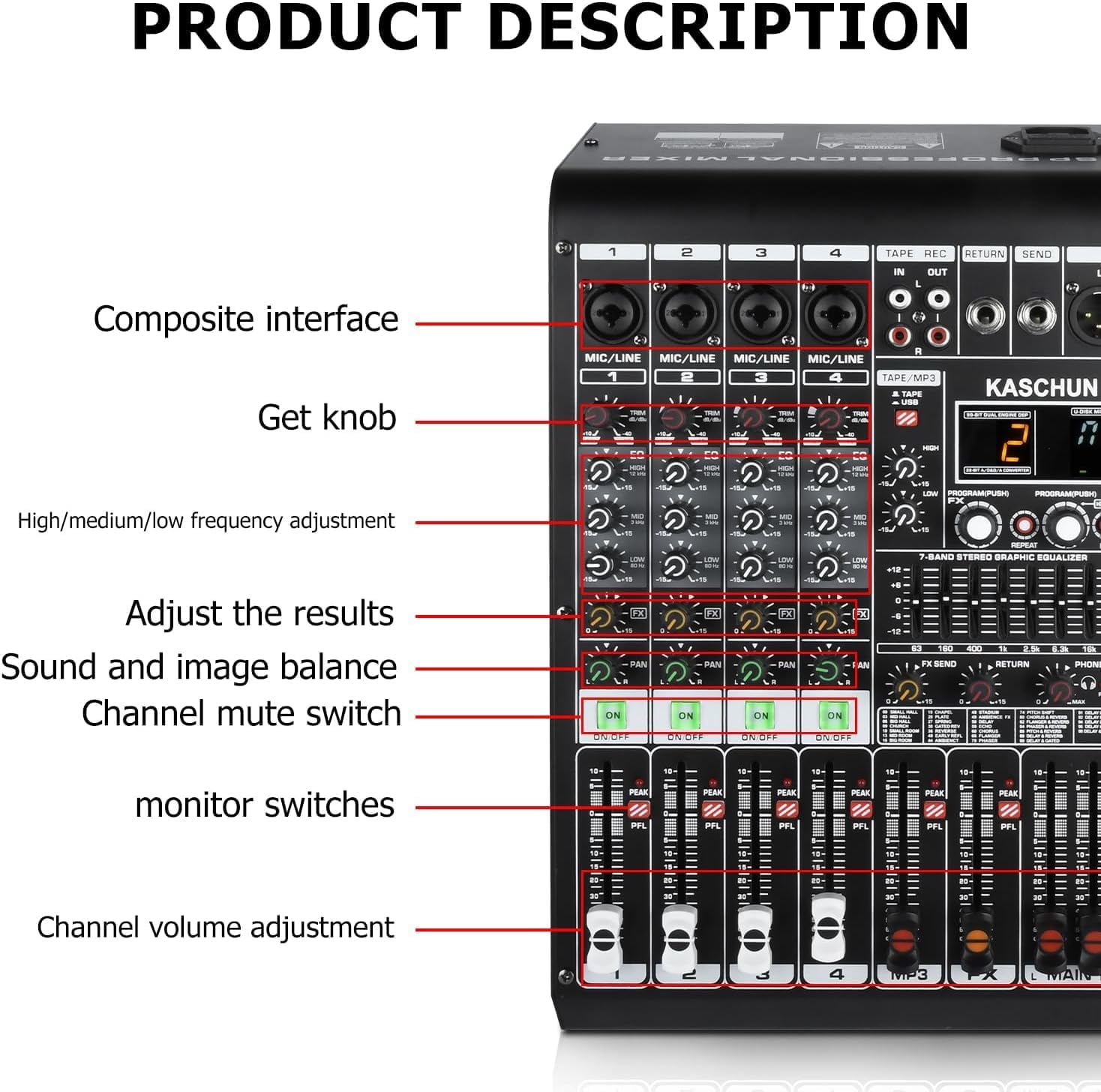
Obraz: Szczegółowy view of the K1-N mixer's left side, showing composite interfaces, gain knobs, EQ controls, channel mute switches, and channel volume faders.
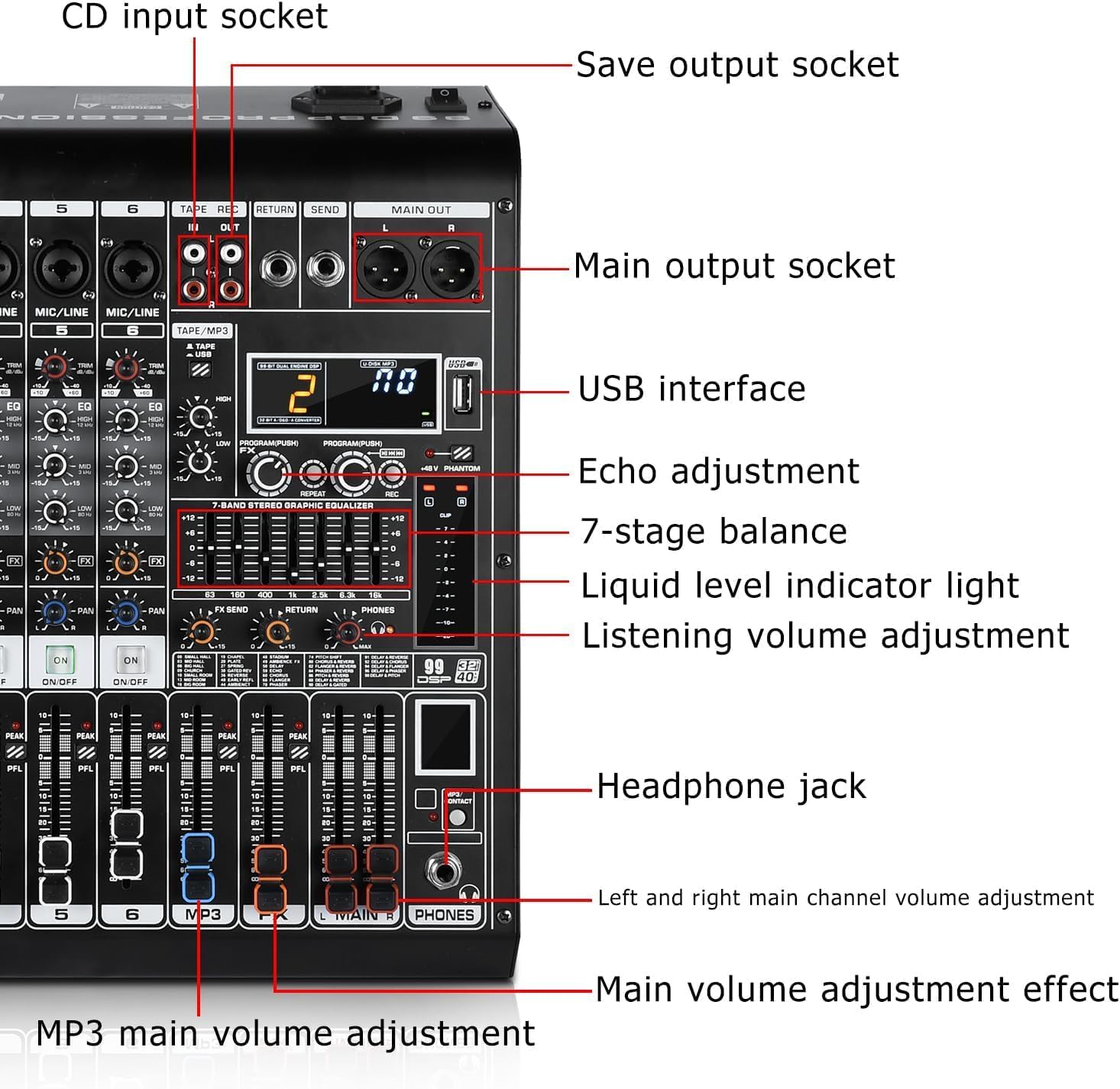
Obraz: Szczegółowy view of the K1-N mixer's right side, highlighting the USB interface, main output sockets, echo adjustment, 7-band graphic equalizer, liquid level indicator, headphone jack, and main volume controls.
4. Połączenia wyjściowe audio
- Główne wyjścia: Connect the main outputs (XLR or 1/4" TRS) to your powered speakers, power amplifier lub interfejs nagrywający.
- Gniazdo słuchawkowe: Plug in headphones for monitoring your mix.
- Tape/REC Out: Use the RCA outputs for recording your mix to an external device.
Instrukcja obsługi
1. Sterowanie kanałami
Each input channel (1-4) features dedicated controls:
- Pokrętło wzmocnienia: Adjusts the input sensitivity for the connected microphone or line source. Set this to achieve a strong signal without clipping (indicated by the PEAK LED).
- 3-pasmowy korektor: Controls the High, Mid, and Low frequencies for each channel, allowing you to shape the tone of individual inputs.
- Wyślij FX: Adjusts the amount of signal sent from the channel to the internal DSP effects processor.
- Chleb: Positions the channel's sound within the stereo field (left to right).
- Channel Mute Switch: Mutes or unmutes the individual channel.
- PFL (Pre-Fader Listen) / Solo: Allows you to monitor the channel's signal independently through headphones, before the fader affects the main mix.
- Suwak głośności kanału: Dostosowuje poziom wyjściowy pojedynczego kanału do miksu głównego.
2. Efekty DSP
The K1-N features 99 built-in Digital Signal Processing (DSP) effects to enhance your audio. Use the PROGRAM/PUSH knob to select an effect and adjust its parameters. The digital display shows the selected effect number.

Image: A list of the 99 available DSP effects, including various hall, room, church, plate, spring, delay, chorus, flanger, phaser, and reverb effects.
3. Master Controls
- 7-pasmowy graficzny korektor stereo: Provides precise control over the overall frequency response of your main mix. Adjust the sliders to boost or cut specific frequency bands.
- Regulacja echa: Controls the overall level of the selected DSP effect applied to the main mix.
- Main Volume Faders (L/R): Steruje ogólnym poziomem wyjściowym głównego miksu stereo.
- Głośność telefonów: Reguluje poziom głośności wyjścia słuchawkowego.

Obraz: widok z góry view of the K1-N 4-channel mixing console, highlighting the layout of controls and the 7-band stereo graphic equalizer.
4. USB/Bluetooth Operation
The K1-N allows for flexible audio playback:
- Odtwarzanie z USB: Włóż dysk flash USB z dźwiękiem files into the USB port. Use the built-in controls (play/pause/skip) to navigate your tracks.
- Strumieniowanie Bluetooth: Enable Bluetooth on your device and select the K1-N mixer from the list of available devices. Once paired, you can stream audio wirelessly.
- Połączenie z komputerem: Connect the mixer to your PC via USB to use it as an audio interface for recording or playback.

Image: The K1-N mixer demonstrating its professional audio console capabilities, supporting multiple device connections including USB and Bluetooth for wireless streaming from a smartphone.
Konserwacja
Proper maintenance ensures the longevity and optimal performance of your K1-N mixer:
- Czyszczenie: Regularly wipe down the mixer with a soft, dry cloth to remove dust and grime. Avoid using liquid cleaners or abrasive materials. The sealed rotary controls are designed to resist dust.
- Składowanie: Gdy mikser nie jest używany, należy przechowywać go w chłodnym, suchym miejscu, z dala od bezpośredniego światła słonecznego i ekstremalnych temperatur.
- Zarządzanie kablami: Zadbaj o to, aby kable były starannie ułożone i nie były naprężone, aby zapobiec uszkodzeniu złączy i portów.
Rozwiązywanie problemów
If you encounter issues with your K1-N mixer, refer to the following common problems and solutions:
| Problem | Możliwa przyczyna | Rozwiązanie |
|---|---|---|
| Brak dźwięku | Power off; incorrect connections; volume levels too low; muted channels. | Ensure power is on; check all audio cable connections; increase main and channel volume faders; verify no channels are muted. |
| Zniekształcony lub zaszumiony dźwięk | Input gain too high; faulty cables; impedance mismatch; fan noise. | Reduce input gain (ensure PEAK LED does not light consistently); try different cables; ensure correct impedance matching for connected devices. Note: Some users have reported fan noise; ensure the mixer is in a well-ventilated area. |
| Mikrofon nie działa | 48V phantom power off (for condenser mics); incorrect mic type; faulty mic/cable. | Activate 48V phantom power for condenser mics; ensure dynamic mics are connected correctly; test with a different microphone or cable. |
| USB/Bluetooth audio bypasses effects | Charakterystyka projektu. | The USB/Bluetooth input signal is routed directly to the main outputs and does not pass through the internal DSP effects. This is normal operation. |
| Sound quality degrades at high fader levels | Overdriving the mixer's internal circuitry. | Ensure input gain levels are set correctly (not too high). Avoid pushing channel or main faders to their maximum limits if distortion occurs. Adjust levels gradually. |
If the problem persists after attempting these solutions, please contact Kaschun customer support for further assistance.
Specyfikacje
| Funkcja | Szczegół |
|---|---|
| Numer modelu | K1-N |
| Marka | Kaschun |
| Liczba kanałów | 4 (input channels) / 8 (total channels including USB/Bluetooth) |
| Technologia łączności | USB, Bluetooth |
| Typ złącza wyjściowego | USB Type B, XLR, 1/4" TRS, RCA |
| Źródło zasilania | Corded Electric (100V-240V +/-15V DC adapter) |
| Efekty DSP | 99 Bit DSP effects |
| Wyrównanie | Per-channel 3-band EQ, 7-band master EQ |
| Moc fantomowa | 48 V (przełączalne) |
| Waga przedmiotu | 8 funta |
| Wymiary opakowania | 18 x 14 x 8 cala |
| Kraj pochodzenia | Chiny |

Image: The K1-N mixer with its dimensions labeled: 13.7cm width, 37cm height, and 25.3cm depth.
Gwarancja i wsparcie
For warranty information or technical support regarding your Kaschun K1-N mixer, please contact the Kaschun Store directly. Refer to your purchase documentation for specific warranty terms and contact details. Ensure you have your model number (K1-N) and purchase date available when seeking support.