
1. Wprowadzenie
This user manual provides comprehensive instructions for the safe and efficient operation, installation, and maintenance of your XWJNE 4000W Pure Sine Wave Power Inverter. This device is designed to convert 48V DC power from batteries into 120V AC power, suitable for a wide range of applications including home, RV, truck, and off-grid solar power systems. Please read this manual thoroughly before using the inverter to ensure proper functionality and to prevent damage to the unit or connected appliances.

Image: The XWJNE 4000W Pure Sine Wave Power Inverter, showcasing its main unit, heavy-duty battery cables (red for positive, black for negative), and the remote control display unit.
2. Instrukcje bezpieczeństwa
Always observe the following safety precautions to prevent personal injury or damage to the inverter and connected equipment:
- Upewnij się, że falownik został zainstalowany w dobrze wentylowanym pomieszczeniu, z dala od bezpośredniego światła słonecznego, źródeł ciepła i materiałów łatwopalnych.
- Nie wystawiać falownika na działanie wody, deszczu ani nadmiernej wilgoci.
- Podłączaj falownik wyłącznie do źródła zasilania 48 V DC. Podłączenie do nieprawidłowego napięciatagspowoduje szkody.
- Ensure all connections are tight and secure to prevent loose connections that can cause overheating or sparks.
- Do not operate the inverter if it has been dropped or damaged.
- Trzymaj dzieci z dala od falownika i jego złączy.
- Always disconnect the battery before performing any maintenance or cleaning.
- Falownik generuje dużą objętośćtage AC power; treat it with extreme caution.
- Nie należy podejmować prób demontażu ani modyfikacji falownika. Wszelkie prace serwisowe należy zlecić wykwalifikowanemu personelowi.
- Ensure the total power consumption of connected appliances does not exceed the inverter's rated output (4000W continuous, 8000W peak).

Obraz: Wnętrze view of the inverter highlighting its six safety protection functions: low-voltage protection, output short circuit protection, overvoltage protection, overpower protection, load shock protection, and overtemperature protection.
3. Zawartość opakowania
Sprawdź, czy w opakowaniu znajdują się wszystkie elementy:
- Falownik sinusoidalny XWJNE 4000W
- Car Battery Cables (2.62ft 7AWG positive and negative)
- Remote Controller (with 16.4ft cable)
- Instrukcja obsługi
- Klucz
- Ground Wire (1.64ft)
- Fuses (7 x 40A 32V)
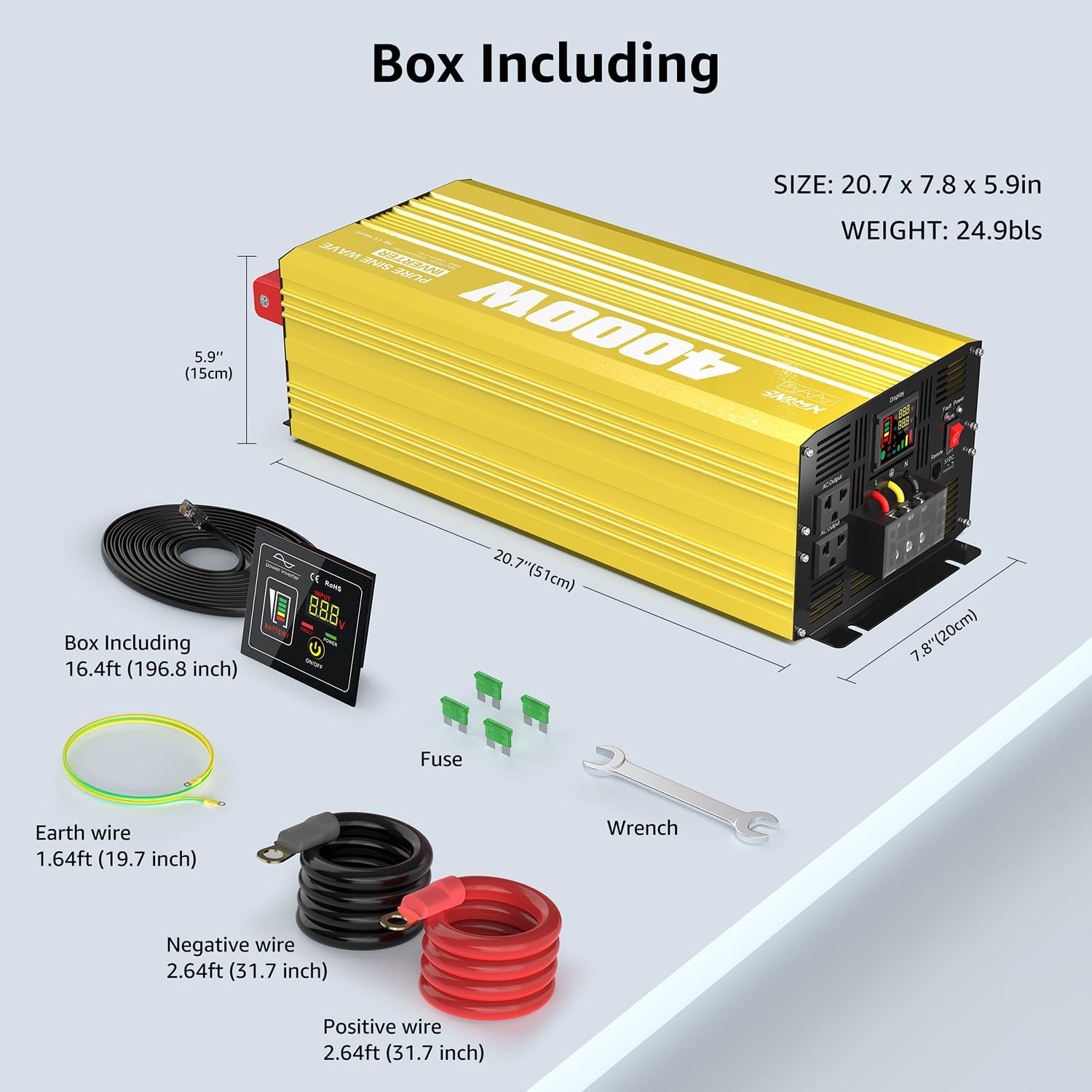
Image: A visual representation of the XWJNE 4000W inverter and its complete set of accessories, including the remote control, battery cables, ground wire, fuses, and a wrench, along with product dimensions.
4. Funkcje produktu
- Wysoka moc wyjściowa: Provides a stable 4000W continuous power output (8000W peak) from 48V DC to 120V AC.
- Technologia czystej fali sinusoidalnej: Delivers clean, stable power comparable to utility grid electricity, suitable for sensitive electronics like laptops, lights, TVs, refrigerators, and stereos, ensuring quiet operation without humming sounds.
- Kompleksowa ochrona: Equipped with 6 types of protection: undervoltage, przettage, overload, over-temperature, short circuit, and reverse connection protection for enhanced safety.
- Wyświetlacz LED i pilot zdalnego sterowania: Features an LED screen for real-time status monitoring and a remote controller with a 16.4ft cable for convenient operation in various settings.
- Wiele portów wyjściowych: Includes 2 x 120V AC output ports, 1 x USB port (5V 2.4A), and 1 x AC terminal board.
- Trwała konstrukcja: Built with aluminum and plastic for a sturdy structure that protects against impacts and aids in heat dissipation.
- Inteligentny system chłodzenia: Integrated smart fans automatically activate when the internal temperature is too high or load reaches half capacity, ensuring optimal operating conditions and low noise.

Image: A diagram illustrating the smooth, consistent waveform of a pure sine wave compared to a modified sine wave, emphasizing the inverter's >90% conversion efficiency and 40% power consumption reduction.
5. Koniec komponentówview
Familiarize yourself with the different parts of your inverter:

Image: A detailed diagram pointing out key components of the inverter, including the Power Switch, Fault Indicator Lamp, Remote Controller port, LED Display, AC Output ports (2x 15A), Earth Wire terminal, AC Terminal Board (45A), USB port (5V 2.4A 12W), Positive and Negative DC Terminals, and Intelligent Cooling Fans.
- Przycisk zasilania: Włącza/wyłącza falownik.
- Wskaźnik usterki Lamp: Illuminates to indicate an error or protection mode.
- Port pilota zdalnego sterowania: Connects the wired remote control.
- Wyświetlacz LED: Pokazuje wolumen w czasie rzeczywistymtage, battery level, frequency, and load percentage.
- Porty wyjściowe prądu przemiennego: Standardowe gniazdka prądu zmiennego 120 V do podłączania urządzeń.
- Earth Wire Terminal: Do uziemienia falownika.
- AC Terminal Board: For hardwiring AC loads.
- Port USB: 5V 2.4A output for charging USB devices.
- DC Input Terminals (Positive/Negative): Connect to the 48V DC battery bank.
- Intelligent Cooling Fans: Automatycznie włącza się w celu rozproszenia ciepła i utrzymania optymalnej temperatury pracy.
6. Konfiguracja i instalacja
Proper installation is crucial for the inverter's performance and safety.
6.1 Podłączenie akumulatora
The inverter requires a 48V deep cycle battery bank. Ensure the battery capacity is sufficient for your power needs. For a 4000W inverter, a minimum of 4 x 100Ah 12V batteries (wired in series for 48V) or equivalent 48V battery is recommended.

Image: Two diagrams illustrating connection methods: one for direct battery connection for independent use, and another for integration into an off-grid solar system with solar panels and an MPPT charge controller.
- Upewnij się, że wyłącznik zasilania falownika jest w pozycji WYŁĄCZONY.
- Connect the positive (+) battery cable (red) to the positive (+) terminal of the battery bank and the positive (+) DC input terminal on the inverter.
- Connect the negative (-) battery cable (black) to the negative (-) terminal of the battery bank and the negative (-) DC input terminal on the inverter.
- Upewnij się, że wszystkie połączenia są dobrze dokręcone i zabezpieczone. Luźne połączenia mogą powodować nadmierne nagrzewanie i uszkodzenia.
- Connect the ground wire from the inverter's earth terminal to a proper ground point (e.g., vehicle chassis, earth rod).
6.2 Instalacja pilota zdalnego sterowania
The remote controller allows for convenient operation from a distance.
- Locate the remote control port on the inverter.
- Connect the remote controller cable to this port.
- The remote controller can be mounted in a suitable location using screws, as it is designed for embedding.
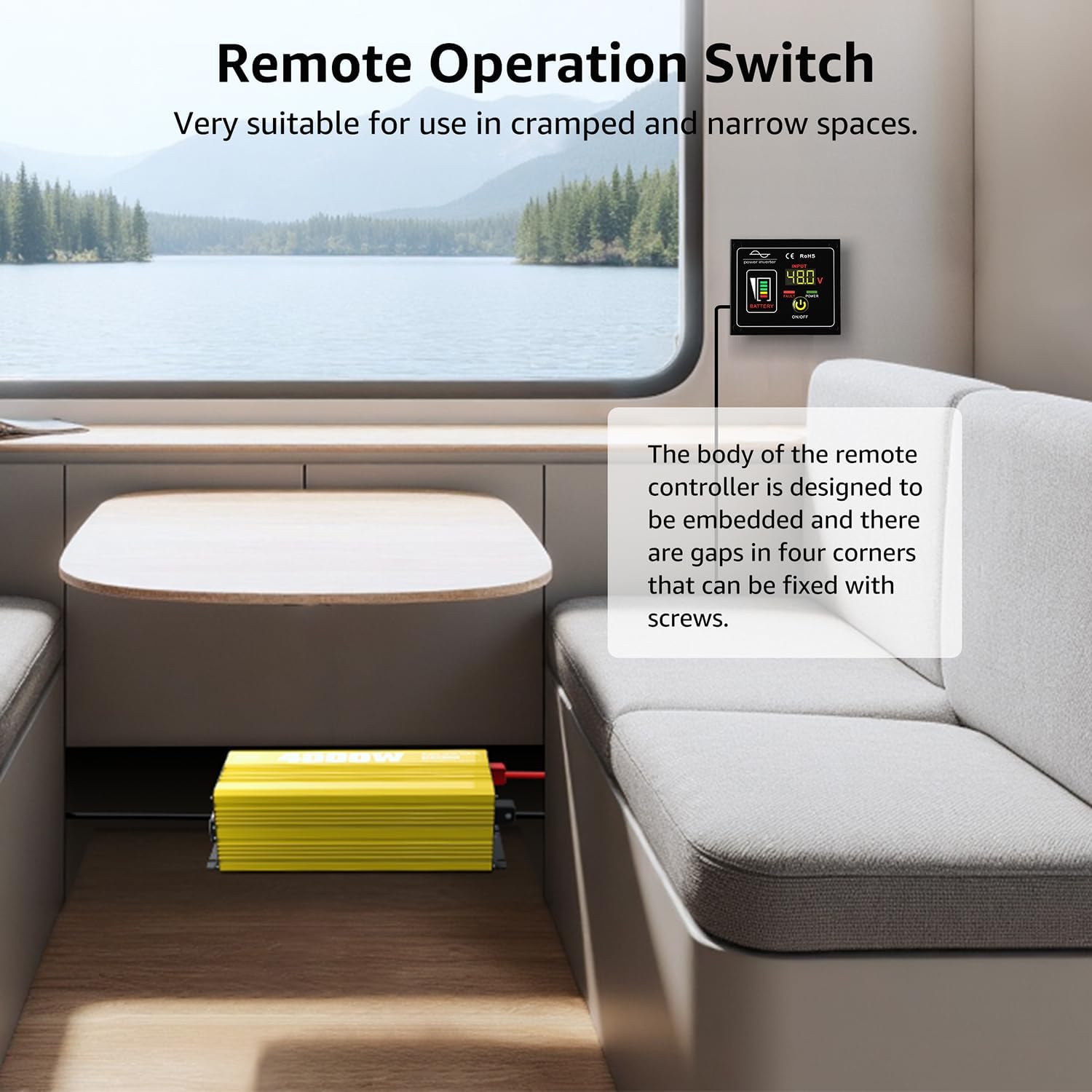
Image: The remote operation switch conveniently installed in a compact space, such as inside an RV, demonstrating its suitability for use in cramped or narrow environments.
7. Działanie
7.1 Włączanie/wyłączanie
- Ensure all connections are secure, then switch the inverter's power button to the ON position.
- The LED display will illuminate, showing battery voltage, objętość wyjściowatage i inne parametry operacyjne.
- To turn off the inverter, switch the power button to the OFF position.
7.2 Podłączanie urządzeń
Plug your 120V AC appliances into the inverter's AC output ports or connect them to the AC terminal board. Ensure the total wattagMoc wszystkich podłączonych urządzeń nie przekracza 4000W.
7.3 Zrozumienie wyświetlacza LED
Wyświetlacz LED dostarcza najważniejszych informacji o stanie falownika:
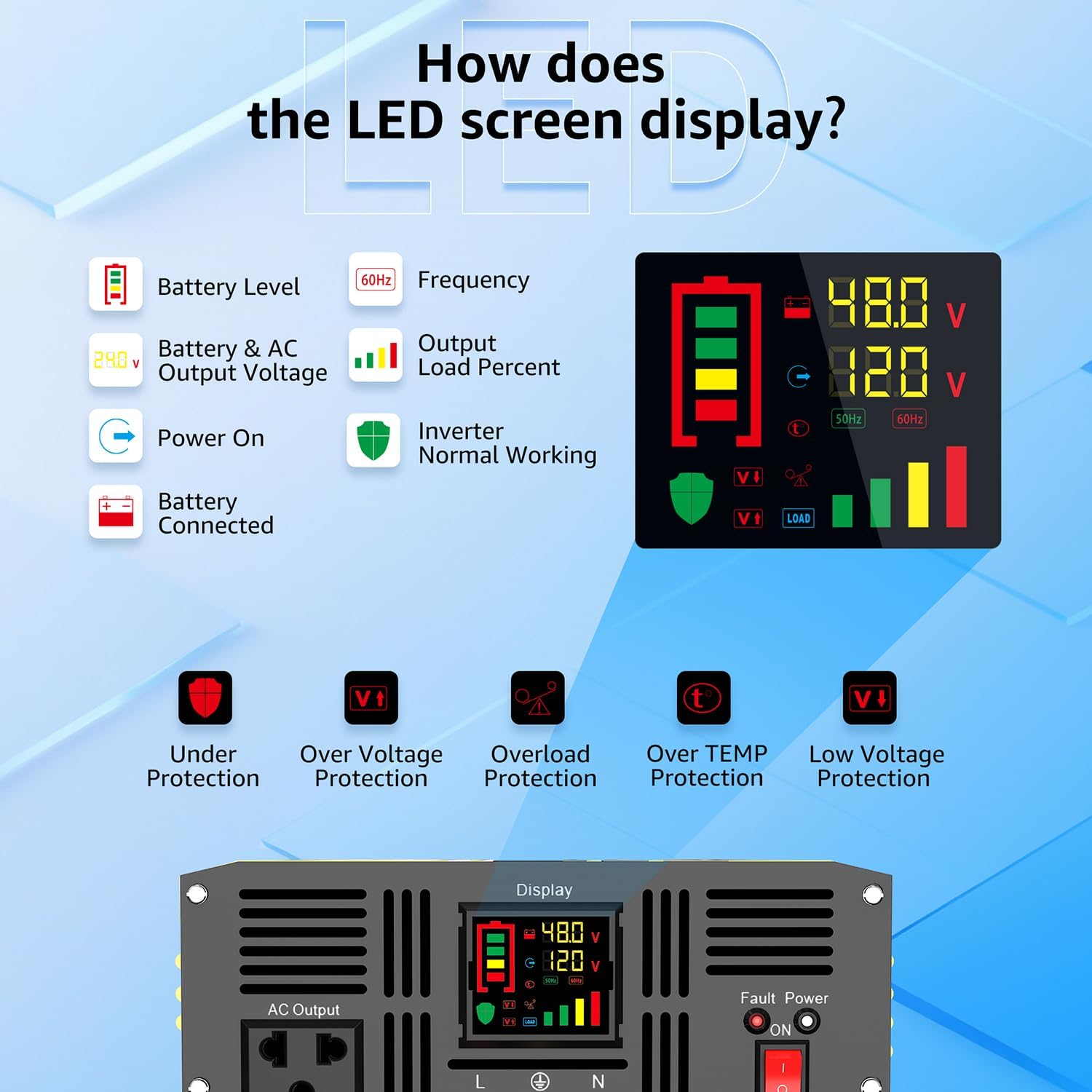
Image: A visual guide to the inverter's LED display, explaining indicators such as Battery Level, Frequency, Output Load Percent, Power On status, Battery Connected status, and Inverter Normal Working status. It also shows icons for Under Protection, Over Voltage Protection, Overload Protection, Over TEMP Protection, and Low Voltage Ochrona.
- Poziom naładowania baterii: Indicates the remaining charge in your battery bank.
- Częstotliwość: Wyświetla częstotliwość wyjściową (np. 60 Hz).
- Output Load Percent: Pokazuje procenttage aktualnie wykorzystywanej mocy falownika.
- Wejście/Wyjście Objętośćtage: Wyświetla głośność wejścia DCtage z akumulatora i wyjścia prądu przemiennegotage.
- Wskaźniki ochrony: Icons will light up to indicate specific protection modes (e.g., Under Voltage, Overload, Over Temperature).
8. Konserwacja
Regularna konserwacja zapewnia długowieczność i optymalną wydajność falownika.
8.1 Ogólne czyszczenie
- Keep the inverter clean and free from dust and debris. Use a dry cloth to wipe the exterior.
- Ensure the cooling fan vents are not obstructed to allow for proper airflow.

Image: A close-up of the inverter's two high-efficiency cooling fans, illustrating their automatic activation at 50 degrees Celsius or half load, and their low decibel operation (less than 60dB when on, less than 20dB when off).
8.2 Wymiana bezpiecznika
If the inverter stops working due to an internal fuse issue, you may need to replace it. Always use fuses of the correct rating (40A 32V).
Video: This video demonstrates the step-by-step process of replacing the fuse in the XWJNE Pure Sine Wave Power Inverter. It shows how to safely open the unit, locate the fuses, remove the old fuse, and install a new one.
- Ensure the inverter is completely disconnected from the battery and all loads.
- Ostrożnie odkręć śruby mocujące górną pokrywę falownika.
- Ostrożnie otwórz górną pokrywę, aby odsłonić wewnętrzne elementy.
- Locate the internal fuses (typically orange 40A fuses).
- Using a suitable tool (e.g., needle-nose pliers), carefully remove the blown fuse.
- Insert a new 40A 32V fuse into the slot.
- Załóż górną pokrywę i przykręć ją śrubami.
9. Rozwiązywanie Problemów
The LED display provides fault codes to help diagnose issues. Refer to the table below for common problems and their solutions.

Image: A visual guide to the inverter's fault display, listing various fault codes (F01-F13) and their corresponding meanings, such as Parameter Configuration Fault, Sampling Circuit Fault, DC Bus Voltage too Low, Output Overload, Over-temperature Protection, and Battery Overvoltage/Podobtage.
| Kod | Opis | Możliwa przyczyna / rozwiązanie |
|---|---|---|
| F01 | Błąd konfiguracji parametrów | Internal error. Contact support. |
| F02 | Sampling Circuit Fault | Internal error. Contact support. |
| F03 | Objętość szyny DCtage zbyt niski | Pojemność bateriitage is too low. Recharge or replace battery. |
| F04 | Other power source connected with the output cables | Ensure no other AC source is connected to the inverter's output. |
| F05 | Wyjście zwarcie | Check connected appliances and wiring for short circuits. Disconnect and restart. |
| F06 | Wyjście nadprądowe | Reduce load. Disconnect some appliances. |
| F07 | Przeciążenie wyjściowe | Reduce total connected load below 4000W. |
| F08 | Ochrona przed przegrzaniem | Ensure proper ventilation. Allow inverter to cool down. Check fan operation. |
| F09 | Other power source connected with the output cables | Same as F04. |
| F10 | Nadmierna ilość bateriitage | Wejście DC voltage is too high. Check battery charging system. |
| F11 | Przepełnienie magistrali DCtage | Przekroczenie wewnętrznetage. Contact support. |
| F12 | Niski poziom naładowania bateriitage | Pojemność bateriitage is too low. Recharge or replace battery. |
| F13 | Data Read Error | Internal communication error. Contact support. |
10. Specyfikacje
| Funkcja | Szczegół |
|---|---|
| Numer modelu | 24IVA-4KW-48V-110 |
| Moc znamionowa | 4000 W |
| Moc szczytowa | 8000 W |
| Objętość wejścia DCtage | 48V prądu stałego |
| Objętość wyjścia ACtage | 120 V prądu zmiennego |
| Przebieg wyjściowy | Czysta fala sinusoidalna |
| Efektywność | >90% |
| Wymiary produktu | 12.01 x 19.21 x 25 cala |
| Waga przedmiotu | 19.2 funta |
| Wyjście USB | 5V 2.4A |
| Zalecane zastosowania | Dom, Poza siecią, Kamper, Ciężarówka, Pojazd |
11. Gwarancja i wsparcie
XWJNE products are designed for reliability and performance. For warranty information, technical support, or service inquiries, please refer to the contact information provided with your purchase or visit the official XWJNE webNasz zespół obsługi klienta jest do Państwa dyspozycji i chętnie odpowie na wszelkie pytania lub pomoże rozwiązać problemy.