
1. Koniec produktuview
The ANJIELO SMART 94218B is a 4-wire video intercom system designed for enhanced home security and convenience. It features a 7-inch touchscreen indoor monitor and an HD 1080P outdoor doorbell camera. The system supports WiFi connectivity for remote access via a mobile application, allowing you to monitor and interact with visitors from anywhere. Key features include a 148° wide-angle lens, integrated infrared sensor for night vision, and robust IP65 waterproof and dustproof construction for the outdoor unit. It is compatible with 12V electronic locks for integrated access control.
2. Zawartość opakowania
Ostrożnie rozpakuj pudełko i upewnij się, że wszystkie wymienione poniżej elementy są obecne i w dobrym stanie. Jeśli któregokolwiek z nich brakuje lub jest uszkodzony, skontaktuj się z obsługą klienta.

Obraz: Ponadview of the ANJIELO SMART 94218B package contents, including the doorbell, IC cards, wiring, user manual, screwdriver, screws, and connection lines.
- Zewnętrzny dzwonek do drzwi
- Indoor Monitor (7-inch Touchscreen)
- IC Cards (Multiple for access control)
- 4-Core Wiring Cable
- External Power Supply (1.2m)
- Instrukcja obsługi
- Śrubokręt
- Śruby montażowe i kołki ścienne
- Connection Lines for electronic locks
3. Informacje dotyczące bezpieczeństwa
Please read and understand all safety instructions before installation and operation. Failure to follow these instructions may result in electric shock, fire, or damage to the product.
- Bezpieczeństwo elektryczne: Przed przystąpieniem do jakichkolwiek prac związanych z okablowaniem lub instalacją upewnij się, że zasilanie jest odłączone. W razie wątpliwości wszelkie prace elektryczne powinny być wykonywane przez wykwalifikowanego elektryka.
- Narażenie na działanie wody: While the outdoor unit is waterproof (IP65), avoid submerging it in water. Ensure all connections are sealed properly during installation.
- Temperatura: Do not expose the device to extreme temperatures or direct sunlight for prolonged periods, which could affect performance and lifespan.
- Czyszczenie: Do czyszczenia używaj miękkiej, suchej ściereczki. Unikaj środków czyszczących o działaniu ściernym i rozpuszczalników.
- Dzieci: Keep packaging materials and small components away from children to prevent choking hazards.
4. Składniki i wymiary produktu
Familiarize yourself with the different parts of your outdoor doorbell unit and its physical dimensions.

Obraz: Szczegółowy view of the outdoor doorbell unit with labels for the rain cover, IR-LED, camera, speaker, keypad, card reader, microphone, call button, and fingerprint sensor.
- Pokrowiec przeciwdeszczowy: Provides additional protection against weather elements.
- IR-LED: Infrared LEDs for night vision illumination.
- Kamera: 1080P HD camera for video capture.
- Głośnik: Do dwukierunkowej komunikacji audio.
- Klawiatura: Numeric keypad for password-based unlocking.
- Czytnik kart: For IC card access control.
- Mikrofon: Do dwukierunkowej komunikacji audio.
- Przycisk dzwonienia: To alert the indoor monitor and mobile app.
- Czujnik odcisków palców: For fingerprint-based unlocking.
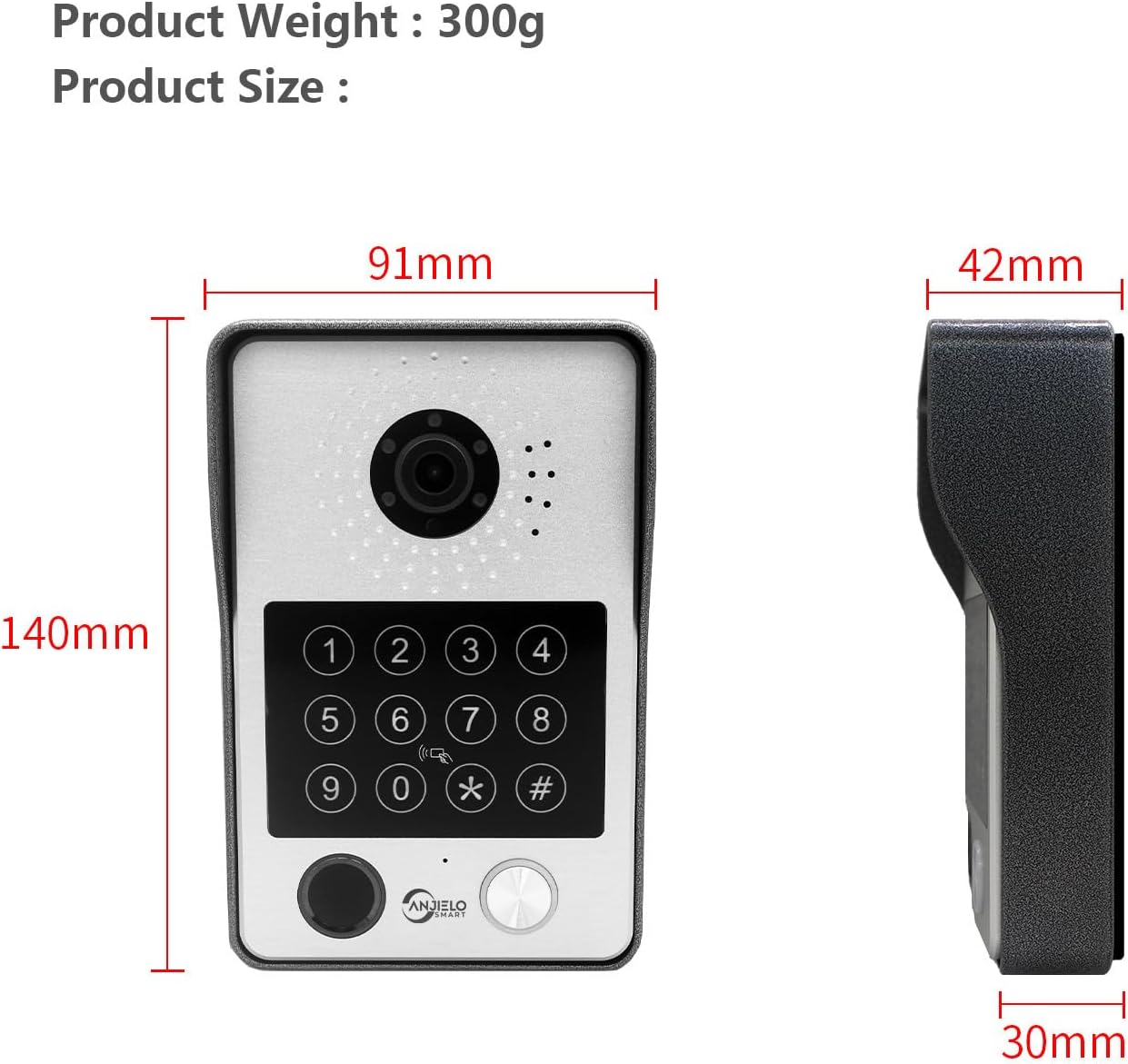
Image: Dimensions of the outdoor doorbell unit: 140mm (height) x 91mm (width) x 42mm (depth, including rain cover) / 30mm (unit depth).
5. Konfiguracja i instalacja
5.1 instrukcje okablowania
The ANJIELO SMART 94218B system uses a 4-wire connection between the outdoor doorbell unit and the indoor monitor. Ensure all power is disconnected before beginning wiring.
- Przygotuj okablowanie: Use the provided 4-core cable to connect the outdoor unit to the indoor monitor. For extended distances, a high-quality 4-core wire is recommended.
- Podłącz zasilanie: Connect the external 1.2m power supply to the indoor monitor.
- Podłączenie zamka elektronicznego: If connecting to a 12V electronic lock, use the provided connection lines. Refer to the lock's manual for specific wiring requirements.
- Bezpieczne połączenia: Aby zapobiec zwarciom, należy upewnić się, że wszystkie połączenia przewodów są solidne i właściwie zaizolowane.
5.2 Montaż jednostki zewnętrznej
The outdoor unit is designed for wall mounting and features IP65 waterproofing.

Image: The outdoor unit is IP65 waterproof, dustproof, and anti-vandal, featuring an aluminum alloy shell with a rain cover.
- Wybierz lokacje: Select a suitable location near your door, ensuring the camera has a clear view of visitors and is at an appropriate height.
- Wiercenie otworów: Use the mounting bracket (if provided, or mark holes directly) to mark and drill holes for the mounting screws.
- Bezpieczna jednostka: Attach the outdoor unit securely to the wall using the provided screws and wall plugs. Ensure the rain cover is correctly positioned.
5.3 Initial Configuration (Wi-Fi and App)
The main indoor monitor can connect to your home Wi-Fi network for remote access via the mobile application.
- Włączanie: Once all wiring is complete, connect the power supply to an electrical outlet.
- Konfiguracja monitora: Follow the on-screen prompts on the 7-inch touchscreen monitor to complete the initial setup.
- Połączenie Wi-Fi: Navigate to the network settings on the monitor and connect to your home Wi-Fi network.
- Pobieranie aplikacji: Download the dedicated mobile application (e.g., Tuya APP) from your smartphone's app store.
- Paruj urządzenie: Follow the instructions within the app to pair your video intercom system. This typically involves scanning a QR code displayed on the monitor or entering a device ID.
6. Instrukcja obsługi
6.1 5-in-1 Unlocking Methods
The ANJIELO SMART 94218B offers multiple convenient ways to unlock your door.

Image: Visual representation of the five unlocking methods: Fingerprint, Password, IC Card, unlocking via the Indoor Monitor, and unlocking via the Tuya mobile application.
- Odcisk palca: Place your registered fingerprint on the sensor on the outdoor unit.
- Hasło: Enter your pre-set password on the keypad of the outdoor unit.
- Karta elektroniczna: Tap a registered IC card on the card reader area of the outdoor unit.
- Monitor: Use the unlock function on the indoor touchscreen monitor.
- Aplikacja mobilna: Use the unlock function within the paired mobile application.
6.2 Two-Way Audio and Monitoring
Communicate with visitors and monitor your entrance from various devices.

Image: The system enables two-way audio communication with visitors through the indoor monitor or a connected mobile phone, showing live views on both devices.
- Zadzwoń do gości: When a visitor presses the call button on the outdoor unit, all connected indoor monitors and paired mobile phones will ring.
- Odbierz połączenie: You can answer the call from any indoor monitor or your mobile phone to see, hear, and speak with the visitor.
- Funkcja interkomu: Indoor monitors support call forwarding and internal audio-only conversations between multiple monitors within the home.
6.3 Detekcja ruchu i nagrywanie
The system provides security by detecting motion and recording events.

Image: The system's smart PIR motion detection sends alerts to your mobile phone and monitor when movement is detected, automatically recording video or snapshots.
- Automatyczne nagrywanie: When motion is detected or the doorbell is pressed, the camera automatically records video or captures snapshots.
- Składowanie: Recordings are saved to an additional Micro SD card (not included, or included as a component) for later review.
- ViewNagrania: Możesz view recorded events directly on the indoor monitor or through the mobile application.
6.4 Widzenie nocne
The outdoor unit provides clear visibility even in low-light conditions.

Image: Comparison of day and night vision capabilities, highlighting the 1080P resolution and 148-degree wide-angle view provided by the outdoor unit's integrated IR-LEDs.
The integrated infrared sensor and IR-LEDs enable clear night vision, ensuring you can identify visitors and monitor your entrance effectively, even in complete darkness.
7. Konserwacja
7.1 Pielęgnacja i czyszczenie
- Jednostka zewnętrzna: Periodically wipe the camera lens and keypad with a soft, damp szmatką do usunięcia kurzu i brudu. Unikaj używania ostrych środków chemicznych.
- Monitor wewnętrzny: Wyczyść ekran dotykowy ściereczką z mikrofibry. Nie spryskuj ekranu środkami czyszczącymi bezpośrednio.
- Znajomości: Regularly check wiring connections for any signs of wear or corrosion, especially for outdoor components.
8. Rozwiązywanie Problemów
If you encounter issues with your ANJIELO SMART video intercom system, refer to the following common problems and solutions.
| Problem | Możliwa przyczyna | Rozwiązanie |
|---|---|---|
| Brak zasilania monitora/dzwonka | Power adapter unplugged; wiring issue; power outage. | Check power connections; verify power outlet; inspect wiring for damage. |
| Brak obrazu/dźwięku z jednostki zewnętrznej | Loose wiring connection; camera/microphone fault. | Ensure 4-core wiring is securely connected; restart the system. |
| Cannot unlock door | Incorrect password/fingerprint/IC card; electronic lock issue; wiring problem. | Verify credentials; check electronic lock power and wiring; ensure correct unlock method is selected. |
| Aplikacja mobilna nie łączy się | Monitor not connected to Wi-Fi; incorrect app pairing; internet issue. | Check monitor's Wi-Fi status; re-pair device in app; verify home internet connection. |
| Słaba widoczność w nocy | IR-LEDs obstructed or faulty; dirty camera lens. | Clean camera lens; ensure no obstructions; contact support if IR-LEDs are not functioning. |
If the problem persists after trying these solutions, please contact ANJIELO SMART customer support for further assistance.
9. Specyfikacje techniczne
Detailed technical specifications for the ANJIELO SMART 94218B video intercom system.
| Funkcja | Specyfikacja |
|---|---|
| Marka | ANJIELO INTELIGENTNY |
| Numer modelu | 94218B |
| Technologia łączności | Przewodowy, bezprzewodowy (Wi-Fi) |
| Rozdzielczość przechwytywania wideo | 1080p |
| Cechy specjalne | Night Vision, Motion Detection, 5-in-1 Unlock (Fingerprint, Password, IC Card, App, Monitor) |
| Do użytku wewnątrz/na zewnątrz | Wewnątrz (monitor), na zewnątrz (dzwonek) |
| Kompatybilne urządzenia | Smartfon |
| Typ mocowania | Montaż ścienny |
| Kolor | Czarny |
| Typ alarmu | Tylko ruch |
| Metoda kontroli | Aplikacja |
| Protokół łączności | Wi-Fi |
| Tomtage | 12 wolty |
| Cotage | 2 watów |
| Liczba kanałów | 2 |
| Format przechwytywania wideo | Plik AVI |
| Wymiary przedmiotu | Wymiary 27 x 2 x 18 cm |
| Unit Volume/Weight | 1.0 Liczba |
| Kraj pochodzenia | Chiny |
| Producent | ANJIELO INTELIGENTNY |
10. Gwarancja i wsparcie
10.1 Informacje o gwarancji
For specific warranty details regarding your ANJIELO SMART 94218B video intercom system, please refer to the warranty card included in your package or contact the seller directly. Warranty terms typically cover manufacturing defects for a specified period from the date of purchase.
10.2 Obsługa klienta
If you require technical assistance, have questions about installation, or need to report a product issue, please contact ANJIELO SMART customer support. You can usually find contact information on the product packaging, the seller's webstronie internetowej lub w aplikacji mobilnej.