
Wstęp
The Kisonli S9 Portable Bluetooth Speaker delivers impressive sound quality in a compact design, suitable for various environments. Featuring a powerful 5W output and an internal magnetic horn, this speaker produces clear and dynamic audio. Its 1200mAh battery provides 3-6 hours of playback, making it ideal for outdoor activities, gatherings, or personal listening. The S9 supports multiple playback options, including Bluetooth, USB, TF card, and AUX, offering versatile listening choices. Simple controls allow for easy mode switching, track selection, and volume adjustment. Small and easy to carry, the S9 is a convenient option for music enthusiasts on the go.
Produkt ponadview
Familiarize yourself with the Kisonli S9 speaker's components and controls.
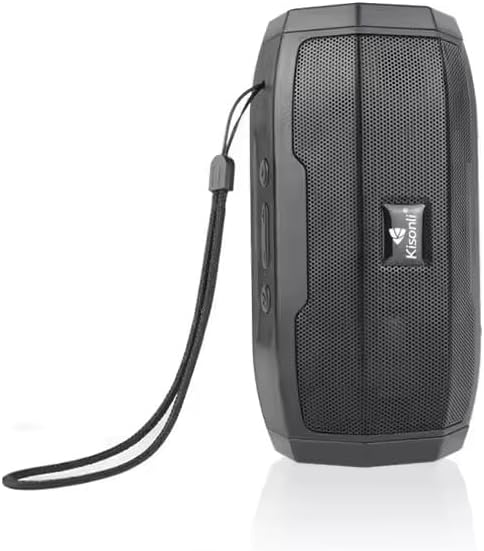
Rysunek 1: Przód view of the Kisonli S9 portable Bluetooth speaker, black color, with the Kisonli logo visible on the speaker grille. A wrist strap is attached to the side.
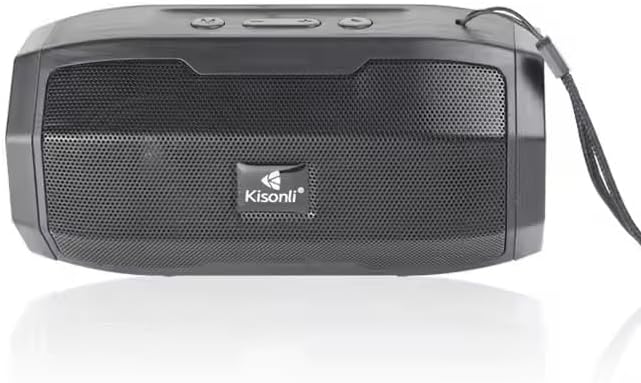
Rysunek 2: Z góry na dół view of the Kisonli S9 speaker's control panel and ports, with labels indicating functions such as power switch, charging port, USB port, TF card slot, AUX input, and control buttons for volume, track, and mode.
Funkcje kontrolne:
- Przełącznik włącz / wyłącz: Located at the back, slides to power the speaker on or off.
- Battery Charging DC-5V Port: Port micro USB do ładowania głośnika.
- U Disk Playback / Intelligent Mobile Charging Interface: USB-A port for playing music from a USB drive or potentially charging a mobile device (check product specifications for charging capability).
- Odtwarzanie kart TF: Slot for playing music directly from a TF (MicroSD) card.
- AUX and Audio Antenna: 3.5mm audio input for connecting external devices via an AUX cable. This port may also function as an antenna for FM radio if supported.
- Przycisk Odtwórz/Pauza: Steruje odtwarzaniem muzyki.
- Następna piosenka / Przycisk zwiększania głośności: Krótkie naciśnięcie spowoduje przejście do następnego utworu, długie naciśnięcie zwiększy głośność.
- Last Song / Volume Down Button: Krótkie naciśnięcie powoduje przejście do poprzedniego utworu, długie naciśnięcie powoduje zmniejszenie głośności.
- BT/USB/AUX Modes Switch: Button to cycle through different playback modes (Bluetooth, USB, AUX, TF card).
Organizować coś
1. Ładowanie głośnika
- Connect the provided USB charging cable to the DC-5V charging port on the speaker.
- Connect the other end of the USB cable to a standard USB power adapter (5V DC) or a computer's USB port.
- Zaświeci się kontrolka ładowania (kolor może się różnić), co oznacza, że głośnik jest ładowany.
- Once fully charged, the indicator light may change color or turn off. A full charge typically takes a few hours.
2. Włączanie/wyłączanie zasilania
- Aby włączyć, przesuń przełącznik WŁ./WYŁ. do pozycji „WŁ.”. Usłyszysz sygnał dźwiękowy.
- Aby wyłączyć urządzenie, przesuń przełącznik ON/OFF do pozycji „OFF”.
Instrukcja obsługi
1. Tryb Bluetooth
- Włącz głośnik. Automatycznie przejdzie on w tryb parowania Bluetooth, co zostanie zasygnalizowane migającą diodą LED i sygnałem dźwiękowym.
- Na swoim urządzeniu mobilnym (smartfonie, tablecie, komputerze) włącz Bluetooth i wyszukaj dostępne urządzenia.
- Select "S9" from the list of devices.
- Once paired, the LED light will stop flashing, and you will hear a confirmation sound.
- Teraz możesz odtwarzać dźwięk ze swojego urządzenia przez głośnik.
2. Tryb odtwarzania USB
- Włóż dysk flash USB zawierający dźwięk w formacie MP3 files do portu USB.
- Press the Mode Switch button (BT/USB/AUX) until the speaker enters USB mode. It should automatically start playing music.
3. TF Card Playback Mode
- Włóż kartę TF (MicroSD) zawierającą dźwięk MP3 files do gniazda karty TF.
- Press the Mode Switch button (BT/USB/AUX) until the speaker enters TF card mode. It should automatically start playing music.
4. Tryb wejścia AUX
- Podłącz jeden koniec kabla audio 3.5 mm (nie ma go w zestawie) do portu AUX w głośniku.
- Podłącz drugi koniec kabla audio do gniazda słuchawkowego lub wyjścia audio w urządzeniu zewnętrznym.
- Press the Mode Switch button (BT/USB/AUX) until the speaker enters AUX mode.
- Play audio from your external device. Volume control may need to be adjusted on both the speaker and the external device.
5. Kontrola głośności i ścieżki
- Zwiększenie głośności: Long press the 'Next Song / Volume Up' button.
- Ściszanie: Long press the 'Last Song / Volume Down' button.
- Następny utwór: Short press the 'Next Song / Volume Up' button.
- Poprzedni utwór: Short press the 'Last Song / Volume Down' button.
- Odtwórz/Pauza: Short press the 'Play/Pause' button.
Konserwacja
- Czyszczenie: Do czyszczenia obudowy głośnika należy używać miękkiej, suchej ściereczki. Nie należy używać środków czyszczących o właściwościach ściernych ani rozpuszczalników.
- Składowanie: Przechowuj głośnik w chłodnym, suchym miejscu, z dala od bezpośredniego światła słonecznego i ekstremalnych temperatur.
- Pielęgnacja baterii: Aby przedłużyć żywotność baterii, unikaj częstego całkowitego rozładowywania. Regularnie ładuj głośnik, nawet jeśli nie jest używany, aby utrzymać baterię w dobrym stanie.
- Wodoodporność: Ten głośnik nie jest wodoodporny. Unikaj narażenia na działanie wody i nadmiernej wilgoci.
Rozwiązywanie problemów
| Problem | Możliwa przyczyna | Rozwiązanie |
|---|---|---|
| Głośnik nie włącza się. | Bateria jest rozładowana. | Charge the speaker for at least 2-3 hours. |
| Brak dźwięku. | Głośność jest zbyt niska lub wyciszona. Wybrano nieprawidłowy tryb. | Increase volume on both speaker and connected device. Ensure correct playback mode (Bluetooth, USB, TF, AUX) is selected. |
| Nie można sparować przez Bluetooth. | Speaker is not in pairing mode. Device Bluetooth is off. Too far from speaker. | Ensure speaker is in Bluetooth mode and flashing. Turn Bluetooth off and on again on your device. Move device closer to the speaker (within 10 meters). |
| Karta USB/TF nie jest obsługiwana. | Błędny file format. Karta/napęd nie zostały prawidłowo włożone. | Zapewnij dźwięk files are in MP3 format. Reinsert the USB drive or TF card firmly. Ensure speaker is in the correct mode. |
Specyfikacje
| Funkcja | Specyfikacja |
|---|---|
| Nazwa modelu | S9 |
| Moc wyjściowa | 5W |
| Pojemność baterii | 1200mAh |
| Objętość operacyjnatage | Prąd stały 5 V |
| Wymiary (dł. x szer. x wys.) | Wymiary: 153 x 75 x 75 mm |
| Opcje odtwarzania | Bluetooth, USB (U disk), TF card, AUX |
| Żywotność baterii | 3-6 hours (depending on volume and usage) |
| Kolor | Czarny |
| Waga przedmiotu | 100 gramów |
| Zawarte komponenty | Szybki przewodnik |
| Kraj pochodzenia | Chiny |
Gwarancja i wsparcie
This product is provided without an explicit warranty as per the product specifications. For any operational issues or questions not covered in this manual, please refer to the retailer or point of purchase for further assistance.