
Wstęp
Thank you for choosing the LEMNOI 7-inch Digital Calendar Clock (Model SG9). This device is designed to assist individuals, particularly those with memory loss or dementia, by clearly displaying the time, date, and day of the week. It features multiple alarm and medication reminder functions, adjustable brightness, and can also serve as a digital photo frame. Please read this manual carefully to ensure proper setup and operation.
Zawartość opakowania
- LEMNOI 7-inch Digital Calendar Clock (SG9)
- Zasilacz
- Instrukcja obsługi
- Stand (for tabletop use)

Produkt ponadview
The LEMNOI SG9 features a clear 7-inch HD display and intuitive controls. The front panel includes navigation buttons for easy menu interaction.

Organizować coś
1. Podłączenie zasilania
- Connect the power adapter to the DC IN port on the back of the clock.
- Podłącz zasilacz do standardowego gniazdka elektrycznego.
- Zegar włączy się automatycznie.
Notatka: The clock operates on AC power and does not use batteries for primary function. A built-in backup system saves settings during power outagt.j.
2. Początkowy wybór języka
- Upon first power-on, the clock may display a language selection screen.
- Użyj Up I W dół buttons to navigate through the language options (English, French, German, Italian, Spanish).
- Naciśnij OK aby potwierdzić swój wybór.

3. Ustawianie czasu i daty
- Naciśnij Menu/Powrót przycisk, aby uzyskać dostęp do menu głównego.
- Navigate to "Date & Time" using the Up/W dół przyciski i naciśnij OK.
- Dostosuj rok, miesiąc, dzień, godzinę i minutę za pomocą Up/W dół guziki. Używać Lewy/Prawidłowy poruszać się między polami.
- Wybierz format 12-godzinny lub 24-godzinny, zależnie od preferencji.
- Naciskać OK aby zapisać zmiany i Menu/Powrót wyjść.
Instrukcja obsługi
1. Tryby wyświetlania
The clock offers 6 distinct display modes, including a unique floral surface mode that changes weekly. You can cycle through these modes by pressing the Lewy or Prawidłowy buttons from the main display.

2. Brightness Adjustment and Auto-Dimming
The clock features 5 levels of adjustable brightness and an automatic dimming function to optimize visibility day and night.
- Ręczna jasność: Access the "Brightness" setting in the menu to select a level from 1 to 5.
- Automatyczne przyciemnianie: Enable "Auto Dimming" in the settings. You can customize the start and end times for dimming, and set the desired dimming brightness level (e.g., 0% for a completely dark screen at night).


3. Ustawienia alarmu
The clock supports up to 15 daily alarms and 15 medication reminders, each with customizable labels and frequencies.
- Ustawianie alarmu:
- From the main menu, select "Alarm" or "Take Medicine".
- Choose an alarm slot (e.g., Alarm 1, Medication 1).
- Set the desired time (hour and minute).
- Select the frequency: Daily, Weekdays (Mon-Fri), Weekends (Sat-Sun), or Specific Dates.
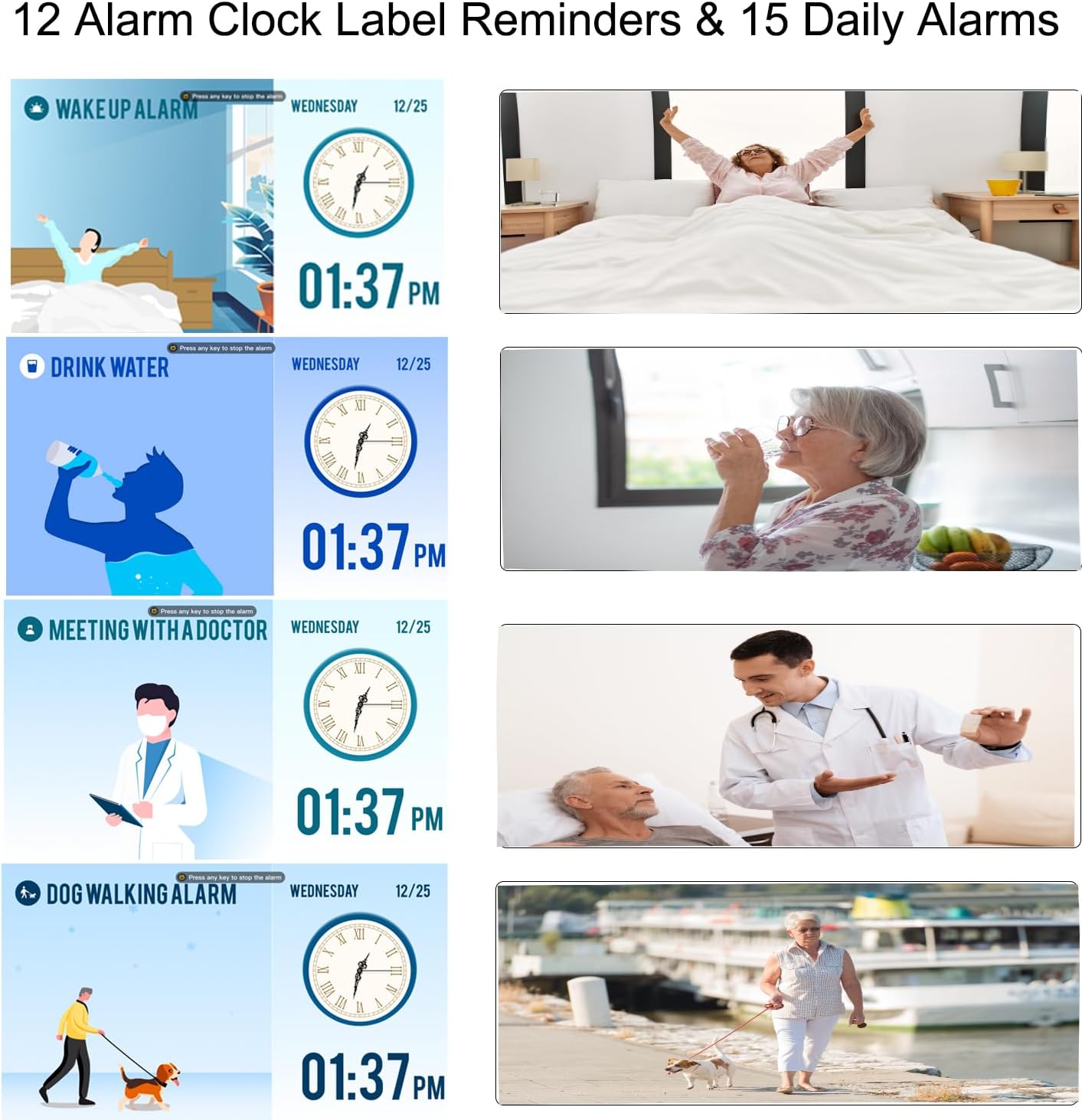
- Choose an alarm label from the 12 available options (e.g., Wake Up, Drink Water, Meeting with Doctor, Dog Walking). These labels are displayed with vivid color images for easy comprehension.
- Select an alarm sound.
- Naciskać OK zapisać.
- Przypomnienia o lekach: Specifically designed for morning, afternoon, and evening medication alerts.

4. Czas letni (DST)
The clock supports automatic adjustment for Daylight Saving Time. Ensure this feature is enabled in the "Date & Time" settings for accurate time display.

5. Using as a Digital Photo Frame
The clock can function as a high-resolution digital photo and video frame. Insert a USB flash drive (not included) into the USB port on the side of the clock. Navigate to the "Photo Frame" option in the menu to play your media.

Konserwacja
- Czyszczenie: Use a soft, dry cloth to clean the screen and body of the clock. Do not use liquid cleaners or abrasive materials.
- Umieszczenie: Place the clock on a stable, flat surface or mount it securely on a wall. Avoid direct sunlight, high temperatures, or humid environments.
- Moc: Always use the provided power adapter. Disconnect power during thunderstorms or when not in use for extended periods.

Rozwiązywanie problemów
| Problem | Możliwa przyczyna | Rozwiązanie |
|---|---|---|
| Zegar się nie włącza. | Brak podłączenia zasilania. | Ensure the power adapter is securely connected to the clock and a working electrical outlet. |
| Wyświetlacz jest zbyt ciemny lub zbyt jasny. | Brightness settings are incorrect or auto-dimming is active. | Adjust manual brightness in settings or check auto-dimming schedule and brightness level. |
| Alarmy nie wyją. | Alarm is disabled, volume is too low, or incorrect time/frequency set. | Verify alarm settings, ensure volume is audible, and check alarm time/frequency. |
| Czas jest nieprawidłowy po wyłączeniu zasilaniatage. | Backup battery may be depleted or not functioning. | The clock has a backup system for settings. If time is incorrect, manually reset the time and date. |
| Cannot play photos/videos. | Dysk USB nie został prawidłowo włożony lub nie jest obsługiwany file format. | Ensure USB drive is fully inserted. Check that media files are in supported formats (e.g., JPEG for photos, common video formats). |
Specyfikacje
| Funkcja | Szczegół |
|---|---|
| Marka | LEMNOI |
| Numer modelu | SG9 |
| Typ wyświetlacza | Cyfrowy |
| Rozmiar ekranu | 7 cali |
| Rezolucja | 1024 x 600 pikseli |
| Wymiary produktu (szer. x wys.) | Wymiary: 19cm x 16cm |
| Waga przedmiotu | 290 gram |
| Tworzywo | Akrylonitryl-butadien-styren (ABS) |
| Źródło zasilania | Kabel elektryczny |
| Cechy specjalne | Auto-dimmable, Adjustable Brightness (5 levels), Temperature Indicator, 6 Display Modes, 15 Daily Alarms, 15 Medication Reminders, 12 Alarm Labels, Digital Photo Frame Function, Daylight Saving Time Auto-Adjust, Multi-language Support |
| Typ montażu | Blat stołu |
| Required Battery (Backup) | 1 CR123A (not included for primary operation) |
Gwarancja i wsparcie
For warranty information or technical support, please refer to the contact details provided on the product packaging or the official LEMNOI webZachowaj paragon jako dowód zakupu na wypadek ewentualnych roszczeń gwarancyjnych.