
1. Wprowadzenie
Thank you for choosing the Leaven K610 Tri-Mode Mechanical Wireless Gaming Keyboard. This manual provides detailed instructions on how to set up, operate, and maintain your new keyboard. Designed for versatility and performance, the K610 offers seamless connectivity via Bluetooth 5.0, 2.4 GHz wireless, and wired Type-C connections, along with vibrant RGB lighting and a satisfying mechanical typing experience.
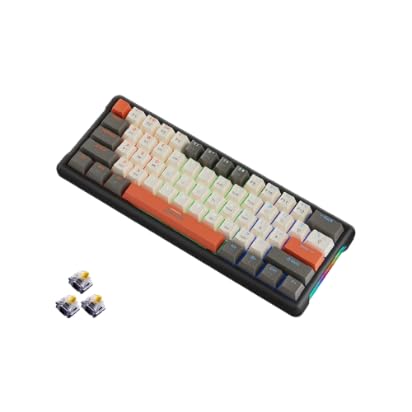
Image: Leaven K610 Tri-Mode Mechanical Wireless Gaming Keyboard, showcasing its compact design and included spare switches.
2. Funkcje produktu
- Łączność trójmodowa: Supports Bluetooth 5.0, 2.4 GHz wireless, and wired (Type-C) connections for maximum compatibility and flexibility.
- Mechanical Key Switches: Provides tactile feedback and a responsive typing experience, ensuring accuracy and durability.
- Konstrukcja umożliwiająca wymianę podczas pracy: Allows for easy replacement of key switches without soldering, enabling customization and maintenance.
- Żywe oświetlenie RGB: Features 16.8 million colors with customizable backlighting to personalize your setup and enhance the gaming atmosphere.
- Kompaktowy układ 61 klawiszy: A streamlined arrangement that saves desk space while retaining essential functions.
- Ergonomiczna konstrukcja: Crafted for comfortable typing posture, reducing strain during extended use.
- Trwała konstrukcja: Built with high-quality ABS material for long-lasting performance.
- Długotrwała bateria: Ensures extended periods of uninterrupted wireless performance.

Obraz: Wybuchowy view diagram of the Leaven K610 keyboard, illustrating its internal components including ABS three-color keycaps, cover, RGB water cooling tube, pluggable mechanical switches, positioning plate, PCB board, and lower lid.
3. Zawartość opakowania
Proszę sprawdzić, czy w paczce znajdują się następujące elementy:
- Leaven K610 Tri-Mode Mechanical Wireless Gaming Keyboard
- Kabel USB typu C.
- 2.4 GHz USB Receiver (usually stored in the keyboard's battery compartment or a dedicated slot)
- Instrukcja obsługi (ten dokument)
- Keycap Puller (may be included for hot-swappable switches)
- Switch Puller (may be included for hot-swappable switches)
- Spare Mechanical Switches (typically 2-3 pieces)
4. Przewodnik konfiguracji
4.1. Ładowanie klawiatury
Before first use, it is recommended to fully charge the keyboard. Connect the supplied USB Type-C cable to the keyboard's Type-C port and the other end to a USB power source (e.g., computer USB port, USB wall adapter). The charging indicator light will show the charging status and turn off when fully charged.
4.2. Connecting via 2.4 GHz Wireless Mode
- Locate the 2.4 GHz USB receiver. It is usually stored in a slot on the keyboard itself.
- Podłącz odbiornik USB 2.4 GHz do wolnego portu USB w komputerze.
- Switch the keyboard's mode switch (usually on the back or side) to the "2.4G" or wireless icon position.
- The keyboard should automatically connect. If not, press the designated pairing key combination (refer to keyboard markings, often Fn + R or a specific key with a 2.4G icon) to initiate pairing.
4.3. Łączenie przez tryb Bluetooth
- Switch the keyboard's mode switch to the "BT" or Bluetooth icon position.
- The keyboard typically has multiple Bluetooth channels (e.g., BT1, BT2, BT3). Press and hold the Fn key along with the corresponding Bluetooth channel key (e.g., Fn + Q for BT1, Fn + W for BT2, Fn + E for BT3) for 3-5 seconds until the indicator light flashes rapidly, indicating pairing mode.
- On your device (PC, smartphone, tablet), open Bluetooth settings and search for new devices.
- Select "Leaven K610" or a similar name from the list of available devices.
- Follow any on-screen prompts to complete the pairing process. The indicator light on the keyboard will stop flashing and remain solid when connected.
- To switch between paired Bluetooth devices, simply press Fn + Q/W/E (for BT1/BT2/BT3) once.
4.4. Łączenie w trybie przewodowym
- Podłącz dołączony kabel USB typu C do portu typu C klawiatury.
- Connect the other end of the USB Type-C cable to an available USB port on your computer.
- Switch the keyboard's mode switch to the "Wired" or cable icon position.
- Klawiatura zostanie rozpoznana jako standardowa klawiatura USB i będzie gotowa do użycia.
5. Instrukcja obsługi
5.1. Sterowanie oświetleniem RGB
The Leaven K610 features dynamic RGB lighting. Use the following key combinations to control the lighting effects:
- Fn + \ |: Cycle through different lighting effects/modes.
- Fn + [{: Zmniejsz jasność.
- Fn + ]}: Zwiększ jasność.
- Fn + ;:: Zmniejsz prędkość oświetlenia.
- Fn + '": Zwiększ prędkość oświetlenia.
- Fn + przesunięcie w prawo: Change lighting color (for static modes).

Obraz: Zbliżenie boczne view of the Leaven K610 keyboard, highlighting the "Side Wing Water Cooling Pipe" which illuminates with RGB lighting, adding to the aesthetic appeal.
5.2. Function Key Combinations (Fn Key)
Due to its compact 61-key layout, many functions are accessed via the Fn (Function) key in combination with other keys. Refer to the keycap legends for specific functions. Common combinations include:
- Fn + A/S/D: Switch between Bluetooth channels (BT1/BT2/BT3).
- Fn + R: Activate 2.4G pairing mode.
- Fn + T: Przełącz na tryb przewodowy.
- Fn + Backspace: Delete (on some layouts).
- Fn + P: Wydruk ekranu.
- Fn + L: Lock Windows key.
- Fn + U/I/O/P/J/K/L: Media controls (Play/Pause, Stop, Previous, Next, Mute, Volume Down, Volume Up).
- Fn + M/<, Fn + >./ Fn + ?/: Navigation keys (Home, End, Page Up, Page Down).
Note: Specific key combinations may vary slightly. Always refer to the legends printed on your keycaps.

Image: Diagram illustrating the 61-key compact arrangement of the Leaven K610 keyboard, emphasizing its minimalist design while retaining essential functionality.
6. Konserwacja i pielęgnacja
- Czyszczenie: Use a soft, dry cloth to wipe the keyboard surface. For deeper cleaning, use a can of compressed air to remove dust and debris from between keycaps. For stubborn stains, a slightly damp Można użyć ściereczki zwilżonej łagodnym mydłem, uważając, aby żaden płyn nie dostał się do klawiatury.
- Wymiana nakładek klawiszy i przełączników: If your keyboard comes with a keycap puller and switch puller, you can carefully remove keycaps and switches for cleaning or replacement. Always pull keycaps straight up to avoid damaging the switch stem. When replacing switches, align the pins correctly before gently pushing them into the hot-swap socket.
- Składowanie: Przechowuj klawiaturę w chłodnym, suchym miejscu, z dala od bezpośredniego światła słonecznego i ekstremalnych temperatur.
- Unikaj płynów: Do not expose the keyboard to water or other liquids. Liquid damage is not covered under warranty.

Obraz: Zbliżenie view of a mechanical switch on the Leaven K610 keyboard, demonstrating the hot-swappable nature of the switches, allowing for easy replacement or customization.
7. Rozwiązywanie Problemów
- Klawiatura nie odpowiada:
- Sprawdź, czy klawiatura jest naładowana.
- Check the mode switch (Wired/2.4G/BT) is in the correct position.
- W przypadku sieci 2.4G sprawdź, czy odbiornik USB jest prawidłowo podłączony. Spróbuj użyć innego portu USB.
- For Bluetooth, ensure Bluetooth is enabled on your device and the keyboard is paired to the correct channel. Try re-pairing.
- For wired mode, ensure the Type-C cable is securely connected to both the keyboard and the computer. Try a different cable or USB port.
- Uruchom ponownie komputer/urządzenie.
- Klawisze nie rejestrują się lub są wpisywane podwójnie:
- Clean under the keycap using compressed air.
- If hot-swappable, try removing and re-inserting the switch. If the issue persists, replace the switch with a spare one.
- Oświetlenie RGB nie działa:
- Sprawdź, czy klawiatura jest włączona.
- Try cycling through lighting modes and adjusting brightness using Fn key combinations.
- Ensure the keyboard firmware is up to date (if applicable, check manufacturer's webStrona).
- Niestabilne połączenie Bluetooth:
- Ensure there are no strong interferences (e.g., other wireless devices, thick walls).
- Keep the keyboard within the recommended Bluetooth range.
- Try forgetting the device on your computer/smartphone and re-pairing.
8. Specyfikacje
| Parametr | Szczegół |
|---|---|
| Model | K610 |
| Łączność | Bluetooth 5.0, 2.4 GHz bezprzewodowy, USB typu C przewodowy |
| Typ klawiatury | Mechanical, Hot-Swappable |
| Układ klawiszy | 61-Key Compact Arrangement |
| Podświetlenie | RGB (16.8 milionów kolorów) |
| Tworzywo | Akrylonitryl-butadien-styren (ABS) |
| Źródło zasilania | Battery Powered and USB Cable |
| Kompatybilne urządzenia | Laptop, PC (Win XP/7/8/10, MAC and Above 10.2), Mobile Devices |
| Wymiary produktu | Wymiary 30 x 11 x 2 cm |
| Waga przedmiotu | 400 gramów |
| Kraj pochodzenia | Chiny |
9. Gwarancja i wsparcie
This Leaven K610 keyboard comes with a 6-miesięczna gwarancja from the date of purchase. This warranty covers manufacturing defects and issues arising from normal use. It does not cover damage caused by misuse, accidents, unauthorized modifications, or liquid damage.
For warranty claims or technical support, please contact your retailer or the manufacturer's authorized service center. Please retain your proof of purchase for warranty validation.