
1. Ważne instrukcje bezpieczeństwa
Please read and save these instructions before operating your humidifier. Failure to follow these instructions may result in electric shock, fire, or serious injury.
- Nawilżacz należy zawsze umieszczać na stabilnej, płaskiej i wodoodpornej powierzchni, z dala od ścian i źródeł ciepła.
- Nie zanurzaj podstawy nawilżacza w wodzie ani innych płynach.
- Przed napełnianiem, czyszczeniem lub przenoszeniem nawilżacza należy go odłączyć od zasilania.
- Do not use essential oils directly in the water tank. Use the designated aroma pad tray.
- Przechowywać w miejscu niedostępnym dla dzieci i zwierząt domowych.
- Używaj wyłącznie czystej, chłodnej wody z kranu lub wody destylowanej. Nie używaj gorącej wody.
2. Zawartość opakowania
- Dreo DR-HHM006S Humidifier Body
- Przewód zasilający
- Zbiornik na wodę
- Instrukcja obsługi
3. Koniec produktuview
Zapoznaj się z elementami nawilżacza powietrza Dreo.

Rysunek 3.1: Dreo DR-HHM006S Cool Mist Humidifier with its smart control app displayed on a smartphone. This image shows the overall design of the humidifier, including the transparent water tank, control panel, and a smartphone screen illustrating the companion app.

Rysunek 3.2: Dimensions of the Dreo DR-HHM006S humidifier. The image provides a visual representation of the humidifier's height, width, and depth measurements.
4. Konfiguracja
4.1 Umieszczenie
Place the humidifier on a flat, stable surface at least 6 inches (15 cm) away from walls and furniture. Ensure it is not placed on carpet or near heat sources.
4.2 Napełnianie zbiornika na wodę
The Dreo DR-HHM006S features a convenient top-fill design.
- Zdejmij górną pokrywę nawilżacza.
- Pour clean, cool tap water or distilled water directly into the water tank up to the 'MAX' line. Do not exceed the maximum fill line.
- Załóż dokładnie górną pokrywę.

Rysunek 4.1: Illustration of the humidifier's top-fill design, showing water being poured directly into the tank. The image also highlights the 360-degree adjustable nozzle and the aroma pad tray.
4.3 Połączenie zasilania
Podłącz przewód zasilający do standardowego gniazdka elektrycznego 120 V AC.
5. Instrukcja obsługi
5.1 Podstawowa obsługa
- Włączanie/wyłączanie: Naciśnij przycisk zasilania na panelu sterowania, aby włączyć lub wyłączyć nawilżacz.
- Wydajność mgły: Adjust the mist level using the control panel buttons. The humidifier releases a cool mist at up to 250ml/hr.
- Dysza obrotowa 360°: Manually adjust the mist nozzle to direct the mist in any desired direction.

Rysunek 5.1: The humidifier operating in a living room, demonstrating its ability to project ultrafine mist up to 40 inches high for effective humidification.
5.2 Smart Control (Dreo App, Alexa/Google Home)
The Dreo DR-HHM006S can be controlled remotely via the DREO app and integrated with smart home systems like Alexa and Google Home.
- Download the DREO App: Szukaj 'DREO' in your smartphone's app store and install the application.
- Łączenie w pary: Follow the in-app instructions to pair your humidifier with your smartphone.
- Zdalne sterowanie: Once paired, you can monitor and adjust humidity levels, set timers, and create schedules from anywhere.
- Sterowanie głosowe: Enable the Dreo skill/action in your Alexa or Google Home app to control the humidifier using voice commands.
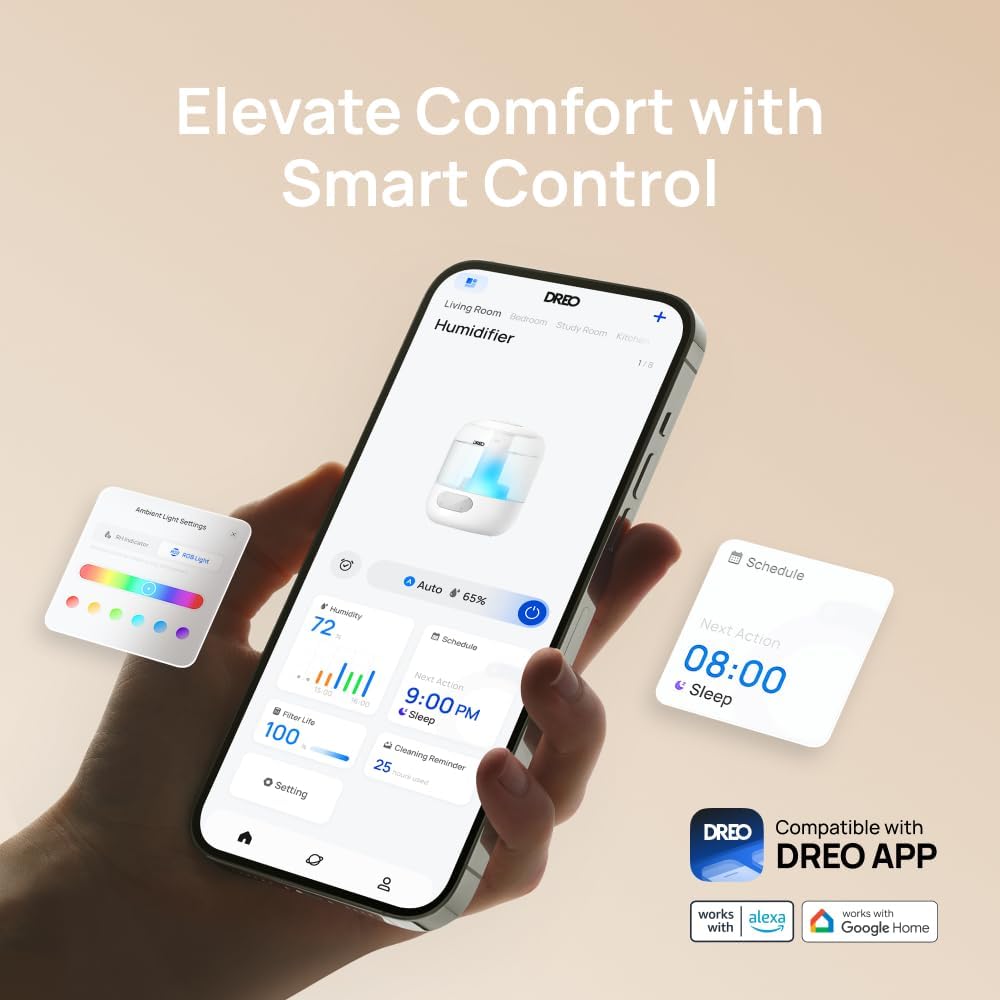
Rysunek 5.2: A smartphone displaying the Dreo app, illustrating various smart control options such as ambient light customization and scheduling functions.
5.3 Kontrola wilgotności
The humidifier features a high-precision humidistat for accurate humidity management.
- Tryb automatyczny: Select Auto Mode to allow the humidifier to automatically maintain a comfortable humidity level based on its sensors.
- Ustawienie ręczne: Adjust the target humidity percentage manually via the control panel or the DREO app.
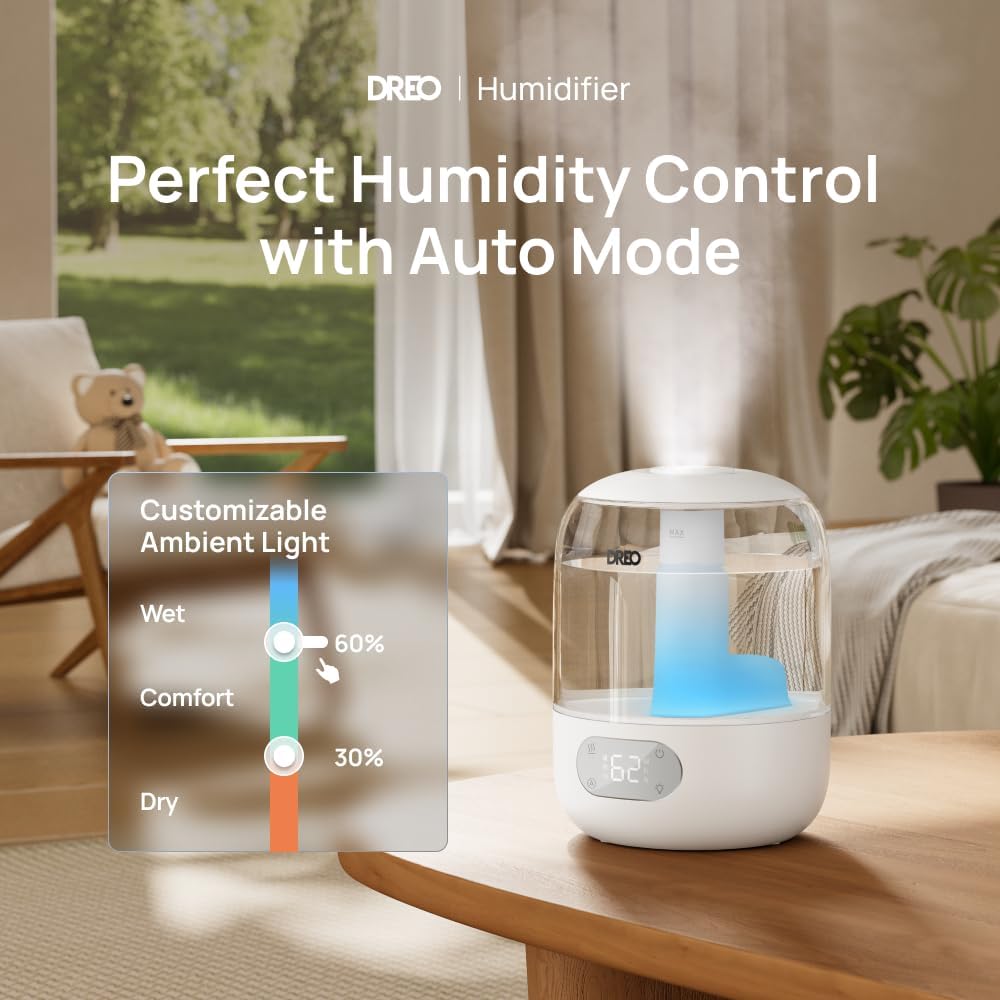
Rysunek 5.3: The humidifier on a table, with a graphic illustrating humidity control settings and customizable ambient light options, emphasizing its auto mode functionality.
5.4 Oświetlenie RGB
Customize the ambient lighting to suit your preference.
- Regulowane kolory: Choose from a range of RGB colors via the DREO app.
- Włącz/Wyłącz: The ambient lighting can be turned on or off as needed, independently of humidification.
5.5 Tryb uśpienia
Activate Sleep Mode for quiet operation during rest periods.
- In Sleep Mode, the humidifier operates at a whisper-quiet 26dB.
- The display lights may dim or turn off to ensure an undisturbed environment.

Rysunek 5.4: The humidifier placed in a nursery, illustrating its ultra-quiet operation at 26dB, ideal for maintaining a peaceful sleeping environment.
5.6 Aroma Pad Tray
Add essential oils to the dedicated aroma pad tray for a pleasant scent.
- Locate the aroma pad tray on the side of the humidifier base.
- Add a few drops of essential oil to the aroma pad (not directly into the water tank).
- Close the tray. The mist will carry the scent into the air.
6. Konserwacja
Regularne czyszczenie zapewnia optymalną wydajność i wydłuża żywotność nawilżacza.
6.1 Codzienna konserwacja
- Codziennie opróżniaj i płucz zbiornik na wodę.
- Wytrzyj wnętrze zbiornika czystą szmatką.
6.2 Cotygodniowe czyszczenie
- Odłącz nawilżacz od zasilania.
- Wyjmij zbiornik na wodę i opróżnij pozostałą wodę.
- Fill the tank with 1 cup (240ml) of white vinegar and let it soak for 30 minutes to loosen mineral buildup.
- Use a soft brush or cloth to clean the inside of the tank and the nebulizer.
- Dokładnie wypłucz wszystkie elementy czystą wodą, aż zapach octu zniknie.
- Przetrzyj powierzchnię zewnętrzną miękką,amp płótno.

Rysunek 6.1: A hand wiping the inside of the humidifier's water tank, demonstrating the easy-to-clean design. This image also shows the top-fill feature and the aroma pad tray.
6.3 Demineralization Cartridge (Optional)
The humidifier supports demineralization or clean-mist cartridges (sold separately) to reduce mineral buildup, especially in hard water areas. Refer to the cartridge instructions for installation and replacement.
6.4 Przechowywanie
If the humidifier will not be used for an extended period:
- Clean all components thoroughly as per weekly cleaning instructions.
- Przed ponownym złożeniem upewnij się, że wszystkie części są całkowicie suche.
- Przechowywać w chłodnym i suchym miejscu.
7. Rozwiązywanie Problemów
Review w tej sekcji znajdziesz informacje o typowych problemach i ich rozwiązaniach.
| Problem | Możliwa przyczyna | Rozwiązanie |
|---|---|---|
| Brak mgły lub jej mała ilość | Low water level; Mineral buildup; Humidifier not level | Refill water tank; Clean the nebulizer and tank; Place on a flat surface |
| Niezwykły zapach | Stale water; Dirty tank | Empty and clean the tank thoroughly; Use fresh water daily |
| Humidifier not connecting to Wi-Fi/App | Incorrect Wi-Fi password; Out of range; Router issues | Verify Wi-Fi password; Move humidifier closer to router; Restart router and humidifier |
| Wyciek wody | Tank not seated correctly; Overfilled tank; Damaged tank | Ensure tank is properly seated; Do not overfill; Contact support if damaged |
8. Specyfikacje
| Funkcja | Szczegół |
|---|---|
| Marka | Dreo |
| Nazwa modelu | DR-HHM006S |
| Tryb działania | Ultradźwiękowy |
| Cechy specjalne | Adjustable Humidity Control, Aroma Diffuser, Digital Display, Humidistat, Timer, RGB Lighting, Smart Control (App, Alexa, Google Home) |
| Kolor | Biały |
| Pokrycie powierzchni podłogi | Do 300 stóp kwadratowych |
| Wymiary produktu | 7.6" gł. x 10.2" szer. x 7.6" wys. |
| Typ pokoju | Bedroom, Kids Room, Nursery, Office, Study Room |
| Zawarte komponenty | Humidifier Body, Power Cord, Water Tank |
| Tomtage | 120 V (AC) |
| Cotage | 29 watów |
| Pojemność zbiornika na wodę | 3 litrów |
| Maksymalny czas pracy | Up to 30 hours (in Sleep Mode) |
| Poziom hałasu | 26dB (in Sleep Mode) |
9. Gwarancja i wsparcie
Dreo provides a warranty for this product. For specific warranty details, please refer to the warranty card included with your purchase or visit the official Dreo webstrona.
If you encounter any issues or have questions regarding your Dreo DR-HHM006S humidifier, please contact Dreo Customer Support for assistance. Contact information can typically be found on the product packaging or the official Dreo webstrona.