
1. Wprowadzenie
Thank you for choosing the Kaschun CT120S Professional Audio Mixer. This 12-channel mixer is designed for a wide range of audio applications, including DJing, studio recording, live streaming, and stage performances. It features 48V phantom power, USB recording, Bluetooth connectivity, and a built-in MP3 player, offering versatile control over your audio. This manual provides essential information for the proper setup, operation, and maintenance of your mixer to ensure optimal performance and longevity.
2. Informacje dotyczące bezpieczeństwa
- Zasilanie: Ensure the mixer is connected to a 110V AC power source with an American plug. Do not use incompatible power adapters.
- Wentylacja: Place the mixer in a well-ventilated area. Do not block ventilation openings.
- Wilgoć: Keep the mixer away from water, moisture, and high humidity. Do not operate with wet hands.
- Ciepło: Unikaj umieszczania miksera w pobliżu źródeł ciepła, takich jak grzejniki, grzejniki, piece lub inne urządzenia wytwarzające ciepło.
- Czyszczenie: Disconnect power before cleaning. Use a dry, soft cloth. Do not use liquid cleaners or aerosol sprays.
- Serwisowanie: Nie próbuj samodzielnie naprawiać tego produktu. Wszelkie czynności serwisowe należy powierzyć wykwalifikowanemu personelowi serwisowemu.
- Moc fantomowa: When using 48V phantom power for condenser microphones, ensure the microphone is connected before activating phantom power to prevent damage.
3. Koniec produktuview
The Kaschun CT120S is a professional 12-channel audio mixer designed for clarity and control. Its ultra-thin metal body ensures durability and portability. Key features include:
- 12 kanałów wejściowych: Multiple microphone (XLR) and line inputs for diverse audio sources.
- 3-Band Equalization: Dedicated knobs for high, mid, and low frequencies on each channel for precise tone shaping.
- Zasilanie fantomowe 48 V: Essential for condenser microphones, available on XLR inputs.
- Łączność Bluetooth 5.0: Bezproblemowe strumieniowanie dźwięku bezprzewodowego z kompatybilnych urządzeń.
- USB Recording & MP3 Player: Direct recording to USB and playback of MP3 files with an LED display.
- Effects Processor: Built-in effects for enhancing vocals and instruments.

Rycina 3.1: Przód view of the Kaschun CT120S Professional Audio Mixer, showcasing its 12 channels and control layout.
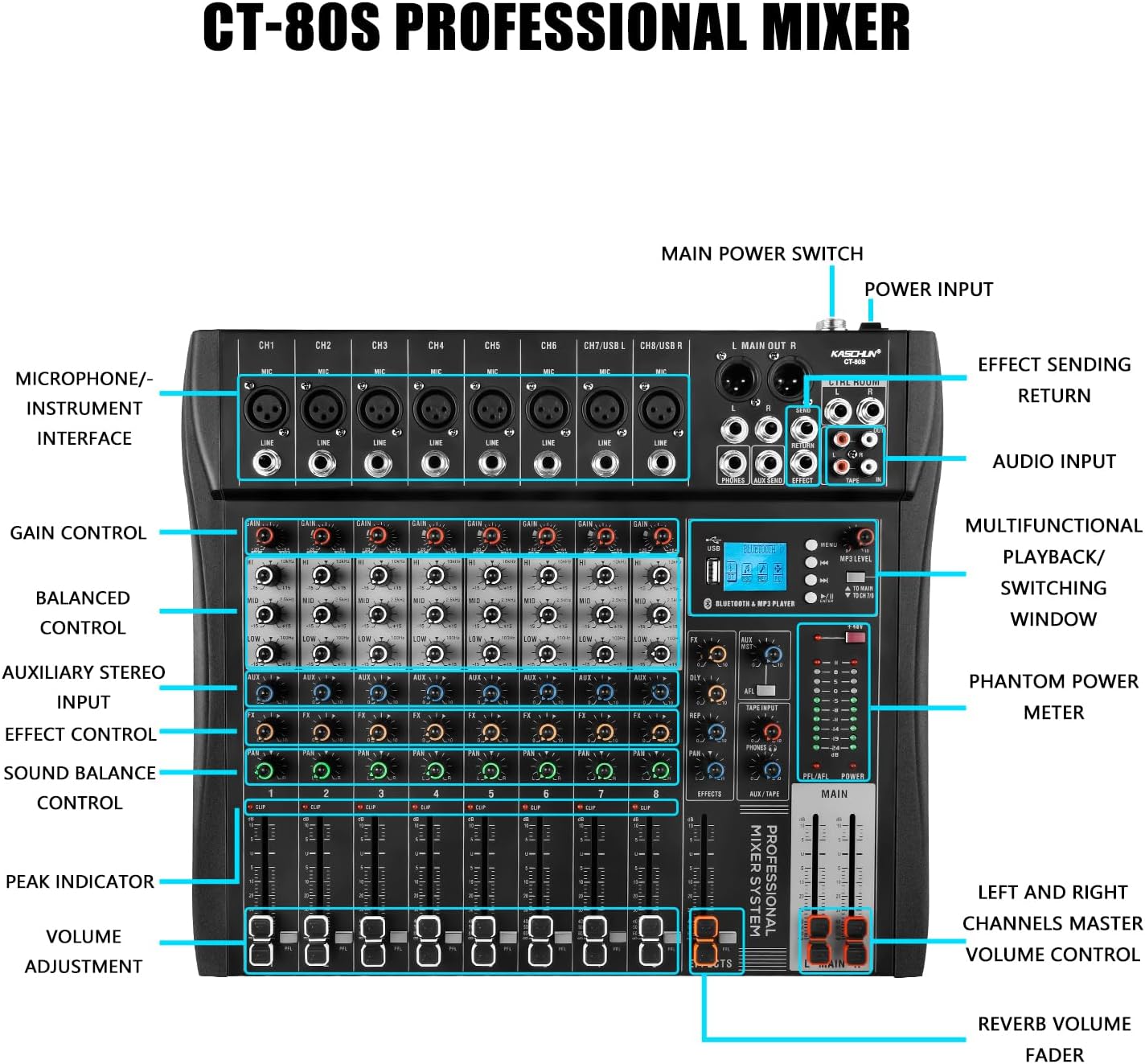
Figure 3.2: Detailed labeled diagram of the CT120S mixer, indicating the function of each control and input/output port.
4. Konfiguracja
Follow these steps to set up your Kaschun CT120S mixer:
- Rozpakowywanie: Carefully remove the mixer from its packaging. Inspect for any signs of damage.
- Umieszczenie: Ustaw mikser na stabilnej, płaskiej powierzchni, zapewniając odpowiednią wentylację wokół urządzenia.
- Podłączenie zasilania: Connect the provided power cord to the mixer's power input and then to a standard 110V AC wall outlet. Do not power on yet.
- Połączenia wejściowe:
- Mikrofony: Connect XLR microphones to the MIC inputs (CH1-CH12). If using condenser microphones, ensure 48V phantom power is off before connecting, then activate it once connected.
- Urządzenia liniowe: Connect instruments, keyboards, or other line-level devices to the LINE inputs using 1/4-inch TRS or TS cables.
- Połączenia wyjściowe: Connect the MAIN OUT (XLR or 1/4-inch) to your amplifier, powered speakers, or recording interface. Connect headphones to the PHONES output for monitoring.
- Pierwsze włączenie: Once all connections are secure, turn on the mixer's main power switch.
5. Instrukcja obsługi
This section details the primary functions and controls of your CT120S mixer.
5.1 Kontrola kanałów
- Zyskać kontrolę: Adjusts the input sensitivity for each channel. Set this to achieve a strong signal without clipping (indicated by the PEAK indicator).
- 3-pasmowy korektor (wysoki, średni, niski): Fine-tune the tonal characteristics of each channel. High controls frequencies above 10kHz, Mid around 2.5kHz, and Low below 100Hz. Adjust these to shape your sound.
- Sterowanie AUX: Sends a portion of the channel signal to the auxiliary output, typically used for monitor mixes or external effects.
- Kontrola efektów: Sends a portion of the channel signal to the internal effects processor.
- Sterowanie PAN: Dostosowuje pozycję stereo sygnału kanału (od lewej do prawej).
- VOLUME Adjustment (Fader): Controls the output level of each individual channel to the main mix.
- CLIP/PEAK Indicator: Lights up when the input signal is too high, indicating potential distortion. Reduce the GAIN if this light illuminates frequently.
5.2 Łączność Bluetooth
The CT120S features built-in Bluetooth 5.0 for wireless audio playback.

Figure 5.1: Illustration of Bluetooth wireless connection to the CT120S mixer from a mobile device.
- Aktywuj Bluetooth na swoim urządzeniu mobilnym (smartfonie, tablecie itp.).
- On the mixer's MP3 player section, select the Bluetooth mode. The LED display will show 'BT' or a similar indicator.
- On your device, search for available Bluetooth devices and select 'CT120S' (or similar name).
- Once paired, you can play audio from your device through the mixer. Adjust the MP3/USB channel volume on the mixer.
5.3 USB Recording and MP3 Playback
The mixer supports direct USB recording and MP3 playback.
- Odtwarzanie MP3: Włóż dysk flash USB zawierający plik MP3 files into the USB port. The mixer will automatically detect and begin playing. Use the controls on the MP3 player section to navigate tracks and adjust volume. The LED display shows song names.
- Nagrywanie USB: To record your mix, ensure a USB flash drive is inserted. Press the 'REC' button on the MP3 player section. The mixer will record the main stereo output directly to the USB drive. Press 'REC' again to stop recording.
5.4 48V Phantom Power
The mixer provides 48V phantom power for condenser microphones.

Figure 5.2: Close-up of the 48V phantom power switch and graphical representation of the 3-stage adjustable balance (EQ curves).
- Locate the '+48V' switch on the mixer.
- Before activating, ensure all condenser microphones are properly connected to their respective XLR inputs.
- Flip the '+48V' switch to the ON position. An indicator light will confirm activation.
- Always turn off phantom power before disconnecting condenser microphones or connecting dynamic microphones.
6. Konserwacja
Właściwa konserwacja gwarantuje długowieczność i optymalną wydajność miksera.
- Czyszczenie: Regularly wipe the mixer's surface with a soft, dry, lint-free cloth. For stubborn dirt, slightly dampPrzetrzyj szmatkę wodą. Unikaj stosowania środków czyszczących o działaniu ściernym i rozpuszczalników.
- Ochrona przed kurzem: When not in use, cover the mixer with a dust cover to prevent dust accumulation, especially in faders and knobs.
- Składowanie: Przechowywać mikser w chłodnym, suchym miejscu, z dala od bezpośredniego światła słonecznego i ekstremalnych temperatur.
- Zarządzanie kablami: Zadbaj o to, aby kable były starannie ułożone i nie były naprężone, aby zapobiec uszkodzeniu złączy i portów.
7. Rozwiązywanie Problemów
W tej sekcji omówiono typowe problemy, na które możesz natrafić.
| Problem | Możliwa przyczyna | Rozwiązanie |
|---|---|---|
| Brak dźwięku | Main volume fader is down; input gain too low; output cables disconnected or faulty; speakers/ampWyłącz lub wycisz liifier. | Increase MAIN fader; adjust channel GAIN; check all cable connections; ensure speakers/amplifier are powered on and unmuted. |
| Zniekształcony dźwięk | Input signal too high (CLIP indicator on); output level too high; faulty cable. | Reduce channel GAIN; lower MAIN output level; try a different cable. |
| Problemy z połączeniem Bluetooth | Device not in pairing mode; mixer not in Bluetooth mode; interference. | Ensure both devices are in pairing mode; select Bluetooth mode on mixer; move closer to mixer; restart both devices. |
| Microphone not working (condenser mic) | 48V phantom power not activated; faulty microphone or cable. | Activate +48V phantom power; test with a different microphone or cable. |
| Nagrywanie USB nie działa | USB drive not inserted or formatted incorrectly; drive full. | Ensure USB drive is properly inserted; check drive format (FAT32 recommended); delete old files or use a new drive. |
8. Specyfikacje
| Funkcja | Specyfikacja |
|---|---|
| Numer modelu | CT120S |
| Liczba kanałów | 12 |
| Waga przedmiotu | 5.99 funta |
| Wymiary opakowania | 22 x 17.27 x 4.5 cala |
| Źródło zasilania | Elektryczny przewodowy |
| Tomtage | 110 V (AC) |
| Technologia łączności | USB, Bluetooth |
| Typ złącza wyjściowego | XLR |
| Moc fantomowa | 48 V |
9. Gwarancja i wsparcie
For any issues encountered before purchase or during product usage, please do not hesitate to contact Kaschun customer service for assistance. We are committed to providing a response within 24 hours. Please refer to your purchase documentation for specific warranty terms and conditions.
For further support, visit the official Kaschun store or contact your retailer.