
Wipkviey S1S
Instrukcja obsługi drona bezszczotkowego Wipkviey S1S
Model: S1S | Model Number: 01
1. Wprowadzenie
Dziękujemy za zakupasing the Wipkviey S1S Brushless Drone. This manual provides essential information for the safe operation, setup, and maintenance of your drone. Please read this manual thoroughly before operating the drone to ensure proper functionality and to avoid damage.
The Wipkviey S1S is a compact, foldable drone featuring five-sided obstacle avoidance, a 6K HD dual camera, and advanced flight modes for an enhanced aerial experience.
2. Co znajduje się w pudełku
Upon unboxing, verify that all components are present and in good condition. The standard package includes:
- Wipkviey S1S Brushless Drone
- Pilot zdalnego sterowania
- Flight Battery (1800mAh)
- Zapasowe śmigła (zestaw 4 szt.)
- Kabel ładujący USB
- Etui do przechowywania
- Instrukcja obsługi (ten dokument)
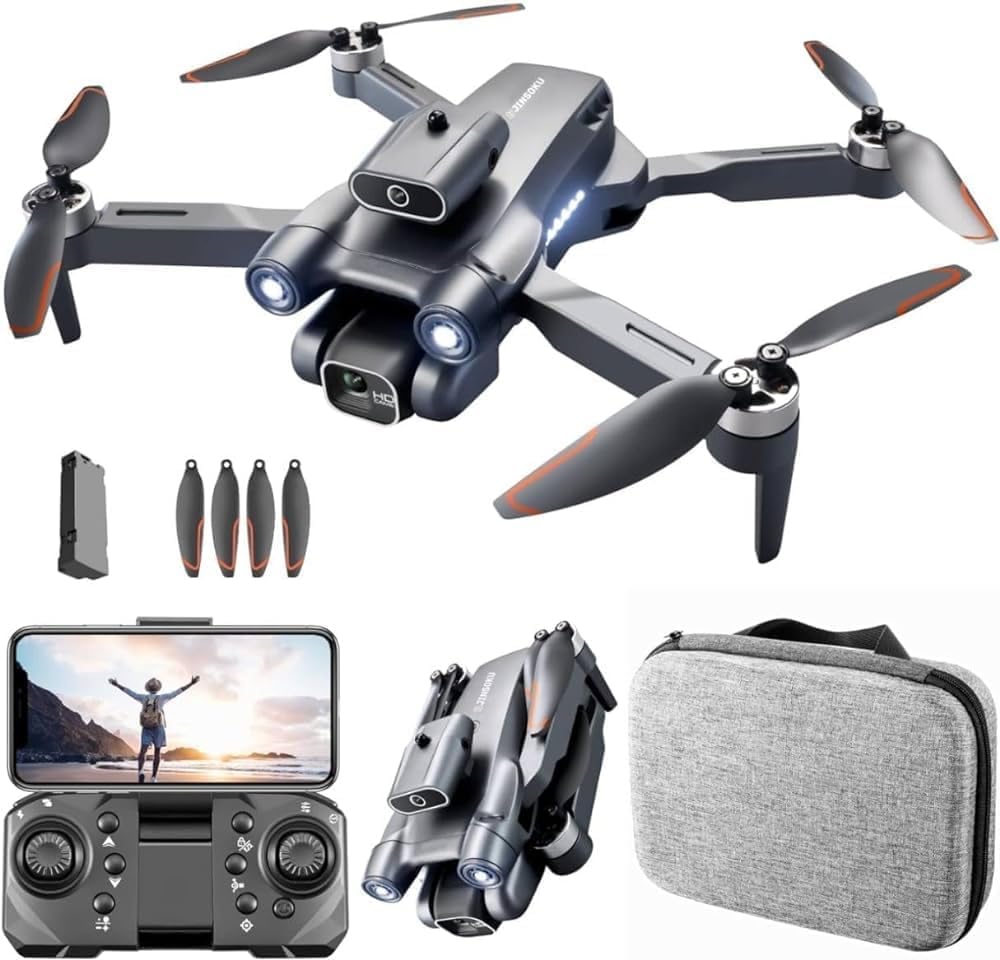
Figure 2.1: Contents of the Wipkviey S1S Brushless Drone package, including the drone, remote, battery, propellers, and case.
3. Przewodnik konfiguracji
3.1. Ładowanie akumulatora
Before first use, fully charge the drone's flight battery. Connect the USB charging cable to the battery and a compatible USB power source (e.g., computer USB port, USB wall adapter). The charging indicator will show the charging status. A full charge typically takes approximately 60-90 minutes, providing up to 30 minutes of flight time.

Figure 3.1: The 1800mAh lithium battery provides extended flight duration. Ensure it is fully charged before each flight.
3.2. Montaż śmigieł
Attach the propellers to the corresponding motor shafts. Ensure that propellers are installed correctly according to their rotation direction (indicated by markings on the propeller and drone arms). Incorrect installation can affect flight stability.
3.3. Rozkładanie drona
The S1S drone features a foldable design for portability. Gently unfold the drone arms until they lock into place. Ensure all arms are fully extended and secure before flight.

Figure 3.2: The S1S drone in its folded configuration, highlighting its compact and portable design.
4. Instrukcja obsługi
4.1. Pilot zdalnego sterowaniaview
Familiarize yourself with the remote controller's buttons and joysticks. The left joystick typically controls altitude and yaw, while the right joystick controls forward/backward and left/right movement. Refer to the remote controller diagram in the quick start guide for detailed button functions.

Figure 4.1: The drone, remote controller, and case, illustrating the complete setup for operation.
4.2. Connecting to the App (Wi-Fi FPV)
Download the official Wipkviey drone application from your device's app store. Power on the drone, then connect your smartphone to the drone's Wi-Fi network (usually named "Wipkviey_S1S_XXXX"). Open the app to access live FPV feed, advanced flight settings, and recording functions.
4.3. Calibration and Takeoff
- Umieść drona na płaskiej, poziomej powierzchni.
- Perform gyroscope calibration as instructed in the app or quick start guide.
- Press the One-Key Takeoff button on the remote or in the app, or manually initiate takeoff by pushing both joysticks to the bottom-outer corners.
4.4. Funkcje lotu
- Przepływ optyczny w ruchu wahadłowym: The drone utilizes optical flow technology for stable hovering, making it easier for beginners to control both indoors and outdoors.

Figure 4.2: Optical flow hovering provides stable flight, ideal for novice pilots.
- Pięciostronne omijanie przeszkód: The drone is equipped with sensors to detect obstacles from five directions, automatically adjusting its flight path to prevent collisions.

Figure 4.3: Intelligent obstacle avoidance system for safer flight.
- Podwójny aparat 6K HD: Capture high-resolution photos and videos with the drone's dual camera system. The main camera supports 6K resolution, and the angle can be adjusted remotely up to 90 degrees.

Figure 4.4: The 6K HD camera captures high-definition images and videos.

Figure 4.5: Remote adjustment of the camera angle up to 90 degrees.
- Selfie z gestem: Use specific hand gestures to trigger photo or video recording, enhancing the selfie experience.
- 360-degree Flip: Execute impressive aerial stunts with the one-key 360-degree flip function.
- Tryb bezgłowy: Simplifies flight control by eliminating the need to orient the drone's front direction, making it easier for beginners.
- Silniki bezszczotkowe: Equipped with powerful brushless motors for strong wind resistance (Level 7) and stable flight performance.

Figure 4.6: High-performance brushless motors provide strong wind resistance and stable flight.
5. Konserwacja
- Czyszczenie: Regularly wipe the drone and remote controller with a soft, dry cloth. Avoid using harsh chemicals or solvents.
- Kontrola śmigła: Before each flight, inspect propellers for any cracks, bends, or damage. Replace damaged propellers immediately using the provided spares.
- Pielęgnacja baterii: Store batteries in a cool, dry place. Do not overcharge or over-discharge. If storing for extended periods, charge the battery to approximately 50% capacity.
- Składowanie: When not in use, fold the drone and store it in its protective case to prevent damage.
6. Rozwiązywanie Problemów
| Problem | Możliwa przyczyna | Rozwiązanie |
|---|---|---|
| Dron się nie włącza | Akumulator nie jest naładowany lub jest nieprawidłowo włożony. | Ensure battery is fully charged and properly seated in the drone. |
| Dron niestabilny podczas lotu | Improper calibration or damaged propellers. | Perform gyroscope calibration. Check and replace any damaged propellers. |
| Brak transmisji FPV w aplikacji | Brak połączenia z siecią Wi-Fi lub problem z aplikacją. | Upewnij się, że telefon jest połączony z siecią Wi-Fi drona. Uruchom ponownie aplikację i drona. |
| Unikanie przeszkód nie działa | Czujniki są brudne lub zasłonięte. | Clean the obstacle avoidance sensors on the drone. Ensure adequate lighting for sensor operation. |
7. Specyfikacje
| Funkcja | Szczegół |
|---|---|
| Nazwa modelu | S1S |
| Marka | Wipkviey |
| Wymiary (rozłożony) | Wymiary 15 x 6 x 15 cm |
| Waga | 440 gramów |
| Rozdzielczość przechwytywania wideo | 6K (Main Camera) |
| Typ aparatu | HD Dual Camera, 90-degree adjustable |
| Łączność | Wi-Fi, USB |
| Typ sterowania | Kontrola aplikacji, zdalne sterowanie |
| Pojemność baterii | 1800mAh (approx. 30 minutes flight time) |
| Maksymalny zasięg | 0.15 kilometers (150 meters) |
| Cechy specjalne | 360-degree Flip, Compact, Foldable, Five-Sided Obstacle Avoidance, Optical Flow Hovering, Brushless Motors (Level 7 wind resistance), Gesture Selfie, One Key Headless Mode |
| Poziom umiejętności | Advanced, Professional |
8. Gwarancja i wsparcie
8.1. Informacje o gwarancji
Wipkviey products are covered by a limited warranty against manufacturing defects. Please retain your proof of purchase for warranty claims. For specific warranty terms and conditions, refer to the warranty card included with your product or visit the official Wipkviey webstrona.
8.2. Obsługa klienta
For technical assistance, troubleshooting, or spare parts, please contact Wipkviey customer support. Contact details can typically be found on the product packaging or the official brand website. When contacting support, please have your product model (S1S) and serial number (if applicable) ready.