
OMOTON Clear Dual Slot
OMOTON Vertical Laptop Stand
Model: Clear Dual Slot
Produkt ponadview
The OMOTON Vertical Laptop Stand is designed to optimize your desk space by holding two devices vertically. Crafted from high-quality clear acrylic, this stand offers a stable and elegant solution for organizing your workspace. Its adjustable slots accommodate a wide range of devices, from laptops to tablets and smartphones, ensuring a secure fit and improved airflow for cooling.

Image: The OMOTON Vertical Laptop Stand, showcasing its dual-slot design holding a laptop and a tablet, along with an exploded view of its components.
Co jest w pudełku
- OMOTON Vertical Laptop Stand components
- Śruby do montażu
- Śrubokręt
Konfiguracja i instalacja
Assembly of your OMOTON Vertical Laptop Stand is straightforward and requires no specialized tools beyond what is provided. Follow these steps to set up your stand:
- Step 1: Secure Side Panel
Secure one side panel onto the card slot on the vertical stand base. Ensure it is firmly seated. - Step 2: Align and Twist Screws
Align the position of the screw hole and twist the screw fixation panel with the supplied screwdriver. - Step 3: Fix Second Panel
Fix the other panel to the other side in the same way as Step 2. - Step 4: Adjust Distance
You can flexibly adjust the distance between the two panels according to the thickness of the laptop or device you intend to place in the slot. This ensures a snug and secure fit.

Image: Visual guide demonstrating the four steps for assembling the vertical laptop stand, including securing panels and adjusting slot width.
Instrukcja obsługi
The OMOTON Vertical Laptop Stand is designed for versatile use, providing a stable and space-saving solution for your electronic devices.
Umieszczenie urządzenia
- Dual Docks Design: The stand features two adjustable slots, allowing you to securely hold two devices simultaneously. This helps in keeping your desk organized and clutter-free.
- Regulowana szerokość: The slots can be adjusted from 0.43 to 1.38 inches (1.1 cm to 3.5 cm) to ensure a secure fit for various device thicknesses.
- Szeroka kompatybilność: Compatible with a broad range of devices including MacBook Air 13/15, MacBook Pro 14/16, HP, Dell, Chromebook, Vivobook, iPad Pro/Air/Mini, Fire HD 8/10, and other laptops up to 17 inches. It can also hold smartphones, keyboards, and books.
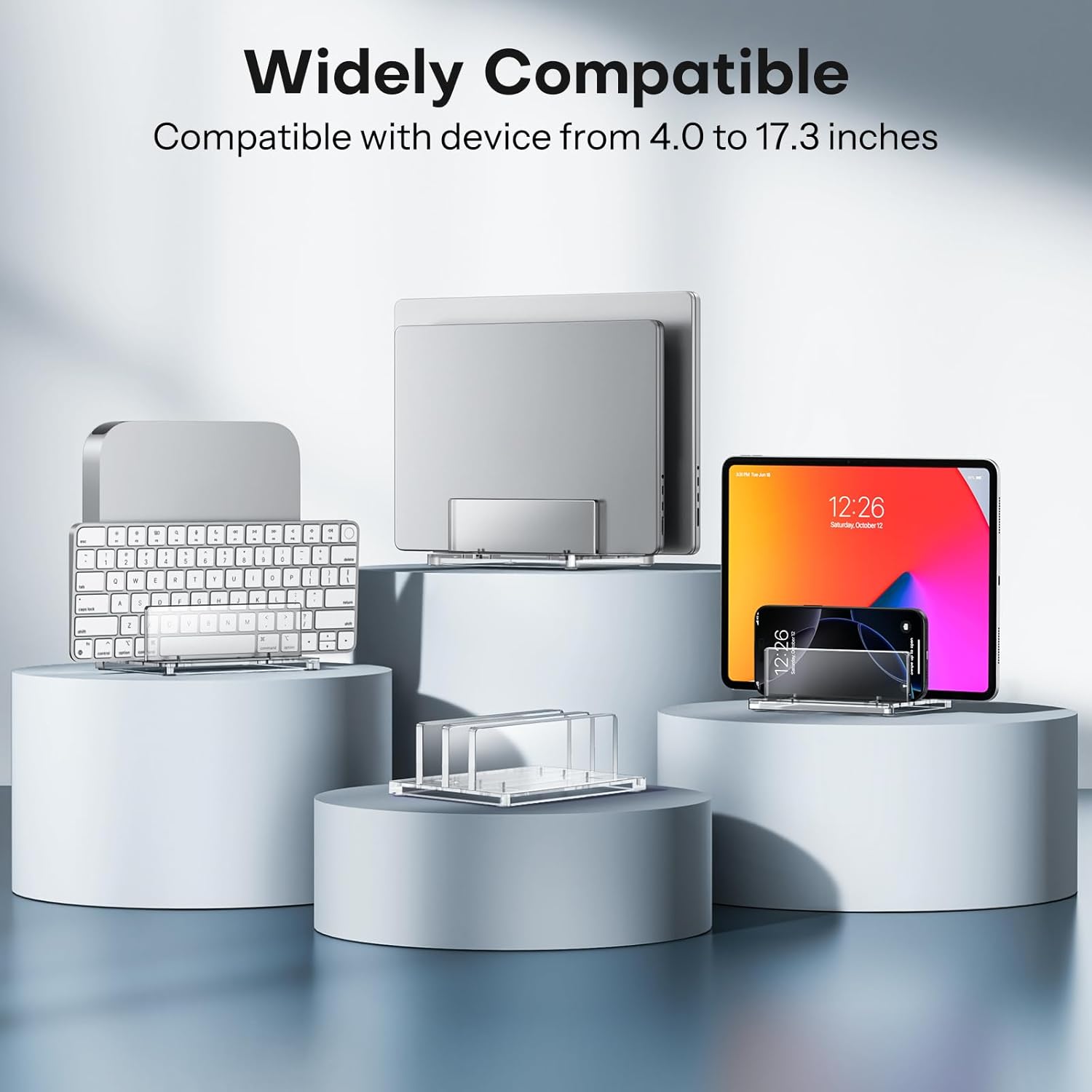
Image: An illustration of the stand's wide compatibility, showing it can hold various devices like laptops, tablets, and phones.
Korzyści z użytkowania
- Oszczędność miejsca: By holding devices vertically, the stand frees up valuable desk space, contributing to a cleaner and more organized work environment.
- Wzmocniona ochrona: Storing devices vertically helps prevent damage from accidental spills or falling objects, offering additional protection for your electronics.
- Ulepszony przepływ powietrza: The design allows for sufficient clearance, aiding in device cooling while charging and prolonging the lifespan of your electronics.

Image: A visual representation of how the stand's design promotes better airflow for device cooling.
Konserwacja
To ensure the longevity and clear appearance of your OMOTON Vertical Laptop Stand, follow these simple maintenance guidelines:
- Czyszczenie: Powierzchnie akrylowe należy przecierać miękką,amp cloth. For stubborn marks, use a mild soap solution. Avoid abrasive cleaners or harsh chemicals, as these can scratch or damage the acrylic.
- Usuwanie kurzu: Regularly dust the stand with a microfiber cloth to prevent dust buildup, which can dull the clear finish.
- Unikaj zadrapań: While durable, acrylic can scratch. Avoid placing sharp or rough objects directly against the stand's surface.
- Sprawdź śruby: Periodically check the tightness of the assembly screws to ensure the stand remains stable.
Rozwiązywanie problemów
If you encounter any issues with your OMOTON Vertical Laptop Stand, refer to the following common troubleshooting tips:
- Stojak wydaje się niestabilny:
Ensure all screws are tightened securely. The adjustable panels should be set to a width that provides a snug fit for your device. If the stand still feels unstable, verify that the non-slip silicone pads on the bottom are intact and making full contact with your desk surface. - Devices Do Not Fit Securely:
Re-adjust the width of the slots. The stand is designed to accommodate devices from 0.43 to 1.38 inches (1.1 cm to 3.5 cm) thick. Make sure your device falls within this range. - Rysy na akrylu:
Minor scratches can sometimes be buffed out with specialized acrylic polish. For deeper scratches, replacement parts may be necessary. Always handle the stand with care to prevent scratches.
Specyfikacje
| Funkcja | Szczegół |
|---|---|
| Marka | OMOTON |
| Model | Clear Dual Slot |
| Tworzywo | Wysokiej jakości akryl |
| Adjustable Slot Width | 0.43 to 1.38 inches (1.1 cm to 3.5 cm) |
| Kompatybilne urządzenia | Laptops (up to 17"), Tablets, Smartphones, Keyboards, Books |
| Wymiary opakowania | 11.81 x 6.65 x 0.63 cala (30 x 16.9 x 1.6 cm) |
| Waga przedmiotu | 12.6 uncji (357.2 grama) |
| Kraj pochodzenia | Chiny |
Gwarancja i wsparcie
Warranty information for the OMOTON Vertical Laptop Stand is not explicitly provided in this manual. For details regarding warranty coverage, returns, or technical support, please refer to the product listing on Amazon or visit the official OMOTON webstrona.
You can also contact OMOTON customer service directly through their official channels for assistance with any product-related inquiries.
OMOTON Official Store: Visit the OMOTON Store on Amazon
Ask a question about this manual
Ask about setup, troubleshooting, compatibility, parts, safety, or missing instructions. Manuals+ will review the question and use this page’s manual context to help answer it.