
1. Wprowadzenie
This manual provides detailed instructions for the safe and effective use of your pxton 666S two-way radio. Please read this manual thoroughly before operating the device and retain it for future reference. The pxton 666S is a reliable communication device designed for various applications, featuring 16 memory channels, privacy codes, and multiple functions such as VOX, noise reduction, and a flashlight.
FCC ID: 2AX68GTR8. This device complies with Part 15 of the FCC Rules. Operation is subject to the condition that this device does not cause harmful interference.

Image 1.1: A set of ten pxton 666S two-way radios, each with its charging dock and an earphone, illustrating the complete package.
2. Zawartość opakowania
Sprawdź, czy w przesyłce znajdują się wszystkie elementy:
- 10 x pxton 666S Two-Way Radios
- 10 x USB Charging Docks
- 10 baterie litowe o pojemności 1500 mAh
- 10 x paski
- 10 x słuchawki
- 5 x Instrukcje obsługi

Image 2.1: An illustration of the individual components included in the pxton 666S package: the radio unit, charging dock, battery, belt clip, earphone, and user manual.
3. Koniec produktuview
3.1 Główne cechy
- 16 kanałów pamięci
- 165 kody prywatności (50 CTCSS / 210 DCS)
- 5 Levels of VOX Sensitivity Adjustment
- Limit czasu (TOT)
- Alarm awaryjny
- Redukcja szumów
- Automatyczna blokada szumów
- Alert niskiego poziomu baterii
- Tryb oszczędzania energii
- Funkcja skanowania
- Funkcja monitorowania
- Latarka LED
- Durable PC+ABS material construction
3.2 Komponenty radiowe
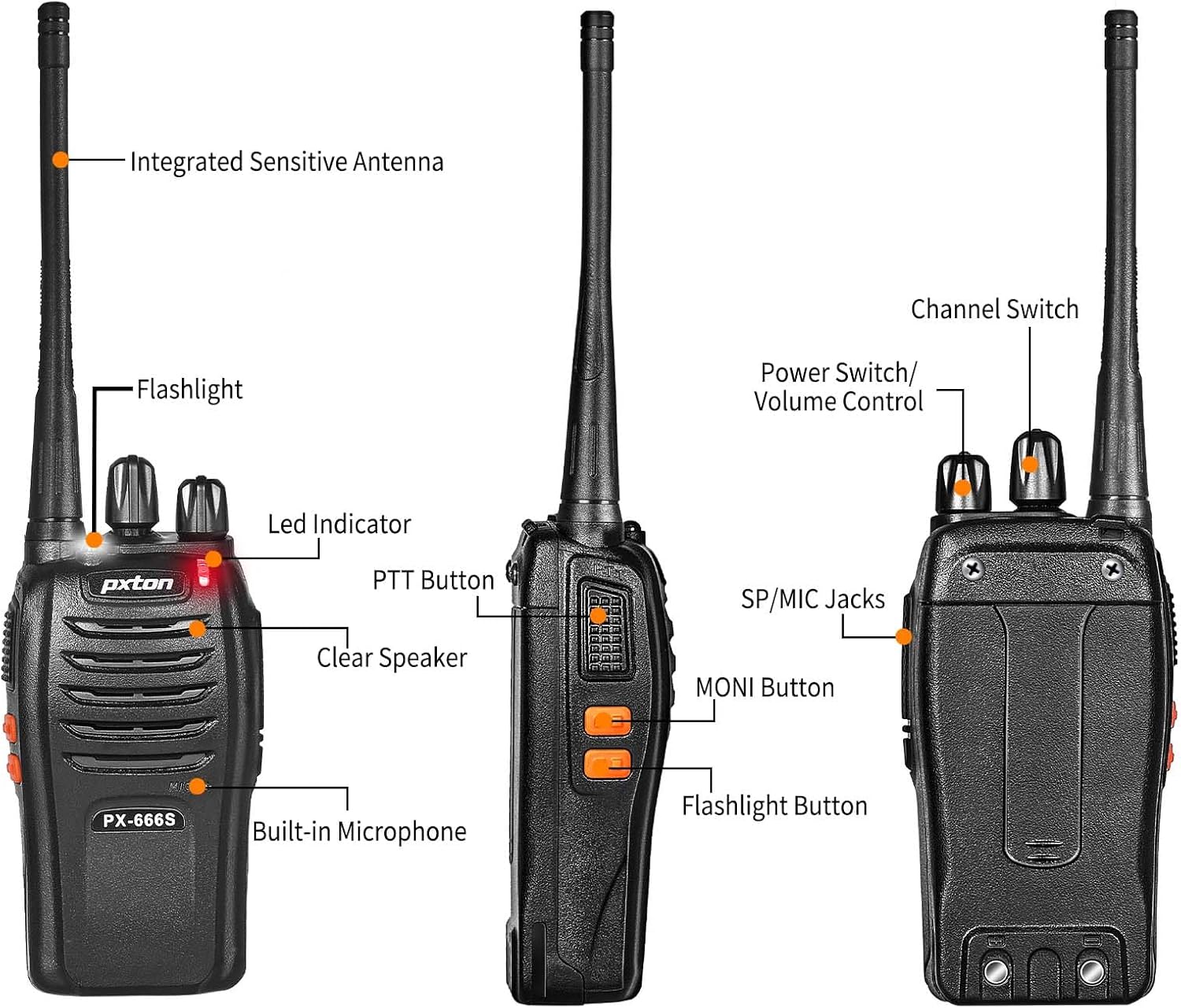
Image 3.1: Detailed diagram labeling the external components of the pxton 666S radio, including the integrated sensitive antenna, flashlight, LED indicator, PTT button, clear speaker, built-in microphone, SP/MIC jacks, MONI button, flashlight button, channel switch, and power switch/volume control.
- Integrated Sensitive Antenna: Do przesyłania i odbierania sygnałów.
- Flesz: Zapewnia oświetlenie.
- Wskaźnik LED: Displays status (e.g., transmitting, receiving, low battery).
- Przycisk PTT (Naciśnij i mów): Naciśnij, aby nadać, zwolnij, aby odebrać.
- Clear Speaker: Do wyjścia audio.
- Wbudowany mikrofon: Do wejścia audio.
- Gniazda SP/MIC: For connecting external earphones or microphones.
- MONI Button (Monitor): Temporarily disables squelch to hear weak signals.
- Przycisk latarki: Włącza latarkę LED.
- Zmiana kanału: Rotates to select desired communication channel.
- Przełącznik zasilania/regulacja głośności: Obrót umożliwia włączanie/wyłączanie radia i regulację głośności.

Image 3.2: The pxton 666S radio resting on rocks, emphasizing its rugged PC+ABS durable material, anti-fall, and anti-vibration design for extended service life.
4. Konfiguracja
4.1 Instalacja baterii
- Dopasuj akumulator do rowków z tyłu radia.
- Przesuń akumulator do góry, aż zatrzaśnie się na miejscu.
- Aby wyjąć baterię, naciśnij zatrzask zwalniający (jeśli jest obecny) i przesuń baterię w dół.
4.2 Ładowanie akumulatora
The pxton 666S uses a 1500mAh Li-ion battery. A full charge takes approximately 3-4 hours.
- Connect the USB charging dock to a power source.
- Place the radio (with battery installed) into the charging dock.
- The LED indicator on the radio or charger will show charging status (e.g., red for charging, green for fully charged).

Image 4.1: Two pxton 666S radios placed in their respective charging docks, with earphones connected, demonstrating the charging setup.
4.3 Mocowanie zaczepu do paska
Secure the belt clip to the back of the radio using the provided screws for convenient carrying.
4.4 Podłączanie słuchawek
Insert the earphone plug into the SP/MIC jacks on the side of the radio. Ensure it is fully inserted for proper audio transmission and reception.
5. Instrukcja obsługi
5.1 Włączanie/wyłączanie i regulacja głośności
- Aby włączyć radio, obróć Przełącznik zasilania/regulacja głośności knob clockwise. You will hear a "click" and a tone.
- To turn off the radio, rotate the knob counter-clockwise until you hear a "click".
- Aby dostosować głośność, obróć pokrętło Przełącznik zasilania/regulacja głośności Obróć pokrętło zgodnie z ruchem wskazówek zegara, aby zwiększyć głośność, a przeciwnie do ruchu wskazówek zegara, aby ją zmniejszyć.
5.2 Wybór kanału
Obróć Przełącznik kanałów knob to select one of the 16 available channels. Ensure all radios in your group are set to the same channel for communication.
5.3 Przesyłanie i odbieranie
- Aby przesłać, naciśnij i przytrzymaj Przycisk NIM. Speak clearly into the microphone. The LED indicator will typically glow red.
- To receive, release the Przycisk NIM. The LED indicator will typically glow green when receiving a signal.
5.4 Funkcja VOX (transmisja sterowana głosem)
The VOX function allows hands-free operation. When activated, the radio will automatically transmit when it detects your voice, without needing to press the PTT button. The pxton 666S offers 5 levels of VOX sensitivity adjustment.

Image 5.1: A security guard using the pxton 666S radio, illustrating the VOX/Handsfree function for clear and bright sound quality, allowing hands-free communication.
5.5 Latarka
Naciśnij Przycisk latarki to turn the LED flashlight on or off. This feature is useful in low-light conditions.

Image 5.2: The pxton 666S radio's flashlight feature in use, illuminating a campsite at night, demonstrating its utility in dark environments.
5.6 Funkcja monitorowania
Naciśnij i przytrzymaj MONI Button to temporarily disable the squelch function. This allows you to hear very weak signals that might otherwise be blocked by the squelch, or to check if a channel is clear before transmitting.
5.7 Funkcja skanowania
The scanning function allows the radio to automatically scan through all programmed channels to detect activity. Refer to the full user manual (if provided separately) for specific instructions on activating and managing the scanning feature.
5.8 Inne funkcje
- Redukcja hałasu: Poprawia klarowność dźwięku poprzez redukcję szumów tła.
- Alarm awaryjny: Activates an audible alarm to signal for help.
- Licznik czasu przekroczenia limitu czasu (TOT): Prevents accidental prolonged transmissions by limiting the duration of each transmission.
- Tryb oszczędzania energii: Automatically reduces power consumption when no activity is detected, extending battery life.
- Alert niskiego poziomu baterii: Provides an audible or visual warning when the battery level is low, indicating it's time to recharge.
6. Zasięg komunikacji
The actual communication range of the pxton 666S can vary significantly based on environmental factors, terrain, and obstructions. General estimates are:
- Open Areas (flat terrain, mountain peaks): Do 3 mil.
- Suburban/Countryside Areas: Approximately 1.2 miles.
- City Limits (with buildings and obstructions): Around 0.6 miles.

Image 6.1: Visual representation of the pxton 666S communication range, indicating up to 1-3 miles in open areas, 1.2 miles in rural settings, and 0.6 miles in urban environments.
7. Informacje o baterii
The pxton 666S is powered by a rechargeable 1500mAh Lithium-Ion battery (Model: BL-1, 5.55Wh, Voltage: 3.7 V).
- Typowe zastosowanie: Up to 12 hours of continuous talk time.
- Czas czuwania: Up to 120 hours (5-7 days).
- Czas pełnego ładowania: Około 3-4 godzin.
Important Battery Safety Information:
- Nie rozmontowuj akumulatora.
- Nie wrzucać do ognia.
- Używaj wyłącznie wskazanej ładowarki.
- Nie wolno zwierać zacisków.
- Przechowywać w chłodnym i suchym miejscu.

Image 7.1: The pxton 666S radio alongside its 1500mAh Li-ion battery, detailing battery model (BL-1), capacity (1500mAh), voltage (3.7V), and safety warnings.
8. Specyfikacje
| Funkcja | Specyfikacja |
|---|---|
| Numer modelu | PX-666S-0004 |
| Marka | pxton |
| Liczba kanałów | 16 |
| Zakres częstotliwości | UHF |
| Maksymalny zasięg rozmów | 3 Miles (line of sight) |
| Typ baterii | 1500mAh litowo-jonowy (w zestawie) |
| Tomtage | 3.7 wolty |
| Waga przedmiotu | 7.05 funta (dla opakowania 10 sztuk) |
| Wymiary produktu | 9.9 x 11 x 6.9 cala (wymiary opakowania) |
| Poziom wodoodporności | Wodoodporny |
| Cechy specjalne | Automatic Squelch, Battery Saver Mode, Long Range, Rechargeable, Voice Operated Transmission (VOX) |

Image 8.1: A size comparison of the pxton 666S radio next to a smartphone (iPhone 14 Pro), illustrating its compact dimensions for portability.
9. Rozwiązywanie Problemów
If you encounter issues with your pxton 666S radio, please refer to the following common problems and solutions:
| Problem | Możliwa przyczyna | Rozwiązanie |
|---|---|---|
| Brak zasilania | Akumulator nie został prawidłowo zainstalowany lub jest rozładowany. | Upewnij się, że akumulator jest prawidłowo osadzony. Naładuj akumulator do pełna. |
| Nie można przesyłać ani odbierać | Incorrect channel, out of range, low battery, squelch too high. | Verify all radios are on the same channel. Move closer to other radios. Recharge battery. Press MONI button to check for weak signals. |
| Słaba jakość dźwięku / Szum | Weak signal, interference, radio too far apart. | Move to an area with fewer obstructions. Adjust volume. Ensure antenna is clear. |
| VOX nie działa | VOX sensitivity too low, feature disabled. | Adjust VOX sensitivity to a higher level. Ensure VOX is enabled (refer to full manual for programming). |
| Żywotność baterii jest krótka | Frequent transmission, battery degradation, power-saving mode off. | Reduce transmission time. Ensure power-saving mode is active. Consider replacing old batteries. |
For further assistance, please contact pxton customer support.
10. Konserwacja
- Czyszczenie: Użyj miękkiego, damp ściereczką do czyszczenia zewnętrznej części radia. Nie używaj silnych środków chemicznych ani ściernych środków czyszczących.
- Składowanie: Jeśli radio nie będzie używane przez dłuższy czas, należy wyjąć baterię i przechowywać je w chłodnym, suchym miejscu.
- Pielęgnacja baterii: Fully charge batteries before long-term storage and recharge them every 3-6 months to maintain optimal performance.
- Antena: Nie zginaj ani nie modyfikuj anteny, gdyż może to wpłynąć na jej działanie.
- Wodoodporność: While water-resistant, avoid submerging the radio in water. Ensure all covers (e.g., earphone jack cover) are securely closed.
11. Gwarancja i wsparcie
pxton offers a 30-day no-questions-asked replacement and refund policy from the date of purchase. Additionally, the product comes with dożywotni serwis posprzedażowy.
If you encounter any issues or require support, please contact pxton customer service. They are committed to assisting you with any concerns.
Uwaga dotycząca zgodności: The pxton 666S walkie talkie is compatible with PX-888S, PX-777S, and PX-888S Pro models. They can utilize the same programming tools and cables (programming cable sold separately).